If your team’s laptops are currently taking longer to boot up than it takes to make a flat white, how much is that “saving” really costing your organisation? Most New Zealand business leaders understand the frustration of unexpected hardware failures or the quiet drain that ageing devices place on staff morale. It’s stressful to manage emergency replacements when you’d rather be focusing on growth. By implementing structured it hardware lifecycle management nz organisations can move from reactive repairs to a strategic refresh schedule that ensures every device is a reliable asset rather than a liability.
We’ll help you navigate the 2026 landscape, including the necessary shift away from unsupported Windows 10 devices and the rising hardware demands of AI. You’ll learn how to master the full lifecycle of your technology assets to boost productivity, strengthen security, and ensure your team is ready for the future. This guide provides a clear roadmap for creating a reliable hardware programme that meets NZ security standards while managing your e-waste responsibilities effectively. It’s about replacing technical stress with a sense of calm, strategic reliability.
Key Takeaways
- Understand how ageing hardware acts as a silent tax on staff productivity and why proactive refreshes are more cost-effective than reactive emergency replacements.
- Master the five stages of it hardware lifecycle management nz, starting with a strategic technology roadmap to ensure your assets align with your long-term goals.
- Learn why modern security resilience requires hardware-level features to protect your organisation against threats that specifically target legacy equipment.
- Discover the shift in 2026 hardware standards, focusing on the role of Neural Processing Units (NPUs) in preparing your fleet for practical AI applications.
- Explore the benefits of partnering with a local team to manage the administrative burden of procurement, deployment, and responsible hardware retirement.
The Business Case for Strategic Hardware Management
Viewing technology as a mere utility is a perspective that often leads to hidden costs. When hardware is treated as a strategic asset, it becomes a lever for growth rather than a recurring headache. Robust it hardware lifecycle management nz ensures that your team isn’t just “getting by”, but is actually equipped to perform at their peak. It’s about shifting the mindset from viewing a laptop as a cost centre to seeing it as a critical tool for organisational success.
In a competitive New Zealand job market, the quality of your technology is a direct reflection of your company culture. Top talent expects tools that match their skills. Providing a high-performance workspace is a powerful retention tool that demonstrates a commitment to professional excellence. Modern gear shows your team that you value their time and their contribution to the business.
The Productivity Drain of “Making Do”
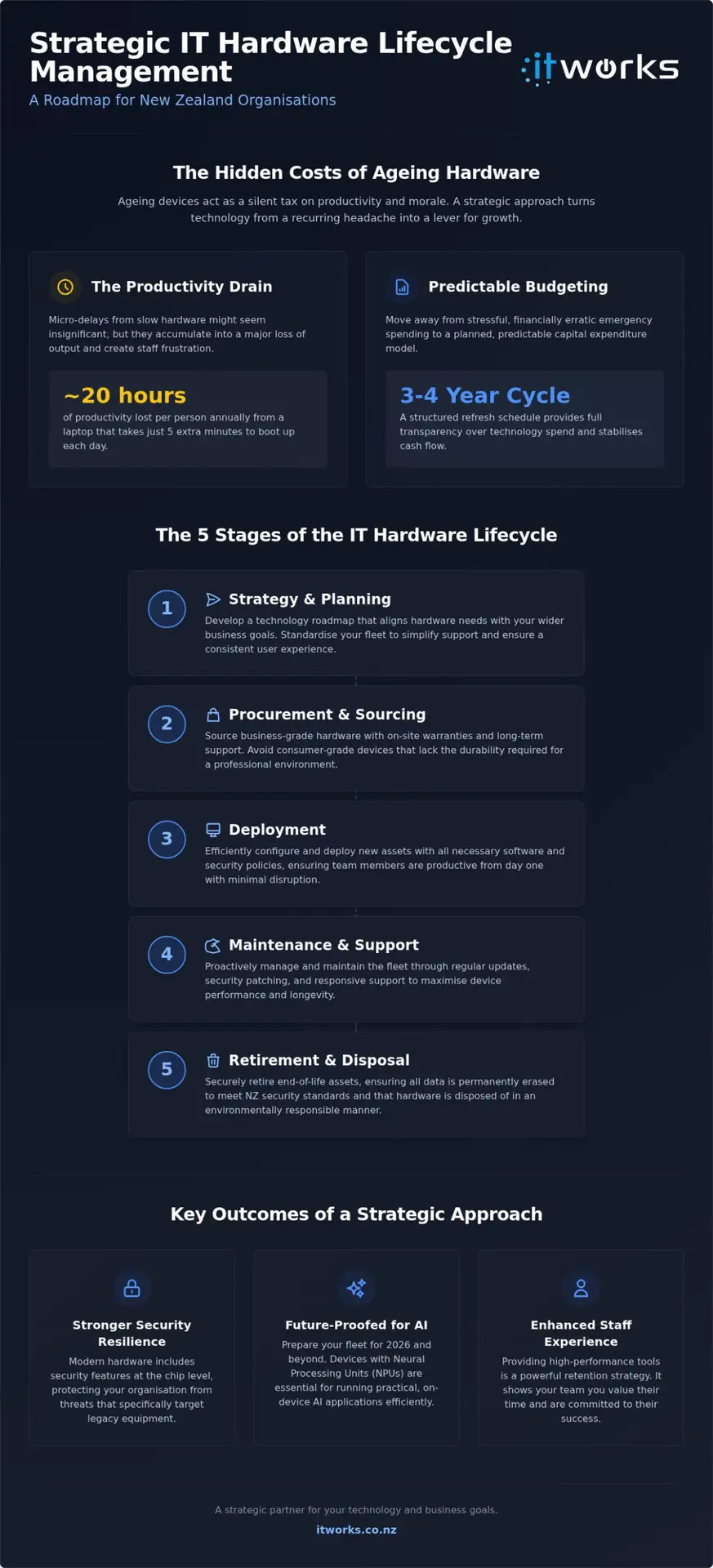
We’ve all seen the frustration of a team member waiting for a spinning wheel on their screen. These micro-delays might seem insignificant, but they act as a silent tax on your output. A laptop that takes five minutes to wake up every morning adds up to nearly 20 hours of lost productivity per person every year. This isn’t just about time; it’s about the psychological impact on your staff.
Reliable tools signal to your employees that their daily efforts matter. When devices are modern and responsive, they complement managed IT support services by reducing the volume of basic tickets. This allows your support team to focus on higher-value optimisations rather than constant troubleshooting of legacy gear. It’s a shift that moves your entire organisation toward a more proactive and positive technical environment.
Predictable Budgeting vs. Emergency Spending
Reactive management often traps businesses in a “break-fix” cycle. This approach is inherently stressful and financially erratic. When a critical workstation fails without warning, the cost isn’t just the price of the new unit. It involves overnight shipping, emergency setup fees, and lost billable hours while the staff member sits idle. Professional IT asset management replaces this chaos with a predictable capital expenditure model.
Implementing structured it hardware lifecycle management nz allows your organisation to transition toward a planned three-to-four-year refresh cycle. Executive teams gain full transparency over their technology spend, allowing for more accurate forecasting. You can see exactly when investments are needed, which stabilises cash flow and removes the friction of unexpected board-level approvals for emergency equipment. This structured approach builds confidence and ensures your technology budget is always working toward your strategic goals.
The 5 Stages of the IT Hardware Lifecycle
Successful it hardware lifecycle management nz isn’t a series of isolated purchases; it’s a continuous, circular process. To move away from the stress of reactive support, organisations must view their fleet through a structured lens. This journey consists of five distinct phases: Strategy, Procurement, Deployment, Maintenance, and Retirement. Each stage requires deliberate thought to ensure your technology remains an enabler rather than a roadblock.
The cycle always begins with a clear technology roadmap. This planning phase allows you to align your hardware needs with your wider business goals, such as AI readiness or remote work flexibility. By following established principles of Hardware Asset Management (HAM), you can standardise your fleet. This standardisation is vital; it simplifies support, reduces the variety of spare parts needed, and ensures a consistent experience for every team member regardless of where they’re working.
Strategic Procurement and Sourcing
It’s often tempting to grab a laptop “off the shelf” from a local retailer when a new staff member starts on Monday. However, consumer-grade gear frequently lacks the durability and long-term driver support required for a professional environment. Business-grade hardware typically includes on-site warranties and consistent components that make fleet management much easier. We recommend categorising your team into specific user roles to ensure everyone has the exact performance they need without overspending on unnecessary specifications.
Secure Deployment and Onboarding
Modern deployment has moved beyond manual setups on a technician’s bench. Using cloud-based provisioning, we can ship a laptop directly to a new hire’s home. They simply log in, and the device automatically installs the required apps and security policies. This “secure by design” approach ensures that every device meets your internal standards before it ever touches your company data. A smooth day-one experience builds immediate confidence in your organisation’s professionalism and respect for its employees’ time.
Decommissioning and Responsible E-waste
In 2026, retirement is as important as procurement. With New Zealand’s Waste Management Bill introducing mandatory producer responsibility frameworks, businesses must be more diligent about disposal. You can’t simply toss an old PC in a skip. Secure data destruction, following NZISM standards, is non-negotiable to prevent data leaks. Partnering with a specialist ensures your old gear is either refurbished or recycled responsibly, providing you with a clear audit trail for compliance. If you’re unsure about your current disposal process, you can talk to IT Works about your technology strategy to ensure your fleet retirement is both secure and sustainable.
Security and Resilience: Managing the Risks of Legacy Tech
In a professional environment, security is the foundation of organisational confidence. It’s not about managing through fear; it’s about ensuring your team can work without the shadow of technical vulnerability. Robust it hardware lifecycle management nz plays a pivotal role here because modern cyber resilience starts at the hardware level. By the time we reach 2026, the shift away from older standards is no longer optional. Devices lacking modern security features, such as TPM 2.0 chips, simply cannot provide the hardware-level encryption and boot protection required for a secure workspace.
Integrating your hardware strategy with your broader approach to cyber security for small business NZ creates a layered defence. When your physical assets are modern and fully supported, your software security tools can perform more effectively. This alignment ensures that your organisation remains resilient against evolving threats while maintaining the high performance your staff expect.
When “Old” Becomes “Legacy”
A device moves from being a useful asset to a liability the moment the manufacturer stops providing firmware and driver updates. While a five-year-old laptop might still turn on, its internal components often harbour unpatchable vulnerabilities that software alone cannot fix. With Microsoft having ended support for Windows 10 in October 2025, any devices still running that operating system in 2026 are exposed to significant risks. A managed lifecycle ensures that no “forgotten” devices remain on your network; every piece of gear is accounted for, updated, or retired before it becomes a weak point in your perimeter.
Compliance and Governance Requirements
Effective hardware tracking is a core component of meeting New Zealand’s privacy and data protection expectations. Under the Privacy Act 2020, organisations must take reasonable steps to protect personal information. An accurate asset register, maintained through it hardware lifecycle management nz, provides the documentation needed for insurance renewals and security audits. It allows you to prove a proactive security posture to your stakeholders and board members. Using lifecycle data to guide your decisions shows that your organisation treats data protection as a serious, strategic priority. This level of governance builds trust with clients and partners, positioning your business as a reliable and responsible leader in your field.
Budgeting for the AI Era: Future-Proofing Your Fleet
With 91% of New Zealand organisations now using some form of AI as of September 2026, the hardware standards of just a few years ago feel increasingly distant. In 2022, a standard office laptop focused primarily on web browsing and document editing. Today, your fleet needs the power to handle local AI processing. Strategic it hardware lifecycle management nz now involves selecting machines equipped with Neural Processing Units (NPUs). These dedicated chips handle AI tasks efficiently, ensuring that tools like Microsoft Copilot don’t drain the battery or slow down other applications while your team works.
This shift is essential for organisations looking to implement AI automation solutions New Zealand. Without the right physical foundation, even the most advanced software will struggle to deliver its full potential. By investing in AI-ready hardware now, you’re ensuring your organisation isn’t left behind as these tools become standard across every industry.
Microsoft Copilot and Hardware Readiness
Effective Microsoft 365 management New Zealand requires a fleet that can actually run the latest updates without compromise. By 2026, the “minimum specs” of the past are no longer sufficient for a productive workforce. We’re seeing that 16GB of RAM is now the absolute baseline, with 32GB becoming the preferred standard for staff who use AI features throughout their day. Planning your refreshes around these requirements ensures your team isn’t frustrated by lag or system crashes when they’re trying to be innovative. It’s about providing the right tools for the job, rather than just the cheapest ones available.
Sustainable Tech Spending
Moving away from “lumpy” capital expenditure allows for a much smoother financial journey. Many New Zealand organisations are adopting “Device as a Service” (DaaS) models to turn hardware costs into predictable monthly operating expenses. This approach ensures your fleet stays modern without requiring massive cash injections every few years. When evaluating your options, remember that Total Cost of Ownership (TCO) is the only metric that matters. This figure includes the purchase price, support costs, downtime impact, and disposal fees over the entire life of the asset.
Choosing between leasing and outright purchase depends on your cash flow priorities and tax strategy. Leasing often provides the agility to refresh gear more frequently, keeping your team at the forefront of AI capabilities without the burden of owning depreciating assets. This flexibility is a key advantage in a rapidly evolving technical environment.
Partnering for Success: The Managed Lifecycle Advantage
Managing a fleet of devices is a significant administrative undertaking that often distracts internal teams from their primary business objectives. From tracking warranty expirations to coordinating repairs for a hardware fault, the logistical burden is constant. By embracing professional it hardware lifecycle management nz, you transition these tasks to a dedicated partner. This shift allows your leadership team to move away from the frantic energy of reactive troubleshooting and toward a state of calm, strategic reliability.
A local partner provides a level of physical support that global vendors simply cannot match. We understand the New Zealand supply chain and can navigate local stock availability to ensure your team has the gear they need, exactly when they need it. This local presence is also a critical component of your backup and disaster recovery NZ strategy. When a critical piece of hardware fails, having a partner who can facilitate a rapid replacement is the difference between a minor inconvenience and a major disruption to your operations.
Strategy First, Hardware Second
We believe that every hardware purchase should be driven by a specific business outcome. Our process involves aligning your technology choices with your organisational goals, whether that’s improving remote work flexibility or preparing for more intensive AI applications. We conduct regular strategic reviews to ensure your technology roadmap remains relevant as your business evolves. Because we’re grounded in the local market, we can provide pragmatic advice on which brands and models offer the best long-term value for New Zealand organisations, avoiding the pitfalls of generic recommendations.
Your Next Steps Toward Resilience
The journey toward a more stable technical environment begins with a comprehensive asset audit. This process identifies immediate risks, such as devices that are no longer receiving security updates or those that are causing significant productivity loss. Once we have a clear picture of your current state, we help you design a transition plan that moves your organisation into a managed lifecycle model. This structured approach ensures that every device in your fleet is accounted for, secure, and performing at its peak.
Moving to a managed model isn’t just about buying new laptops; it’s about building a long-term partnership that supports your business success. If you’re ready to replace technical stress with a sense of purposeful action, we invite you to talk to IT Works about your technology strategy. We’re here to act as your strategic ally, ensuring your technology remains a powerful enabler for your organisation’s growth and resilience.
Building a Resilient Technical Foundation
Mastering your technology assets is about more than just replacing old laptops. It’s a strategic commitment to your team’s productivity and your organisation’s long-term security. By moving away from the stress of reactive repairs and adopting structured it hardware lifecycle management nz, you ensure your business is ready for the AI-driven future. This approach replaces the “silent tax” of ageing gear with a predictable, high-performance environment that supports your staff and protects your data.
Since 2004, our NZ-based team of strategic advisors has helped organisations replace technical friction with purposeful, outcome-based action. We focus on practical AI enablement and proactive management to ensure your tools always align with your broader business goals. Whether you’re navigating new e-waste regulations or transitioning to AI-ready hardware, having a steady guide ensures your journey is smooth and successful.
Talk to IT Works about your technology strategy
It’s time to turn your hardware from a recurring headache into a strategic asset. We look forward to helping you build a more resilient and productive workspace for your team.
Frequently Asked Questions
What is the ideal lifespan for a business laptop in NZ?
Standard business practice suggests a three-to-four-year lifespan for professional laptops. Beyond this point, hardware failure rates increase and battery performance often declines significantly. Older devices also struggle to run modern software efficiently, leading to a “silent tax” on productivity. By sticking to a structured refresh cycle, you ensure your team always has reliable tools that support their daily workload without the frustration of constant micro-delays or unexpected downtime.
How does hardware lifecycle management improve cybersecurity?
Effective it hardware lifecycle management nz strengthens your perimeter by ensuring every device supports modern security protocols. Hardware-level features like TPM 2.0 chips are now essential for encryption and secure boot processes. A managed lifecycle prevents “forgotten” legacy devices from remaining on your network, which are often the primary targets for cyber threats. This proactive approach builds organisational confidence by closing the physical security gaps that software alone cannot always address.
Is it better to lease or buy IT hardware for a growing business?
Leasing is often the preferred choice for growing organisations that value predictable operating costs and rapid scalability. Models like Device as a Service (DaaS) allow you to refresh your fleet more frequently, keeping your team at the forefront of technical developments. While outright purchase creates a depreciating asset on your balance sheet, leasing provides the flexibility to adjust your hardware requirements as your headcount changes, ensuring you never pay for more than you need.
What should we do with our old IT equipment to ensure data security?
Secure data destruction is the most critical step when retiring old equipment, and it should always follow NZISM standards. You must ensure all sensitive information is permanently erased before the hardware leaves your control. With New Zealand’s updated e-waste regulations, businesses are also responsible for sustainable disposal. Partnering with a specialist ensures your gear is either refurbished or recycled responsibly, providing a clear audit trail for your governance and compliance requirements.
Does our organisation really need AI-ready hardware in 2026?
Yes, because local AI processing now requires dedicated Neural Processing Units (NPUs) to maintain system performance. Without AI-ready hardware, your team will experience significant lag when using tools like Microsoft Copilot, as the standard processor struggles to handle the workload. Investing in modern specifications now ensures your organisation can fully leverage productivity tools throughout 2026 and beyond, preventing your fleet from becoming obsolete well before its planned retirement date.
How much time does managed hardware procurement actually save?
Managed procurement saves dozens of hours per year by removing the administrative burden of sourcing, vetting, and configuring new devices. Instead of your team spending time comparing retail prices or manually installing software, a partner handles the entire process from order to delivery. This includes modern cloud-based provisioning, so laptops arrive ready for immediate use. This efficiency allows your leadership team to focus on high-level strategy rather than the logistics of hardware deployment.
What are the risks of using “end-of-life” hardware?
The primary risks include unpatchable security vulnerabilities and a steep decline in staff morale due to unreliable tools. Once a device reaches “end-of-life”, manufacturers stop providing the firmware and driver updates necessary to defend against modern threats. This creates a permanent security hole in your network. Additionally, the increased frequency of hardware failures leads to expensive emergency replacements and lost billable hours, which far outweigh the cost of a planned, proactive refresh.
Can a managed service provider help with hardware standardisation?
A managed partner is essential for establishing and maintaining hardware standardisation across your entire organisation. By narrowing your fleet to a few specific, business-grade models, you simplify technical support and reduce the variety of spare parts and peripherals required. This consistency ensures that every staff member has a uniform experience, whether they are working in the office or remotely. Standardisation also makes it much faster to swap out devices if a fault occurs.