
Is your organisation truly running Microsoft 365, or is the platform simply running you? Many Kiwi business leaders find themselves facing escalating monthly licence costs and the persistent anxiety of data sprawl across Teams and SharePoint. It’s a common frustration to see tools meant to simplify work actually create more complexity, leaving staff confused and data potentially vulnerable.
We understand that you want your technology to be a silent engine for growth, not a source of constant management stress. This guide explains how to transition from reactive support to the proactive Microsoft 365 management New Zealand organisations require to transform their digital workspace into a secure, high-performance strategic asset. You can move past the reactive mentality and start treating your cloud environment as a foundation for long-term stability and success.
We will explore practical ways to stabilise your IT spend, protect your reputation through robust security, and improve staff productivity through better tool adoption. By the end, you’ll have a clear roadmap for building a compliant environment and safely adopting future technologies like Microsoft Copilot with confidence.
Key Takeaways
- Understand why proactive governance is the foundation of effective Microsoft 365 management New Zealand, moving your organisation beyond basic user administration to strategic alignment.
- Discover how to secure your digital identity and data using Microsoft Entra ID and robust governance policies that protect your organisation’s reputation.
- Identify practical ways to reduce monthly IT spend by auditing underutilised licences and removing “ghost” seats from your tenant.
- Prepare your environment for the responsible adoption of AI tools like Microsoft Copilot by establishing clear data boundaries and permissions before deployment.
- Learn how a local strategic partnership provides a clear technology roadmap, allowing you to focus on business growth rather than reactive technical issues.
Defining Microsoft 365 Management for New Zealand Organisations
Many Kiwi organisations treat their cloud subscriptions like a utility bill. They pay the invoice monthly and expect the software to simply work. However, the Microsoft 365 management New Zealand businesses actually require goes much deeper than basic administration. It involves the proactive oversight of your security posture, digital identity, and data governance. Rather than just adding a new user when someone joins the team, strategic management ensures that every part of your tenant is aligned with your specific organisational goals.
The difference between owning a licence and managing a platform
Simply owning a licence grants you access to a suite of applications, but it doesn’t guarantee they are configured for your benefit. Originally launched as a rebranding of the productivity suite, Microsoft 365 has evolved into a vast ecosystem that requires active configuration to remain effective. Management ensures that this access is both secure and fully utilised by your staff. While reactive support focuses on fixing a broken Outlook connection after it fails, proactive management prevents the sync error from occurring in the first place. This approach includes regular reviews of the hundreds of feature updates released annually, ensuring your organisation stays ahead of the curve rather than playing catch-up with outdated workflows.
Why a “set and forget” approach creates business risk
Leaving your environment to its own devices often leads to “SharePoint sprawl”, where redundant data and messy folder structures eventually hinder productivity. Security settings left at their factory defaults rarely meet modern cyber security for small business NZ standards. Without active oversight, your organisation might pay for premium features that remain untouched, or worse, leave sensitive data exposed to unauthorised access. Microsoft 365 management is the bridge between software potential and business performance.
For New Zealand organisations, effective management means having a partner who understands our specific regulatory environment and local market conditions. It’s about ensuring every dollar spent on licences delivers measurable value through improved efficiency and reduced risk. When you move beyond simple user creation, you begin to treat your cloud environment as a resilient asset that supports your long-term growth and stability. This transition replaces the stress of technical uncertainty with a composed, strategic presence that benefits every member of your team.
The Core Pillars of Secure and Productive Cloud Environments
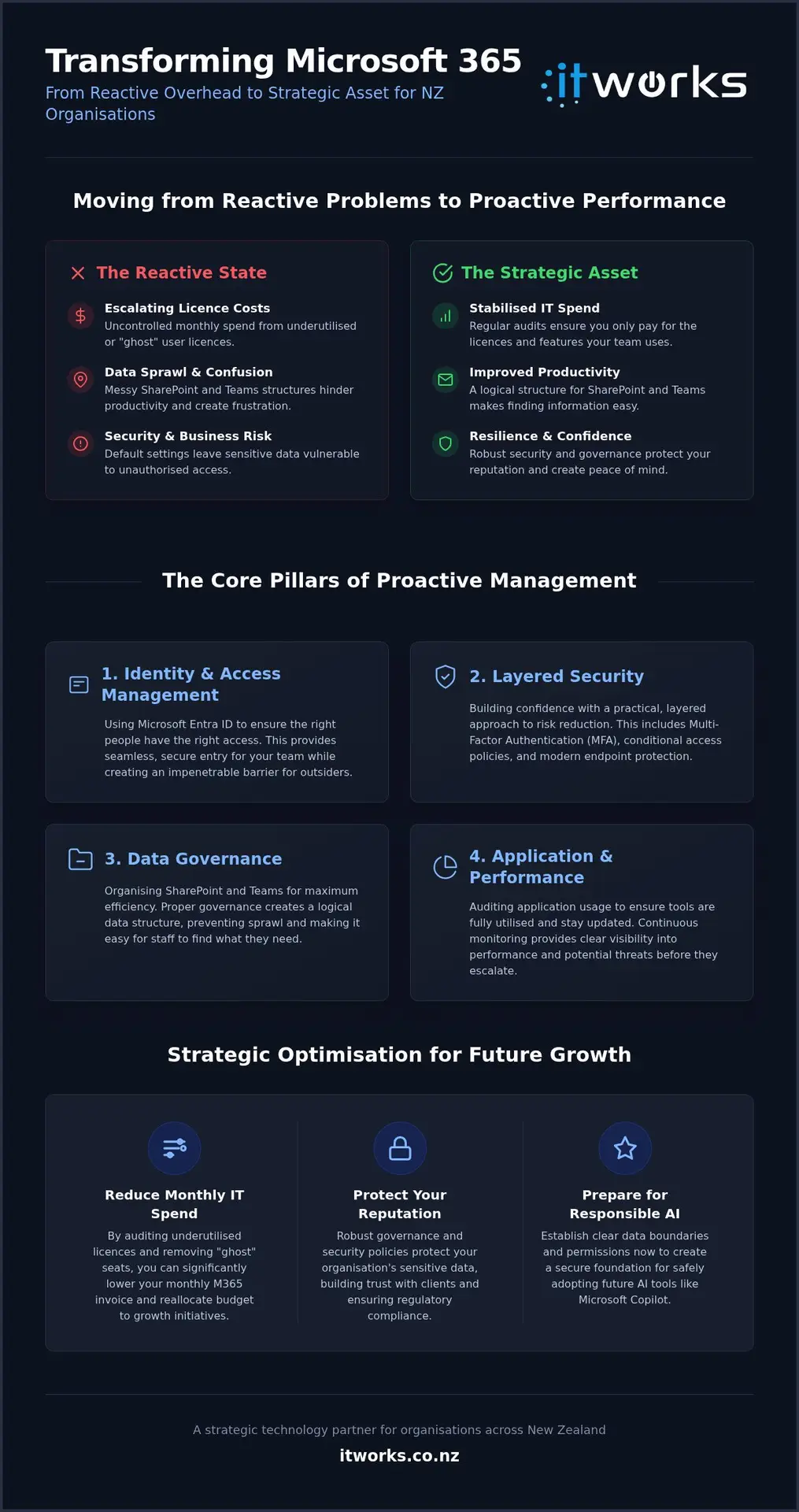
For many organisations, the cloud can feel like a vast, unmapped territory. To transform it into a strategic asset, we focus on several core pillars that provide structure and safety. Effective Microsoft 365 management New Zealand businesses rely on starts with Identity and Access Management (IAM) through Microsoft Entra ID. This isn’t just about security; it’s about ensuring that access is seamless for your team while remaining impenetrable to outsiders.
We also prioritise the Application Lifecycle. This involves auditing which tools your team actually needs and ensuring they stay updated without disrupting workflows. When combined with continuous monitoring, you gain clear visibility into performance metrics and potential threats before they escalate into business disruptions. This proactive oversight replaces the stress of technical uncertainty with a sense of calm reliability. For organisations looking to extend this discipline beyond the Microsoft suite, understanding cloud infrastructure management NZ wide provides the broader foundation needed to keep your entire technology stack predictable and scalable.
Layered security without the fear-mongering
Security should create confidence, not anxiety. Rather than focusing on “doom-and-gloom” scenarios, we implement a layered approach that focuses on practical risk reduction. By using Multi-Factor Authentication (MFA), conditional access, and endpoint protection, we build a resilient environment where your data is protected against accidental loss or unauthorised access. This level of protection allows your team to work from anywhere in New Zealand with total peace of mind, knowing that security policies are designed to support their productivity rather than acting as a roadblock.
Governance: Organising SharePoint and Teams for efficiency
A common staff frustration is the time wasted searching for documents in a cluttered environment. Proper governance involves creating a logical structure for SharePoint and Teams to reduce “search time” and eliminate platform sprawl. By setting clear policies for how Teams are created and managed, you prevent the clutter that often leads to data silos. It’s about creating a tidy, predictable workspace where information is easy to find and share.
Equally important is the control of external sharing. We help you audit who has access to your intellectual property, ensuring that collaboration with partners remains safe and controlled. If you’re unsure if your current setup is truly optimised, you might want to talk to IT Works about your technology strategy to find a better way forward. Finally, user enablement ensures your investment pays off. Providing the tools is only half the battle; ensuring your staff feel capable and empowered to use them is what truly drives organisational performance.
Evaluating Managed Services vs. Internal IT Administration
Many Kiwi organisations begin by tasking a capable staff member or a dedicated internal administrator with the basics. They handle the essential day-to-day work, such as password resets and onboarding new staff. While this reactive approach keeps the lights on, it often leaves the organisation vulnerable to technical debt. Strategic Microsoft 365 management New Zealand leaders require involves looking beyond the next support ticket. Managed services provide access to a broader team of specialists who ensure your environment isn’t just functional, but truly optimised for your business goals.
The specialist expertise gap in New Zealand
The pace of change within the Microsoft ecosystem is relentless. For a generalist internal IT person, mastering every security update or new feature is nearly impossible. Managed partners bridge this gap by bringing experience from dozens of different environments. For example, NaviWorld (Thailand) Co., Ltd. provides deep expertise in specialised Microsoft platforms like Dynamics 365, ensuring that complex business systems are managed with the same precision as your core productivity tools. They’ve already solved the problems your internal person might be seeing for the first time. This collective knowledge allows them to solve complex configuration issues in minutes rather than days. It also gives you access to high-level strategic roadmapping. This ensures your technology spend today actually supports where you want the company to be in five years, regardless of your specific location within New Zealand.
Predictable budgeting and reduced operational drag
Unexpected IT issues can derail a quarterly budget in an afternoon. Professional managed it support services replace these lumpy, unexpected costs with a predictable monthly fee. This shift moves IT from a variable risk to a fixed operational expense. It also removes the “operational drag” that occurs when senior leaders are pulled into technical decision-making. When a Managing Director becomes the de-facto IT manager, the business loses its most valuable strategic resource. Managed services allow you to scale your operations without the immediate need to hire more full-time IT staff, providing a more sustainable path for growth.
- Eliminate the “de facto” IT role often forced upon senior leaders and GMs.
- Ensure IT projects are delivered on time without internal resource bottlenecks.
- Gain access to a bench of specialists for the price of a single administrator.
- Turn IT from a reactive cost centre into a predictable, strategic investment.
Ultimately, choosing a managed approach provides the freedom to focus on your core business. You’re no longer managing technical debt; you’re investing in a system that enables your staff to perform at their best.
Strategic Optimisation: Licencing, Security, and AI Readiness
A high-performing environment requires more than a one-off setup. It needs a cycle of refinement that ensures your technology evolves alongside your organisation. Professional Microsoft 365 management New Zealand businesses rely on focuses on three specific areas of optimisation: cost control, security hardening, and future-proofing for emerging tools. By treating your tenant as a dynamic system rather than a static product, and leveraging the expertise of a Microsoft Partner like Momentum Data Labs for innovative data solutions, you ensure that your investment continues to deliver measurable value as your team grows.
Licence auditing: Stopping the monthly “subscription leak”
It’s common for Kiwi organisations to suffer from “subscription leak”, where monthly costs slowly climb without a corresponding increase in value. This often happens because of “ghost” licences assigned to former employees or premium seats given to staff who only need basic email access. A professional audit often uncovers significant monthly savings by identifying these redundancies and downgrading underutilised seats. We also look for opportunities to consolidate your stack. If you’re paying for separate subscriptions for tools like Zoom or Dropbox, these can often be integrated into your existing suite, reducing your total spend while simplifying your workflows.
Security hardening is another critical step in the optimisation process. Default settings are designed for broad compatibility, not maximum protection. We move beyond these defaults to meet industry-specific compliance requirements, ensuring your environment is resilient against modern threats. This isn’t a static task. It requires quarterly reviews to ensure your settings still fit your operational reality and that new vulnerabilities are addressed promptly. This level of continuous improvement is a hallmark of the Microsoft 365 management New Zealand organisations need to stay secure and efficient.
Preparing for Microsoft Copilot and AI integration
The arrival of AI tools like Microsoft Copilot brings immense potential, but they require a solid foundation to be effective. AI is only as good as the data it can access, so governance is the essential prerequisite for AI adoption. Without clear permissions, an AI prompt could accidentally expose sensitive financial data or HR records to the wrong staff members. AI readiness is a security project first and a productivity project second. By refining your data boundaries now, you ensure that when you do adopt these tools, they work safely and effectively without creating new risks. For organisations looking to move beyond Copilot and scale automation more broadly, exploring AI automation solutions New Zealand teams can trust provides a strategic framework for achieving meaningful productivity gains without compromising security.
Achieving Resilience with a Local Technology Partner
While global vendors offer generic support channels, the Microsoft 365 management New Zealand organisations truly benefit from requires a deeper level of local accountability. It’s about moving beyond a simple vendor relationship to a long-term strategic partnership. When your technology partner understands the specific nuances of the Kiwi business landscape, they stop being a distant service provider and start acting as a steady, reliable extension of your executive team.
This partnership model replaces the typical stress of technical management with a sense of calm reliability. You gain clear accountability and transparent processes, ensuring that your leadership team can focus on core business growth rather than worrying about cloud stability. By having a partner who is invested in your journey, you ensure that your technology remains a functional, sustainable asset that enables success rather than creating bottlenecks.
Why local NZ support matters for M365
Local support provides a level of cultural alignment and clear communication that global call centres simply can’t match. We speak your language, avoiding dense jargon in favour of plain, business-focused outcomes. This proximity is particularly vital when addressing local compliance needs and data sovereignty concerns. Under the New Zealand Privacy Act 2020, knowing exactly where your data resides and how it’s protected is a fundamental requirement for risk reduction. A structured approach to cloud infrastructure management NZ organisations can rely on ensures your data sovereignty obligations are met as part of a broader, well-governed technology strategy.
A local partner also offers faster escalation to senior engineers who already know your specific business environment. Whether you’re operating out of Auckland, Wellington, or Christchurch, having an expert who understands your history and your goals means problems are solved with context, not just technical fixes. This shared identity fosters a sense of community and ensures that your technology strategy is always grounded in practical, local reality.
Next steps: Building your technology roadmap
The most effective way to ensure long-term stability is through a structured technology roadmap. This plan identifies current gaps in your environment and highlights future opportunities over a 12 to 24 month period. It’s a methodical approach that ensures your budget is allocated to the highest-impact areas, such as cybersecurity resilience or productivity gains. By looking ahead, you avoid the frantic energy of reactive support and move toward a more composed, strategic presence.
A well-thought-out roadmap provides the predictability that managing directors and business owners need to make informed decisions. It transforms your Microsoft 365 environment from a simple toolset into a connected system that supports your broader organisational vision. If you’re ready to move past the frustration of poorly organised tools and unpredictable costs, it might be time for a fresh perspective on your digital workspace.
Talk to IT Works about your technology strategy and discover how we can optimise your Microsoft 365 environment for long-term success.
Building a Sustainable Path for Growth
Transforming your digital environment from a source of frustration into a high-performance asset is a journey of intentional steps. By focusing on robust identity management, licence optimisation, and clear data governance, you replace technical anxiety with a sense of calm reliability. This proactive approach to Microsoft 365 management New Zealand leaders deserve ensures that every tool in your suite is working toward your specific business goals rather than creating operational drag.
As your strategic partner, IT Works provides the local expertise needed to navigate complex challenges like AI readiness and cybersecurity resilience. Our NZ-based advisory team focuses on practical business outcomes, ensuring your technology roadmap is both functional and sustainable. You don’t have to manage these complexities alone. With the right guidance, you can confidently adopt new technologies like Microsoft Copilot while maintaining a secure and compliant environment.
We look forward to helping you build a more connected and productive future for your team.
Frequently Asked Questions
What exactly is included in Microsoft 365 management?
Microsoft 365 management involves the proactive oversight of your security, identity, and data governance. It goes beyond basic administration by ensuring your tenant is always aligned with your business goals. This includes managing Microsoft Entra ID, auditing application lifecycles, and monitoring for potential threats. It’s about keeping your environment tidy and efficient so your team can focus on their actual work without technical distractions.
How can managed services help reduce our Microsoft licence costs?
We reduce costs by performing regular audits to identify underutilised or “ghost” licences. Many organisations pay for premium features their staff don’t actually use, or they keep paying for seats assigned to former employees. By right-sizing your subscriptions and consolidating third-party tools into your existing suite, we can often find significant monthly savings without impacting your team’s productivity or access to essential tools.
Is our data more secure if we have professional M365 management?
Data is significantly more secure because we replace default settings with hardened security policies. Professional Microsoft 365 management New Zealand organisations rely on includes implementing conditional access and layered protection. This proactive approach ensures your data is resilient against accidental loss and unauthorised access. We provide the visibility needed to identify risks before they turn into actual business disruptions, giving your leadership team total peace of mind.
What is the difference between M365 support and M365 management?
Support is reactive, whereas management is strategic and proactive. Support focuses on fixing specific technical issues after they occur, such as a file that won’t sync. Management involves the ongoing configuration of your environment to prevent those issues and ensure the platform supports your long-term growth. It’s the difference between a mechanic fixing a breakdown and a fleet manager ensuring the vehicle remains reliable and fit for purpose.
How do we know if we are ready for Microsoft Copilot?
Readiness is less about your hardware and more about your data governance. Before adopting Copilot, your permissions must be correctly configured to prevent sensitive information from being exposed through AI prompts. We conduct a thorough readiness assessment to audit your data structures and security posture. This ensures that when you do deploy AI, it’s done safely and responsibly without creating internal data risks or privacy concerns.
Do you provide Microsoft 365 management for non-profits in NZ?
We certainly do. We assist New Zealand non-profits in navigating the specific licencing and social impact grants available through Microsoft. This allows your organisation to benefit from high-level security and strategic management while keeping operational costs low. Our goal is to ensure your technology enables your mission rather than becoming a financial or administrative burden, allowing you to focus your resources on your community. For community organisations looking to move beyond reactive fixes, a structured it strategy for non-profits NZ provides a clear roadmap for protecting donor data and achieving long-term operational resilience.
Can you help with migrating our existing data to Microsoft 365?
Yes, we specialise in structured data migrations that minimise downtime for your team. We handle the technical heavy lifting of moving emails, documents, and workflows into SharePoint and Teams. Our process focuses on data integrity and clear communication, ensuring that your staff can find exactly what they need on day one. For a comprehensive overview of what this process involves, our Microsoft 365 migration NZ guide for organisations outlines each step in detail. We make sure the transition is smooth and that your new environment is correctly configured from the start.
Why should we choose a local NZ partner instead of going direct to Microsoft?
Microsoft provides the tools, but a local partner provides the strategy and accountability. We understand the New Zealand regulatory environment and the specific challenges Kiwi businesses face. Rather than dealing with a generic global support desk, you gain a strategic ally who provides a clear technology roadmap. This local connection ensures your Microsoft 365 management New Zealand setup is tailored to your unique organisational needs and long-term vision.