
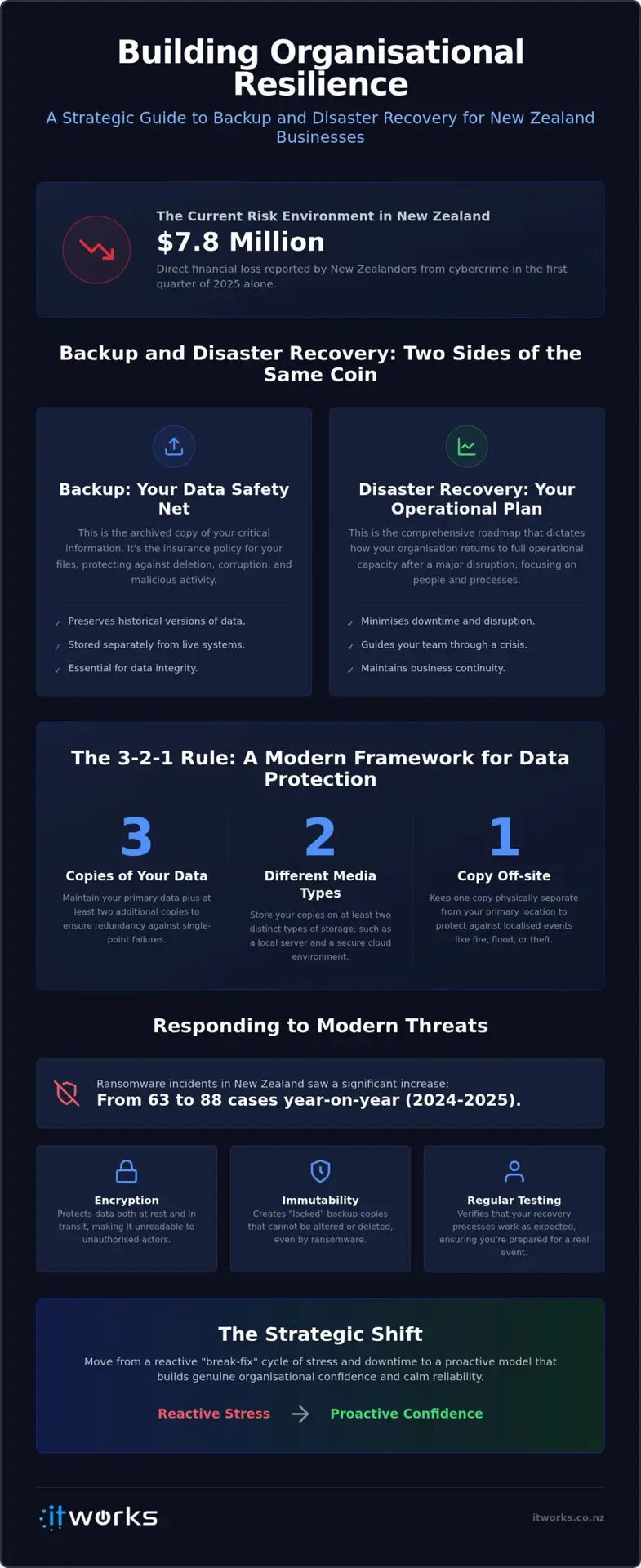
Did you know that New Zealanders reported $7.8 million in direct financial losses to cybercrime in the first quarter of 2025 alone? For organisations from Auckland to Christchurch, this figure represents a significant shift in the risk environment, making a strategic approach to backup and disaster recovery NZ wide a fundamental pillar of business continuity. This isn’t just about technical insurance; it’s about ensuring your team can keep moving forward regardless of the challenges they face.
You likely recognise the weight of this responsibility, yet it’s common to feel uncertain about whether your current backups are actually being tested or if they’d truly stand up during a full system recovery. The confusion between simple file storage and a comprehensive resilience plan is a challenge many executive teams face. It’s perfectly normal to want more than just a technical fix; you’re looking for the confidence that comes with knowing your operations are secure and your data is handled with care.
This guide will help you bridge that gap by teaching you how to protect your organisation’s data and ensure operational continuity through a structured lens. We’ll explore how the May 2026 update to the Privacy Act affects your data management and how aligning with international standards like ISO 22301 can turn technical requirements into long term stability.
Key Takeaways
- Understand the vital difference between simply holding a copy of your data and having a verified process to restore your operations quickly.
- Implement the 3-2-1 rule to ensure your information is redundant, encrypted, and protected against modern risks.
- Learn why a practical business continuity plan must be a living document that prioritises your most critical organisational functions.
- Discover how a strategic approach to backup and disaster recovery NZ wide can replace reactive stress with a sense of calm reliability.
- Shift your perspective from reactive support to a long-term technology roadmap that builds genuine organisational confidence.
Understanding Backup and Disaster Recovery in the New Zealand Context
Building a resilient organisation starts with a clear understanding of the tools at your disposal. While they are often mentioned in the same breath, backup and disaster recovery serve two distinct roles in your technology strategy. Think of a backup as the archived copy of your critical information; it’s the insurance policy for your files. In contrast, IT disaster recovery is the comprehensive process of restoration. It’s the roadmap that dictates how your organisation returns to full operational capacity after a disruption.
For many organisations across New Zealand, the old approach of “break-fix” support is no longer sufficient. Relying on reactive repairs creates a cycle of stress and unpredictable downtime. By shifting toward a proactive resilience model, you treat technology as a strategic asset rather than a hidden cost. This shift ensures that your backup and disaster recovery NZ strategy isn’t just about ticking a box, but about maintaining business continuity when it matters most. With the introduction of Information Privacy Principle 3A in May 2026, having a verified way to manage and restore data is now a matter of regulatory compliance as much as operational safety.
The Role of Backup in Data Integrity
A true backup acts as your safety net against accidental deletion, file corruption, or malicious activity. It’s vital to distinguish this from simple file syncing services. While tools like OneDrive are excellent for daily collaboration, they often mirror changes instantly. If a file is deleted or corrupted by ransomware, that change is synced across all devices, leaving you without a clean version to recover.
A robust backup system preserves historical versions of your data in a separate, secure environment. For NZ-wide resilience, off-site storage is non-negotiable. Storing data in a different geographic region, such as moving copies from Wellington to Auckland or into a secure cloud environment, protects your information from localised physical events. This ensures that even if your primary site is compromised, your data remains intact and ready for use.
Why Disaster Recovery is an Operational Necessity
If a backup ensures you have the data, disaster recovery ensures you can actually use it. This strategy focuses heavily on the human element of your business. When a primary system fails, your team needs to know exactly how to access their tools and continue serving clients without missing a beat. It addresses the practicalities of a crisis, such as how staff can work remotely if the physical office is unavailable.
Operational necessity is about more than just servers; it’s about maintaining organisational confidence. When your staff know there is a proven plan in place, they can work with a sense of calm reliability. This level of preparedness also builds significant trust with your clients and donors. It proves your organisation is a stable, forward-thinking partner capable of navigating unexpected challenges while keeping their sensitive information secure.
The Anatomy of a Modern Data Protection Strategy
A reliable framework is the foundation of any resilient organisation. To move beyond basic file saving, we recommend the 3-2-1 backup rule as the industry standard. This strategy ensures your data is redundant and accessible even during complex failures. It involves keeping three copies of your data; two are stored on different media types, such as a local server and a cloud repository; and one copy is kept strictly off-site. For organisations across the country, this off-site copy is the ultimate safeguard against localised incidents in cities like Wellington or Christchurch.
Modern risks require more than just copies. With ransomware incidents in New Zealand increasing from 63 to 88 year-on-year in the 2024/2025 period, encryption and immutability have become essential. Immutable backups are “locked” so they cannot be altered or deleted by malicious actors, even if they gain access to your network. A strategic approach aligns with insights from Harvard Business School on Operational Resilience, which suggests that preparedness is a fundamental business requirement rather than just a technical task. By automating these routines, you remove the risk of human error and ensure your backup and disaster recovery NZ strategy remains consistent without manual intervention.
Cloud vs. Local: Finding the Right Balance
A hybrid approach often provides the best balance of speed and security for New Zealand organisations. Local backups allow for the rapid restoration of large files, while the cloud provides the necessary off-site isolation. This is particularly important for Microsoft 365 environments, where cloud-to-cloud backup ensures your emails and shared documents are protected independently of the primary provider. Knowing exactly where your data lives also helps you meet the requirements of the Privacy Act 2020, ensuring data sovereignty and compliance with local regulations.
Proactive Monitoring and Maintenance
The true value of a backup is only proven during its last successful test. It is common for organisations to assume their systems are running correctly, only to discover a failure when it’s too late. Proactive monitoring identifies these gaps before they become crises, providing executive teams with a centralised view of their resilience status. This level of oversight is a core component of Managed IT Services, where the focus is on long-term stability rather than reactive fixes.
By treating your data protection as a living system, you replace uncertainty with a structured roadmap for growth. If you’re unsure how your current systems would perform under pressure, you can discuss your technology strategy with our team to ensure your organisation is truly prepared.
Backup vs. Disaster Recovery: Why You Need Both
Understanding the interplay between these two pillars is essential for any executive team. While having a copy of your data is a vital first step, it doesn’t automatically mean your staff can keep working during a crisis. Backup is about the preservation of information; disaster recovery is about the restoration of your operational capacity. Without a clear strategy for both, you might find yourself with all your files intact but no way to access them for days on end. This dual approach is a cornerstone of effective cyber security for small business NZ wide, as it ensures that even a successful attack doesn’t lead to a permanent closure.
Different scenarios require different tools. If a staff member accidentally deletes an important email, a simple backup restoration solves the problem in minutes. However, if a server failure or a localised event at your office occurs, you need a full disaster recovery plan to move your operations to a different environment. Investing in backup and disaster recovery NZ wide is a strategic decision to protect your uptime. The cost of a solution is fixed and predictable, while the cost of downtime is often exponential, compounding with every hour your team remains offline.
Recovery Point Objective (RPO): How Much Data Can You Lose?
Think of RPO as a “time-gap” in your data. It defines the maximum amount of information your organisation can afford to lose before the impact becomes unmanageable. If your systems fail at 4:00 PM and your last backup was at 9:00 AM, you’ve lost seven hours of work. For some organisations, re-entering a day’s worth of data is acceptable. For others, even an hour of lost progress is a catastrophe. Your “pain threshold” for this data loss dictates how frequently your backups must run, whether that’s every few hours or in real-time.
Recovery Time Objective (RTO): How Quickly Must You Be Back?
RTO is the timer that starts the moment a system goes down. It asks a simple but difficult question: how long can the doors stay shut before the financial and reputational damage becomes irreversible? This metric determines the complexity and speed of your backup and disaster recovery NZ infrastructure. A short RTO might involve having a secondary system ready to take over instantly, while a longer RTO allows for a more methodical restoration process. By defining these objectives early, you ensure your technology roadmap is perfectly aligned with your business priorities.
Building a Practical Business Continuity Plan
A business continuity plan is only as effective as its last update. Far too often, these documents are treated as a compliance checkbox, left to gather dust in a digital folder. For your backup and disaster recovery NZ strategy to be effective, the plan must be a living document that evolves alongside your organisation. It serves as a practical manual for your team, providing clear instructions when the unexpected occurs. If the plan is too complex to read during a crisis, it won’t be used.
The first step is identifying your Critical Business Functions. These are the core activities that must continue for your organisation to survive. By prioritising these essentials, you ensure your resources are directed where they are needed most. This clarity also extends to your communication strategy. During a disruption, uncertainty is the greatest enemy. Your plan should clearly define who is responsible for updating staff and who manages client or donor expectations. Having these roles pre-assigned replaces panic with a structured, calm response.
Conducting a Business Impact Analysis (BIA)
A BIA allows you to move from general concerns to specific requirements. It involves reviewing your core systems, such as email, CRM, and payroll, and assessing the consequences if they were to go offline. This data-driven approach informs your broader IT strategy, ensuring your technology investments match your actual operational needs. Ask yourself what happens at various intervals:
- 4 Hours: Can your team still communicate with clients effectively?
- 24 Hours: Does a lack of CRM access halt your sales or service pipeline?
- 48 Hours: Are legal obligations, like payroll or regulatory reporting, now at risk?
The Importance of Regular Testing
There is a significant difference between seeing a “green light” on a backup dashboard and actually performing a successful restore. Technical indicators can sometimes be misleading, which is why regular validation is essential. We recommend quarterly or bi-annual testing of your most critical systems. These exercises allow your team to walk through a recovery scenario in a safe environment, identifying gaps in the plan before a real incident occurs.
Regular testing builds organisational confidence. It proves to your board and your stakeholders that your resilience isn’t just a theory, but a tested reality. This proactive maintenance ensures that when a challenge arises, your team can act with the steady hand of an expert who has been there before. Tabletop exercises turn a static document into a functional tool that everyone understands.
Partnering for Resilience: The IT Works Approach
At IT Works, we believe technology should be a quiet enabler of your success rather than a source of constant worry. We position ourselves as a strategic ally for organisations across New Zealand, moving away from the reactive model of traditional support. Instead of simply answering calls when a system fails, we work alongside your executive team to ensure your backup and disaster recovery NZ strategy is robust and aligned with your broader objectives. This partnership is built on a foundation of local knowledge, with our NZ-based team providing the advisory and support you need to navigate local regulations and operational challenges with ease.
Our primary goal is to provide you with the confidence that your systems are secure and ready to support your growth. When you have a reliable partner managing the technical complexities, you can focus on your core mission without the anxiety of unexpected downtime. We aim to replace the typical stress of IT management with a sense of calm reliability, ensuring that your resilience is a strategic asset rather than an afterthought.
Strategic Roadmapping for Long-Term Growth
Resilience is not a one-off project; it is a continuous process that must scale alongside your organisation. We build a tailored Technology Roadmap that aligns your data protection needs with your future goals, ensuring your infrastructure remains a stable platform for success. This strategic process involves:
- Shifting from unpredictable capital expenditure to stable, managed resilience costs that fit your budget.
- Ensuring that as you expand your staff count or move into new regions, your data remains protected and accessible.
- Integrating security and backup requirements into your long-term planning to avoid technical debt.
By treating resilience as a managed operational expense, your organisation gains a predictable financial model while maintaining the highest standards of data integrity. This approach ensures that your technology scales securely as your organisation expands, providing a firm foundation for future innovation.
Managed Resilience and Continuous Improvement
A resilient system requires constant attention to remain effective. Our team takes an active role in proactive monitoring and regular recovery testing, ensuring that your plan works in the real world, not just on paper. As your organisation adopts new tools like AI and automation, we update your disaster recovery protocols to encompass these new data streams and workflows, keeping your protection comprehensive and relevant.
We believe that long-term partnerships lead to better business outcomes. By choosing a partner who understands the human side of technical challenges, you ensure that your organisation is prepared for whatever comes next, with a strategy that supports both your people and your productivity.
Building a Future-Ready Organisation
Resilience is more than a technical backup; it’s the foundation of organisational confidence. By moving beyond simple file storage and embracing a comprehensive approach to backup and disaster recovery NZ wide, you ensure your team can navigate any disruption with clarity and purpose. We’ve explored how identifying critical functions and defining your recovery objectives turns a static document into a strategic roadmap for growth.
Success lies in the transition from reactive fixes to a proactive partnership. Our NZ-based strategic advisors focus on outcome-focused models that replace technical stress with a sense of calm reliability. This layered, non-fear-based security ensures your technology remains a silent enabler of your success, allowing you to focus on your long-term vision while we manage the operational complexities.
Your organisation’s stability is within your control. With the right plan and a dedicated partner, you can turn potential challenges into opportunities for reinforced strength and continued success.
Frequently Asked Questions
What is the difference between backup and disaster recovery?
Backup is the secure copy of your critical data, while disaster recovery is the strategic process used to restore your operations. Think of backup as the spare tyre and disaster recovery as the toolkit and instructions needed to change it and get back on the road. Having the data is only half the battle; you need a verified method to make that information accessible to your team during a crisis.
Do I need backup if all our files are in Microsoft 365 or Google Workspace?
Yes, because primary cloud providers generally focus on service availability rather than comprehensive data protection against user error or malicious deletion. If a file is permanently deleted or corrupted by ransomware, it may be purged from the provider’s system after a short retention period. A dedicated cloud-to-cloud backup ensures you have independent, historical versions of your emails and documents that can be restored regardless of what happens in the primary environment.
How often should our organisation be testing our disaster recovery plan?
We recommend conducting a full review and test of your recovery procedures at least twice a year. Critical systems might require quarterly validation to ensure that your backup and disaster recovery NZ strategy remains aligned with any software updates or staff changes. Regular testing moves the plan from a theoretical document to a functional tool, giving your executive team the confidence that operations can resume swiftly if an incident occurs.
What are RPO and RTO, and why do they matter for my business?
Recovery Point Objective (RPO) measures how much data you can afford to lose, while Recovery Time Objective (RTO) dictates how quickly you must be back online. These metrics are vital because they define your organisation’s tolerance for disruption. Without these clear targets, your technology team won’t know whether to prioritise real-time replication or daily snapshots, which can lead to significant gaps between business expectations and technical reality during a restoration process.
Is cloud backup safer than keeping a physical backup on-site?
Safety comes from redundancy rather than choosing one over the other. While a physical on-site backup allows for the rapid restoration of large files, it remains vulnerable to local events like fire or theft. Cloud backup provides essential geographic isolation, ensuring your data is stored in a separate secure location. A hybrid approach is often the most resilient choice for organisations in Auckland or Wellington, combining the speed of local access with the security of the cloud.
How much does a disaster recovery plan typically cost for an NZ SME?
Costs vary significantly based on the volume of data you protect and the speed of recovery your organisation requires. A plan that mandates near-instant restoration will involve more complex infrastructure than one that allows for a longer recovery window. Instead of focusing on a single price point, it’s better to view these costs as a predictable monthly investment in operational stability. This managed approach helps you avoid the high, unexpected expenses associated with reactive emergency repairs.
What should be included in a basic business continuity plan?
A basic plan should include a clear list of critical business functions, a communication tree for staff and clients, and step-by-step restoration procedures for your primary systems. It should also identify alternative work locations if your main office is inaccessible. Most importantly, the document must be easy to read and accessible offline. Including a Business Impact Analysis ensures that your resources are focused on the systems that most directly influence your daily productivity and legal obligations.
Can backup and disaster recovery help protect against ransomware?
These tools are your final line of defence when primary security layers are bypassed. While they don’t prevent the initial infection, immutable backups ensure that your data cannot be encrypted or deleted by the attacker. This allows you to restore your systems to a clean state without paying a ransom. Integrating these solutions into your backup and disaster recovery NZ strategy significantly reduces the leverage a criminal has over your organisation, building genuine resilience against extortion.