

Protecting confidential corporate records on employee smartphones shouldn’t mean seizing administrative control over their personal lives. If you have hesitated to enforce mobile safeguards because you’re worried about staff pushback or remote wiping fears, you aren’t alone. Balancing mobile working against data governance obligations can feel daunting. Establishing an effective securing company data on personal devices policy doesn’t require invasive surveillance or heavy-handed factory resets to keep sensitive files safe.
You can safeguard commercial files while leaving personal photos and private messages untouched. In this practical guide, you’ll learn how to create, implement, and govern a balanced BYOD policy that protects organisational data while respecting staff privacy. We’ll walk through the essential technical guardrails that containerise business applications, outline your statutory privacy duties, and share a structured rollout framework designed to earn genuine buy-in across your team.
Key Takeaways
- Drafting a well-structured securing company data on personal devices policy establishes clear boundaries between commercial files and personal information, enabling flexible working with confidence.
- Clear acceptable use standards protect corporate assets while removing ambiguity and unnecessary administrative friction for your staff.
- Modern application protection policies isolate work tools like Teams and Outlook within secure containers, safeguarding files without accessing private photos or messages.
- A transparent five-stage rollout roadmap, grounded in practical device auditing and proactive staff engagement, secures high adoption rates across your organisation.
- Regular governance reviews ensure your operational mobile guardrails remain resilient alongside continuous operating system and software updates.
Understanding the Need for a Personal Device Data Security Policy
Modern working arrangements rely heavily on mobility. Staff routinely check emails between meetings, review spreadsheets at home, and respond to urgent chat messages on the go. While this flexibility keeps teams agile, unmanaged mobile access creates operational blind spots across corporate communication channels. Without clear rules, sensitive business files mix with personal applications on uncontrolled smartphones and tablets.
A comprehensive Bring your own device (BYOD) security framework defines the boundary where corporate governance ends and personal autonomy begins. Implementing a formal securing company data on personal devices policy is not an exercise in micromanagement. It is a proactive operational strategy designed to build business resilience, streamline communication, and give leadership genuine confidence in their mobile systems.
The Realities of Modern Mobile Working
Daily operational tasks quickly blur the line between personal convenience and business risk. When a team member opens a client file on an unmanaged phone, that document enters an environment outside central oversight. Common mobile exposures include:
- Unencrypted storage: Devices lacking baseline encryption expose local application caches if misplaced.
- Physical loss: A phone left behind in transit can compromise authenticated email sessions within minutes.
- Unsecured Wi-Fi: Public networks allow opportunistic interception of unencrypted application traffic.
Addressing these gaps through a formal policy ensures routine disruptions do not compromise ongoing business operations.
Balancing Business Protection with Employee Privacy
Employee pushback often stems from a simple misunderstanding. Staff worry that connecting to work accounts gives management permission to browse private photo libraries, read personal text messages, or monitor physical movements. A successful securing company data on personal devices policy addresses these anxieties directly by drawing clear technical and legal boundaries.
Organisational oversight must focus on protecting the work environment, not inspecting the device hardware. When an organisation specifies exactly what it can access, such as company emails and document libraries, and explicitly confirms what remains private, team members embrace mobile standards with confidence. Transparent boundaries cultivate trust, turning team members into proactive partners in organisational security.
Essential Components of an Effective Personal Device Policy
An actionable policy provides direct answers rather than theoretical rules. When teams understand precisely what is expected of them, security becomes a natural extension of daily workflows instead of an administrative roadblock. Rather than burying staff under dense legal disclaimers, a balanced securing company data on personal devices policy sets clear boundaries that protect organisational files while supporting modern productivity.
Building these operational standards aligns closely with the practical baselines outlined in our guide to Cyber Security for Small Business NZ. Grounding your device documentation in these core principles ensures mobile access supports your broader risk management objectives.
Acceptable Use and Permitted Data Classifications
Your policy must establish clear tiers for what data can live on employee-owned devices. While reviewing calendars and responding to client emails are typical mobile activities, handling unencrypted sensitive exports requires firmer boundaries.
- Permitted mobile data: Viewing schedules, routine business emails, and standard chat channels via corporate accounts.
- Restricted activities: Downloading raw customer databases, bulk financial records, or storing client files in personal cloud accounts.
- Local storage controls: Saving work attachments directly to unmanaged local phone storage should be explicitly blocked.
These distinctions protect your organisation’s core information assets without creating unnecessary friction for day-to-day communication.
Mandatory Device Hygiene and Security Baselines
Technical baselines guarantee that every device touching corporate systems meets an agreed security standard. Aligning your internal requirements with established NIST guidelines for managing mobile device security helps leadership set sensible, defensible technical rules across all hardware.
Staff must secure their devices with biometric authentication or complex alphanumeric passcodes, alongside mandatory automatic screen lockouts after brief periods of inactivity. Operating systems must run supported versions with active patch management. Any modified firmware, such as rooted Android or jailbroken iOS software, completely invalidates access permissions.
Incident Reporting and Remote Wipe Permissions
Timely incident response relies entirely on open communication. Staff need to know they can report a misplaced phone immediately without facing punitive reactions from management. Policies should define a clear reporting timeframe, typically within 24 hours of a confirmed loss.
Critically, your securing company data on personal devices policy must clarify the exact scope of remote wipe capabilities. Reassure employees that technical wipe commands isolate and delete only organisational data containers. Their family photos, private messages, and personal files remain completely untouched. If you are reviewing your mobile governance rules, talk to IT Works about your technology strategy to establish practical controls that suit your team.
Technical Safeguards: MDM versus MAM for Personal Devices
A securing company data on personal devices policy requires technical enforcement to back up written expectations. Choosing between managing the entire physical device or governing only corporate applications determines how readily staff adopt your guidelines. Striking the right balance ensures commercial data stays protected without disrupting user convenience.
Full Mobile Device Management (MDM) Capabilities
MDM enrols the entire physical smartphone into a central management portal. This architecture gives administrators comprehensive control, including device-wide configuration, forced operating system updates, and remote factory resets. While this level of oversight suits corporate-owned hardware or heavily regulated environments, applying it to personal handsets creates immediate friction. Staff hesitate to grant employers administrative authority over their private hardware, fearing sudden data wipes or perceived surveillance.
Mobile Application Management (MAM) and Containerisation
Mobile Application Management (MAM) eliminates this friction by securing business information at the application layer, avoiding device enrolment entirely. Through containerisation, applications such as Microsoft Teams, Outlook, and OneDrive operate within an encrypted enclave separated from personal social media, personal cloud accounts, and photo libraries.
Aligning with core principles in the FTC business data protection guide, containerisation restricts unmanaged data movement. It prevents users from copying text out of business emails into personal messaging platforms, restricts local document downloads, and enables selective remote wiping when an employee moves on. For practical setup details across your productivity suite, explore our guide to Microsoft 365 Management.
Layered Authentication and Conditional Access
Containerisation performs best alongside strong identity controls. Phishing-resistant multi-factor authentication serves as an indispensable first barrier, verifying identity before any connection succeeds. Automated Conditional Access rules evaluate device risk and operating health at sign-in, ensuring that outdated operating systems cannot access company systems.
Enforcing these application protection policies allows leadership to maintain an effective securing company data on personal devices policy that protects core business assets while preserving staff trust.
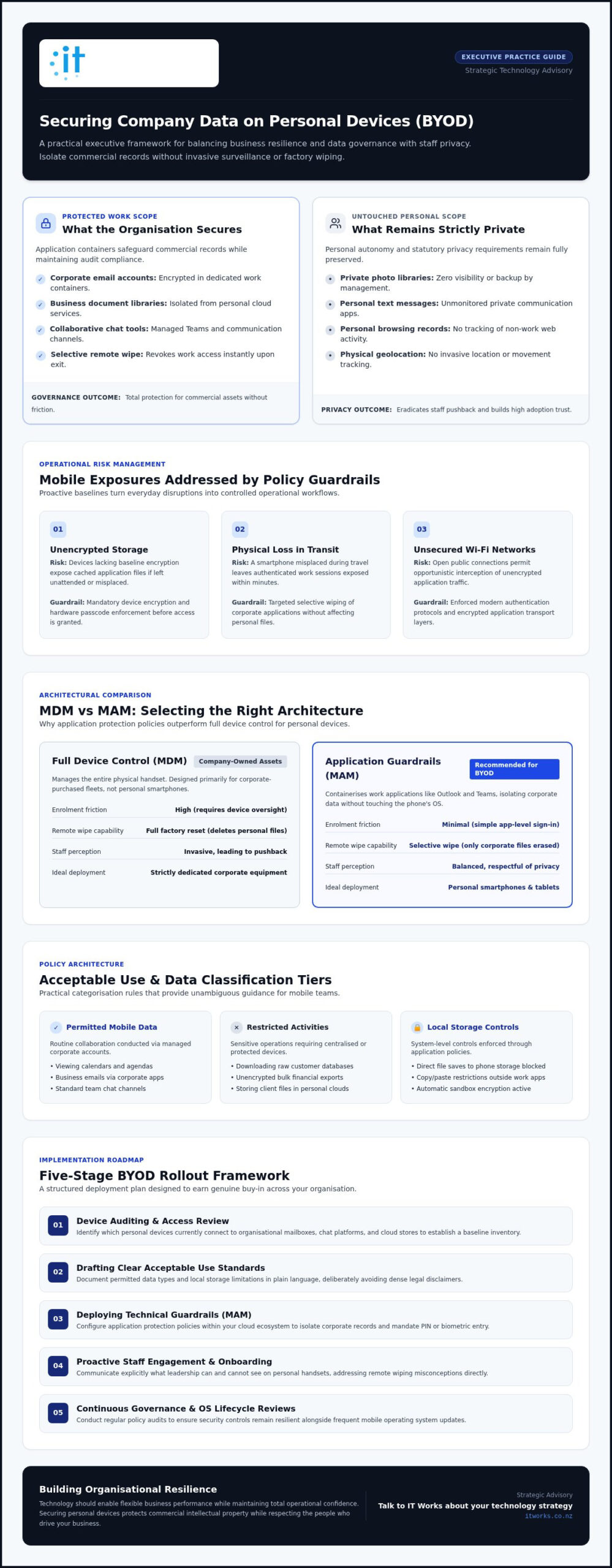
Step-by-Step Implementation: Rolling Out Your BYOD Policy
Rolling out an operational framework requires a structured rollout that prioritises people alongside technology. Even the most comprehensive technical safeguards fall short if staff find the changes confusing or intrusive. Introducing your securing company data on personal devices policy through a deliberate five-stage roadmap secures adoption across every department:
- Phase 1: Discovery. Audit active endpoints, map cloud file repositories, and identify current usage patterns.
- Phase 2: Technical preparation. Configure containerised application policies and pilot them with a small leadership test group.
- Phase 3: Clear communication. Run open briefings explaining the boundaries between personal privacy and business protection.
- Phase 4: Supported enrolment. Assist staff through self-service app setup with active helpdesk support.
- Phase 5: Governance and review. Monitor sign-in health, evaluate access logs, and refine rules alongside operational changes.
Discovery, Device Auditing, and Risk Profiling
Begin by surveying your workplace to identify the full spread of hardware accessing company services. Determine which operating systems and device models are active across your workforce, and map out which cloud platforms they touch, such as shared team channels, cloud folders, and CRM databases. Establishing this visibility allows leadership to evaluate exposure risks accurately without interrupting daily commercial activities.
Collaborative Communication and Policy Sign-off
Organisational trust hinges on transparent consultation. Rather than sending out a dense legal mandate without context, host an all-hands briefing to explain why these safeguards protect the whole enterprise. Distribute a concise overview addressing top employee concerns directly, such as who controls personal photos and what happens during a selective wipe. Providing clear answers upfront removes hesitation, making formal digital sign-off a straightforward process.
Offering responsive assistance during this stage keeps momentum steady. Discover how dedicated technical support simplifies team onboarding in our Guide to Managed IT Support.
Offboarding and Departure Protocols
A resilient securing company data on personal devices policy must cover the end of the employee journey just as thoroughly as the start. When a team member departs, human resources and IT must follow an orderly offboarding workflow:
- Revoke identity access: Terminate user account credentials centrally across all business systems.
- Initiate selective wiping: Send an immediate command to erase work enclaves, leaving private personal media untouched.
- Conduct an exit debrief: Confirm with the departing individual that all business data and access channels have been successfully disconnected.
Long-Term Policy Governance and Technology Partnership
A mobile governance strategy cannot be treated as a set-and-forget administrative exercise. Operating systems release frequent updates, staff adopt new productivity tools, and business workflows continually evolve. A sustainable securing company data on personal devices policy operates as a living framework, adapting alongside your organisation to maintain robust data protection without hindering workplace efficiency.
Scheduled Reviews and Policy Maintenance
Establishing an annual review cycle keeps your mobile device guidelines relevant and practical. Technology teams should periodically audit registered devices to purge stale user tokens and unenroll obsolete hardware. Scheduling brief check-ins also provides valuable operational insights:
- Evaluate new tools: Assess whether emerging messaging apps or file-sharing platforms require policy updates.
- Audit access lists: Reconcile enrolled mobile accounts against active employee records to ensure departed staff retain zero access.
- Gather user feedback: Identify any usability bottlenecks or unexpected hurdles that might encourage team members to seek unapproved workarounds.
Integrating Mobile Security into Business Continuity
Endpoint security is an indispensable component of organisational resilience. When a mobile handset is misplaced or compromised, containment protocols must isolate the incident before it affects central operations. Weaving mobile policies directly into your wider incident response planning ensures operational readiness across every remote endpoint.
Aligning device access controls with robust cloud safeguards ensures business records stay secure and retrievable under any circumstances. Review our comprehensive insights on Backup and Disaster Recovery to learn how layered data protection preserves operational integrity across distributed environments.
Collaborating with a Strategic Technology Partner
Keeping pace with rapid operating system changes and evolving mobile threats can stretch internal resources thin. Partnering with a dedicated technology advisor ensures that your Conditional Access rules, application protection settings, and identity governance remain properly configured. This ongoing oversight frees executive leadership to pursue core commercial priorities with total confidence in their mobile systems.
Maintaining an effective securing company data on personal devices policy protects your critical commercial records while empowering staff to perform at their best. Speak with our team about improving productivity and security across all workplace devices.
Empowering Flexible Work with Practical Device Governance
Establishing a well-designed securing company data on personal devices policy gives your leadership team the confidence to embrace flexible working without compromising governance standards. Modern mobile protection no longer forces a difficult trade-off between corporate security and personal privacy. By coupling application containerisation with transparent acceptable use rules, your business safeguards commercial assets while keeping personal employee information strictly private.
A strategic approach turns everyday endpoints into resilient, productive tools. With specialised Microsoft 365 expertise and an outcome-focused advisory model, our New Zealand team helps organisations implement pragmatic safeguards that empower staff rather than restrict them. Practical endpoint governance builds lasting resilience across your entire business.
Frequently Asked Questions
Can my organisation legally monitor an employee personal device under a BYOD policy?
No, an employer cannot legally inspect personal communications, browser histories, or private files stored on an employee-owned handset. Your securing company data on personal devices policy should clearly state that oversight applies exclusively to corporate data containers. Under New Zealand privacy legislation, collecting information outside the clear scope of employment is unlawful. Restricting administrative visibility strictly to work applications ensures your business maintains compliance while building mutual trust with staff.
What happens to personal photos and files if we perform a remote wipe?
Personal photos, personal messages, and private applications remain completely untouched when administrators execute a selective wipe. Using modern application management, the wipe command only erases the encrypted work container housing company emails, files, and chat records. Personal data sits entirely outside this corporate enclave. Explaining this technical distinction during onboarding eliminates fear, giving employees confidence that their private media will never be wiped or viewed by the business.
Is multi-factor authentication necessary for staff checking email on personal phones?
Yes, multi-factor authentication is an essential technical control for any mobile access to business services. Passwords alone leave corporate accounts vulnerable if a team member reuses credentials or falls victim to phishing. Requiring an authenticator app prompt or biometric verification ensures that only authorised personnel can open work applications. Enforcing this baseline protects sensitive company information from unapproved access even if an employee misplaces their device.
How do we handle personal device security when an employee resigns?
You should revoke their corporate account access centrally and trigger an automated selective wipe of work data immediately upon departure. This process removes corporate emails, synced documents, and internal chat histories from the handset without altering personal content. Conducting a brief exit debrief confirms that all corporate files have been disconnected. Establishing this protocol within your securing company data on personal devices policy guarantees an orderly transition without operational friction.
What is the practical difference between MDM and MAM for small to medium organisations?
Mobile Device Management takes administrative control over the entire physical handset, while Mobile Application Management controls only the specific business applications. Enrolling employee-owned devices into MDM often provokes pushback because it allows full hardware wiping and device tracking. MAM avoids this friction by isolating corporate assets inside encrypted app containers. It gives leadership strong data governance while allowing team members to retain full personal privacy over their hardware.
Are employees required to report a lost personal phone if work data is protected by a password?
Yes, staff must report lost or stolen devices immediately regardless of whether the phone has a lock screen passcode. Passcodes offer initial resistance, but prompt notification allows IT administrators to revoke session tokens and trigger an immediate selective wipe. Fast reporting protects against sophisticated credential attacks. Your policy should outline a clear, non-punitive reporting timeframe so employees feel encouraged to alert management without delay.
Can our business mandate minimum operating system versions on employee-owned devices?
Yes, your organisation can mandate minimum operating system standards as a condition of connecting to business data. Older operating systems no longer receive vital security patches, creating vulnerabilities that compromise company information. Conditional access rules can automatically block sign-ins from unsupported mobile platforms until the user completes the necessary software update. Setting clear technical requirements ensures that every personal device touching company systems maintains adequate operational resilience.