
If a single password is all that stands between a cyber criminal and your organisation’s sensitive data, your business is effectively operating with an unlocked front door. While most leaders recognise that multi factor authentication is now a non-negotiable standard, the prospect of implementation often brings a sense of hesitation. You might worry about staff pushback regarding personal phone use, or perhaps you’re concerned that a technical glitch could leave your entire team locked out of their accounts during a busy week.
We understand that security should create confidence, not frustration. It’s entirely possible to bolster your defences while keeping your workflows fluid and your team happy. In this article, you’ll learn how to protect your organisation with multi factor authentication and discover a strategic approach to rolling it out smoothly across your team. We will look at the latest 2026 standards for authentication assurance and provide a practical roadmap to ensure your security transition is both professional and permanent.
Key Takeaways
- Identify why passwords are no longer a reliable defence and how to strengthen your organisation’s resilience.
- Learn how multi factor authentication creates a layered security posture by combining different types of identification.
- Compare the security and convenience of various methods, including authenticator apps and hardware keys, for your staff.
- Discover a communication-focused rollout strategy that minimises disruption and ensures high team adoption.
- See how aligning security with your broader technology roadmap creates a foundation for stable and confident business growth.
Why Multi-Factor Authentication is Essential for NZ Business Resilience
Multi factor authentication is a security system that requires two or more separate forms of identification to verify a user’s identity before granting access to a system. By moving beyond the simple password, this approach ensures that a single compromised credential doesn’t lead to a total breach. You can explore the technical details of How Multi-Factor Authentication Works to see the various layers involved. For New Zealand organisations, this is no longer a technical luxury. It’s a fundamental shift in how we maintain business continuity and protect the trust we’ve built with our clients and partners.
Relying on passwords alone has become a significant risk that most modern businesses can’t afford. Cyber criminals use automated tools to test billions of password combinations, and they only need to get it right once to cause chaos. If your organisation doesn’t have these extra layers in place, you’re essentially leaving your sensitive data vulnerable to anyone who can guess, buy, or steal a login. This vulnerability can lead to prolonged downtime, which directly impacts your bottom line and reputation.
The Shift from Passwords to Identity Protection
Credential harvesting and phishing attacks specifically target staff members in every corner of New Zealand. These attacks often look like legitimate emails from banks or common software providers, tricking even the most diligent employees into giving away their login details. Implementing multi factor authentication acts as a vital safety net. Even if a password is stolen, the attacker cannot gain access without the second factor, such as a code on a physical device. This proactive approach is a core part of Cyber Security for Small Business NZ, where the focus is on building resilience before a crisis occurs.
MFA as a Foundation for Trust
Your stakeholders and partners now expect robust identity management as a standard business practice. When you can demonstrate that your systems are secure, you build internal confidence and project a professional image to the market. For non-profits, this is particularly vital. Protecting donor data and maintaining mission integrity depends on your ability to keep unauthorised users out of your database. A breach of donor trust can be far more damaging than the technical recovery costs themselves.
Beyond the internal benefits, there’s a practical financial incentive to consider. Many cyber insurance providers in New Zealand now view MFA as a baseline requirement for coverage. Without it, you may find it difficult to secure a policy or you might face significantly higher premiums. Transitioning to a multi-factor model is a strategic move that reduces risk, ensures your organisation meets modern compliance standards, and provides a sense of calm reliability for your leadership team.
How Multi-Factor Authentication Works: The Three Pillars
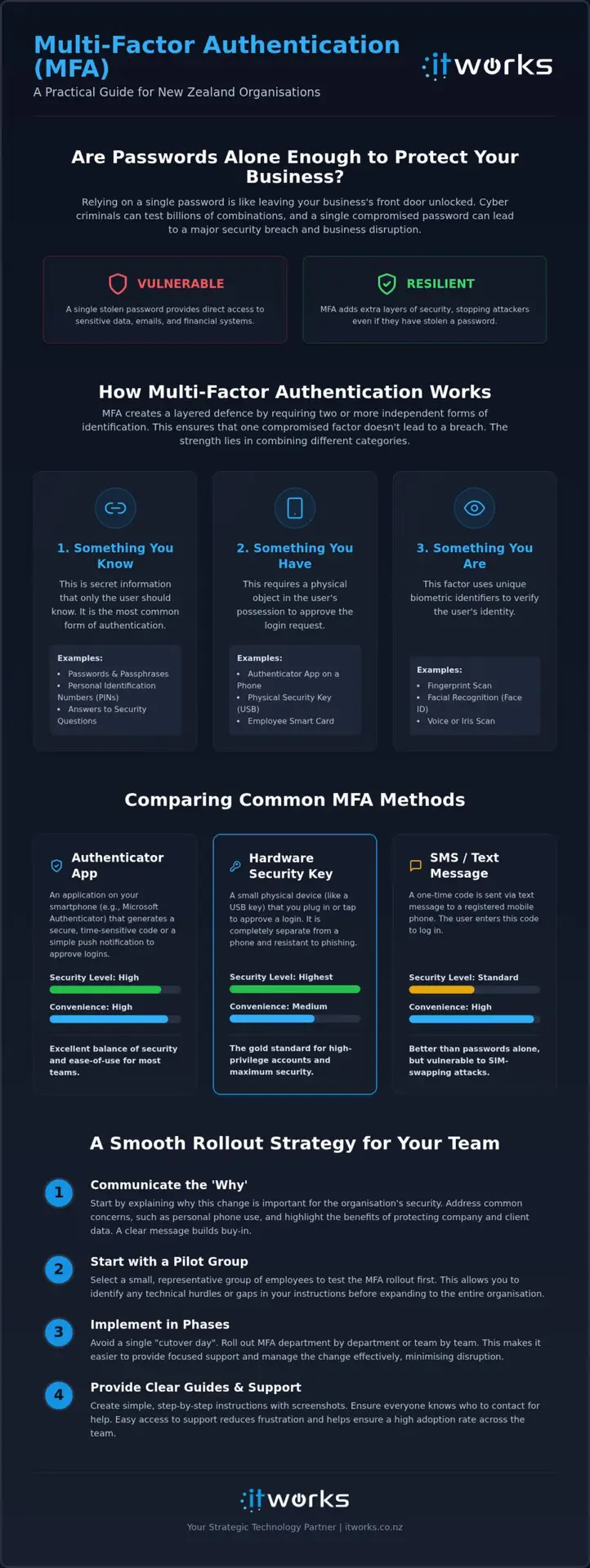
Multi factor authentication functions by requiring multiple independent pieces of evidence to prove you are who you say you are. Instead of relying on a single secret password, it builds a fence with several different types of locks. This approach is central to Strengthening Your Security Posture, as it ensures that even if a thief steals one key, they still can’t open the door. By combining different categories of identification, you create a layered defence that is significantly harder to bypass than a traditional login.
This security model isn’t just for your email. It should be applied to every piece of cloud-based software your team uses, from accounting platforms like Xero to your CRM and file storage. Managing these various entry points becomes much simpler when you use a centralised identity system. For most New Zealand organisations, Microsoft 365 serves as this central hub, allowing you to control access to all your business tools from one secure location. If you want to ensure your setup is robust, you can discuss your cybersecurity priorities with our team.
The Three Factors Explained Simply
The strength of this system lies in the variety of the factors used. Security experts generally group these into three distinct pillars:
- Something you know: This is the most common factor, including your passwords, PINs, or the answers to secret recovery questions.
- Something you have: This involves a physical object in your possession, such as a smartphone app, a hardware token, or a dedicated security key.
- Something you are: These are biometrics, such as your fingerprint or facial recognition. Under the 2026 Authentication Assurance Standards, biometrics now require high levels of liveness detection to ensure they can’t be spoofed.
The Role of the Authenticator App
Apps like Microsoft Authenticator have become the modern standard for New Zealand businesses because they balance high security with a smooth user experience. Rather than typing in a six-digit code from an SMS, which can be intercepted or delayed, staff simply receive a push notification on their phone. They can then approve the login with a single tap or by using their phone’s built-in face or fingerprint scan. This method is much more resilient than text-based codes.
As cyber attacks become more sophisticated, there is a growing shift toward phishing-resistant multi factor authentication. This advanced level of security uses specialised hardware or encrypted “passkeys” that are bound to a specific device. This ensures that even if a staff member is tricked into visiting a fake login page, the authentication factor won’t work for the attacker. Implementing these modern methods allows your team to work with confidence, knowing their digital identity is protected by the latest standards.
Comparing MFA Methods: Which is Right for Your Team?
Selecting the right multi factor authentication method is a balancing act between robust security and the daily productivity of your staff. While the goal is to protect the organisation, an overly complex system can lead to frustration or workarounds that compromise safety. For most New Zealand businesses, the choice usually comes down to three main options: SMS codes, authenticator apps, or physical hardware keys. Each serves a specific purpose depending on the user’s role and their comfort with technology.
One common hurdle is the “personal phone” dilemma. Staff may feel hesitant about using their private devices for work purposes, fearing privacy intrusion or data costs. It’s helpful to clarify that apps like Microsoft Authenticator don’t give the organisation access to personal photos or messages; they simply act as a secure digital doorbell. For team members who are often on the road or away from a desk, mobile-based methods are usually the most practical choice. For those who remain hesitant, providing a small monthly allowance or a dedicated hardware token can be a pragmatic way to move forward.
SMS Codes vs. Authenticator Apps
SMS codes are often the first step for many organisations because they feel familiar. However, they are increasingly vulnerable to “SIM swapping” attacks, where a criminal convinces a mobile provider to port a phone number to a new device. Because of this risk, we generally recommend moving towards push-notification apps. These apps are not only more secure but also faster for the end-user. Instead of waiting for a text and typing in a code, a staff member simply taps “Approve” on their screen. This small change can save significant time over a week and provides a much smoother experience for those who aren’t particularly tech-savvy.
When to Consider Hardware Security Keys
For high-risk accounts, such as those held by managing directors, executive teams, or finance staff, hardware security keys offer the highest level of protection. These are physical USB or NFC devices that must be present to complete a login. They are virtually impossible to phish because the secret key never leaves the physical device. This makes them the “gold standard” for anyone handling sensitive financial data or high-level organisational strategy.
While hardware keys provide exceptional security, they do involve upfront procurement costs and require a clear plan for when a key is inevitably lost or left at home. They are an excellent solution for staff who don’t have a smartphone or work in secure environments where mobile phones are prohibited. By providing a mix of methods tailored to different roles, you can ensure every member of your team is protected without compromising their ability to get the job done.
How to Roll Out MFA Without Disrupting Your Productivity
Successful implementation of multi factor authentication is rarely a purely technical challenge. In our experience, a smooth transition is roughly 20% technical configuration and 80% clear communication. When staff feel blindsided by new security requirements, frustration can lead to a drop in productivity and a resistance to future technology changes. By taking a methodical, people-first approach, you can turn a potential technical hurdle into a collective win for your organisation’s resilience.
A Step-by-Step Implementation Plan
Moving your team to a more secure way of working requires a structured path. Following a logical progression helps you catch potential issues before they affect the entire office. We recommend this five-step process:
- Step 1: Account Audit. Identify every system your team uses that supports multi factor authentication. Prioritise your email, financial software, and any platforms containing client data.
- Step 2: Method Selection. Based on our previous comparison, choose a primary method for your team. Most NZ organisations find that push-notification apps provide the best balance of speed and security.
- Step 3: The Pilot Group. Select a small, diverse group of staff to test the setup first. Include both your most tech-savvy individuals and those who usually find new software challenging to ensure your instructions work for everyone.
- Step 4: Education. Launch cyber security awareness training alongside the rollout. This helps staff understand that MFA isn’t just a chore; it’s a vital tool for protecting their own digital identity.
- Step 5: Enforced Transition. Set a firm “go-live” date. Ensure your internal support team or IT partner is ready to handle an influx of questions during the first 48 hours.
Managing Staff Buy-in and Common Objections
The most frequent hurdle is the use of personal devices. It’s essential to communicate clear privacy boundaries from the start. Reassure your team that an authenticator app acts only as a secure verification tool and does not allow the organisation to monitor their personal activity or access their private data. Framing the change as a way to protect their colleagues and the organisation’s mission helps build a sense of shared responsibility.
Ultimately, multi factor authentication should be presented as a productivity enabler. The time lost to a single afternoon of account lockout or a week-long recovery from a breach far outweighs the few seconds it takes to approve a login request. By reducing the risk of catastrophic downtime, you’re actually giving your team more space to focus on their core work without the looming threat of technical disruption.
Strengthening Your Security Posture with Strategic IT Support
Implementing multi factor authentication is a vital first step, but it shouldn’t be the final destination of your security strategy. Real resilience comes from viewing security as an integrated part of your broader technology roadmap. Instead of treating IT as a series of isolated fixes, a strategic partnership allows you to build a cohesive system where every component supports your organisational goals. This shift from reactive support to proactive management replaces the typical stress of technical maintenance with a sense of calm reliability.
Managed IT services take the heavy lifting of security configurations off your plate. Rather than worrying about whether every staff member has the latest updates or if your multi factor authentication protocols are still meeting current standards, you can rely on an expert team to handle the details. Proactive monitoring and regular audits ensure that your defences remain effective as new threats emerge in the New Zealand market. This composed approach allows you to focus on your core mission while we ensure your digital foundation remains stable and secure.
Beyond MFA: Building a Layered Defence
While multi factor authentication stops the vast majority of unauthorised access attempts, a truly secure organisation requires multiple layers of protection. This includes robust endpoint protection for every laptop and mobile device, along with advanced email security to filter out malicious links before they ever reach an inbox. Even with the best defences, having a solid plan for backup and disaster recovery provides the ultimate safety net for your data. This layered approach ensures that your organisation can remain operational even in the face of unexpected technical challenges.
Regular technology reviews are essential for any growing organisation. As your team expands or your operations become more complex, your security needs will naturally evolve. By conducting frequent assessments, you can ensure your systems remain aligned with your business objectives and that there are no hidden gaps in your digital perimeter. This strategic alignment is what separates a high-performing organisation from one that is merely getting by.
Next Steps for Your Organisation
The journey toward a more secure and productive business starts with a clear understanding of where you stand right now. Assessing your current security posture with an expert review allows you to identify priorities and allocate resources where they will have the most impact. This isn’t about creating fear; it’s about building the confidence you need to innovate and grow. A well-planned security strategy provides a sense of certainty that allows leadership teams to make bold decisions.
We invite you to discuss your cybersecurity priorities with our team to see how a strategic approach can benefit your organisation. By focusing on sustainable growth through resilient, secure systems, you can move away from the “break-fix” cycle and toward a future where technology is a genuine enabler of success. Talk to IT Works about your technology strategy and let us help you navigate the path forward with a steady, expert hand.
Building a Resilient Digital Foundation
Strengthening your organisation’s security doesn’t have to be a source of constant stress or technical friction. By moving beyond simple passwords and adopting a people-first approach to multi factor authentication, you create an environment where your team can work with total confidence. The most successful transitions we see are those that prioritise clear internal communication and select authentication methods that actually fit the daily workflows of your staff.
As your strategic advisors, our local team provides the expert Microsoft 365 management and proactive cybersecurity focus required to keep your systems stable. We’re here to handle the technical heavy lifting, allowing you to focus on leading your organisation toward its long-term goals. Our collaborative approach ensures that your security measures are practical, sustainable, and aligned with your broader business objectives.
You have the opportunity to turn technical resilience into a genuine competitive advantage. With a steady partner and a clear roadmap, your organisation can navigate the complexities of modern security while maintaining the trust of your clients, donors, and team members.
Frequently Asked Questions
Is multi-factor authentication really necessary for a small business?
Yes, multi factor authentication is essential because smaller organisations are frequently targeted due to perceived gaps in their digital defences. It acts as a primary safeguard against automated attacks that don’t differentiate between a local non-profit and a global corporation. Implementing this standard builds a foundation of resilience that protects your reputation and ensures your operations can continue without the threat of sudden account lockouts.
Can MFA be bypassed by hackers?
While no security measure is entirely foolproof, this system significantly increases the difficulty for attackers. Sophisticated threats like “MFA fatigue” or session hijacking do exist, but they are far less common than standard credential theft. Moving toward phishing-resistant methods, such as hardware keys or passkeys, provides the highest level of protection against these advanced bypass attempts and keeps your data secure.
What happens if a staff member loses their phone with the MFA app?
Losing a device is a common occurrence and is easily managed through your central identity platform. Your IT administrator can quickly revoke the old device’s access and issue a temporary bypass code or set up a new device for the user. This structured process ensures the staff member isn’t permanently locked out of their work while maintaining the overall security of the organisation’s network.
How much does it cost to implement MFA across an organisation?
For many New Zealand organisations, the software for multi factor authentication is already included in existing subscriptions like Microsoft 365. The primary costs usually involve the initial strategic configuration, staff training, and the optional procurement of hardware keys for high-risk roles. Investing in a professional rollout prevents the much higher costs associated with data recovery and the loss of client trust after a breach.
Does MFA work for staff who don’t have a company-issued smartphone?
Yes, you can support staff without company phones by using hardware tokens or physical security keys. While many employees are comfortable using an app on their personal device for simple approval, providing physical alternatives ensures everyone is included regardless of their personal technology. This approach respects individual boundaries while maintaining a consistent and professional security standard across your entire team.
Can we use MFA for all our business software, not just Microsoft 365?
You can certainly extend this protection to almost all your cloud-based tools through Single Sign-On (SSO) technology. By linking your accounting software, CRM, and HR platforms to your central Microsoft 365 identity, staff only need to authenticate once to access their entire digital toolkit. This creates a more secure and streamlined experience that reduces the burden of managing multiple passwords for your team.
How do I ensure my team actually uses MFA correctly?
Success comes from a combination of clear internal policies and ongoing education that focuses on business outcomes. When staff understand that these measures protect their own daily work and the organisation’s long-term mission, they are much more likely to embrace the change. Enforcing the requirement at the system level ensures that security remains a standard, reliable part of your operations rather than an optional extra.