
While 82% of New Zealand organisations have already integrated AI into their daily workflows, many leaders still feel they are flying blind regarding the practicalities of Microsoft Copilot. It’s understandable to feel a mix of excitement and hesitation. You’ve likely heard that 93% of Kiwi businesses report efficiency gains from AI, yet the anxiety of accidentally sharing sensitive data or paying NZ$48.50 per user every month for a tool that sits idle is very real.
We agree that technology should be an enabler of success, not a source of stress or a security risk. This article provides a clear, step-by-step roadmap to help you implement Microsoft Copilot responsibly and effectively. We’ll walk through the latest 2026 pricing structures, essential data governance strategies to meet New Zealand’s IPP3A privacy requirements, and practical methods to ensure your staff actually embrace these new capabilities. By the end, you’ll have the confidence to turn AI from a confusing concept into a secure, productive asset for your organisation.
Key Takeaways
- Learn why auditing your SharePoint permissions is the essential first step to preventing internal data leaks before enabling AI.
- Understand how Microsoft Copilot uses the Microsoft Graph to securely surface your files, emails, and meeting notes without compromising privacy.
- Discover a practical five-step roadmap to move your organisation from initial curiosity to full, productive AI adoption.
- Identify how to optimise your Microsoft 365 licensing to ensure you only pay for what your team actually needs and uses.
- Find out how a professional AI Readiness Assessment can identify security gaps and create a stable foundation for your long-term technology strategy.
Understanding Microsoft Copilot: A Strategic Tool for Productivity
Microsoft Copilot is much more than a simple chat interface. It is an AI-powered assistant built directly into the Microsoft 365 applications your team uses every day, such as Word, Excel, and Teams. To understand its scope, it helps to view Microsoft Copilot as a bridge between advanced language models and your specific business data. It doesn’t just pull information from the internet; it draws from your emails, calendar, and documents to provide answers that are relevant to your specific projects.
This capability is often called “Work IQ”. While a standard AI might know how to write a generic project plan, this tool understands your specific project history because it has access to your internal context. Microsoft Copilot acts as a sophisticated productivity layer that sits atop your existing Microsoft Graph data, turning your organisation’s vast information stores into actionable insights.
The Difference Between Public and Private AI
Many business owners worry about intellectual property when using AI tools. If your staff use free, public chatbots, any sensitive information they enter could potentially be used to train those global models. This is where enterprise-grade AI differs. Microsoft ensures that your prompts and data remain strictly within your organisation’s secure boundary. Your proprietary information is never used to train the underlying Large Language Models for other users. It provides the power of AI with the security of a private vault, ensuring your data stays your own.
Why NZ Businesses are Exploring AI Integration
According to the AI Forum of New Zealand (2026), 82% of New Zealand organisations are already using AI in some capacity. This shift isn’t about chasing a trend; it’s about addressing the heavy administrative load that slows down Kiwi teams. Leaders are looking for ways to reduce repetitive tasks like meeting transcription or complex data entry. By automating these labour-intensive processes, staff can focus on higher-value work that actually grows the business. It’s a pragmatic approach to improving decision-making through faster, more accurate data analysis, helping organisations remain competitive without increasing their headcount.
How Copilot Works Within Your Microsoft 365 Environment
Microsoft Copilot doesn’t operate as a standalone tool. It functions as a sophisticated orchestration engine that coordinates between three distinct elements: the Microsoft 365 apps you use daily, the Microsoft Graph where your data lives, and a Large Language Model (LLM) that processes natural language. When you ask a question, the system doesn’t just guess an answer based on general internet knowledge. Instead, it “grounds” your request in your specific business facts, ensuring the output is relevant to your actual work.
Security is baked into this process from the start. A common worry for managing directors is whether the AI will expose sensitive payroll or strategy documents. It’s vital to understand that the tool strictly respects the existing permissions already set in your environment. If a staff member doesn’t have access to a specific folder in SharePoint, the AI won’t see it either. This approach to Managing Data Privacy and Governance ensures that your internal security boundaries remain intact while you leverage the power of automation.
Copilot in Daily Applications: Word, Outlook, and Teams
The practical value of this integration becomes clear when you look at daily workflows. In Outlook, you can summarise long, complex email threads in seconds, allowing you to get the gist of a conversation without reading dozens of replies. Within Teams, the tool can recap meetings you missed, identifying specific action points and who is responsible for them. For those managing budgets or project timelines, Excel can now generate complex data visualisations through simple text prompts, removing the need for advanced formula knowledge. These small efficiencies add up, with some studies suggesting users save an average of 14 to 26 minutes per day.
The Role of Microsoft Graph and Data Context
The secret to this accuracy is the Microsoft Graph. Think of the Graph as the connective tissue of your organisation. It understands the relationships between your emails, files, meetings, and chats. Because it knows “who” you work with and “what” projects you’re currently focused on, it can provide context that a generic AI simply cannot match. This deep understanding of your work relationships is what allows the system to move from being a simple chatbot to a genuine business-specific assistant.
To ensure your data is ready for this level of integration, you might want to discuss your technology strategy with a partner who understands the nuances of the New Zealand business environment.
The Security Factor: Managing Data Privacy and Governance
The single most frequent question we hear from New Zealand business leaders is: “Will my staff see files they aren’t supposed to?” It’s a valid concern. When you introduce a tool as powerful as microsoft copilot, you’re essentially giving every employee a super-fast research assistant. However, the AI doesn’t have a mind of its own regarding access. It strictly inherits the security policies, permissions, and labels you’ve already established within your Microsoft 365 environment. If a user doesn’t have permission to view a file, the AI won’t show it to them.
The real risk isn’t that the AI will “break” your security. It’s that it will perfectly follow the permissions you currently have, even if those permissions are too broad. In many organisations, there is a significant gap between “Just Enough Access”-where staff only see what they need for their roles-and “Too Much Access.” If a sensitive payroll document was accidentally saved to a public folder three years ago, the AI will find it. Proactive auditing is the key to turning this potential vulnerability into a strength, ensuring your data is organised and secure before the tool is even switched on.
The “Oversharing” Risk in Teams and SharePoint
A rollout of microsoft copilot often acts like a spotlight, revealing existing gaps in your file permissions that might have gone unnoticed for years. One of the most common issues we see is the use of “Company-wide” or “Everyone” sharing settings. While these settings are convenient for collaboration, they are often applied to folders containing sensitive intellectual property or client data. Before enabling AI features, it’s essential to identify this sensitive data. Cleaning up these “Everywhere” links ensures that the AI only generates responses based on information that the specific user is authorised to view.
Implementing Information Protection and Sensitivity Labels
To manage this effectively, we recommend using sensitivity labels such as “Confidential,” “HR Only,” or “Internal Use.” These labels act as a digital fence. When a document is tagged correctly, the AI respects that tag and restricts access accordingly. This level of governance is a core part of a robust cyber security for small business NZ posture. By creating a structured framework for your data, you replace anxiety with confidence. This strategic approach ensures your adoption is successful because the foundation is stable, secure, and ready for the future of work.
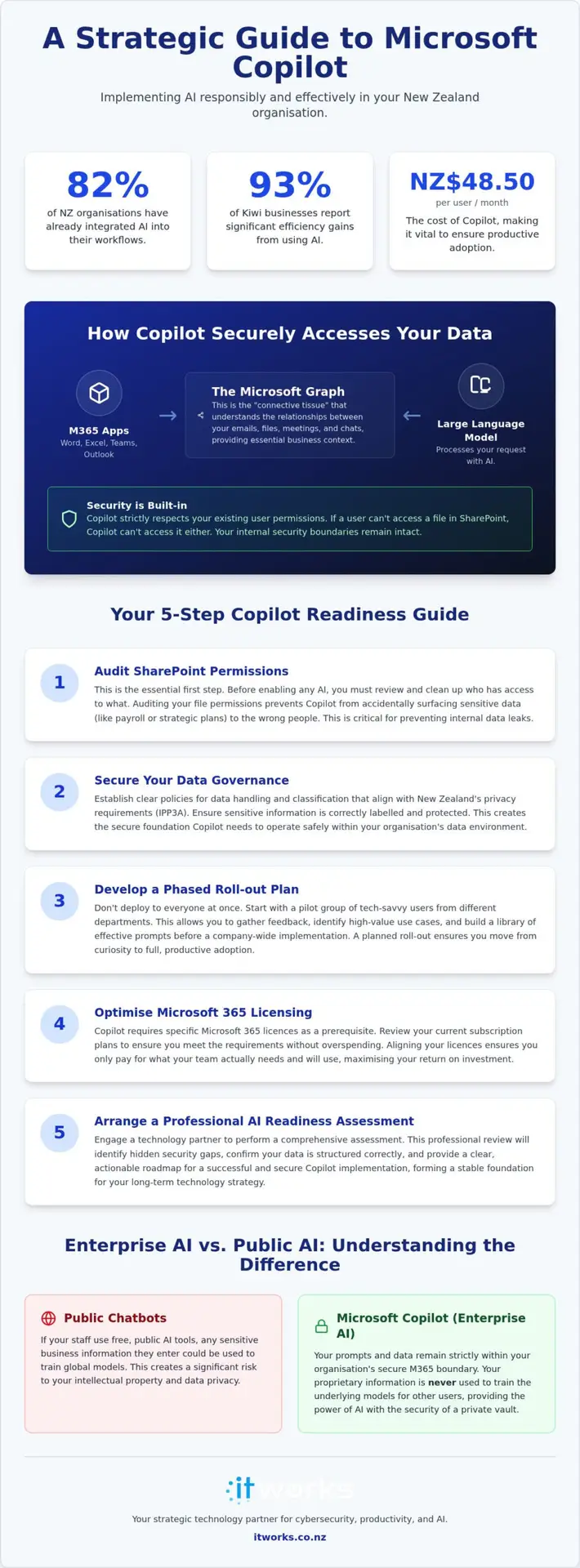
How to Implement Copilot: A Practical 5-Step Readiness Guide
Adopting microsoft copilot is not as simple as flipping a switch. To see a genuine return on your investment, you need a methodical approach that balances technical configuration with cultural change. We recommend a structured five-step roadmap to ensure your organisation moves from initial curiosity to productive, secure usage.
- Step 1: Audit your licensing. Verify that you have the correct base subscription, such as Business Standard or Premium, to support AI add-ons.
- Step 2: Clean up data permissions. Address the oversharing risks discussed earlier by auditing your SharePoint and Teams environments.
- Step 3: Define use cases. Identify specific tasks in departments like Sales or Finance where AI can solve actual bottlenecks.
- Step 4: Run a pilot programme. Test the tool with a small group of “AI champions” to gather feedback and refine your internal workflows.
- Step 5: Full rollout. Implement comprehensive training and clear internal policies to support your entire team.
Technical Readiness and Licensing Audits
Before purchasing licences, you must ensure your underlying environment is stable. This starts with checking if you are on the right base licence. Microsoft Copilot is generally available as an add-on for those on Microsoft 365 Business Standard, Business Premium, or Enterprise plans. It is also a good time to ensure your managed it support services are aligned with these new technical requirements. Not every staff member needs an AI licence immediately. By identifying which users handle the most administrative or data-heavy tasks, you can allocate your initial investment where it will have the greatest impact on productivity.
Training Your Team for Responsible AI Use
Buying the software is only half the battle; your team needs to know how to use it effectively. This involves teaching staff how to write clear, specific “prompts” to get the best results. We advocate for a “Human-in-the-loop” principle, where staff are taught that they must always verify AI-generated work for accuracy and tone. Developing an internal AI policy is equally important. This document should outline acceptable uses and remind team members of their responsibility to protect client privacy. When governance and training work together, your staff feel supported rather than overwhelmed by the new technology.
Navigating the Future: How IT Works Supports Your AI Integration
The potential of microsoft copilot is vast, but the path to a successful rollout is often paved with technical complexities. Many organisations find that the “boring but critical” preparation work, such as auditing legacy data or untangling complex sharing permissions, is where they need the most support. As your strategic partner, IT Works handles these foundational tasks, allowing you to focus on leading your team through this transition. We provide the steady hand and technical depth required to ensure your AI adoption is as smooth as it is secure.
The AI Readiness Assessment: A Safe Starting Point
We believe that every successful technology project begins with a clear understanding of the current state. Our AI Readiness Assessment is designed to identify security gaps and licensing inefficiencies before you commit to a full rollout. We conduct a thorough audit of your data environment, ensuring that your managed IT services include the proactive monitoring necessary for AI. This assessment isn’t just about security; it’s about building a solid business case. We help you identify where the greatest productivity gains lie, ensuring your investment in microsoft copilot delivers measurable results for your specific organisation.
Building a Sustainable Technology Roadmap
Integrating AI is one component of a broader, resilient technology strategy that supports your long-term business goals. As the technology evolves, your roadmap must also adapt to include new capabilities and security requirements. A partnership with IT Works provides the ongoing accountability and expert guidance needed to navigate these rapid changes. We ensure that your systems remain secure, your team remains productive, and your technology continues to serve as an enabler of success rather than a source of frustration.
Starting your AI journey doesn’t have to be overwhelming. We invite you to have a low-pressure, consultative conversation about your business objectives and how we can support your team’s growth. Whether you are in the early stages of exploration or ready to begin your assessment, we are here to act as your strategic ally.
Talk to IT Works about your technology strategy
Building Your AI Roadmap with Confidence
Adopting new technology shouldn’t feel like a leap into the unknown. By focusing on robust data governance and a structured implementation plan, you can ensure that microsoft copilot becomes a secure asset rather than a security risk. The objective is to move beyond the initial hype and focus on practical applications that save your team time and reduce daily administrative friction.
Our NZ-based advisory team of Microsoft 365 Specialists is here to guide you through every stage of this transition. We specialise in Strategic AI Readiness Assessments that identify your specific security gaps and productivity opportunities before you commit to a full rollout. This methodical approach ensures your technology roadmap remains stable while you explore the potential of automation. It’s about building a foundation of confidence where your data is protected and your staff feel supported.
Talk to IT Works about your technology strategy
Technology should enable your business success. We look forward to helping you build a resilient, AI-ready organisation that is prepared for the future of work right here in New Zealand.
Frequently Asked Questions
Is my business data used to train Microsoft Copilot?
No, your organisation’s data remains strictly within your secure tenant and is never used to train the global Large Language Models. Microsoft provides enterprise-grade privacy protections that ensure your prompts and responses stay private. This is a significant difference compared to public AI tools. Your intellectual property is protected by the same security and compliance commitments that apply to all your Microsoft 365 services.
Can Copilot see sensitive HR or payroll files?
The tool only accesses information that the individual user already has permission to see. It uses your existing SharePoint and Teams permissions to determine access. If your file permissions are currently too broad, the AI might surface sensitive documents to unauthorised staff. This highlights why a thorough data audit is an essential first step before enabling microsoft copilot features in your environment.
How much does a Microsoft Copilot licence cost for NZ businesses?
The official price for a microsoft copilot licence is NZ$48.50 per user per month, which is billed annually. This price does not include GST or the cost of the required base Microsoft 365 subscription. For small and medium businesses, the total monthly investment depends on your existing plan. These costs apply to each specific user you choose to enable.
Do I need to upgrade my Microsoft 365 plan to use Copilot?
You must have an eligible base subscription to add AI capabilities. These include Microsoft 365 Business Standard, Business Premium, or Enterprise plans such as E3 or E5. If you are currently on a basic plan, you’ll need to upgrade those specific users before they can access the AI features. We recommend reviewing your current licensing to identify the most cost-effective path for your team.
Can Copilot replace my existing staff or roles?
The goal of AI in the workplace is to augment your team’s capabilities rather than replace human roles. It handles repetitive administrative tasks, such as summarising meetings or drafting initial document versions. This allows your staff to focus on high-value strategic work that requires human intuition and empathy. Successful organisations view it as a digital assistant that helps their existing team work more efficiently.
What is the best way to start using Copilot in a small team?
The most effective approach for a small team is to start with a pilot group of two or three “AI champions.” These individuals can test the tool on specific workflows and identify where it provides the most value. Once you’ve refined your internal policies and seen clear productivity gains, you can then roll it out to the rest of the organisation with confidence and clear training.
What happens if Copilot gives me a wrong or “hallucinated” answer?
Human oversight is essential if the system provides an incorrect answer. AI can occasionally generate “hallucinations” or confident but inaccurate responses. This is why we advocate for the “Human-in-the-loop” principle. Every output should be reviewed and verified by a staff member before it’s used in a professional capacity. Treating the AI as a draft generator rather than a final source of truth is the safest approach.
How does Copilot handle New Zealand-specific context or spelling?
Microsoft Copilot generally handles New Zealand English spelling and grammar well when prompted correctly. However, its proficiency with te reo Māori and specific local cultural nuances may be limited. We recommend that staff remain mindful of this when generating client-facing content. Human review ensures that your communications remain culturally appropriate and aligned with the market expectations.