The most expensive IT invoice isn’t the one for a new server; it’s the hidden cost of staff sitting idle during a system outage. If you’ve spent more time lately worrying about recurring downtime or unpredictable bills than your actual business goals, you aren’t alone. Many New Zealand organisations find themselves trapped in a reactive cycle where technology is something that only gets attention when it breaks. This approach doesn’t just disrupt your daily workflow; it often leaves your team exposed to security risks that stay hidden until they cause real trouble.
Moving towards a strategic model of managed it support services offers a clear path out of this frustration. You deserve a technology environment that feels calm, reliable, and entirely aligned with your long-term objectives. This article explains how a proactive partnership can move your organisation beyond temporary fixes to achieve genuine resilience and productivity. We will look at how a structured technology roadmap for the next 12 to 24 months and predictable monthly spending can provide the stability you need to lead your team with confidence.
Key Takeaways
- Understand why moving beyond a reactive “break-fix” model to strategic managed it support services creates a more stable and predictable environment for your team.
- Learn how a clear 12 to 24 month technology roadmap aligns your digital systems with your long-term business objectives and growth plans.
- Discover a layered approach to cybersecurity that builds organisational confidence by focusing on practical risk reduction rather than fear-based tactics.
- Identify how to prepare your data environment for practical AI tools to drive genuine productivity gains across your organisation.
- Recognise the importance of choosing a local, outcome-focused partner who understands the specific cultural and operational context of New Zealand organisations.
The Shift from Reactive Troubleshooting to Strategic Technology Management
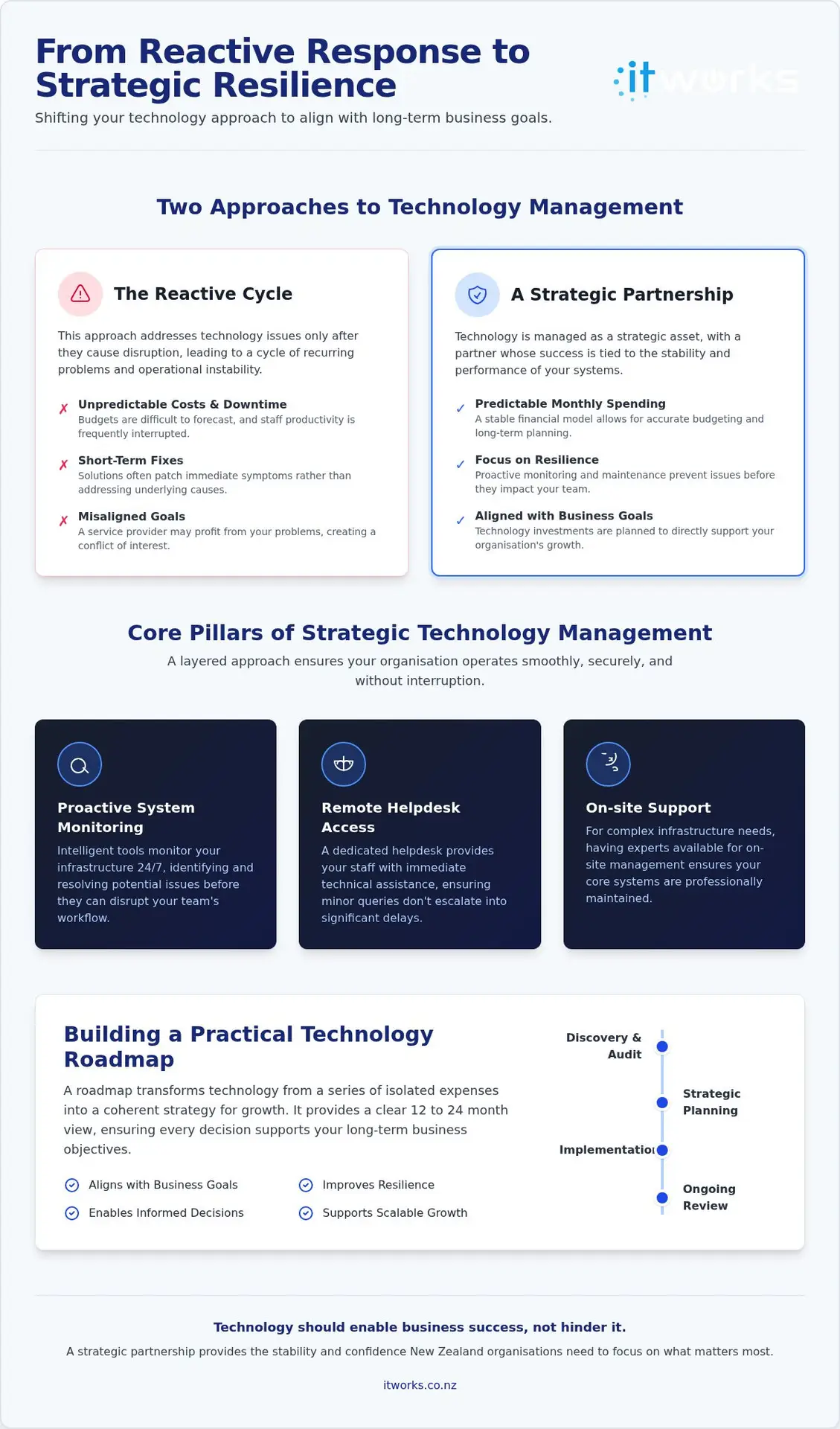
Many New Zealand organisations are caught in a cycle of waiting for something to break before they fix it. This is the “break-fix” trap. It feels productive because you’re solving immediate problems, but it actually holds your business back. When you rely on a service provider who only profits when things go wrong, your interests aren’t aligned. True Managed Services represent a fundamental shift in this relationship. Instead of a distant contractor, you gain a strategic partner whose success depends on your systems running perfectly.
Moving to modern managed it support services means your technology is treated as a strategic business asset rather than a recurring headache. This shift stabilises your operations and significantly boosts staff morale. Teams feel supported when they know their tools work, and leadership can focus on high-level growth instead of daily troubleshooting. When your technology environment is managed with a long-term view, you move away from the frantic energy of reactive fixes toward a composed, predictable strategy.
Why Reactive IT Costs Your Business More
The true price of reactive support isn’t found on the technician’s invoice. It’s hidden in the cost of lost productivity. When systems fail, your staff’s workflow stops, but your overheads and payroll continue. This creates a form of “technical debt” where short-term patches lead to larger, more expensive failures down the road. Unpredictable IT costs also make it nearly impossible to forecast budgets with any accuracy. Without a structured plan, you’re constantly paying a premium for emergency responses rather than investing in the stability of your organisation.
The Core Pillars of Managed IT Support
A strategic approach to technology relies on three fundamental layers designed to keep your organisation moving forward without the stress of constant interruptions:
- Proactive System Monitoring: We use intelligent tools to watch your infrastructure around the clock. This allows us to identify and resolve potential bottlenecks or hardware failures before they ever disrupt your team’s day.
- Remote Helpdesk Access: Your staff need immediate answers to keep their momentum. A dedicated helpdesk provides quick technical assistance for daily queries, ensuring minor glitches don’t turn into afternoon-long delays.
- On-site Support: While many issues are solved remotely, complex infrastructure often requires a physical presence. Having experts available for on-site hardware management ensures your core network and servers are maintained to a professional standard.
The transition from a cost centre to a strategic asset happens when technology actively enables your business goals. Instead of just “keeping the lights on,” your IT partner should be looking for ways to improve efficiency and alignment. When technology works seamlessly, it fades into the background, allowing your people to do their best work without the frustration of recurring downtime.
Building a Practical Technology Roadmap for Growth
A technology roadmap is a visual plan that aligns your business goals with the technical steps needed to reach them. For many New Zealand organisations, technology has historically been managed as a series of isolated events. A server fails, so it’s replaced. A new staff member joins, so a laptop is bought. This reactive approach creates a fragmented environment that is difficult to secure and even harder to scale. By contrast, a roadmap provides a clear 12 to 24 month view of your digital landscape, ensuring every investment serves a specific purpose.
Executive-level guidance is essential in this process. When your leadership team has visibility of technical risks, they can make informed decisions that protect the organisation’s future. A well-constructed roadmap doesn’t just list products; it identifies the milestones required to improve resilience and operational efficiency. It moves technology from a conversation about “fixing things” to a discussion about enabling growth.
Strategic Planning vs. Daily Operations
Effective managed it support services should balance immediate technical needs with long-term infrastructure goals. While the helpdesk focuses on daily productivity, your roadmap addresses the underlying health of your systems. Regular technology reviews ensure your stack remains fit for purpose as your organisation evolves. This is particularly vital for purpose-driven groups where resources must be used efficiently. You can learn more about this in our guide on IT Strategy for NZ Not-for-profits, which details how to build resilience through structured planning. Even for commercial entities, the principles of technology roadmaps outlined in that guide provide a robust framework for governance.
Budgeting for Future Technology Needs
One of the most significant benefits of a roadmap is the move from emergency capital expenditure to predictable monthly operating costs. Instead of being blindsided by a large invoice when a core system fails, you can plan for hardware lifecycles and software renewals well in advance. This visibility allows your leadership team to make informed decisions about growth without the fear of hidden costs. As your team expands, your technology stack should scale securely, maintaining performance without compromising your budget. If you’re ready to gain this level of clarity, you can talk to IT Works about your technology strategy to begin building your own roadmap.
Layered Cybersecurity: Building Confidence Without the Fear
Cybersecurity is often presented as a technical battleground, but for a business leader, it’s actually about organisational resilience. It isn’t about buying every piece of software on the market. Instead, it’s about making informed choices that reduce risk to an acceptable level. When you partner with managed it support services, the focus shifts from reactive firefighting to building a sturdy, layered defence that gives your executive team the confidence to innovate. This approach replaces the stress of the unknown with a composed, strategic framework.
Practical security starts with visibility. If you can’t see the risks, you can’t manage them. By moving away from the scare tactics often found in the industry, we focus on providing clear, actionable data. This transparency allows you to see exactly where your protections stand, ensuring that your investment is targeted where it matters most. According to NCSC Quarter One Cyber Security Insights 2026, direct financial losses from cyber incidents reached $5.6 million in just three months, highlighting why risk reduction must be a core leadership priority rather than just an IT task.
Protecting Your Most Critical Digital Assets
A layered approach treats security like the rings of a tree. The innermost ring is identity. Implementing robust identity and access management ensures that only the right people have access to your sensitive data, regardless of whether they’re in Auckland, Wellington, or working remotely. This is complemented by managed email protection and endpoint security, which act as active filters for the most common entry points for disruption. You can explore these concepts further in our guide on Cyber Security for Small Business NZ, which focuses on building resilience through practical, confidence-building steps.
We also believe that your staff are your strongest asset. Security awareness training empowers your team to recognise threats like credential harvesting or phishing before they escalate. When your people feel confident in their ability to spot risks, your entire organisation becomes more resilient and secure.
Incident Response and Business Continuity
Confidence also comes from knowing exactly what to do when things go wrong. A clear incident response plan is a vital part of your strategy, ensuring that everyone knows their role during a disruption. While many focus on backups, it’s important to remember that backups are just the data; a disaster recovery strategy is the actual process of getting your business back on its feet. Our Backup and Disaster Recovery NZ guide provides a detailed framework for ensuring your operations can continue even in the face of unexpected challenges.
Modernising Operations Through AI Readiness and Cloud Integration
As your organisation stabilises through proactive support, the focus naturally shifts toward modernisation. Recent data from Datacom’s 2026 State of AI Index shows that while 91% of New Zealand organisations are using some form of AI, only 15% have scaled its use across their operations. This gap often exists because the underlying data environment isn’t yet ready for sophisticated tools like Microsoft Copilot. Modern managed it support services play a critical role here, ensuring your file structures and permissions are correctly configured before you enable automation.
Responsible governance is the foundation of safe adoption. With 81% of employees reportedly bringing their own AI tools to work, many businesses face the risk of “Shadow AI” where sensitive data is processed through unsanctioned platforms. By establishing a formal AI policy and a secure data framework, you can empower your team to use these tools productively without compromising your organisation’s security or privacy obligations.
Optimising Your Microsoft 365 Environment
Many organisations pay for features they don’t use or struggle with cluttered SharePoint sites that hinder productivity. Our approach focuses on licence optimisation and structured management to turn these tools into a cohesive ecosystem. Proper configuration of Teams and SharePoint doesn’t just improve collaboration; it ensures your data is indexed correctly for future AI integration. For a deeper look at how to refine your setup, see our Microsoft 365 Management New Zealand guide.
Transitioning to Scalable Cloud Solutions
The choice between hybrid and full cloud migrations should always be driven by your specific business needs. A well-managed cloud infrastructure provides the performance and security required to support a modern workforce, allowing your systems to scale as your team grows. As part of our managed it support services, we integrate automation to reduce repetitive manual tasks. This reduces operational overheads and allows your staff to focus on higher-value work. This methodical move toward the cloud ensures your technology remains a functional and sustainable part of your business journey.
Choosing an Outcome-Focused Technology Partner in New Zealand
The final choice of a technology partner is one of the most critical decisions an executive team can make. It shouldn’t be based on a list of technical features or hardware brands. Instead, look for a partner that focuses on business outcomes. A successful relationship with managed it support services is built on the understanding that technology exists to enable your success, not just to exist for its own sake. When your partner understands your specific goals, they stop being a distant vendor and start acting as a strategic extension of your own organisation.
Trust and cultural alignment are particularly important in the New Zealand context. Working with a local, NZ-based team ensures that your partner understands the unique challenges and opportunities of the domestic market. They are available when you need them and possess the cultural context required to communicate effectively with your staff. This proximity fosters clear accountability and ensures that service responsibilities are transparent, leaving no room for the ambiguity that often plagues larger, outsourced support models.
Questions to Ask a Potential IT Partner
To find a partner that truly aligns with your vision, you need to look beyond their technical certifications. Use these questions to gauge their strategic depth during your initial discussions:
- How do you align technology recommendations with our specific business goals? A partner should be able to explain the “why” behind every suggestion, connecting it directly to your productivity or security.
- What is your approach to proactive risk management and roadmapping? Look for a structured process that identifies risks before they become incidents.
- Can you provide examples of helping similar-sized NZ organisations grow? Experience with organisations of 10 to 250+ staff is vital for understanding your operational scale.
A partner who can’t answer these questions with concrete examples is likely still stuck in a reactive mindset. You want a guide who has navigated these challenges before and can show you a clear path forward.
The Onboarding and Partnership Model
The transition to a managed service should feel like a relief, not a disruption. During onboarding, a strategic partner will conduct a deep dive into your existing environment to identify immediate risks and long-term opportunities. This isn’t a one-time event but the beginning of an ongoing advisory relationship. Regular strategy sessions ensure your technology environment remains high-performing and aligned with your evolving needs. To understand the full scope of this relationship, you can consult our Guide to Managed IT Support, which outlines what a successful partnership looks like for organisations across New Zealand. This model ensures that as your business changes, your technology stack adapts with it, providing a stable foundation for your team to lead with confidence.
Building a Resilient Future Through Strategic Partnership
Technology should be a quiet enabler of your organisation’s success, not a constant source of friction. Moving beyond the cycle of reactive troubleshooting allows your leadership team to regain control over unpredictable budgets and staff productivity. A strategic approach to managed it support services provides the visibility you need to make informed decisions about your future infrastructure and security, ensuring your team can work without interruption. This shift moves your digital environment from a cost centre to a strategic business asset that supports your long-term goals.
Our NZ-based team of experts is committed to an outcome-focused partnership model that treats your success as our own. Through proactive technology roadmapping, we ensure your systems are always aligned with your vision and operational needs. This methodical guidance replaces the stress of technical management with a sense of calm reliability and practical stability. We focus on delivering results that are functional and sustainable in the real world, acting as a strategic ally rather than a distant provider.
Talk to IT Works about your technology strategy
We look forward to helping your organisation build a more secure, productive, and confident future for your entire team.
Frequently Asked Questions
What is included in a typical managed IT support agreement?
A typical agreement provides a comprehensive blend of operational support and strategic guidance. It includes 24/7 remote helpdesk access for your staff, proactive system monitoring to prevent downtime, and on-site technical assistance when physical infrastructure needs attention. Beyond daily fixes, we include technology roadmapping and regular reviews to ensure your systems align with your business goals. This structured approach replaces unpredictable invoices with a single, predictable monthly fee for all your technology management needs.
How does managed IT support help reduce our overall technology costs?
Modern managed it support services reduce costs by shifting your organisation from reactive emergency spending to a predictable monthly operating model. By identifying potential hardware failures or security vulnerabilities before they cause disruption, you avoid the high cost of staff downtime. We also help you plan hardware lifecycles and optimise software licensing, ensuring you only pay for what you use. This strategic planning prevents expensive technical debt and large, unplanned capital expenditures.
Can you support our internal IT leader or department?
We frequently act as a strategic partner for internal IT leaders who need extra capacity or specialist expertise. Our team provides escalation support for complex issues, handles daily helpdesk tickets to free up your leader’s time, and offers guidance on high-level projects like AI enablement or cloud migrations. This collaborative model ensures your internal department has the resources and technical depth required to support a growing organisation without the need for constant recruitment.
Is managed IT support suitable for non-profit organisations in NZ?
Non-profit organisations across NZ benefit significantly from this model because it ensures donor funds are used efficiently on reliable technology. We understand that non-profits often operate with lean teams and require high levels of security to protect sensitive stakeholder data. Our approach focuses on maximising your existing tools, such as Microsoft 365, and providing a stable roadmap that helps you achieve your mission. This creates a resilient environment where your staff can focus on community outcomes.
What is the difference between remote helpdesk and on-site technical support?
Remote helpdesk support provides immediate assistance for software queries, password resets, and daily troubleshooting via phone or screen-sharing. It’s designed for speed, ensuring your team stays productive without waiting for a technician to travel. On-site technical support is reserved for physical infrastructure tasks, such as server maintenance, network cabling, or hardware deployments. Both layers are essential for a complete technology ecosystem, providing a balance of rapid response and hands-on expertise when your hardware requires physical attention.
How do you ensure our business stays secure from cyber threats?
We use a layered security framework that builds organisational confidence by reducing risk at every level. This includes robust identity management, managed email protection, and proactive endpoint monitoring to detect unusual activity. We also prioritise staff security awareness training, empowering your team to recognise threats like phishing before they escalate. By providing clear visibility of your security posture to your executive team, we ensure you have a resilient environment that protects your critical digital assets.
What happens if we already have a Microsoft 365 subscription?
If you already have a Microsoft 365 subscription, we take over the management and optimisation of your existing environment. We review your current licensing to ensure you aren’t overpaying for unused features and help structure your SharePoint and Teams sites for better collaboration. Our team also ensures your security settings are correctly configured, which is a vital step for any organisation planning to adopt practical AI tools like Microsoft Copilot in the near future.
How quickly can we transition to a new managed IT provider?
The transition to new managed it support services is a methodical journey that typically begins with a deep dive into your current technology landscape. While the initial technical handover can happen relatively quickly, a full onboarding process ensures we identify any immediate risks or performance bottlenecks. We work closely with your team to document systems and establish clear service responsibilities. This structured approach ensures a smooth handover that feels like a relief for your staff.