Backing up corporate records preserves historical information, but strategic recovery design guarantees ongoing commercial survival. When operational disruptions occur, leaders inevitably ask what backup and data recovery solutions their organisation actually needs to safeguard daily continuity. Having data archived somewhere is reassuring, but genuine resilience relies on your ability to restore critical systems without friction.
Most leadership teams share the same quiet hesitation. It is normal to feel uncertain about whether your existing backups will actually restore quickly during an outage, or how cloud data protection compares with traditional local storage. Extended downtime halts productivity and strains client trust, which is why business continuity must never depend on guesswork.
Discover how modern backup and data recovery solutions protect critical operational assets, minimise disruption, and build lasting business resilience. This guide outlines the essential architectures, actionable recovery objectives, and proven principles needed to keep your organisation secure, compliant, and ready for steady growth.
Key Takeaways
- Modern backup and data recovery solutions combine automated data redundancy with structured restoration processes to protect daily operational stability.
- Adapting the proven 3-2-1 framework across varied media ensures essential systems remain safeguarded against isolated infrastructure disruptions.
- Establishing clear Recovery Time Objectives (RTO) and Recovery Point Objectives (RPO) translates technical safety nets into measurable business continuity metrics.
- Routine recovery simulation and scheduled snapshot audits confirm system restorability long before unexpected outages occur.
- Transitioning from reactive troubleshooting to proactive managed oversight provides the predictable technical foundation required for steady organisational growth.
What Are Modern Backup and Data Recovery Solutions?
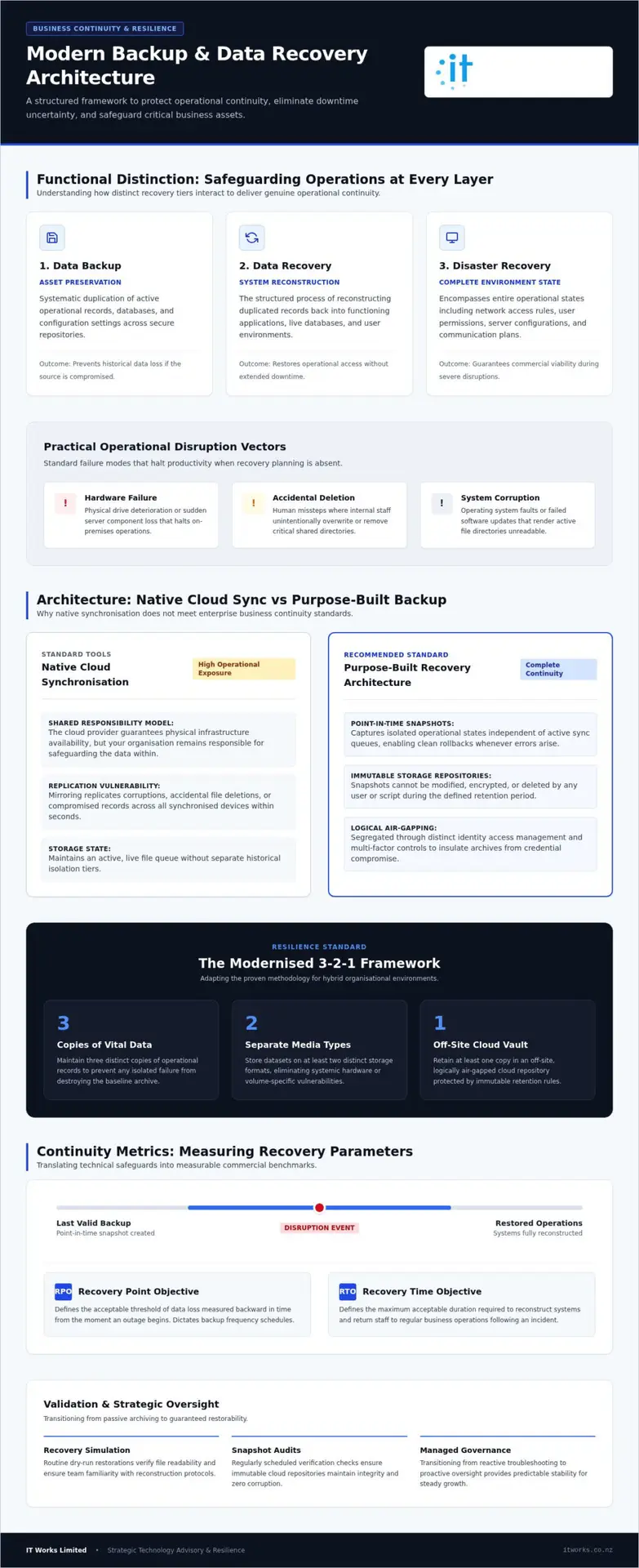
Business leaders often hear the terms grouped together, yet they serve distinct functions. At its foundation, data backup refers to the systematic duplication of active operational data across secure repositories. It creates a secondary copy of records, databases, and configuration settings so information remains preserved if the original source fails.
Data recovery is the structured process of restoring operational systems after an unexpected event. It takes those duplicated records and reconstructs them into functioning applications, databases, and user environments. Storing duplicate files without a tested recovery plan creates false security. A collection of safe files offers little comfort if staff cannot access their core operating software for several business days.
Modern organisations face several practical disruption vectors that require robust backup and data recovery solutions:
- Hardware failure: Physical drive deterioration or sudden server component loss that halts local systems.
- Accidental deletion: Human missteps where users unintentionally overwrite or remove critical shared folders.
- System corruption: Operating system faults or failed updates that render file directories unreadable.
The Distinction Between Data Backup and Disaster Recovery
Static file storage safeguards individual documents, but disaster recovery restores the entire operational system state. Disaster recovery encompasses the complete environment, including network access rules, user permissions, and server configurations. It also links into wider business continuity planning, ensuring staff maintain clear internal communication channels while systems are brought back online. You can consult the backup and disaster recovery NZ resilience guide to explore how these strategic continuity frameworks protect commercial operations.
Why Native Cloud Storage Is Not a Complete Backup Strategy
Relying solely on native cloud drives or synchronisation software leaves notable gaps. Enterprise platforms operate on a shared responsibility model: the cloud host guarantees physical infrastructure availability, but your organisation remains responsible for protecting and governing the data stored inside it.
Synchronisation platforms mirror local directories directly to the cloud. If an employee accidentally deletes a primary client record or malware encrypts local files, that mistake replicates across connected devices within seconds. Purpose-built backup and data recovery solutions capture isolated, point-in-time snapshots that sit separate from active sync queues, allowing clean rollbacks whenever errors arise.
Core Architecture: Designing a Resilient Data Protection Framework
A dependable defence begins with intentional structure. Modern backup and data recovery solutions rely on the proven 3-2-1 rule, refined for hybrid working arrangements. This standard dictates keeping three distinct copies of vital data across two separate storage media types, with at least one copy stored in an off-site, logically isolated cloud repository.
Relying on a single storage drive or local network volume exposes operations to physical hazards, power surges, and accidental overwrites. By separating active workloads from redundant archives, your business isolates operational risks. Modern frameworks also introduce immutable storage repositories. Once an immutable snapshot is written, it cannot be modified, encrypted, or deleted by any user or automated script for a defined retention period, securing your recovery baseline.
The Modern Evolution of the 3-2-1 Backup Methodology
Transporting physical magnetic tapes off-site once served as the industry standard. Modern infrastructure replaces manual routines with automated cloud vaults, reducing human oversight errors. Advanced designs introduce logical air-gapping, isolating secondary repositories through separate identity access management and strict multi-factor controls. If on-premises network credentials face compromise, these segregated archives remain entirely insulated from unauthorised administrative changes.
To evaluate how these layered tiers integrate with your broader commercial infrastructure, you can talk to IT Works about your technology strategy.
Protecting Productivity Within Microsoft 365 Environments
Organisations routinely conduct daily operations across cloud platforms, yet default protection settings often catch leadership off guard. Standard retention periods across SharePoint, OneDrive, Exchange, and Microsoft Teams prioritise short-term recycle bin functionality rather than comprehensive historical archiving.
Third-party cloud-to-cloud backup supplements these built-in utilities by capturing independent, point-in-time snapshots of user inboxes, document libraries, and collaboration channels. When staff leave or documents vanish, administrators can pinpoint specific versions without overwriting current teamwork. Review the Microsoft 365 management New Zealand organisation guide for actionable configuration standards that protect collaborative productivity.
Evaluating Backup and Data Recovery Solutions: Key Business Metrics
Selecting the right protection model requires measuring operational tolerance rather than simply browsing software features. Executive teams assess backup and data recovery solutions by balancing continuity requirements against infrastructure complexity. Two foundational metrics guide this strategic evaluation: Recovery Time Objective (RTO) and Recovery Point Objective (RPO).
RTO defines the acceptable duration of operational downtime before system unavailability causes significant financial or reputational strain. RPO establishes the maximum tolerable age of data lost during an interruption, dictating backup snapshot frequency. Balancing both targets allows organisations to make pragmatic investments across on-premises, pure cloud, or hybrid deployment architectures.
| Architecture Model | Typical RTO Profile | Operational Strengths |
|---|---|---|
| On-Premises | Fast local file restoration | Direct local area network throughput without internet dependence. |
| Pure Cloud | Moderate retrieval windows | Eliminates local server management and scales seamlessly off-site. |
| Hybrid Deployment | Near-instant system failover | Local operational speed paired with isolated cloud redundancy. |
Calculating Realistic RTO and RPO for Operational Systems
Every workload carries a different operational priority. Classifying resources into distinct operational tiers prevents overspending on secondary files while under-protecting core workflows:
- Mission-critical workloads: Enterprise line-of-business applications and core databases requiring RTOs under two hours and near-zero RPOs.
- Essential operational systems: General email communication and internal file shares where half-day recovery timelines keep workflows functional.
- Secondary administrative archives: Historical reporting or inactive client records capable of tolerating multi-day retrieval windows.
Assessing the hourly cost of idle staff and deferred transactions clarifies practical investment thresholds. Not every directory demands instant failover capabilities.
Hybrid Cloud Versus Pure Cloud Restoration Performance
Bandwidth realities heavily influence actual recovery timelines. Pure cloud repositories work well for individual file restoration, but retrieving terabytes of database structures over standard commercial connections takes substantial time. Hybrid models resolve this friction by staging local appliance snapshots for rapid operational recovery while simultaneously replicating immutable archives to secure off-site data centres.
Modern hybrid appliances also provide instant virtualisation, launching complete server images within minutes if physical hardware falters. Connecting these continuity workflows with structured cyber security for small business NZ controls builds lasting operational stability across hybrid operating environments.
Implementing and Testing a Reliable Data Recovery Plan
A business continuity policy is only as sound as its most recent successful restoration test. Implementing dependable backup and data recovery solutions begins with a thorough discovery audit across all local servers, mobile endpoints, and software-as-a-service applications. Shadow IT and unmapped network shares frequently leave sensitive files outside existing snapshot routines. Once operational assets are catalogued, administrators schedule automated snapshots aligned directly with departmental RPO thresholds.
Technology alone does not restore operations during a crisis. Executive teams need clearly documented role assignments distinguishing technical restoration tasks from incident response governance. When leadership defines responsibilities in advance, organisations react methodically under pressure rather than scrambling through manual workarounds.
Step-by-Step Recovery Testing and Verification
Relying solely on green automated email notifications provides a false sense of readiness. A successful backup log merely confirms data transfer completed, not that the saved image will boot without operating system errors. Comprehensive verification demands routine operational testing:
- Checksum validation: Automated file integrity scans that verify copied blocks match source records without disk corruption.
- Sandbox boot testing: Spinning up virtual machine snapshots in isolated network segments to confirm databases, services, and core applications launch properly.
- Tabletop continuity drills: Quarterly operational walkthroughs where department heads simulate an unplanned outage, validating communication trees and operational workarounds.
Documenting practical lessons from these drills ensures procedural checklists reflect actual working conditions, helping teams refine their continuity roadmaps over time.
Establishing Documented Incident Responsibilities and Governance
Clear communication protocols keep operational teams aligned while technical personnel resolve underlying infrastructure issues. Establishing structured escalation workflows defines precisely when technical support partners are engaged, how customer updates are managed, and how staff transition to secondary tools without risking administrative data leaks.
Incident governance also maintains alignment with broader regulatory responsibilities. Systematic record retention ensures corporate data remains compliant with the Privacy Act 2020 and its evolving notification mandates, confirming that critical client information remains secure, traceable, and legally compliant throughout recovery procedures.
Partnering with Strategic Technology Advisors for Long-Term Resilience
Traditional IT management often relies on an outdated break-fix mentality. An unexpected outage occurs, work stops, and teams rush to log helpdesk tickets. Strategic technology partnerships replace this reactive friction with structured infrastructure oversight. Rather than waiting for hardware to degrade or software services to falter, managed oversight identifies capacity bottlenecks and data replication issues before they impact daily operations.
Scheduled executive reviews ensure your continuity architecture evolves alongside commercial growth. As headcount expands and new software tools enter your environment, recovery frameworks require recalibration. Treating modern backup and data recovery solutions as a strategic enabler transforms data resilience into a foundation for workplace confidence, empowering teams to innovate without fearing catastrophic operational loss.
The Advantage of Outcome-Focused Managed Technology
Transactional support tickets resolve isolated technical symptoms, but outcome-focused advisory relationships address underlying operational health. Strategic advisors integrate business continuity planning into broader capital expenditure forecasts and organisational risk registers.
This holistic methodology treats data protection as an essential business discipline rather than a background IT expense. By aligning system retention policies with operational workflows, organisations maintain predictable stability. Explore our guide to managed IT support for New Zealand organisations to see how dedicated technical guidance supports sustainable commercial expansion.
Next Steps Toward Comprehensive Operational Resilience
Strengthening your data security posture does not require overhauling entire environments overnight. Leadership teams can begin with practical, methodical steps:
- Perform a self-assessment: Review your current recovery time objectives and quantify acceptable data loss across departmental workflows.
- Map systemic vulnerabilities: Identify single points of failure across local hardware, network equipment, and cloud software subscriptions.
- Validate continuity roadmaps: Collaborate with technical specialists who understand how to translate operational objectives into resilient, future-ready architecture.
Taking a proactive stance replaces uncertainty with lasting stability. Talk to IT Works about your technology strategy to ensure your operational data remains protected and fully restorable under any circumstances.
Securing Your Operational Future with Confidence
True commercial continuity extends far beyond keeping secondary file copies in the background. Modern backup and data recovery solutions unite immutable storage architectures, rigorously defined recovery targets, and routine sandbox verification to safeguard your daily productivity. When your organisation replaces reactive troubleshooting with comprehensive business continuity planning and managed disaster recovery design, technical oversight transitions into an active foundation for ongoing commercial resilience.
Collaborating with a proven outcome-focused technology partner gives growing organisations nationwide the clarity needed to expand securely. Supported by a dedicated advisory team delivering strategic, non-fear-based risk mitigation, executive teams can pursue new opportunities without the lingering fear of unplanned downtime. With verified safeguards and predictable restoration pathways firmly established, your systems remain safe, compliant, and ready to support sustainable growth.
Talk to IT Works about your technology strategy
Frequently Asked Questions
How do backup and data recovery solutions differ from standard cloud storage sync tools?
Sync tools mirror files across connected endpoints, whereas dedicated backup and data recovery solutions capture isolated, historical snapshots. If a file gets corrupted or deleted locally, sync tools instantly replicate that change across every device, overwriting the healthy version. Dedicated platforms archive point-in-time states in separate repositories, allowing clean rollbacks without spreading corrupted files to other team members.
What is the 3-2-1 backup rule and is it still relevant for organisations using cloud platforms?
The rule remains highly relevant, requiring organisations to hold three copies of data on two distinct media types, with one copy stored off-site. In modern operating environments, this strategy adapts by treating secure cloud repositories as the off-site tier and adding immutable retention models. This multi-layered structure prevents an isolated hardware fault or compromised account credential from erasing every data copy simultaneously.
How frequently should our leadership team conduct data restoration testing?
Automated verification should run alongside every backup cycle, but executive and technical teams should conduct full sandbox boot tests quarterly. Running routine restoration exercises confirms that system images boot cleanly without software corruption. Conducting these simulations regularly validates communication protocols, confirms recovery timeframes, and ensures your team isn’t discovering hidden restoration errors during a genuine operational outage.
Does our organisation need third-party backup if we already use Microsoft 365?
Yes, third-party protection is necessary because native Microsoft 365 features focus on service availability and short-term recycle bin retention rather than comprehensive archival. If items are permanently deleted or an administrative account faces compromise, built-in retention windows quickly expire. Independent cloud-to-cloud backup solutions safeguard your emails, SharePoint files, and Teams channels in an isolated vault, ensuring rapid restoration when files disappear.
What is the practical difference between Recovery Time Objective (RTO) and Recovery Point Objective (RPO)?
Recovery Time Objective defines the total duration your business can tolerate systems being offline before severe operational disruption begins. Recovery Point Objective measures the maximum age of data your organisation can afford to lose, determining snapshot scheduling frequency. Together, these metrics guide technology investments, ensuring you don’t overspend on non-essential archives or under-protect mission-critical operating databases.
How does immutable storage protect organisational data against accidental or malicious deletion?
Immutable storage relies on a write-once, read-many framework that locks historical snapshots for a predefined retention timeframe. Once saved, no administrative user, rogue script, or external threat can modify, overwrite, or delete the archived blocks. This architectural lock guarantees an uncompromised recovery baseline, providing leadership with genuine peace of mind that operational records remain completely safe and instantly restorable.
Can our organisation recover operational data quickly if our main facility experiences a power outage?
Yes, provided your infrastructure incorporates modern hybrid or off-site cloud replication. If a primary facility suffers a severe power disruption, cloud-based virtualisation allows technicians to launch operational server images off-site within hours or minutes. Remote employees can continue accessing essential line-of-business applications over secure connections, keeping commercial activities running smoothly while on-site utility services are safely restored.