
The fastest IT migration isn’t always the least disruptive. When you’re migrating IT services without business disruption, the priority is keeping essential systems, staff support and business operations connected throughout the change.
It’s understandable to worry that employees could lose access to the tools they rely on, or be unsure who to contact if something goes wrong. Unclear ownership, rushed timing and limited communication can add pressure. A well-managed transition starts with business priorities, clear responsibilities and a practical understanding of how your systems work together.
This guide explains how to plan, compare and manage an IT services migration with continuity in mind. You’ll learn how to assess transition approaches beyond price, assign ownership, prepare staff and check readiness before key changes take effect.
We’ll also look at how staged delivery, practical security planning and ongoing support can connect day-to-day operations with longer-term technology goals. The aim isn’t to move everything as quickly as possible. It’s to make informed decisions, manage change deliberately and give your people confidence at each step.
Key Takeaways
- Keep business-critical activities at the centre of your migration plan, so decisions reflect what staff and customers need to keep working.
- Plan clear stages for discovery, prioritisation, responsibility-setting, transition and review. Agree who can approve each stage before moving to the next.
- Choose between a phased or consolidated change by weighing business impact, coordination effort and system dependencies, rather than assuming one approach suits every organisation.
- When migrating IT services without business disruption, prepare staff communications, support contacts, access checks and escalation responsibilities before the transition begins.
- Assess an IT partner on more than the handover. Look for clear ownership, useful documentation, security alignment and a connection between operational support and longer-term planning.
Why migrating IT services without business disruption starts with business priorities
Staff still need reliable systems, access to their files and a clear way to get help while IT service arrangements change. If these basics aren’t planned, disruption may show up as missed support requests, access problems, unclear responsibility or dependencies that surface at the wrong time.
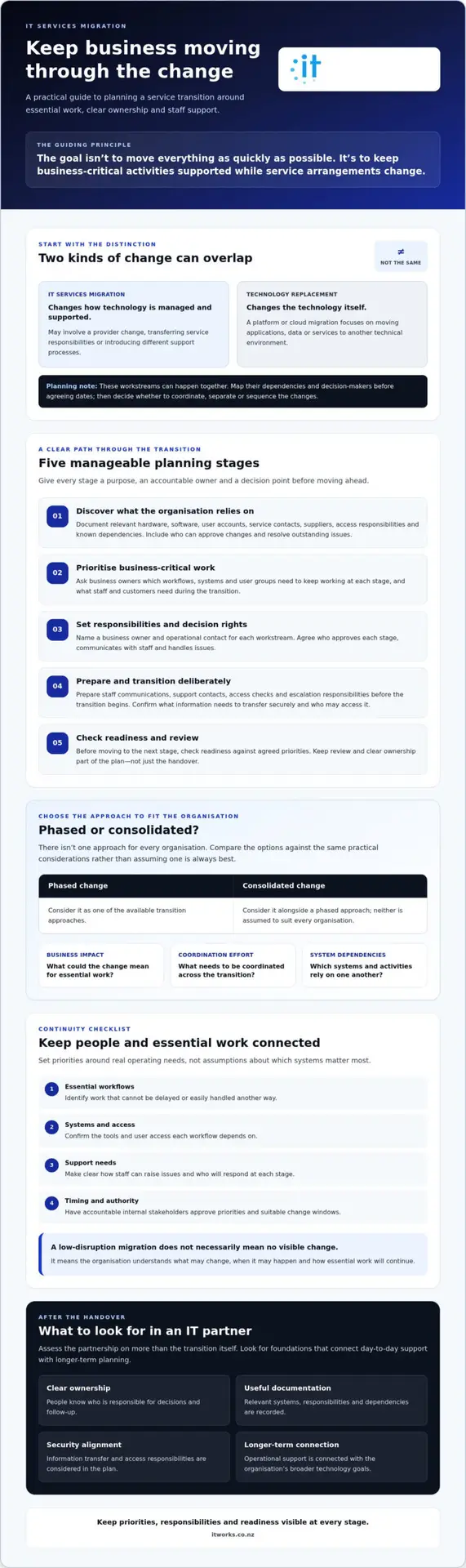
A low-disruption migration is a controlled transition that protects agreed business-critical activities. It doesn’t necessarily mean staff won’t notice any change. It means the organisation understands what may change, when it may happen and how essential work will continue.
A service migration changes how technology is managed and supported; a technology replacement changes the technology itself. The two can happen together, but they aren’t the same project. A provider change might introduce new support processes, while a separate cloud or platform migration changes where or how systems operate. The System migration overview gives useful background on the broader concept of moving systems between environments.
What counts as an IT services migration?
An IT services migration may involve changing providers, transferring service responsibilities, introducing different support processes or changing how technology is managed. A platform or cloud migration, by contrast, focuses on moving applications, data or services to another technical environment.
These changes can overlap. For example, a new provider may take responsibility while the organisation is also planning a platform change. Map each workstream, its dependencies and decision-makers before agreeing dates. This makes it easier to decide whether changes should be coordinated, separated or sequenced.
Which business activities need continuity first?
Start with the people responsible for business operations, not just the technology inventory. Ask business owners which workflows, systems and user groups must keep working at each stage, and what staff and customers need to do during the transition.
For example, a team that handles customer enquiries may depend on shared email, customer records and a reliable support contact. Agree which activities must remain available, who owns each continuity decision and what change windows are acceptable. Set priorities according to real operating needs, not assumptions about which systems matter most.
- Essential workflows: Identify work that cannot be delayed or easily handled another way.
- Systems and access: Confirm the tools and user access each workflow depends on.
- Support needs: Decide how staff will raise issues and who will respond during each stage.
- Timing and authority: Have accountable internal stakeholders approve priorities and suitable change windows.
The right plan depends on your systems, existing responsibilities and operational priorities. Clarifying these first gives the transition a practical measure of success: business-critical work stays supported while service arrangements change.
How to plan an IT services migration in clear, manageable stages
A practical migration plan gives each stage a clear purpose, an accountable owner and a decision point before work moves forward. This helps business leaders see what is changing, who is responsible and whether the organisation is ready for the next step.
What should be documented before the change?
Build an inventory that reflects your organisation’s setup. Record relevant hardware, software, user accounts, service contacts, suppliers, access responsibilities and known dependencies. Include who can approve changes, communicate with staff and resolve outstanding issues. Confirm what information needs to transfer securely and who is authorised to access it. For help defining service scope and responsibilities, see this guide to managed IT support for New Zealand organisations.
Agreed ownership gives people a clear route for decisions, communication and action. Name a business owner and an operational contact for each workstream, and record how they will coordinate with current and incoming providers.
How should the migration be staged and checked?
Group the work according to business priorities and dependencies. Before each stage, agree with the relevant system owner how the outcome will be checked and what to do if readiness or results fall short. A pause, escalation or rollback process should suit the change, with decision-makers identified in advance.
- 1. Discover. Purpose: understand services, assets, access, suppliers and dependencies. Owner: the transition lead, supported by current service contacts. Gate: confirm the inventory is complete enough to plan safely.
- 2. Prioritise. Purpose: identify critical workflows and sequence the work around business needs. Owner: business stakeholders. Gate: agree priorities, acceptable change windows and what must remain available.
- 3. Agree responsibilities. Purpose: clarify approvals, communications, access and issue ownership. Owner: the internal sponsor with the relevant service leads. Gate: confirm responsibilities and escalation routes are understood.
- 4. Transition in stages. Purpose: move agreed services or responsibilities in a controlled order. Owner: the operational lead for each workstream. Gate: confirm dependencies and readiness before starting each stage.
- 5. Validate. Purpose: check that agreed services, access and support arrangements work as intended. Owner: system owners and the transition team. Gate: review results against checks agreed before the stage began.
- 6. Review. Purpose: track unresolved items and confirm ongoing ownership. Owner: the business sponsor. Gate: accept the handover or assign remaining actions and due dates.
For organisations planning a provider change alongside other technology work, IT strategy and migration planning can help connect transition decisions with operational priorities.
Which IT services migration approach best balances continuity and control?
A phased transition separates work into smaller changes, while a more consolidated transition coordinates related changes within a shared window. Neither approach is automatically safer. The right choice for migrating IT services without business disruption depends on how services connect, how much internal capacity is available and whether stakeholders are ready to act together.
Use the comparison below as a planning framework, not a promise that disruption can be eliminated. It helps make trade-offs visible before you commit to an approach.
| Consideration | Phased transition | More consolidated transition |
|---|---|---|
| Business impact | Limits each change to a defined group of services or users, but impacts may extend across several stages. | Concentrates change into a shared window, which may suit a coordinated handover but requires careful preparation. |
| Coordination effort | Requires ongoing coordination and handovers between stages. | Requires several stakeholders to align their work, communications and decisions at the same time. |
| Visibility | Provides opportunities to review outcomes and adjust later stages. | Offers a more unified transition, but leaves less separation between individual changes. |
| Dependencies | Can be difficult if services rely on one another and can’t move independently. | May suit closely linked responsibilities, provided the dependencies are understood and tested. |
| Suitability | Consider when work can be separated and the organisation can support multiple stages. | Consider when changes are tightly connected and stakeholders can prepare for a coordinated window. |
When is a phased transition worth considering?
Phasing may help when services or user groups can move separately, making it easier to observe the effects of each change before proceeding. For instance, support processes might transition separately from a platform change. However, a staged plan can add coordination work, and dependencies may prevent a service from moving on its own. Before starting, agree what counts as a successful stage, who reviews the results and who can approve, pause or change the next step.
When might a more consolidated transition suit the organisation?
A coordinated change may fit when responsibilities or systems are closely linked, or when one agreed change window is more practical for the organisation. It calls for strong preparation: stakeholders need clear roles, staff need timely information and someone must own issues across workstreams. Compare this option with a phased approach against business priorities, internal capacity and readiness, not a provider’s preference or a desire to move quickly.
Choose the approach that gives your organisation the clearest control over dependencies, decisions and business impact. A well-considered plan may combine both, separating work where that improves visibility while coordinating changes that need to move together.
How to protect staff, systems and support during the IT services transition
People need to know what is changing, where to get help and who is responsible if an issue affects their work. A clear transition checklist makes these practical details visible while cybersecurity, backups and recovery planning are coordinated with the wider change. No transition is risk-free, so plan for issues as well as the intended outcome.
Assign a named business owner and operational contact to each workstream. The business owner can confirm priorities and decisions; the operational contact can coordinate checks, updates and issue handling. Make sure staff know which support route applies during each stage, especially if responsibility is moving between providers.
What should the staff communication plan cover?
Explain in plain language what is changing, when staff are likely to notice it and where they can get support. Tailor updates to affected roles and work patterns rather than sending everyone the same technical detail. Give managers a clear route to report problems and share feedback about how the change affects day-to-day work.
Before each stage, confirm that staff and managers know:
- Which systems, services or support arrangements are changing, and when.
- How to contact the right support team during the transition.
- Who managers should notify about an issue affecting a team or business process.
- How updates and decisions will be shared if plans need to change.
How can the organisation validate the transition?
Agree checks with relevant users and system owners before each change. Confirm that people can access the systems they need, support requests reach the right contact and business-critical workflows operate as expected. A successful technical handover isn’t enough if staff can’t use the service or don’t know how to get help.
Keep a shared transition record of open issues, owners, decisions and next steps. Review it with workstream contacts so unresolved items don’t disappear between teams. Also confirm who is responsible for backups and recovery during the change and after handover. The backup and disaster recovery resilience guide provides context for continuity planning, while this cyber security guide for small businesses covers practical security controls.
As part of migrating IT services without business disruption, treat access and security as transition tasks, not checks to leave until the end. Confirm who is authorised to access systems, review access as responsibilities change and agree how security concerns will be raised. These steps support a more controlled transition without implying that all risk can be removed.
What to expect from an IT partner after migration is complete
A migration isn’t finished simply because the new arrangements are in place. The handover should leave your organisation clear about who owns each service, how staff get support, where important information is recorded and what still needs attention. This creates a reliable operating model after the transition, rather than leaving decisions to be worked out later.
What makes a handover clear and accountable?
Confirm who is responsible for support requests, service decisions and outstanding transition actions. Documentation should reflect the current environment and make key responsibilities clear to the authorised people who need them. Check that access arrangements are understood, including who can approve access changes and how responsibilities are managed if they change.
Keep a record of unresolved items with an owner, next action and review point. Agree how the organisation and its technology partner will review service performance, recurring issues and changes in business needs. A clear review process helps distinguish a one-off transition task from an issue that needs ongoing attention.
- Support: Staff know where to raise requests and what to expect from the agreed support process.
- Ownership: Business and service contacts understand who makes decisions and follows up actions.
- Documentation: Relevant information is current, accessible to authorised people and maintained as responsibilities evolve.
- Follow-up: Open items and recurring concerns have named owners and a way to review progress.
How should the next technology priorities be agreed?
Use the post-migration review to connect day-to-day operational needs with wider goals. A recurring access issue, for example, may affect staff productivity; a change in business plans may prompt a fresh look at security or cloud priorities. The aim is to make technology decisions in context, rather than treating each request as an isolated task.
For a New Zealand organisation, a technology partner should be able to discuss both operational support and longer-term planning. IT Works combines support and advisory work, with services including Managed IT Services and IT Strategy & Consulting. The relevance of either depends on your organisation’s current position, internal capability and priorities. A practical roadmap discussion can help identify what needs attention now, what can be planned for later and how progress should be reviewed.
Evaluate a partner on the quality of communication, clarity of accountability, alignment with your security priorities and ability to connect operational delivery with strategic advice. No provider can promise that every change will be disruption-free, but clear ownership and ongoing review can help your organisation manage change with greater confidence.
Make your next IT transition a confident step forward
Migrating IT services without business disruption starts with business priorities, not a rush to change. Agree which activities need continuity, make ownership clear and choose a transition approach that fits your systems, dependencies and internal capacity.
Use staged planning to keep decisions visible, and prepare staff with clear communication and support routes. After the change, a useful handover includes agreed responsibilities, current documentation and a way to track unresolved work. The transition can then become a foundation for better-aligned technology decisions, rather than a one-off provider change.
IT Works has operated since 2004. Its New Zealand-based team combines operational support with strategic technology advice, helping organisations connect day-to-day needs with priorities such as security, productivity and growth. Every transition is different, so the right next step is a conversation grounded in your organisation’s current position and goals.
With clear ownership and a practical plan, your organisation can approach change with greater confidence and keep technology focused on enabling the work ahead.
Frequently Asked Questions
How can a business migrate IT services without disruption?
Plan the transition around business-critical work, with clear responsibilities, suitable timing and checks before each change. Identify the systems and support staff rely on, map dependencies, and agree how issues will be raised and handled. Communicate what is changing and where to get help. No plan can guarantee disruption will be eliminated, but staged decisions and defined ownership can help the organisation manage change with greater confidence.
What is the first step when changing IT service providers?
Start by documenting the current IT environment and agreeing what the business needs to protect during the change. Record relevant systems, suppliers, service contacts, access responsibilities and known dependencies. Then identify an internal business owner who can approve priorities and decisions. This gives incoming and outgoing service teams a shared view of what needs to transfer, what must keep working and who is accountable for each part.
Should IT services be migrated all at once or in stages?
Choose the approach that best fits your systems, dependencies and capacity to coordinate change. A phased transition can make impacts easier to observe, but may require more handovers and can be difficult if services rely on each other. A consolidated change may suit closely linked responsibilities, provided stakeholders are ready and well prepared. Agree success checks, decision owners and a suitable response if a stage doesn’t go to plan.
How do you keep staff productive during an IT migration?
Tell affected staff what is changing, when they may notice it and how to get support. Tailor updates to the roles and workflows involved, and make sure managers know how to report issues that affect operations. Before each transition stage, check that users can access the tools they need and that key workflows still function. Clear support routes help staff spend less time working out who to contact.
What should be included in an IT migration plan?
Include the business priorities, service and asset inventory, dependencies, transition stages, accountable owners and agreed change windows. Document who approves changes, communicates with staff, manages access and handles unresolved issues. Set validation checks with relevant system owners, and define how the team will pause, escalate or reverse a change if needed. Include handover details such as support routes, current documentation and follow-up actions for outstanding items.
How can an organisation reduce security risks during an IT services migration?
Build security into transition planning rather than leaving it until after services move. Confirm who is authorised to access systems, how access responsibilities will change and how information will be transferred securely. Coordinate security checks with service owners, and clarify responsibility for backups and recovery throughout the transition. Review access when provider responsibilities change, and agree how staff can raise security concerns. These steps support practical risk reduction, not risk-free change.
When should a business involve a managed IT partner in a migration?
Involve a managed IT partner early, while the organisation is defining scope, priorities and responsibilities. Early input can help identify service dependencies, clarify what needs to be documented and shape a transition plan that connects operational needs with longer-term technology goals. Agree the partner’s role, decision authority, communication responsibilities and handover expectations before work begins. This helps your internal team assess whether the approach fits its capacity and business priorities.