
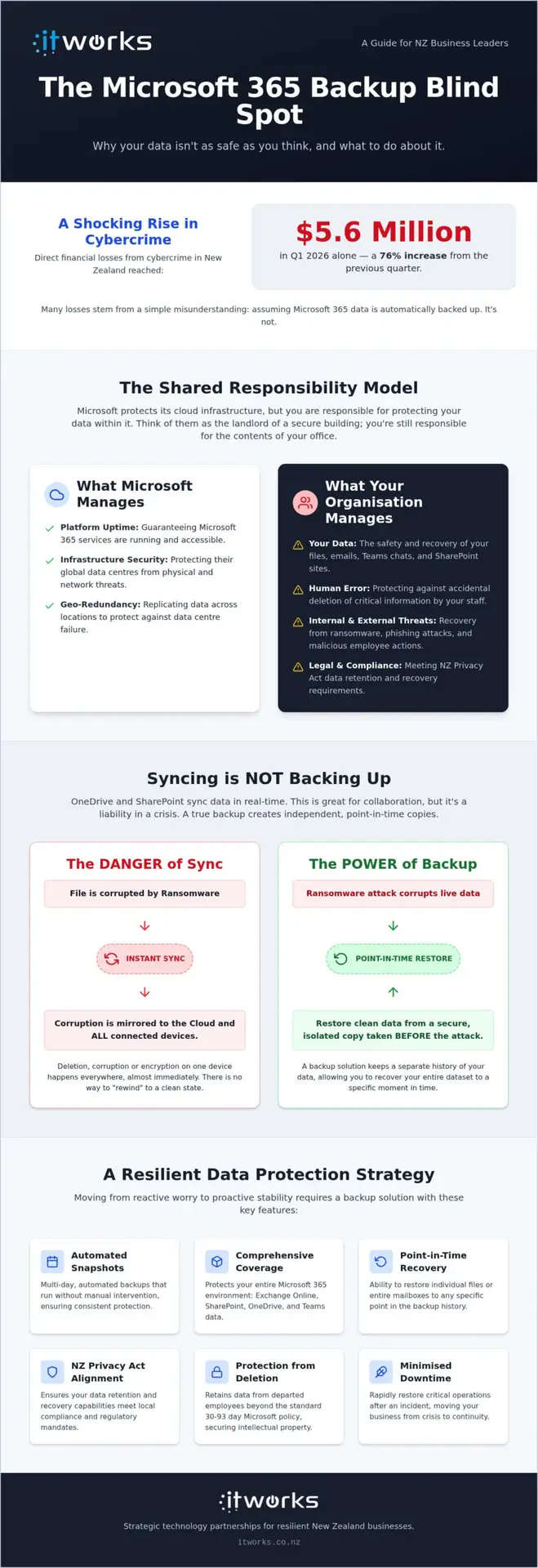
In the first quarter of 2026 alone, direct financial losses from cybercrime in New Zealand reached $5.6 million, a staggering 76% increase from the previous quarter. Many of these losses stem from a simple misunderstanding of how cloud data is preserved, particularly the assumption that robust microsoft 365 backup solutions nz are automatically provided by the vendor. This confusion often leads to significant stress when organisations face ransomware threats or the strict reporting mandates of the NZ Privacy Act.
We understand that you want to focus on growth rather than technical vulnerabilities. The good news is that establishing a strategic backup framework doesn’t have to be a complex burden. By choosing the right approach, you can gain total confidence in your recovery capabilities while ensuring your organisation in Auckland, Wellington, or Christchurch remains compliant and resilient. We’re here to help you move from reactive worry to a position of calm, proactive stability.
This guide explores the essential components of a modern backup strategy. We will walk through the shared responsibility model, explain how to minimise downtime during an incident, and provide a clear technology roadmap that supports your long-term business success.
Key Takeaways
- Understand the Shared Responsibility Model and why Microsoft manages the platform while your organisation remains responsible for the safety and recovery of your own data.
- Identify common local risks beyond external threats, including accidental deletions and internal data mishandling that can disrupt daily operations.
- Evaluate the essential features of robust microsoft 365 backup solutions nz, focusing on automated, multi-day snapshots that cover Teams, SharePoint, and Exchange.
- Align your data protection strategy with NZ Privacy Act 2020 requirements to ensure your business remains compliant and ready for future AI-driven productivity.
- Discover how integrating backup into a broader technology roadmap provides a resilient foundation for long-term business growth and operational confidence.
The Microsoft Shared Responsibility Model Explained
Many organisations across Auckland and Wellington make a risky assumption: that moving to the cloud means data safety is entirely outsourced. While Microsoft provides a highly secure and resilient platform, they operate under a Shared Responsibility Model. This framework defines exactly where their duties end and yours begin. If you need a concise way to explain this to your board, it’s best to think of it this way: Microsoft is the landlord of the building, ensuring the electricity and structural integrity are sound, but you are responsible for the contents of your office.
A common point of confusion is the difference between service availability and data protection. Microsoft guarantees uptime, which means they promise the software will be accessible. However, they don’t provide a comprehensive historical archive of your specific files. If your data is lost due to an internal error or a cyber incident, the responsibility for recovery sits squarely with your business. This is why many local leaders are now prioritising dedicated microsoft 365 backup solutions nz to fill the gap.
Infrastructure vs Data: Who Owns the Risk?
Microsoft’s primary focus is the infrastructure. They manage the physical data centres, hardware, and the underlying software updates that keep the platform running. Your organisation’s role is to manage the “content” layer. This includes protecting against:
- Accidental deletion by staff members.
- Malicious actions from disgruntled or departing employees.
- External threats like ransomware and phishing.
Relying on “Trash” folders or temporary retention policies is not a viable business strategy. These features are designed for small, immediate mistakes, not for long-term recovery or meeting NZ legal standards. Without a separate backup, you’re essentially trusting that a recycle bin will never be emptied when you need it most.
Why OneDrive Sync is Not a Backup
There’s a significant difference between syncing and backing up. OneDrive and SharePoint are collaboration tools that sync changes in real-time. This mirroring is helpful for productivity, but it’s a liability during a crisis. If a file is corrupted on a local laptop, that corruption is instantly mirrored to the cloud. If a folder is deleted, it disappears from every connected device simultaneously.
Ransomware thrives on this sync loop. If your local files are encrypted by an attacker, the synced versions in the cloud can be overwritten with the encrypted copies almost immediately. Robust microsoft 365 backup solutions nz provide “point-in-time” recovery that exists outside this sync environment. This allows you to restore your entire data set to a specific moment before an incident occurred, ensuring your business stays operational with minimal disruption.
Identifying the Strategic Risks to Your Organisation’s Data
Data loss rarely announces itself with a siren. More often, it’s a quiet realisation that a folder has gone missing or a SharePoint site was accidentally purged during a routine cleanup. While high-profile cyberattacks dominate the headlines, the most frequent cause of data loss in New Zealand offices remains the human element. Whether it’s a simple mistake or a more complex internal issue, the impact on your productivity is the same. Without a plan, your team is forced into the slow, expensive process of manual reconstruction.
The New Zealand Government’s Cloud First policy encourages organisations to embrace the benefits of the cloud, but it also highlights the need for robust risk management. Relying solely on a vendor’s default settings often leaves gaps in your long-term data retention. Implementing reliable microsoft 365 backup solutions nz ensures that your intellectual property remains under your control, regardless of external platform changes or internal errors.
The Human Element: Accidental Deletion and Malicious Acts
It is surprisingly easy to “tidy up” a Teams channel or a SharePoint library into oblivion. Once a file is deleted and the recycle bin is emptied, that data is often gone forever. This risk is particularly acute when managing departing employees. When a staff member leaves and their licence is cancelled, Microsoft typically only retains their OneDrive data for 30 to 93 days before permanent deletion. If you haven’t captured that information in an independent backup, you lose the institutional knowledge and work history that employee built. Having an independent copy of your data allows you to offboard staff with confidence, knowing their contributions are preserved for the long term.
Cyber Resilience Without the Fear
We prefer to view ransomware as a business disruption event rather than a looming catastrophe. In the first quarter of 2026, financial losses from cybercrime in New Zealand jumped by 76%, reaching $5.6 million. These numbers are significant, but they don’t have to be a source of anxiety. True resilience comes from knowing you can get back to work quickly. If an incident occurs, a strategic backup allows you to restore your entire environment to a “clean” state from just before the event. This air-gapped approach means your recovery data is isolated from the attack, giving you a clear path to resume operations without paying a ransom or suffering weeks of downtime. If you want to ensure your data remains protected, you can discuss your cybersecurity priorities with our team.
Essential Features for a Robust NZ Backup Solution
Finding the right fit for your organisation involves looking beyond simple data copying. Effective microsoft 365 backup solutions nz must be automated and frequent, capturing changes multiple times per day. This ensures that the gap between your last backup and a potential incident is as small as possible. High-frequency snapshots provide a safety net that manual processes simply cannot match, giving your team the freedom to work without the constant fear of data loss.
Precision is just as vital as frequency. A robust solution offers granular restore capabilities, allowing you to recover a single lost email or a specific version of a document without needing to roll back an entire SharePoint site. This saves time and prevents the accidental overwriting of newer work. While Microsoft’s default retention periods for deleted items usually sit between 30 and 93 days, a strategic backup allows you to set policies that span years. This ensures your historical records are always within reach when you need them.
Comprehensive Coverage Across the 365 Suite
Modern collaboration happens in Microsoft Teams, yet it’s often the most overlooked area in a backup strategy. Protecting Teams means more than just saving files; it involves capturing chat histories, channel structures, and tab configurations that hold your projects together. Similarly, backing up SharePoint isn’t just about the raw data. It’s about preserving the complex permissions and metadata that keep your files organised. By including Exchange Online mailboxes in your archive, you create a permanent record for legal and historical purposes, aligning with the Cloud Security Technical Reference Architecture guidelines for comprehensive data management.
Recovery Speed and Data Sovereignty
A backup is only as good as your ability to restore it. We recommend regular testing to see how quickly your team can actually get back to work after a loss. Speed of recovery is the true metric of success. For many New Zealand organisations, data sovereignty is also a key priority. Storing your backup data locally in New Zealand centres can provide peace of mind regarding jurisdictional control and faster access speeds. Ultimately, the system should be easy to use. Your IT partner should be able to locate and restore a lost file in minutes, ensuring that a minor technical slip doesn’t turn into a major operational delay. This level of reliability allows you to focus on your core business goals with total confidence in your technology foundation.
Organising Your Backup Strategy for AI and Compliance
A backup strategy is more than just a technical safety net. It’s a vital governance tool that ensures your organisation remains on the right side of New Zealand law. Under the Privacy Act 2020, and the subsequent amendments that came into force in May 2026, businesses are required to maintain reasonable security safeguards to protect personal information. Implementing robust microsoft 365 backup solutions nz is a practical way to demonstrate this commitment. It moves your data management from a reactive approach to a structured, defensible position that satisfies both regulators and insurers.
We see backup as a core pillar of a resilient business foundation. It isn’t just about recovering from a disaster; it’s about having a clear, auditable trail of your intellectual property. When you treat backup as a governance priority, you’re not just protecting files. You’re protecting the reputation and the long-term viability of your organisation. This strategic alignment ensures that technology serves your business goals rather than creating unforeseen risks.
Meeting NZ Regulatory and Compliance Standards
Compliance requirements vary significantly across different sectors in the local market. Financial services may need to hold records for seven years, while non-profits have their own distinct obligations to donors and stakeholders. A professional backup solution allows you to automate these retention policies. This ensures you don’t delete data too early or keep it longer than necessary, which is a common pitfall in manual data management. This systematic approach provides clear proof of governance during audits or when applying for cyber insurance. It also simplifies the process of responding to information requests, as you can quickly locate historical data that might have been purged from live systems.
AI Readiness: Why Backups Matter for Microsoft Copilot
The rise of tools like Microsoft Copilot has changed how we think about our data. AI is only as effective as the information it can access. If your data is corrupted or incorrectly moved, the AI’s output will be equally flawed. This is why AI automation solutions New Zealand organisations are adopting rely on a foundation of “clean data”. Backup ensures this integrity and provides a vital undo button for AI-related errors. If an automated process accidentally deletes a folder or misplaces a critical file, you can restore it instantly. Building a trusted data environment is the essential first step on any AI roadmap, ensuring your productivity gains aren’t undermined by data integrity issues. Reliable microsoft 365 backup solutions nz provide the stability needed to innovate with confidence.
Partnering with IT Works for Resilient Data Management
Choosing a technology partner is about finding a guide who understands your business goals as well as they understand the cloud. At IT Works, we take a strategic approach to data safety. We handle the complex technical execution of your microsoft 365 backup solutions nz so your leadership team can focus on what matters most: growing your organisation. By removing the daily friction of technical management, we replace reactive stress with a sense of calm reliability. This partnership allows you to move forward with the knowledge that your technology foundation is managed by experts who are invested in your journey.
Your data protection shouldn’t exist in a vacuum. It works best when it’s integrated into a broader Technology Roadmap. This roadmap serves as a strategic pillar, ensuring your technology evolves alongside your business objectives. Whether you are operating out of Auckland, Wellington, or Christchurch, having a local team that understands the New Zealand business environment provides a distinct advantage. We’re here to ensure your technology enables success rather than acting as a hurdle, providing the pragmatic guidance needed to make informed decisions.
A Proactive Approach to Microsoft 365 Management
We believe in a proactive model that moves far beyond the traditional reactive support mentality. Instead of waiting for a crisis to occur, our team continuously monitors and tests your recovery points. This ensures that when we talk about backup and disaster recovery NZ organisations can rely on, we mean a system that is verified and ready for immediate action. Regular reporting gives you the peace of mind that your intellectual property is secure. You won’t have to wonder if your backups worked; you’ll have the data to prove it, allowing your team to work with total confidence.
Next Steps: Strengthening Your Security Posture
Strengthening your resilience starts with a clear understanding of your current environment. We offer a strategic review to help identify any gaps in your existing data protection and compliance framework. This process isn’t about finding faults; it’s about building a more robust foundation for your future growth. A steady, methodical approach to microsoft 365 backup solutions nz builds the confidence needed to innovate and adopt new tools like AI. When you know your foundation is solid, you can lead your organisation with purpose and clarity.
Talk to IT Works about your technology strategy.
Building a Resilient Foundation for Growth
Securing your organisation’s data is more than a technical checklist; it’s a strategic commitment to your future success. We’ve explored why the shared responsibility model makes independent microsoft 365 backup solutions nz essential for every local business. By addressing human error and cyber risks proactively, you shift from a state of reactive worry to one of calm, operational confidence. This resilience doesn’t just protect you from the past; it prepares you for the productivity gains of AI and the strict requirements of NZ privacy law.
Our NZ-based team of strategic advisors is dedicated to these business outcomes. We prioritise long-term partnerships that focus on cybersecurity and strategic alignment, ensuring your technology roadmap supports your unique goals. When your data is secure and your recovery points are verified, you gain the freedom to innovate without hesitation. You can move forward knowing that your intellectual property is preserved and your team is supported by experts who understand the local landscape.
Taking these steps today ensures your technology remains a silent, reliable partner in your long-term journey toward success and stability.
Frequently Asked Questions
Does Microsoft 365 automatically back up my data?
Microsoft manages the infrastructure and uptime of the service, but they don’t provide a comprehensive backup of your specific data. Under the Shared Responsibility Model, your organisation is responsible for protecting information from accidental deletion or malicious acts. While they offer basic versioning, these features don’t constitute a true backup. Implementing dedicated microsoft 365 backup solutions nz ensures you have a separate, historical copy of your data that is always recoverable.
What is the difference between archiving and backup in Microsoft 365?
Archiving is a data management tool designed to move older information out of your primary environment to free up space or meet compliance standards. It doesn’t protect against data loss because if the archive is deleted or corrupted, the data is gone. A backup creates a separate, point-in-time copy of your data stored in a different location. This allows you to restore your files to a previous state following an incident or error.
How long does Microsoft keep deleted emails and files by default?
By default, Microsoft typically retains deleted items in the recycle bin for 30 to 93 days depending on your specific licence and configuration. Once this period expires, the data is permanently purged from their servers and cannot be recovered through standard tools. This short window is often insufficient for business continuity or legal requirements, which is why a strategic backup plan is necessary to preserve your intellectual property for the long term.
Why do I need a third-party backup solution if I use OneDrive?
OneDrive is a synchronisation tool designed for collaboration and accessibility, not for historical data protection. If a file is corrupted by ransomware or accidentally deleted on one device, the change is instantly mirrored across all synced locations. A third-party backup operates independently of this sync loop. It provides an “undo button” that allows you to restore your environment to a clean state before the corruption occurred, ensuring your operations remain resilient.
Can a Microsoft 365 backup protect us from ransomware?
A backup doesn’t prevent a ransomware attack, but it is your most effective tool for recovery and resilience. If an attacker encrypts your files, a professional backup allows you to restore your entire data set to a point in time just before the incident. This air-gapped approach means your recovery data remains untouched by the attack. It gives you the confidence to resume business operations quickly without the need to pay a ransom.
Is my backup data stored in New Zealand?
The storage location depends on the specific solution you choose, but many microsoft 365 backup solutions nz offer the option to store data within New Zealand data centres. Storing your backups locally supports data sovereignty and often provides faster recovery speeds for your team. We recommend a strategic review of your requirements to ensure your data storage aligns with your organisational policies and any specific regulatory obligations your industry might have.
How often should our Microsoft 365 data be backed up?
For most organisations, we recommend automated backups that occur multiple times per day. High-frequency snapshots ensure that the amount of data lost between the last backup and an incident is kept to an absolute minimum. This methodical approach reduces the impact on your productivity and ensures that your recovery points are as current as possible. It’s a key part of building a steady and reliable technology foundation for your business.
What happens to a user’s data when they leave the organisation?
When a user’s licence is removed, Microsoft generally deletes their associated data after a short grace period of 30 to 93 days. Without an independent backup, any critical emails or documents stored in their personal folders will be lost forever once that window closes. A strategic backup solution allows you to preserve this institutional knowledge indefinitely. You can access the former employee’s work history and intellectual property whenever it’s needed for future projects or audits.