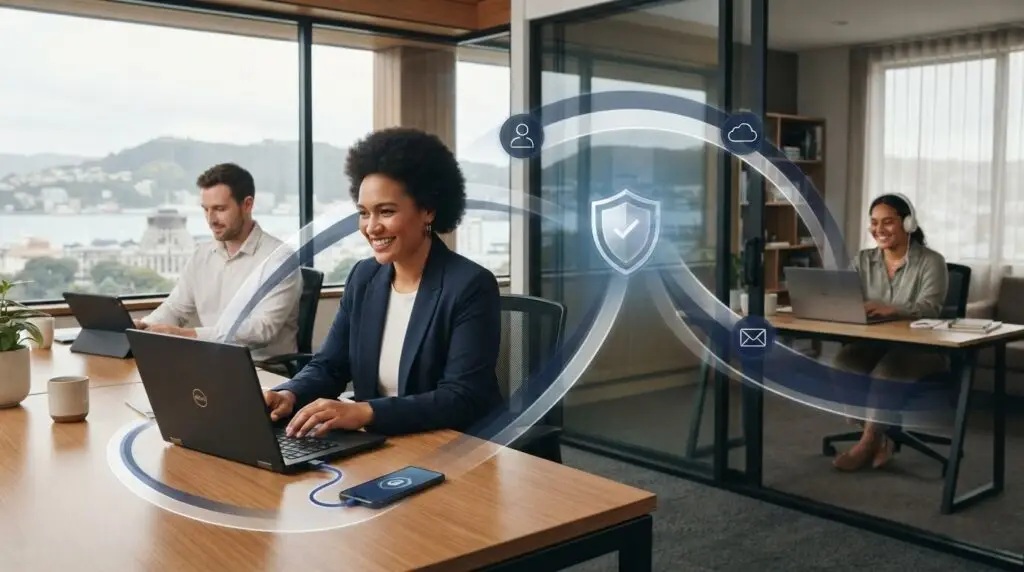
A secure remote laptop depends on more than the software installed on it. Getting endpoint security for remote workforce teams right means protecting devices wherever people work while keeping everyday tasks straightforward. The key is a coordinated approach, not simply adding another control.
It’s understandable to be unsure who’s responsible for a laptop outside the office, or how much control is appropriate. Safeguards that are too loose can leave gaps, while controls that disrupt routine work are difficult to sustain. Endpoint protection also needs to work alongside identity, email security and IT support, so staff know where to turn when something doesn’t look right.
This guide explains which devices and users to include, practical safeguards for remote and office settings, and how to coordinate monitoring and response. You’ll come away with a clearer way to reduce risk, support staff productivity and build confidence in your organisation’s security.
Key Takeaways
- Map the laptops and mobile devices that access business systems, then identify who sets them up and supports them.
- Build endpoint security for remote workforce teams into a layered approach that connects device protection with identity, email security and staff awareness.
- Understand how antivirus, endpoint protection and detection-and-response capabilities differ, while recognising that features vary between vendors.
- Roll out safeguards in a practical order, starting with devices, users and business access, then setting clear processes for updates and escalation.
- Review endpoint security as staff, devices and work patterns change, and align it with wider cybersecurity planning.
What endpoint security for a remote workforce means
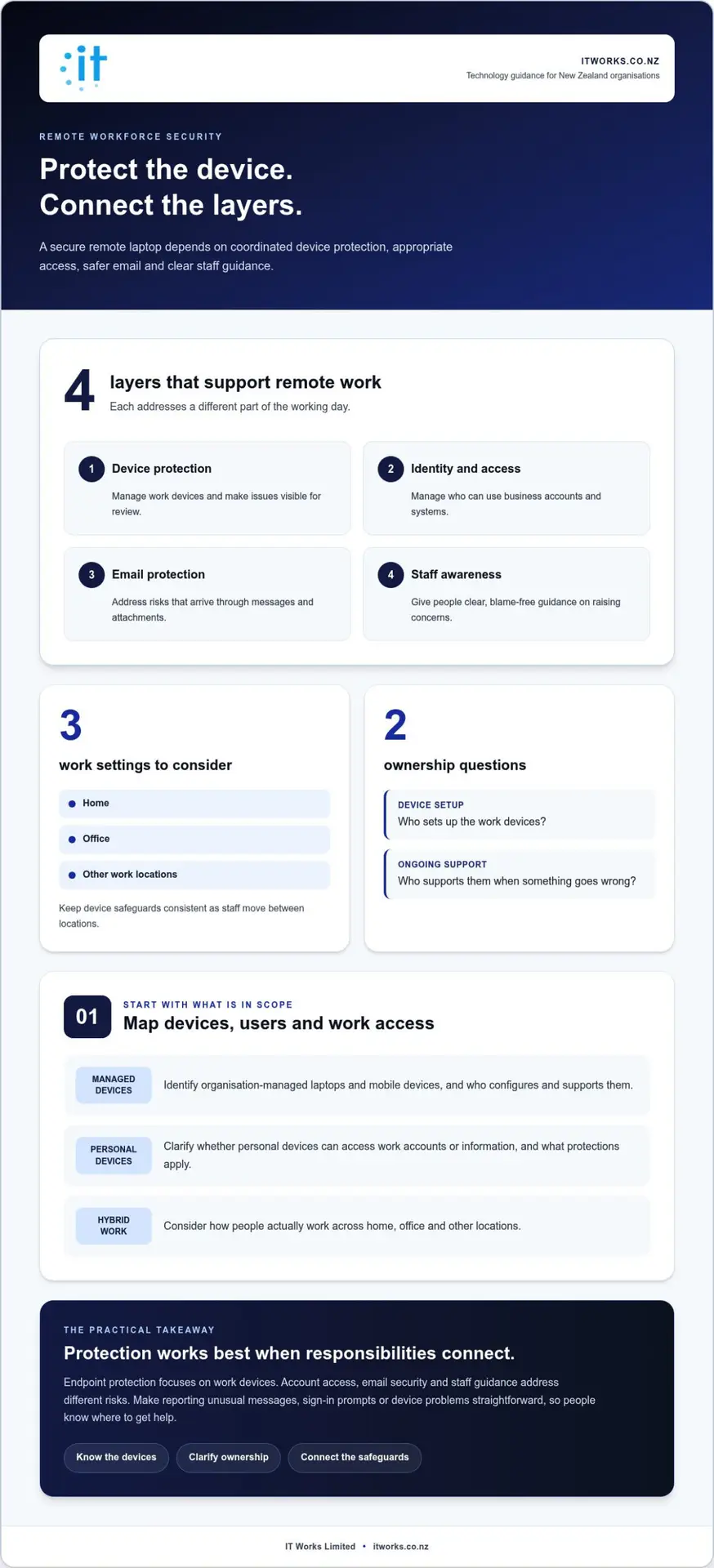
A work device remains part of your organisation’s technology environment when someone takes it home, visits a client or works in a shared space. An endpoint is a device, such as a laptop or mobile phone, that connects to business systems or information. Consider every device and connection, whether it’s used in the office or elsewhere.
Endpoint security is the policies and protections used to secure work devices and manage their access to business systems and information. For an endpoint security for remote workforce approach, that means considering both the device and how it connects to work. The What is Endpoint Security? overview offers a broader introduction. In practice, an organisation needs to know which devices are in use and how they’re managed.
An office can make it easy to assume devices are protected because they’re connected to a familiar network. Remote and hybrid work changes that assumption. Staff may connect from home, a client’s site or another location, using networks the organisation doesn’t manage. Device safeguards need to remain consistent across those settings. Endpoint protection helps, but it isn’t a complete cybersecurity programme. It works alongside protections for user identities, email and staff awareness.
Which devices and work situations are in scope?
Start with any device used to access work accounts, systems or information. This usually includes organisation-managed laptops and mobile devices. Consider personal devices separately: whether staff may use them for work, and what protections apply, depends on your organisation’s policy and operating needs.
- Organisation-managed devices: identify who sets them up, applies agreed settings and provides support.
- Personal devices: clarify whether and how they can access work accounts or information.
- Hybrid work: keep protections consistent as staff move between home, the office and other work locations.
This inventory gives managers and IT teams a shared view of the devices and users they’re responsible for. It can also reveal gaps between assumptions based on office work and the way people actually work.
Why endpoint security matters to business operations
Staff rely on their devices to access everyday tools, business information and communication channels. If a device is unreliable, poorly managed or difficult to support remotely, routine work can become harder. Consistent management helps keep devices usable and gives staff a clear path to support when something isn’t working as expected.
For leaders, the goal isn’t to add controls for their own sake. It’s to manage work devices in a way that supports secure access and dependable day-to-day operations. Clear ownership connects device setup, ongoing care and security concerns, helping remote work function as part of the organisation’s normal operating model.
How endpoint security fits into a layered remote-work security approach
A managed work device is an important part of remote security, but it isn’t the only part. Staff also need appropriate access to business accounts, protection for the messages they receive, and clear guidance on what to do if something seems unusual. These measures work best when they support one another rather than being managed as separate tasks.
For example, device protection can help an organisation manage and monitor its endpoints. Identity and access controls help manage who can use business systems, while email protection addresses risks arriving through messages. Staff awareness helps people recognise concerns and report them through an agreed process. Each layer addresses a different part of the working day.
What endpoint protection does, and what it does not do
Endpoint protection focuses on work devices and can provide visibility of issues that need attention. By itself, it doesn’t decide whether a user should have access to a particular account, protect every email interaction or set rules for handling business information. Device safeguards, account access, email security and data practices address different risks, so they need to work together.
This distinction helps leaders set practical expectations. A laptop may be managed, but staff still need appropriate account access. An email may be filtered, but people need a straightforward way to flag a suspicious message. A device alert may need to be assessed and followed up, rather than treated as a standalone technical event.
How endpoint security connects with identity and staff practices
Consider a staff member signing in to a work account from a laptop. Device safeguards apply to the computer; identity controls apply to the person’s account and access. Email protection supports the next step, such as opening a message or handling an attachment. If something looks wrong, staff guidance should make reporting it clear and blame-free.
Make guidance specific to people’s work. Explain how to report unexpected sign-in prompts, unusual messages or device problems, and make sure staff know where to get help. Reinforce that raising a concern early helps keep work moving. This makes security a shared practice, rather than a responsibility placed solely on employees or the IT team.
Monitoring, vulnerability management and incident response connect these layers over time. Monitoring helps surface issues for review. Vulnerability management helps identify and prioritise weaknesses in systems and devices. Incident response sets out how the organisation will assess and manage a security event. Clear ownership helps ensure a device concern is considered alongside account, email and business context.
A layered approach connects practical safeguards with wider business priorities, as outlined in this guide to cyber security for small business in New Zealand. Organisations looking to align device protection with wider cybersecurity and IT responsibilities can discuss their priorities with IT Works.
Endpoint protection compared: antivirus, detection and managed response
Security tools use overlapping terms, so a product label alone may not tell you what your organisation can see or who will act on an issue. For endpoint security for remote workforce teams, compare capabilities and responsibilities, not just names. Antivirus, broader endpoint protection and detection-and-response capabilities can each play a role, but none replaces wider security measures around devices and business access.
How antivirus and endpoint protection differ
Antivirus is a familiar category of device protection. Broader endpoint protection may bring together additional safeguards and management information, but exact capabilities vary between vendors. Use the comparison below as a starting point, not as a guarantee that every tool in a category works the same way.
| Approach | Purpose | Visibility | Management responsibility |
|---|---|---|---|
| Antivirus | Provides a baseline focus on identifying and addressing malicious software on a device. | May show information about detections on protected devices. The detail available depends on the product. | Someone needs to oversee its configuration, upkeep and any notifications it raises. |
| Broader endpoint protection | May combine device safeguards with tools for managing or reviewing endpoint security issues. | Can offer a wider view of device status or issues, depending on the product and setup. | Responsibility may sit with an internal IT team or be coordinated with an external support partner. |
| Detection and response | Focuses on identifying and handling potential security issues on endpoints. | Provides information to support assessment and follow-up, with capabilities varying between offerings. | The organisation needs a clear process and an accountable person or team to review and respond. |
Use the table to frame a practical discussion: which devices are covered, what information is available, and who follows up? Consider how the chosen approach fits with existing IT support. A tool that raises an alert without a clear owner can leave staff uncertain about what happens next.
When detection and response capabilities become relevant
Detection and response become more relevant when an organisation needs to identify and manage endpoint issues, rather than relying only on baseline device protection. The right operating model depends on the number and mix of devices, the capacity of internal IT staff, and how security work connects with everyday support.
For example, a small internal team may be responsible for device support, account access and security concerns at the same time. Leaders should establish who reviews endpoint issues, how they’re assessed, and who coordinates next steps. If responsibilities are shared with an external partner, define how information and decisions pass between that partner and the organisation.
Before comparing options, map your needs: device coverage, useful visibility, available people and response ownership. Then review how proposed capabilities fit existing systems and support arrangements. This keeps the decision grounded in business operations, rather than assuming one product name or feature set is right for every organisation.
How to implement endpoint security for remote staff
A clear rollout helps organisations improve device security without making routine work harder. Start by understanding what staff use and what they need to access. Then agree on practical expectations and make ownership clear. This gives managers, staff and IT support a shared plan for endpoint security for remote workforce teams.
A practical rollout sequence for a smaller organisation
Work through these steps in order. Each one gives the next stage a sound foundation.
- Record devices, users and business access. Create a current list of work laptops and mobile devices, who uses them, and which business systems they need. Note whether devices are organisation-managed or personal, and how staff work across home, office and other locations. This baseline helps identify what needs protection and where support responsibilities sit.
- Set consistent protection and access expectations. Agree how devices should be set up and maintained, and how users access work accounts and information. Apply expectations across remote and hybrid work while accounting for organisational policies and staff needs. Explain any changes before introducing them, including what staff might notice and where to get help.
- Assign ongoing responsibilities. Make clear who handles device setup, updates, support requests, monitoring, vulnerability management and security issue escalation. If responsibilities are shared between internal staff and an external partner, document how an issue is passed on and who coordinates follow-up. Clear ownership helps prevent alerts or support requests being left in limbo.
Keep the rollout proportionate to your organisation. You could begin with a group of devices that reflects different work patterns, review how the agreed setup affects day-to-day tasks, then apply the approach more widely. This helps identify support issues and clarify responsibilities before they affect more staff.
Keep security workable for staff
Security controls are easier to follow when people understand their purpose. Use plain language to explain what’s changing, what staff need to do and how to raise an issue. If a control affects access to a work system, provide a clear support pathway so staff can get help and keep work moving.
Consider the practical differences between remote and office-based work. Someone working from home may need a different route to support than someone who can speak with a colleague in person. Make sure staff know how to report a device problem or unexpected access change from either setting, and that the responsible team knows how to follow up.
Review device coverage, user needs and work arrangements regularly. New starters, departing staff, device changes and shifts in where people work can all affect whether records and responsibilities are accurate. A planned review helps keep the approach aligned with how the organisation operates.
Connect device procedures with wider security planning, including the recommendations in this cyber security guide for small businesses in New Zealand.
Discuss your endpoint security priorities with IT Works.
Managing remote endpoint security as an ongoing business responsibility
Putting endpoint controls in place is a starting point, not a one-off task. Devices are replaced, staff roles change and work patterns shift. Without ongoing oversight, records and protections can drift away from how people actually work. A planned review helps keep endpoint security for remote workforce teams aligned with business needs, while recognising that no single measure can remove every risk.
What ongoing oversight should cover
Give reviews a clear purpose. Check whether devices in use are accounted for, whether protection is active, and whether support and escalation responsibilities are understood. Look at changes since the previous review, such as a new device, a role change or a staff member working from a different location.
Consider the wider security picture too. Endpoint protection should connect with account access, email safeguards, staff awareness and incident response. If one area changes, consider whether the others still fit together. For example, a change in how staff access a work system may prompt a review of both device arrangements and the support process for sign-in issues.
- Coverage: are the devices and users represented in the organisation’s records?
- Ownership: is it clear who reviews device issues and coordinates follow-up?
- Fit: do current arrangements still support the way staff work?
- Improvement: what practical change would strengthen coordination or reduce avoidable disruption?
Use the findings to agree on manageable next steps. A review is an opportunity to improve visibility and clarify responsibilities, not a claim that risk can be eliminated. Recording decisions and assigning an owner also makes it easier to track progress and revisit unresolved issues.
How a technology partner can support the approach
For organisations without a dedicated in-house security team, coordinating device management with day-to-day IT support and wider cybersecurity planning can be challenging. A technology partner can connect operational responsibilities with strategic priorities, so endpoint security is considered alongside identity and access, email protection, monitoring and incident response.
IT Works is a Wellington-based technology and cybersecurity partner. Its approach combines practical IT support with strategic guidance, helping New Zealand organisations align layered security with their needs and internal capacity. This helps establish clear responsibilities and a sustainable approach, rather than treating endpoint protection as an isolated purchase.
Organisations considering broader support can explore managed IT services in Wellington as part of a wider technology plan. A conversation about your current arrangements can help identify where responsibilities are clear and where coordination could improve.
Learn how IT Works can strengthen your cybersecurity posture.
Make your next security step practical
A useful next step is to identify one improvement that will make endpoint security for remote workforce teams easier to manage. You might clarify who reviews device concerns, check whether device records reflect current work arrangements, or agree how staff should get help if access is affected. Choose a change that fits your organisation’s capacity, assign responsibility and set a time to review how it’s working.
Security doesn’t need to add unnecessary friction. A considered approach can help your team work confidently while giving leaders a clearer view of how technology responsibilities fit together. Keep reviewing and refining the approach as your organisation changes.
With clear ownership and steady improvement, your organisation can support remote work with greater confidence.
Frequently Asked Questions
What is endpoint security for a remote workforce?
Endpoint security for a remote workforce is the set of protections and working practices used to secure devices that access business systems away from a central office. These endpoints can include a laptop used at home or a mobile device used while travelling. The approach covers more than software on a device: it also needs to work alongside identity and access controls, email protection, staff awareness and a clear support process.
Is antivirus enough to protect remote work devices?
Antivirus can help protect a remote work device, but it isn’t enough on its own to cover the wider security needs of remote work. For example, it doesn’t determine whether an employee should have access to a finance system or explain how to report a suspicious email. Consider how device protection connects with account access, email safeguards, staff guidance, monitoring and a named person or team to manage issues. Capabilities differ between products.
Can endpoint security work when employees use different home networks?
Yes. Endpoint security can protect a work device away from the office, rather than relying solely on the office network. The security of the connection and the user’s access still matter. For example, protecting a laptop doesn’t determine whether the person signing in should reach a particular system. Pair device safeguards with suitable identity controls and a clear way to get support, so staff can work from different locations with appropriate protections in place.
What devices should a business include in endpoint security?
Include work laptops and mobile devices used to access business systems or information. Create an inventory that connects each device to its user and purpose, such as a laptop used for customer records or a phone used for work email. Include hybrid staff, even if they spend some days in the office. For personal devices, record whether they’re used for work under your organisation’s arrangements, then clarify ownership and support expectations.
How does endpoint security differ from network security?
Endpoint security focuses on work devices, while network security concerns the connections and infrastructure that carry data between devices and services. A staff member may use a laptop away from the organisation’s office network, so protecting office infrastructure alone won’t address every device or sign-in. The two disciplines complement each other. Identity and email safeguards also matter because access and messages raise security considerations beyond the device or network.
What happens when a remote work device has a security issue?
If a remote device raises a security concern, staff should know how to report it and what information to provide, such as which device is involved, what they noticed and when. The responsible support team can assess the issue, decide on suitable next steps and coordinate with the organisation’s wider incident response process. Give employees a clear contact route and keep them informed, so they can follow guidance and managers can plan work appropriately.
How often should a business review endpoint security?
Review endpoint security as an ongoing business task, not only when a new tool is introduced. Revisit it when a laptop is replaced, someone changes role, a new work arrangement is agreed or business systems change. These events can affect device coverage and who needs access. Set a review process that fits your organisation’s size and capacity, and record follow-up actions so responsibilities remain clear between reviews.