
The strongest business case for managed IT services is clearer accountability for the technology your organisation relies on. An external provider takes responsibility for agreed areas of IT management and support, which can include cybersecurity, cloud services, backups, network management and software updates. Your business retains responsibility for setting priorities and making decisions, while the provider delivers the work defined in your agreement.
It’s reasonable to want to understand what managed IT services will cost and what your team will still need to manage. Fees and responsibilities depend on the agreed services and how they fit your existing systems, people and priorities. A considered transition also accounts for security, access, business continuity and staff communication.
This article explains what managed IT services can include, how costs and responsibilities are structured, and what to consider when planning a secure transition in New Zealand. You’ll be better placed to assess whether the model suits your organisation and what a well-managed change should involve.
Key Takeaways
- Assess whether managed IT services fit your organisation by looking at the expertise, support and continuity your team needs.
- Clarify which cybersecurity, data protection and compliance responsibilities sit with your business and which are covered by the provider.
- Plan the transition around your systems, staff, access requirements and business priorities to support a secure, orderly handover.
- Understand how service scope, setup work and ongoing support shape subscription fees and help make IT costs more predictable.
- Set clear expectations for provider responsibilities, support processes and service levels before the arrangement begins.
Cybersecurity, data protection, and compliance
Security planning connects cybersecurity controls with how your organisation stores, accesses and protects information. For New Zealand businesses, a clear structure helps identify risks, assign responsibilities and maintain confidence in day-to-day operations.
Cybersecurity and data protection
Cybersecurity and data protection combine safeguards for systems with controls over the information they hold. They matter because staff, suppliers and customers rely on business data being handled appropriately. A practical review should identify where sensitive information is stored, who can access it, and how access changes when roles change.
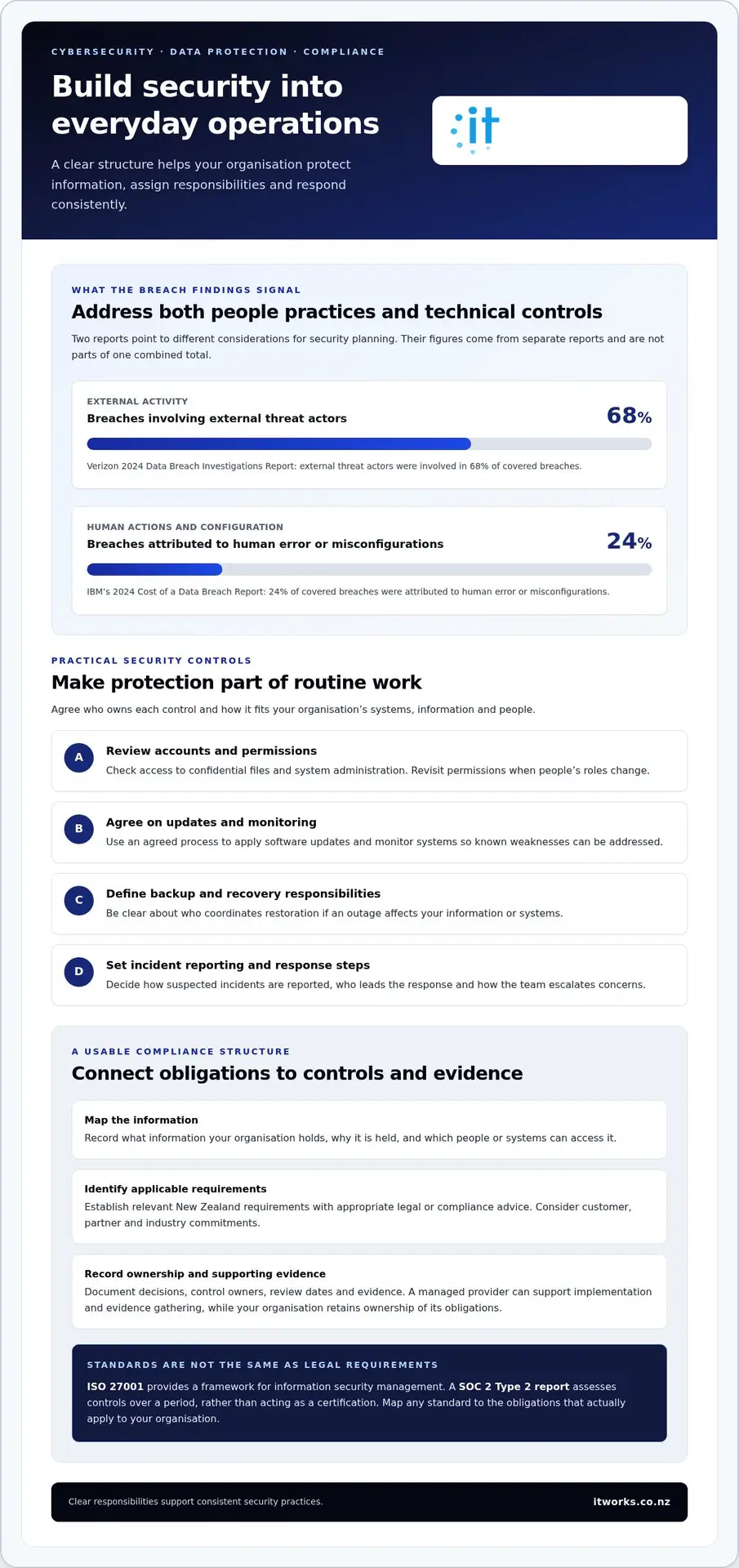
Use specific controls to make protection part of routine operations:
- Review user accounts and permissions, especially for people who can access confidential files or administer systems.
- Apply software updates and monitor systems, so known weaknesses can be addressed through an agreed process.
- Define backup and recovery responsibilities, including who coordinates restoration after an outage.
- Set a clear process for reporting suspected incidents and deciding who leads the response.
Human actions and external activity both matter. IBM’s 2024 Cost of a Data Breach Report attributes 24% of covered breaches to human error or misconfigurations. The Verizon 2024 Data Breach Investigations Report says external threat actors were involved in 68% of covered breaches. These findings show why a plan should address both staff practices and technical controls.
For example, a staff member may retain access to shared files long after changing roles. A scheduled permissions review can identify and correct that access. Proactive monitoring and clear escalation steps also help teams respond consistently, rather than relying on informal knowledge held by one person.
Legal requirements and standards
Legal and compliance requirements are the obligations and control expectations that apply to an organisation’s data, services and industry. Identifying them matters because security measures should reflect the information handled and commitments made to customers, partners and regulators.
Start by mapping the information your organisation holds, its purpose, and the people or systems that can access it. Then identify applicable New Zealand requirements with appropriate legal or compliance advice, and record how each relates to technical controls. A managed provider can support implementation and evidence gathering, but your organisation should retain clear ownership of its obligations.
Standards offer a structured way to assess and communicate security practices. ISO 27001 provides a framework for information security management. A SOC 2 Type 2 report assesses controls over a period, rather than acting as a certification. These frameworks are not interchangeable with legal requirements, so regulated organisations should map each standard to their actual obligations.
For instance, a business handling health information or processing payments should identify relevant industry and customer requirements before selecting controls. HIPAA and PCI-DSS are frameworks associated with healthcare and payment processing, respectively, but New Zealand organisations need to establish which requirements apply to their operations. Keep a record of decisions, control owners, review dates and supporting evidence. This creates a usable compliance structure and helps keep cybersecurity work aligned with business responsibilities.
What are Managed IT Services, and how can they benefit my business?
Managed IT services mean an external provider manages agreed IT operations under an ongoing service arrangement. Risks include reduced day-to-day control, unclear scope, dependency on one provider, and disruption during handover.
Managed services and other IT models
Managed services assign continuing responsibility for agreed IT operations to an external provider. This differs from staff augmentation, where a specialist joins your team but your leaders retain direct management. Professional services usually focus on a defined project, such as a cloud migration or infrastructure review.
Outsourcing is a broad term for arranging external delivery of work. Managed services are one form, usually covering recurring responsibilities rather than a single task. The distinction matters: a business needing ongoing network management has different requirements from one needing temporary help with an application upgrade.
Before choosing a model, list the outcomes and decisions your team wants to retain. For example, leaders might keep ownership of technology priorities while assigning routine system monitoring and user support externally. Clear boundaries help the arrangement complement internal staff instead of creating confusion about who acts.
In-house IT and outsourcing costs
In-house IT costs include more than an employee’s salary. Recruitment, training, leave coverage and specialist knowledge all affect the resources needed to maintain operations. A small team may also depend on one person for several systems, making capacity and continuity important planning factors.
Outsourcing changes the cost structure by replacing some internal workload with an agreed service fee. The comparison depends on scope, existing staff, software and infrastructure complexity, and the support required. Map current spending and staff time against the proposed services, including project work or equipment outside recurring support.
For example, a business with an internal IT lead could retain that strategic role while outsourcing routine maintenance. Another organisation might need broader operational coverage. Compare like with like, and identify which costs will remain internal after the change.
IT functions outsourced to MSPs
A managed service provider can take responsibility for specified technology functions, giving internal teams a defined point of coordination. Common areas include network infrastructure, cybersecurity, cloud environments, backups, software updates, hardware procurement and user support. The scope should reflect the systems your business relies on.
Outsourced IT operations work best when each activity has an owner and an agreed process. For instance, an agreement can explain who handles a new starter’s account, who approves access, and who escalates an application fault. Service level agreements can document expectations and how responsibilities are divided.
Risks become manageable when scope, access and communication are explicit. Keep internal ownership of business priorities, document provider access to systems, and agree how information and responsibilities transfer if the relationship ends. A managed IT services arrangement should make those boundaries clear, while supporting the outcomes your organisation expects.
Planning the transition to managed IT
A well-planned transition links technology decisions to business priorities, staff needs and continuity. Set the scope, ownership and handover sequence before changing access or support processes.
IT expertise and strategic planning
IT expertise and strategic planning connect technical decisions with organisational goals. Outsourcing should support business operations, not simply transfer tasks. Start by documenting key systems, current pain points and planned changes. For example, if a new application is planned, include its access, support and infrastructure needs in the transition plan.
Use that assessment to define what success looks like. Leaders might prioritise reliable access to core software, clearer monitoring or more capacity for innovation. Record which decisions remain internal and where external expertise is needed. This gives the provider a useful view of the organisation’s capabilities, constraints and priorities, while helping staff understand how responsibilities will change.
Choosing and vetting a provider
Choosing a provider means assessing whether its expertise and working model fit your organisation’s operations. The provider will need to coordinate with staff and understand the systems it supports. Ask for a clear scope, defined service responsibilities, escalation processes and a transition plan. Review how monitoring and reporting will help leaders track agreed outcomes.
In Wellington and across New Zealand, compare providers against your actual business needs, not a generic enterprise checklist. Discuss a practical example, such as restoring access to a critical application or supporting a new staff member. A useful assessment explains who leads each task, what information is shared, and how progress is communicated. Include disaster recovery planning, particularly if backups and recovery are central to business continuity.
Avoiding vendor lock-in
Vendor lock-in occurs when systems, records or processes become difficult to transfer from one provider. Planning for portability matters because it preserves your ability to change arrangements without losing access to essential business information. Agree how your organisation can access its data, system documentation, configurations and account records throughout the relationship.
Before transition, create an inventory of services, integrations, administrator accounts and data locations. Specify how information will be provided in usable formats, who will support the transfer, and how access will be handed back or removed. For example, document which business applications depend on a provider-managed account, then establish an organisation-controlled owner for each account.
Include exit planning in the service agreement and review it when systems change. A practical handover plan identifies the records needed, the people responsible for transfer, and how incoming support will receive access. For disaster recovery, document backup locations, restoration procedures and recovery responsibilities. These steps support continuity and make future changes easier to manage.
Subscription fees and predictable IT costs
A managed IT budget is easier to plan when recurring services and extra work are clearly separated. Compare the proposed scope with current internal costs, downtime and network priorities.
Cost savings and predictable fees
Predictable fees replace some variable support costs with an agreed recurring charge, helping leaders plan spending. Providers may charge an upfront setup or transition fee, followed by a flat or near-fixed monthly fee. This structure can make routine support costs easier to forecast, but savings depend on what is included and which costs remain internal.
The price depends on the case and is given after a quote request, with scope, users, devices, systems and support needs shaping the cost. A useful comparison includes existing IT staff time, software and infrastructure costs, plus any project work excluded from the ongoing service.
Cost savings can also come from addressing recurring challenges before they cause downtime. For example, if network performance issues repeatedly interrupt work, identify whether monitoring and maintenance are included in the recurring scope. Then compare that coverage with the operational impact of the interruptions, rather than treating the monthly fee as the only measure of success.
Predictable monthly IT budgets
Predictable monthly pricing gives finance teams a clearer view of planned IT spending. Leaders can separate recurring operations from one-off changes, then align each with the right budget. A scalable agreement should also explain how charges change when staff numbers, devices or business requirements change.
Pricing models differ. Common approaches include per-user, per-device, fixed-fee, pay-as-you-go, à la carte, tiered and hourly charges. Each allocates costs differently. A per-user model may change with staffing, while a fixed fee can make agreed services simpler to forecast. The best comparison starts with the work your business needs, not the model’s label.
Before approving a proposal, map what is covered, what triggers extra work and how changes are handled. Check whether software licensing, hardware procurement, project delivery and support for new locations are included or charged separately. This prevents a predictable base fee from obscuring costs that arise as the organisation changes.
- Separate recurring support from setup, migration and project work.
- Record the users, devices, network and systems covered by the service.
- Clarify how additions, removals and scope changes affect billing.
- Compare included support hours and activities with your internal requirements.
- Review the budget when business operations or technology priorities change.
For example, a growing organisation can forecast its agreed monthly services while planning a separate budget for a new application rollout. Review the service scope alongside business plans so technology spending stays aligned with priorities and supports operational success.
Managed IT services and provider responsibilities
A managed service provider takes responsibility for agreed technology activities, while your organisation retains business ownership and direction. The practical value lies in defining that boundary clearly, so staff know who manages each task and leaders can make informed decisions.
The agreement should describe the services, systems and users covered. It should also explain how work is prioritised, reported and escalated. For example, if staff cannot access a business application, the process should show who receives the request, who investigates it and when the issue moves to another support level.
Responsibilities commonly assigned to a provider can include:
- Monitoring network infrastructure and coordinating maintenance.
- Managing software updates, patching and agreed security controls.
- Supporting users and tracking service requests through to resolution.
- Managing cloud services, backups and recovery processes within the agreed scope.
- Providing technology advice that connects operational needs with business priorities.
These tasks don’t transfer every technology decision. Your organisation still sets its priorities, approves material changes and decides how technology supports its goals. A provider can present technical options and explain trade-offs, while leaders choose the direction. That balance makes the relationship strategic, rather than simply a queue for remote support.
A service level agreement (SLA) records the service expectations and responsibilities both parties have agreed. It should define covered systems, support channels, escalation routes, reporting and exclusions. For instance, the agreement might distinguish routine user requests from a major network interruption, with a separate process for each. Clear definitions help prevent gaps and conflicting assumptions.
Access and information handling also need named owners. Identify which provider staff can access systems, how permissions are approved, and how access is reviewed when responsibilities change. Your internal contact should know where records are kept and how to raise a concern. These steps help preserve oversight without requiring your team to manage every technical task.
Provider performance is easier to discuss when reporting reflects business needs. Agree which updates matter, such as recurring application issues, unresolved requests or planned maintenance. A regular service review gives both sides an opportunity to discuss trends, upcoming changes and priorities. It should lead to clear actions, owners and follow-up dates.
Good provider relationships also plan for change. Document who approves new systems, how projects fit alongside ongoing support, and how responsibilities transfer if the arrangement ends. This structure helps your service provider work as a reliable partner while keeping accountability visible across the organisation.
IT Works: Managed IT Services
IT Works helps New Zealand organisations align technology support with business priorities through Managed IT Services. For leaders planning a transition, that means shaping support around operational needs, cybersecurity and the systems staff rely on.
IT Works also supports connected priorities through Cyber Security, Cloud Solutions, and AI & Automation. The right starting point depends on your organisation’s current systems, internal capabilities and plans for change. A conversation can clarify which responsibilities should sit with a technology partner and how support can contribute to productivity and resilience.
Talk to IT Works about your technology strategy, or visit itworks.co.nz.
Shape your next technology decision
A transition can be more than a change in who handles IT. It’s a chance to connect technology decisions with how your organisation plans to work and grow. A strong business case for managed IT services links the support model to practical priorities, such as building staff confidence, improving coordination or making room for planned business initiatives. Keep those priorities visible as you decide what to change first.
IT Works supports organisations through Managed IT Services, Cyber Security, and AI & Automation. These capabilities can bring operational support, risk reduction and practical innovation into a considered technology strategy. The next step is a conversation about your organisation’s priorities, current challenges and direction, so the discussion starts with business outcomes rather than a list of technical features.
With clear priorities and the right partnership, your technology decisions can support steady progress and give your team greater confidence to focus on its work.
Frequently Asked Questions
How can Managed Services help improve my company’s security?
Managed services can help leaders make security decisions more visible and connected to business priorities. Start by identifying which information and systems would have the greatest effect on customers or operations if unavailable. Then use regular risk reviews to track whether security work addresses those priorities. This gives executives a clearer basis for deciding where to focus investment, without treating every system or risk as equally important.
What type of industries are suited for Managed IT Services?
Managed IT Services can suit organisations in any sector, but the fit depends on how technology supports their work. Consider whether your organisation relies on several cloud applications, operates across multiple sites, or faces changing technology demands during the year. For example, a team with seasonal workloads may value flexible access to IT expertise. The key is matching the operating model to your workflows, systems and capacity, rather than choosing by industry label alone.
What are the business benefits of managed IT services for New Zealand businesses?
For Wellington businesses and organisations across New Zealand, managed IT services can give leaders more visibility over technology priorities and reduce the time spent coordinating separate IT tasks. A business case for managed IT services is stronger when it connects those changes to organisational goals. For instance, a leadership team can align technology planning with a planned service launch, then track whether the supporting work is progressing. This makes technology a more deliberate part of business planning.
What is typically included in a managed IT services agreement?
Alongside the technical service description, an agreement should make the commercial and relationship terms understandable. Review its contract term, renewal process, confidentiality provisions, data ownership, subcontracting arrangements and dispute process. These details help leaders understand how the relationship works beyond routine support. For example, clarify how the agreement handles changes in ownership or organisational structure, so decision-making remains clear as the business evolves.
How do managed IT services compare with hiring an in-house IT team?
An in-house employee can build deep knowledge of your organisation’s people, processes and informal ways of working. An external service model can provide access to different specialist skills without placing every capability inside one role. Consider which work depends on close day-to-day business context and which tasks can be delivered consistently from outside. That distinction helps you decide where internal knowledge is essential and where external capacity could complement it.
How can a business calculate the ROI and total cost of managed IT services?
Set a baseline before the service begins, then compare it with agreed measures after implementation. Track practical indicators such as staff time spent on technology administration, completion of planned projects, or delays affecting customer-facing work. Separate direct financial savings from improvements that enable future work. A business case for managed IT services should show how each measure relates to a business objective, rather than relying on a single headline return figure.
What service levels, response times, and uptime guarantees should an MSP provide?
Ask how any uptime figure is calculated, which systems it covers and whether third-party services are included. A percentage alone can be difficult to interpret without a measurement period, an agreed source of service records and clear treatment of planned maintenance. For response targets, distinguish acknowledgement from service restoration. These definitions help your team assess whether a stated commitment reflects the reliability your operations require.