
What if a phishing test could strengthen security without making staff feel blamed? A phishing attack simulation for employees is most useful when it tests how well an organisation’s guidance, reporting process and security controls work, not who makes a mistake. A poorly planned exercise can undermine trust instead of building confidence, so it needs a clear purpose and sensible safeguards.
The aim is to understand how people respond to realistic messages and where extra support may help. A simulation is only one measure of readiness. A click rate alone won’t show whether staff know how to report a concern or whether email protections are working as intended.
This guide explains how to plan a fair, relevant exercise, set clear boundaries and interpret the findings constructively. You’ll also learn how to turn results into practical improvements, from clearer awareness guidance to stronger security practices. For Wellington and other New Zealand organisations, the goal is a more confident, prepared team supported by a broader cybersecurity approach.
Key Takeaways
- Set a clear objective and choose a scenario based on everyday work, without relying on personal or distressing themes.
- A well-planned phishing attack simulation for employees can show how people interact with messages, report concerns and use follow-up learning.
- Interpret results in context. A click rate alone does not provide a complete picture of organisational readiness.
- Agree on ownership, communication and support before the exercise, so the focus stays on learning rather than blame.
- Use findings to guide wider improvements across email protection, identity and access, monitoring and incident response.
What is a phishing attack simulation for employees, and what can it show?
Staff handle many routine emails, and leaders need a practical way to understand how well the organisation recognises and responds to suspicious messages. A phishing attack simulation for employees is a planned, controlled exercise that sends a benign phishing-style message to a defined group. It should not deliver malware or create a real security incident. Its purpose is to observe responses and identify opportunities to improve.
The value is not simply finding out who interacted with a message. A simulation can show whether staff recognise a suspicious request, know how to report it and receive useful guidance afterwards. It can also prompt a review of the reporting route and response process. These observations are clues for improvement, not a complete verdict on the people or systems involved.
What does a simulated phishing attack test?
It tests how employees recognise, report or respond to a simulated message, and whether the organisation’s processes support a confident response. For example, a message about a shared document might prompt someone to pause, report it through the agreed channel or open it. Each action provides context for review, not a judgement of an individual’s ability.
If staff are unsure where to report a suspicious email, that may point to a gap in communication or process. If they do report it, leaders can check whether the report reaches the right team and whether the next steps are clear. In an organisation with 15 to 75 staff, responsibilities can overlap, so it helps to know who receives reports and how they are handled.
Interpret results alongside the conditions of the exercise. A single interaction does not explain why someone acted, whether instructions were clear or whether email protections and support processes worked well. The wider signal may be about communication, reporting pathways or access to guidance, rather than an individual alone.
How is a simulation different from phishing awareness training?
Training gives staff guidance and practical skills for recognising suspicious messages and deciding what to do next. A simulation provides a safe opportunity to apply that guidance in a controlled setting. Background on phishing and user training also describes the role of simulated exercises in learning.
The two activities work best together. Training sets expectations and explains the reporting process; a simulation can show whether that process is understood in practice and where more support could help. If the exercise reveals confusion, clarify the guidance or process, then review later whether the change is helping.
A simulation is one input to security improvement, not a substitute for layered controls. Email protection, identity and access practices, monitoring and incident response each play a different role. Read simulation results alongside those safeguards and the organisation’s wider needs. This gives leaders a balanced view and helps direct effort towards practical improvements, without treating one exercise as proof that the organisation is secure or insecure.
How to design an employee phishing simulation that reflects real work
A useful exercise starts with a business question, not a template. Before planning a phishing attack simulation for employees, decide what you want to learn, who will take part and how you will use the findings. This keeps the exercise relevant to day-to-day work and gives decision-makers a clear basis for reviewing the outcome.
Set the objective and scope first
Choose one focused learning question, such as whether employees know how to report a suspicious email. Then define the participant group, timing, boundaries and internal owners. Agree who approves the message, responds to staff questions and reviews the results. Decide in advance how you will explain the exercise and provide support afterwards, so the process is clear and consistent.
Choose a realistic, safe scenario
Build the message around a familiar work task, such as a routine document-sharing notification or an account update. The aim is to reflect the decisions staff make, not to make the exercise as deceptive as possible. Avoid themes involving personal hardship, sensitive events or an employee’s individual circumstances.
Keep the exercise controlled and benign. It should not collect real passwords or expose credentials. Before launch, confirm what the message will prompt recipients to do, what information the exercise records and how that information will be protected. Clear boundaries keep the focus on organisational learning.
Brief decision-makers and prepare the exercise
Agree the plan with the people responsible for technology, communications and staff support. Make sure they understand the objective, scope, reporting route and follow-up process. Consider how the timing fits with normal work, and avoid running the exercise during a major business change or disruption. The goal is to test everyday processes fairly, not to create extra pressure.
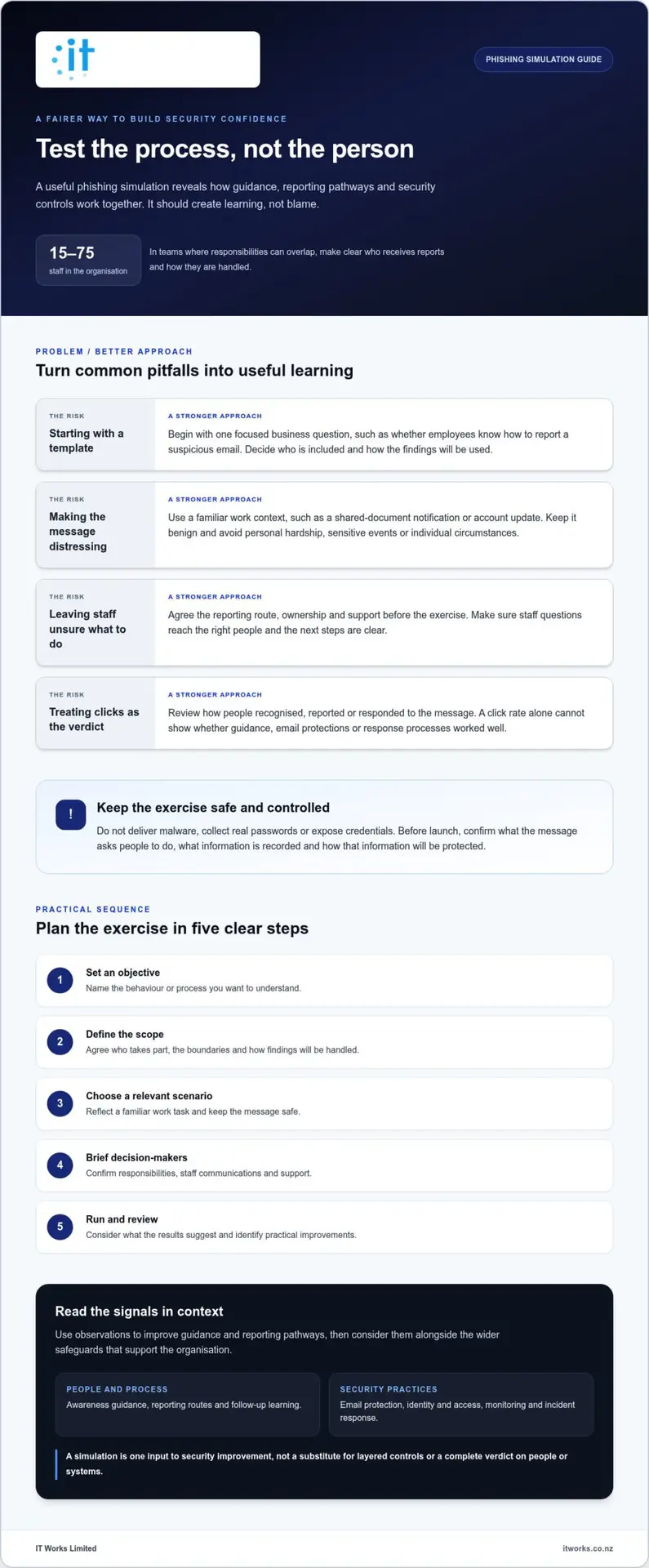
Use this sequence to keep planning practical:
- Set an objective: Identify the behaviour or process you want to understand.
- Define scope: Agree who is included, the boundaries and how findings will be handled.
- Choose a scenario: Use a familiar business context and keep the message safe.
- Brief decision-makers: Confirm responsibilities, staff communications and support.
- Run and review: Deliver the exercise, then assess what the results suggest and what could improve.
Select tools that fit your environment
Separate the exercise design from the platform used to deliver it, as tools and settings differ. Microsoft Defender for Office 365 includes a product-specific feature called Attack Simulation Training. Available options and setup depend on the Microsoft environment. For current instructions, refer to Microsoft’s Attack Simulation Training documentation and check the details against your configuration before planning the exercise.
Whichever tool you use, make deliberate choices about the audience, scenario, timing, learning resources and reporting. Organisations reviewing how a simulation fits their wider security priorities can discuss cybersecurity planning with IT Works.
What should you measure, and how should you interpret the results?
Simulation results are most useful when they help you decide what to improve. A click figure may show that someone interacted with a message, but it cannot explain why, whether they knew how to report it or how well the organisation responded. For a phishing attack simulation for employees, review several signals together and treat them as prompts for learning, not a scorecard for judging staff.
Which simulation metrics are useful?
Choose measures that connect directly to the exercise objective and can be collected consistently. Consider:
- Message interaction: Record the actions the exercise is designed to observe, such as opening a link or attachment. This indicates interaction with that message, not overall judgement or security awareness.
- Reporting behaviour: Track whether employees use the agreed channel to flag the simulated message. Reporting is a positive signal of engagement, including when someone interacts with the message before reporting it.
- Response time: If reliably available, note how long it takes for a report to reach the right team. Consider whether the timing reflects staff behaviour, the clarity of the reporting route or the process for handling reports.
- Follow-up learning: Record whether participants complete the relevant learning activity. Completion shows the material was accessed, but does not confirm by itself that the guidance was understood or retained.
Define each measure before launch. Specify what counts as a report, which actions count as interaction and the time window used for review. Consistent definitions make results easier to interpret and help avoid comparisons based on different measurement methods.
How do you turn results into useful learning?
Start with patterns, not names. If several staff members do not use the reporting route, make it easier to find or explain what happens after a report is sent. If a message causes widespread uncertainty, consider whether communications or guidance need clarification. Ask what would make the safe response easier during normal work.
Review results carefully. Limit access to identifiable information to people who need it for the exercise, and share organisation-wide findings in a way that protects individual privacy and dignity. Avoid ranking or naming staff. A constructive review should make people more comfortable reporting genuine concerns, not less willing to raise them.
Use findings to choose a practical improvement, such as clearer reporting instructions, a focused learning reminder or a review of relevant email and identity controls. Record the action and its owner so the exercise informs day-to-day security practices rather than ending with a report.
Comparisons can show change, but only when the audience, scenario and measurement approach are sufficiently similar. If those conditions differ, describe what changed and interpret the results cautiously. The aim is to understand what the organisation can strengthen next, not to prove one campaign was better.
How to keep phishing simulations fair, useful and constructive
A simulation should support learning, not rank, shame or punish employees. That principle needs to guide the exercise from planning through follow-up. For a phishing attack simulation for employees to build confidence, people need to understand that the purpose is to improve organisational readiness, not to catch individuals out or judge their ability based on one action.
Before the exercise, agree its purpose with relevant leaders and decide who is responsible for each part. In a smaller organisation, one person may hold more than one role, but responsibilities still need to be clear.
- Planning: Approves the objective, scope and safeguards.
- Communications and support: Explains the learning purpose and responds to staff questions.
- Review: Handles results appropriately and identifies improvements.
How can you protect employee trust?
Set expectations with leaders before launch, including how staff will be supported and how findings will be used. Decide whether employees will receive general notice that simulations form part of security awareness, while keeping the exact exercise details undisclosed. Avoid public scoreboards, naming individuals or using results as a shortcut for performance management.
Protect privacy by limiting access to identifiable results to people who need them for the exercise. Share wider findings as themes, not individual stories. This helps leaders address process or communication gaps without making employees feel exposed.
What should happen after the simulation?
Follow up in a calm, practical way. A short learning message can explain the signs the exercise was designed to highlight, reinforce how to report a suspicious message and remind staff what happens after they report one. Keep the tone supportive. Make it easy for people to get a clear answer if they have questions or need help with the reporting steps.
Then review whether the reporting channel and response steps are straightforward. Can an employee find the right reporting option quickly? Does the report reach the person or team responsible for responding? If the process is unclear, improve it rather than assuming the issue sits with staff.
Turn the review into specific follow-up actions. Assign an owner to each improvement, such as updating guidance, clarifying the reporting route or reviewing a relevant security control. Set a later point to check progress and whether the change has made the process easier to follow. This connects the exercise to day-to-day practice.
Handled thoughtfully, a simulation can reinforce a culture where people feel comfortable raising concerns. Reviewing how awareness, processes and security controls fit together helps organisations make measured improvements that suit their needs.
Build phishing simulation into a broader cybersecurity plan
A simulation is most valuable when its findings inform the organisation’s wider security priorities. It can highlight where awareness guidance or reporting steps need attention, but it cannot protect accounts, filter suspicious email or manage an incident on its own. For New Zealand organisations with 15 to 75 staff, connecting the exercise to existing controls helps turn observations into practical, coordinated improvements.
Connect findings to layered cybersecurity
Look for themes that relate to other parts of your security approach. If staff are unsure how to report a suspicious message, make the reporting route clearer and check that reports reach the right people. If the exercise points to a need for more guidance, reinforce it through security awareness. Where appropriate, review email protection and identity and access practices alongside those findings.
Consider how the organisation would respond if someone reported a genuine suspicious email. Are responsibilities clear? Do the relevant people know what to do next? These questions connect employee awareness with monitoring and incident response, helping the human and technical parts of the plan work together.
Keep the exercise in perspective. A phishing attack simulation for employees offers one source of insight alongside technical controls, response planning and other security practices. The right scope and cadence depend on your organisation’s needs, changes to its working environment and what previous reviews have identified. There is no universal frequency that suits every organisation. Set a proportionate approach and revisit it as priorities change.
When can a cybersecurity partner help?
External guidance can help leaders connect awareness activity with business priorities and existing safeguards. A partner can support a broader review of security awareness, email protection, identity and access, monitoring and incident response, so improvements address the organisation as a whole rather than one measure in isolation.
IT Works is a Wellington-based technology and cybersecurity partner supporting organisations across New Zealand. Its cybersecurity services can form part of a practical, layered approach aligned with an organisation’s needs and wider priorities.
To plan next steps, identify which findings need action, who will own each improvement and how progress will be reviewed. Connecting learning, processes and technical safeguards helps build a more confident and resilient organisation.
Make the next security improvement count
Choose one improvement your organisation can realistically put into practice, then make responsibility for it clear. This could mean updating a staff resource, clarifying who reviews reports or adding a security awareness goal to a wider technology plan. Keep the action proportionate to what your review has shown.
If you are considering a phishing attack simulation for employees, use the planning process to check that the exercise supports business priorities and fits alongside existing security work. A focused review can clarify where to direct attention next, without treating one exercise as the whole measure of readiness.
Small, well-chosen improvements can help your team build confidence and strengthen security practices over time.
Frequently Asked Questions
What is a phishing attack simulation for employees?
It is a planned workplace exercise that lets an organisation practise handling a phishing-style message without involving a real attack. For example, leaders can check whether the hand-off from an employee who flags a message to the person assessing it is clear. The exercise should have a defined learning purpose and agreed safeguards, so it informs organisational readiness rather than becoming a judgement of an individual’s capability.
Are phishing simulations effective for employee cybersecurity awareness?
They can help when they lead to a useful change in how the organisation works. One practical test is whether staff can apply the guidance to a message with a different format or request from the one used in training. Review whether the guidance fits the tools and processes people use in their roles. A simulation can inform this review, but it cannot establish that everyone will recognise every phishing attempt.
How often should an organisation run a phishing simulation?
Set a schedule that suits your organisation, and revisit it when work practices change. A new email system, a revised reporting process or a change in staff roles may be a reason to review the exercise plan. Include the exercise in broader security planning rather than scheduling it automatically. This keeps the activity relevant and gives the organisation time to act on what it learns.
Can a phishing simulation collect employees’ passwords?
A simulation should not ask employees to provide their real passwords. A safe design can use a mock landing page that displays a learning message without accepting credentials. Before approving the exercise, have the responsible security lead review what the page does, what event data is recorded and how long it is retained. If the exercise tool offers credential collection, ensure that option is disabled.
What should employees do if they click a simulated phishing link?
Follow the organisation’s instructions for the exercise and be open about what happened. Concealing a response does not help improve workplace processes. If you entered a real password before realising a message was suspicious, use a trusted route to change it and notify your IT or security contact promptly. Do not return to the message link to sign in or verify your account.
How do you measure the success of a phishing simulation?
Decide what a successful outcome means before the exercise begins. For instance, you might want to know whether the right team can assess a reported message without needing the employee to resend information. Afterwards, check whether an agreed change was put into practice, such as updating a staff resource or making a reporting option easier to locate. This focuses the review on operational progress, not just campaign activity.
Can a phishing simulation damage employee trust?
Yes, particularly if staff feel the exercise breaches workplace expectations or uses a scenario that affects them personally. Make it easy for employees to raise concerns privately, and respond constructively if the exercise has an unintended impact. Before running another campaign, consider that feedback alongside the organisation’s agreed boundaries. Taking concerns seriously shows staff that their experience matters as the organisation improves its security practices.