
What if reducing cybersecurity risk depended less on expecting staff to get everything right, and more on making the safer choice easier? For organisations in Wellington and across New Zealand, preventing human error in cybersecurity starts with recognising how everyday workflows, unclear processes and competing demands can create opportunities for mistakes.
It’s understandable to look first to staff training. Awareness matters, but a session on its own may not change what happens when someone is busy, unsure or working around an awkward process. A more supportive approach looks at the conditions behind common errors, then adds practical safeguards without blame.
This article explores how to identify everyday actions that can create risk and reduce the impact when something goes wrong. You’ll learn how to make security controls fit the way people work, combine clear guidance with technology, and assign ownership for ongoing improvements. The result is a considered security approach that supports staff, protects business operations and builds confidence over time.
Key Takeaways
- Map recurring risks to the workflows, access and decisions involved, rather than treating mistakes as individual failings.
- Look for interruptions, time pressure and unclear ownership that can make secure steps harder to follow.
- Use training to build awareness, then match safeguards and process changes to the risks they can address.
- Make preventing human error in cybersecurity practical by prioritising improvements according to business impact, likelihood and fit with daily work.
- Give leaders and teams clear responsibilities, and review improvements regularly to support resilience and confident operations.
What preventing human error in cybersecurity means for your organisation
Human error in cybersecurity is an unintentional action or oversight that can affect the confidentiality, accuracy or availability of information or systems. It isn’t a character flaw, nor does it have one cause. Preventing human error in cybersecurity means understanding how everyday decisions interact with the access people have, the processes they follow and the technology they use.
A mistake may be small on its own, but its effect depends on the surrounding conditions. For example, sharing a file with the wrong recipient could have greater consequences if access permissions are broad or there is no clear way to correct the mistake. A rushed approval may be more likely if instructions are unclear or a process has too many steps. The aim is to understand both the action and the conditions around it.
That distinction helps organisations focus on prevention rather than blame. A person may make an error, but system design can influence how likely it is and how much impact it has. A broad overview of human error in cyberattacks sits within a wider picture: cyberattacks can involve human actions as well as technical weaknesses. Looking at both helps leaders make balanced security decisions.
Which everyday actions can increase cyber risk?
Examples include clicking a phishing link, reusing a password, sharing sensitive information with the wrong person, delaying an update or using an unapproved device for work. These are possibilities to consider, not assumptions about your staff. The relevant question is whether a particular action could happen in your organisation’s workflows, and what access or safeguards might affect the outcome.
Consider how each example connects to the work itself. Is it easy to check whether a request is genuine? Are staff clear about which devices and tools are suitable for work? Can they share information with the right people without creating unnecessary workarounds? These questions reveal where guidance, permissions or technical controls may need attention.
Why blame is a poor prevention strategy
Blame can make people less willing to report a near miss, such as noticing that information was almost sent to the wrong recipient. A delay in reporting can make it harder for an organisation to respond appropriately and learn from what happened.
Instead, make it straightforward to raise concerns and ask for help. If instructions are unclear, a workflow is rushed or a security step is difficult to follow, treat that as useful information. Leaders, managers and staff all have a part in improving security, while technical teams can help identify safeguards that fit the work. A supportive response turns reports into practical learning and helps strengthen the organisation without making individuals solely responsible for outcomes.
How people, processes and technology shape cybersecurity mistakes
Cybersecurity decisions are part of everyday work, often alongside meetings, deadlines and interruptions. A staff member switching between tasks may miss a detail in an access request. If responsibility for checking it is unclear, the process can make an oversight more likely. The same action can have different consequences depending on the access the person has and the safeguards in place.
Safer systems reduce reliance on perfect recall. Clear steps, sensible access and well-designed technology can help people make secure choices even when work is busy. This is a practical foundation for preventing human error in cybersecurity: design work so that security supports the task, rather than depending on everyone remembering every instruction at every moment.
How work design influences staff decisions
Consider a manager asked to approve a change while moving between meetings. If the request doesn’t clearly state what access is needed, who will use it or how long it should remain in place, the manager may have to guess or delay the decision. Similarly, file-sharing instructions that don’t distinguish between internal and external access can leave staff uncertain about which option to choose.
Clear ownership helps. Define who requests, approves and reviews access, and give staff straightforward guidance they can apply in their normal workflow. This isn’t about treating ordinary lapses in attention as deliberate policy breaches. It’s about recognising reasonable human limitations, then making safe actions clearer and easier to complete.
How technology can reduce or amplify risk
Technology can limit the reach of an accidental action, or make its impact broader. If someone has more access than their role requires, a mistaken change or disclosure may affect more information than necessary. Reviewing permissions and matching access to job needs helps reduce that exposure. It also gives managers a clearer basis for approving requests.
Identity and access controls help organise who can use particular accounts, systems and information. Email protection can support safer handling of messages, while endpoint protection helps protect the devices people use for work. These controls are most useful as part of a wider approach, not as guarantees that every mistake or incident will be prevented.
Work design and technical safeguards should reinforce each other. A clear approval process is less useful if the system makes it hard to apply, while a technical control can frustrate staff if it blocks normal work without a practical route forward. NIST’s security and privacy controls offer a broader reference for thinking about safeguards across people, processes and systems.
For organisations reviewing these connections, IT Works’ cybersecurity services combine practical security support with advice aligned to business needs. This can help turn observations about day-to-day work into clear areas for improvement.
Do training and security tools prevent human error on their own?
Training, technical safeguards and well-designed processes each address different parts of cybersecurity risk. Training helps people recognise suspicious requests and understand how to respond. Controls can reduce the chance that an error leads to unauthorised access or wider exposure. Process changes make secure actions clearer and easier to follow.
None works well as a standalone fix. Awareness can’t remove a confusing approval process, and a technical control may not help if it disrupts essential work or is poorly understood. For organisations with limited time and internal IT capacity, the practical question is which combination addresses the most relevant risks with the least unnecessary friction.
What security awareness training can and cannot do
Relevant, ongoing learning can help staff recognise suspicious messages, handle information carefully and feel more confident about raising concerns. It’s most useful when examples reflect the tasks people actually do, rather than relying on generic reminders. Training can’t remove time pressure, unclear instructions or weaknesses in systems, so it should support practical safeguards rather than carry the responsibility alone.
| Measure | Role | Limitation |
|---|---|---|
| Awareness training | Builds recognition and confidence to report concerns. | Can’t remove workflow pressures or system weaknesses. |
| Process changes | Clarify approvals, responsibilities and safe ways to share information. | Need to be easy to follow and kept relevant as work changes. |
| Multi-factor authentication (MFA) | Adds a further identity check when signing in. | Doesn’t address every risk involving accounts or information. |
| Email protection | Supports safer handling of email threats. | Doesn’t replace staff judgement or clear reporting steps. |
| Access and endpoint protection | Can limit access to information and help protect work devices. | Needs to fit roles and be maintained as requirements change. |
This comparison can help leaders focus their effort. Start with the risk a measure is intended to address, then consider whether staff can use it as part of normal work. A control that’s proportionate and practical is more likely to support consistent behaviour than one that adds steps without a clear purpose.
How layered safeguards complement staff awareness
MFA can add a check beyond a password, while access management helps ensure people can reach the information needed for their role. Email protection supports safer handling of messages, and endpoint protection helps protect devices used for work. Each has a distinct purpose. Together with clear processes and security awareness, these measures can reduce exposure and limit consequences, but no single tool prevents every error or incident.
Controls don’t have to make work harder. Review where friction occurs, such as repeated approvals or unclear sharing options, and adjust the process or safeguard to suit the task. In practice, preventing human error in cybersecurity means combining useful guidance with controls people can follow, then refining that combination as work changes.
A practical way to reduce human error in cybersecurity
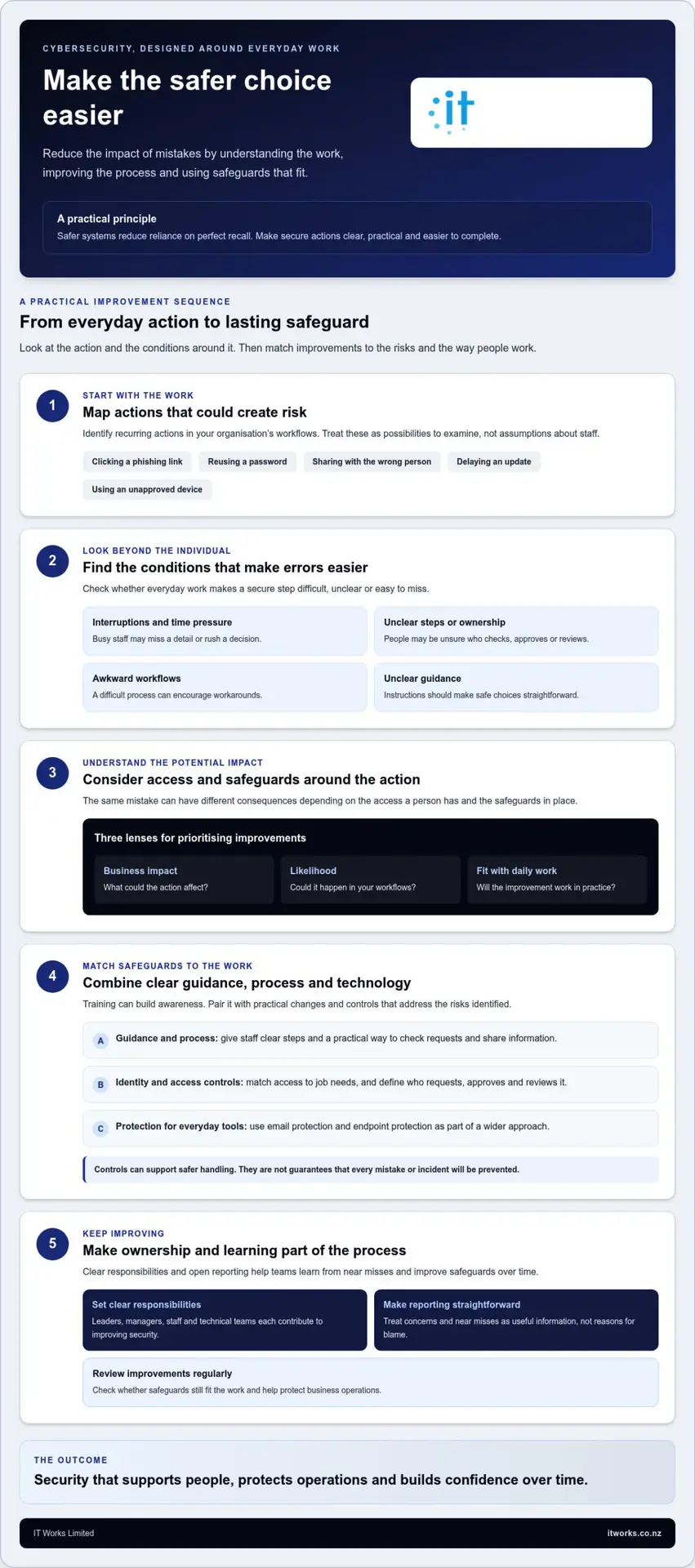
For organisations with limited time and internal IT capacity, a manageable plan is more useful than a long list of controls. Start with work that matters to the organisation, then choose improvements that are practical to put in place and maintain. This makes preventing human error in cybersecurity a focused process, rather than another broad task competing for attention.
Assess important workflows, prioritise the risks, make targeted improvements, assign ownership, then review what you learn. Use the sequence below to turn that approach into clear actions.
Start with the situations where mistakes matter most
Begin with a simple map of important information, systems and everyday workflows. Look at how staff access shared files, approve requests, handle customer or organisational information, and use devices for work. The aim isn’t to document everything. It’s to identify where an unclear instruction, broad access or confusing approval could make an error more likely or consequential.
- Identify recurring risks and key workflows. Ask staff and managers where they encounter uncertainty or repeated workarounds. Focus on processes that involve important information or systems, and note where an error could affect operations.
- Assess impact and likelihood. Consider what could happen if something goes wrong, how plausible the situation is in normal work, and what safeguards are already in place. This helps distinguish a priority from a concern that can be monitored.
- Choose a few practical improvements. Select changes that address the priority risks and fit the way people work. Examples might include clearer file-sharing guidance, a simpler approval route or a review of who has access to a system. Start with changes the organisation can implement and support.
- Assign an owner to each action. Name who is responsible for making the change, communicating guidance and checking that it remains useful. Ownership can sit with a relevant manager or team, with technical support where needed. The important point is that tasks don’t become everyone’s responsibility and no one’s job.
- Review the result and adjust. Check whether the change is being followed and whether it has made the workflow clearer. Use staff feedback, reported concerns and changes to systems or roles to decide what should be refined or addressed next.
Make reporting and learning part of the process
Staff need a clear, supportive route to report a mistake, a near miss or a suspicious message. Tell them who to contact and what details are useful, such as what happened and which account or information may be involved. Keep the reporting steps easy to find, so people don’t have to work out the process while deciding whether to speak up.
Prompt reporting gives the organisation a better opportunity to respond and understand what occurred. Review reports for patterns, such as repeated uncertainty about approvals or a recurring difficulty with a process. Focus first on what could make the workflow safer and clearer, rather than defaulting to individual blame. A short, regular review can help an organisation with limited capacity keep improvements moving without creating a complex programme.
Make cybersecurity improvement an ongoing organisational practice
Security improvements last when they’re part of how an organisation manages change and everyday work, not a separate task left to the IT team. Leaders can set priorities, managers can reinforce practical guidance, and staff can raise questions or concerns. This shared ownership helps make preventing human error in cybersecurity a continuing business capability rather than a one-off project.
A regular review doesn’t need to become a lengthy exercise. A planned check-in can consider whether access still suits people’s roles, whether policies remain clear, and whether staff are asking the same questions about a process. The right rhythm will depend on how your organisation works. The purpose is to notice when systems, responsibilities or business needs have changed and respond thoughtfully.
Build ownership into normal business routines
Include cybersecurity in conversations about new systems and changes to business processes. Before a new way of sharing information or approving work is introduced, consider who needs access, what guidance staff will need and how the process will be reviewed. Give actions a named owner and a clear place in existing planning or management routines, so they remain visible without relying on one person to keep them moving.
Feedback and incident learnings can also help teams refine instructions and controls. If staff repeatedly ask how to handle a particular task, that may point to guidance that needs to be clearer. If responsibilities or tools change, review the relevant access and process. These adjustments can support smoother work as well as more consistent security.
Where a technology partner can support progress
For organisations with limited internal capacity, a technology partner can help connect priorities with practical changes across people, processes and systems. This might include reviewing how identity and access, email protection, endpoint protection, security awareness and other safeguards work together. The aim is to align improvement with business needs and make ownership and next steps easier to manage, not to add controls without a clear purpose.
IT Works is a Wellington-based technology and cybersecurity partner, combining strategic advice with operational cybersecurity support for New Zealand organisations. Its Managed IT Services and Cybersecurity services bring strategic guidance together with practical support. A partner who understands both the technology and how it supports day-to-day work can help leaders keep improvement focused on productivity, resilience and confidence. In turn, staff have clearer guidance and a more considered environment in which to do their jobs.
Keep the next step straightforward: identify the security question that matters most to your organisation, then decide what a useful improvement would look like. A measured approach makes progress easier to sustain and review as your organisation changes.
Make your next security improvement count
Cybersecurity progress doesn’t need to begin with a major programme. Choose one change that would make secure work clearer or easier, give someone responsibility for moving it forward, and decide how you’ll know whether it has helped. That small commitment can create a useful starting point for preventing human error in cybersecurity, while keeping improvement connected to the needs of your organisation.
As your people, systems and priorities change, revisit what’s working and where staff need better support. Over time, this steady attention can help make security a normal part of good business practice, not an extra burden carried by individuals or left solely to IT. The goal is an organisation where people can work confidently and leaders have a clearer view of how security supports day-to-day operations.
Practical progress is built one considered step at a time. Your organisation can make that progress in a way that supports both its people and its work.
Frequently Asked Questions
Can human error be eliminated from cybersecurity?
No, an organisation can’t ensure that nobody will ever make a cybersecurity mistake. The realistic goal of preventing human error in cybersecurity is to make mistakes less likely and limit what they can affect. For example, a confirmation step before changing supplier payment details can catch an incorrect or misleading request, while restricted access can limit the information affected if someone acts incorrectly. Review safeguards as work and responsibilities change.
Is security awareness training enough to prevent cybersecurity incidents?
No, training is useful, but it can’t address every source of risk on its own. It can help staff recognise an unusual sign-in request or feel confident checking an unexpected message. Access controls can limit what an account can reach, while email protection can support safer handling of messages. Clear steps for approvals and reporting also help people act on what they’ve learned during normal work.
What should staff do if they click a suspicious link?
Staff should follow their organisation’s reporting process promptly, even if they’re unsure whether anything has happened. They should share what they clicked, when it happened and any details requested by the organisation’s procedure. Avoid entering further information or following additional instructions from the message. Don’t delay because of embarrassment: a prompt, factual report helps the right people assess the situation and decide what action is appropriate.
How can a small organisation improve cybersecurity without a large internal IT team?
A small organisation can make steady progress by focusing on a few important workflows rather than trying to address every possible risk at once. For example, identify who owns access approvals, agree how staff raise suspicious messages, and choose a safeguard that fits the way work is done. Assign responsibility for checking progress, and use IT Works’ technology and cybersecurity expertise when specialist guidance can help clarify priorities and practical next steps.
Does multi-factor authentication prevent every account compromise?
No, multi-factor authentication adds a layer of protection to sign-ins, but it doesn’t guarantee that an account can’t be compromised. Its value depends on being part of a broader approach. Limit account permissions to what each person needs, review access when roles change, and make it straightforward for staff to report unexpected sign-in prompts. These complementary measures can help reduce exposure and support a timely response to concerns.
Who is responsible for preventing human error in cybersecurity?
Responsibility is shared across leaders, technology teams, managers and staff. Leaders set priorities and make sure security is considered in business decisions; technology teams help implement and maintain suitable safeguards; managers clarify responsibilities in daily work. Staff contribute by following practical guidance and raising concerns. Clear ownership matters: for example, name who approves access and who reviews it when someone changes roles.