
What if the best way to strengthen your IT function isn’t to hand it over, but to give your existing team the right support? Your people understand the organisation and its priorities, but limited capacity can leave projects, specialist needs and strategic work competing for attention. Co-managed IT services for businesses with IT staff can add capability while keeping internal ownership in place.
The value depends on getting the partnership right. Unclear responsibilities can create duplicated effort or leave important work without a clear owner. A well-defined arrangement should make it easier for your team and provider to work together, access skills you don’t have internally and stay focused on business needs.
This guide explains how to define responsibilities, assess providers and agree on practical ways of working. You’ll also learn what to consider when choosing support for escalation, cybersecurity, service continuity and longer-term technology planning, so an external partner strengthens your team rather than replacing it.
Key Takeaways
- Understand when co-managed support can fill capacity or skills gaps without replacing your internal IT team.
- Use a responsibility matrix to clarify who handles day-to-day support, security, projects and key decisions.
- When comparing providers, look for clear escalation paths and support that complements your existing capability. Co-managed IT services for businesses with IT staff should be shaped around documented needs, not a one-size-fits-all model.
- Prepare for a smoother partnership by recording your systems, recurring issues, current providers and planned technology work.
- Choose a partner that shares accountability, works collaboratively and connects operational support with business priorities.
Co-Managed IT Services for Businesses with IT Staff: When Does the Model Fit?
An internal IT team can know the organisation well and still lack the capacity or specialist skills to meet every need. Co-managed support offers another option: bring in an external provider to work alongside staff, with responsibilities agreed to suit the organisation’s priorities and existing capability.
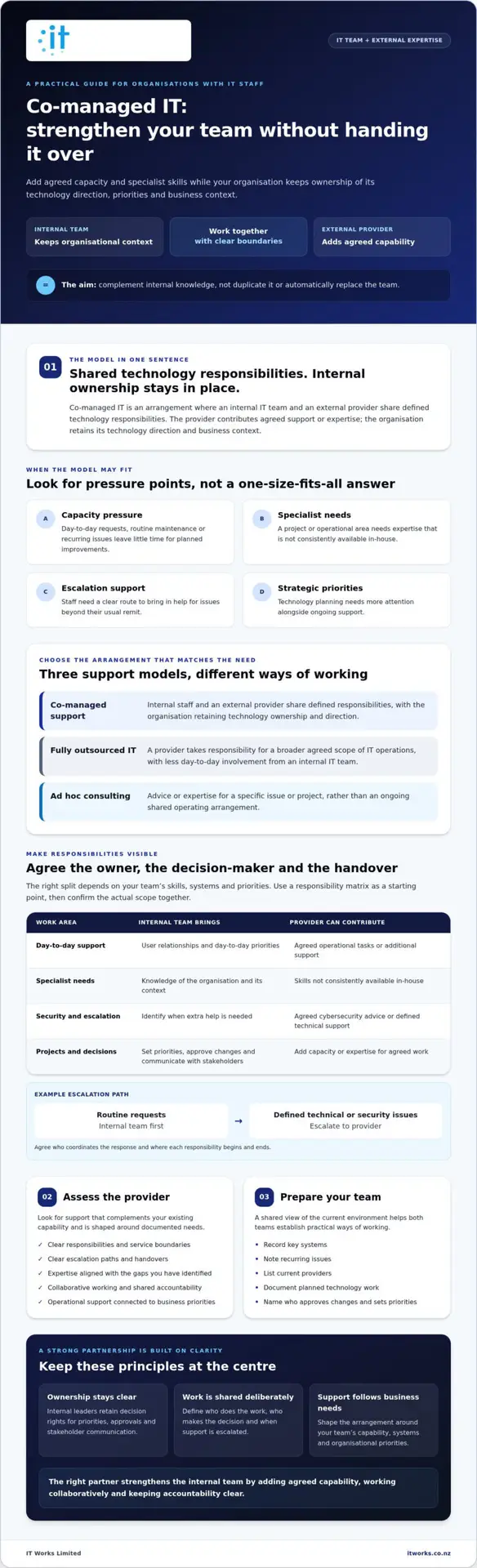
Co-managed IT is an arrangement where an organisation’s internal IT team and an external provider share defined technology responsibilities, while the organisation retains ownership of its technology direction and business context. The provider adds agreed support or expertise; it doesn’t automatically take over the internal team’s role.
What is co-managed IT support?
In practice, the division of work can vary. Internal staff might manage user relationships and day-to-day priorities, while a provider contributes specialist skills or helps with agreed operational tasks. The arrangement should reflect what the team already does well and where additional capacity would make a practical difference.
A provider may be a Managed Service Provider (MSP), an organisation that delivers managed IT services. In a fully outsourced model, a provider takes responsibility for a broader agreed scope of IT operations, with less day-to-day involvement from an internal IT team. Ad hoc consulting is different again: it usually provides advice or expertise for a specific issue or project, rather than an ongoing, shared operating arrangement.
When might a business with IT staff need a partner?
Consider co-managed IT services for businesses with IT staff when operational demands regularly push improvement work down the list. If the team is occupied with user requests, routine maintenance or recurring issues, projects such as improving systems, strengthening security or planning cloud changes may struggle to progress.
A partner may also help where the organisation needs access to skills that aren’t consistently available in-house. That could involve cybersecurity, cloud services or Microsoft 365, depending on the gaps and the provider’s agreed capabilities. The aim is to complement internal knowledge, not duplicate it.
- Capacity pressure: day-to-day work leaves little time for planned improvements.
- Specialist needs: a project or operational area calls for expertise the team doesn’t have readily available.
- Escalation support: staff need a clear route to seek additional help for issues beyond their usual remit.
- Strategic priorities: technology planning needs more attention alongside ongoing support.
Planned escalation can make support more predictable. Agree which issues the internal team handles, when they should involve the provider, and who coordinates the response. For example, a responsibility guide might state that routine requests go to the internal team first, while defined technical or security issues are escalated to the provider. The right model gives the team room to focus on organisational priorities while keeping decisions and accountability clear.
How Co-Managed IT Services Divide Work, Decisions and Escalations
A co-managed arrangement works best when both teams know what they own, where decisions sit and how work is handed over. The right split depends on your internal skills, systems and priorities. Use the framework below as a starting point, then confirm actual responsibilities and service boundaries in the proposed arrangement.
Which IT responsibilities should stay with your internal team?
Your internal team holds valuable organisational context. It understands how people work, which services are business-critical and how technology decisions affect wider priorities. Even where a provider takes on agreed delivery tasks, internal leaders should retain decision rights for priorities, approvals and stakeholder communication.
That doesn’t mean every organisation needs the same roles or skills in-house. Allocate ownership according to your team’s structure and capability, and identify who has authority to approve changes or set business priorities. For each responsibility, name a decision-maker as well as the person or team doing the work. This avoids confusion when a technical recommendation needs business approval.
Where can an external IT provider add capacity?
A provider can contribute additional capacity or specialist expertise across agreed areas. For example, it might help resolve support requests, maintain infrastructure, advise on cybersecurity or deliver a defined project. The division should be tailored, not assumed. This managed IT support guide offers broader context on service arrangements.
A sample responsibility framework could look like this:
- User support: Internal staff manage business context and priorities; the provider handles agreed requests or receives escalations.
- Infrastructure: Internal staff approve changes and share system knowledge; the provider supports agreed maintenance or technical work.
- Security: Internal leaders set risk priorities and coordinate decisions; the provider contributes agreed expertise and support.
- Projects: The organisation sets outcomes and approvals; the provider supplies project capacity or specialist delivery where agreed.
- Strategy: Business leaders retain ownership of direction; internal staff and the provider contribute advice based on organisational needs.
Make handovers explicit. For each area, record who receives a request, what information should accompany it, when it should be escalated, who updates stakeholders and who signs off the outcome. A shared process helps prevent duplicated effort and avoids tasks falling between teams. Confirm response measures and the provider’s available capabilities for the specific arrangement before relying on them.
Clear roles also make it easier to adapt as needs change. Forrester’s discussion of the future of managed services provides a wider perspective on how managed services may evolve. For a practical conversation about aligning technology responsibilities with business priorities, explore IT strategy and consulting.
Comparing Co-Managed IT Services for Businesses
A provider’s service list won’t tell you how well it will work with your internal team. For co-managed IT services for businesses with IT staff, compare how each provider understands your needs, shares responsibility and communicates, not just the tasks it can perform.
Use the same questions and criteria for each provider. A simple scorecard can help your team compare responses consistently:
- Responsibility boundaries: Does the provider explain what it will own, what stays with your team and how shared tasks are managed?
- Escalation and contact: Are the escalation route and points of contact clear? Ask how handovers are recorded and how your team is kept informed.
- Fit with capability gaps: Does the proposed support address needs you’ve identified, or does it repeat work and skills already covered internally?
- Communication and documentation: How will decisions, system information, open issues and agreed actions be documented and shared?
- Review and planning: Will service reviews connect recurring operational issues and risks with business priorities and future technology planning?
- Project coordination: How will project responsibilities, approvals, dependencies and updates be managed alongside business-as-usual work?
Compare each provider against your requirements rather than relying on a general impression. You can record each answer as clear, needs clarification or not covered, then follow up on gaps before choosing. Check whether the proposed arrangement reflects your actual systems and team structure, rather than assuming a standard service description will fit.
Questions to ask a co-managed IT provider
Ask how the provider will learn about your current systems, existing responsibilities and internal capabilities before recommending a division of work. Then explore how requests move between teams, how an escalation is handed over, and who coordinates project work. Ask for a practical example of how a request would move from initial contact to resolution, including who updates the relevant staff. Finally, ask how performance, open risks and outstanding actions will be reviewed and communicated, and who will be involved from your organisation.
How to assess cybersecurity and strategic fit
Check how the provider’s proposed security responsibilities will work with your internal owners and existing processes. Clarify who raises concerns, coordinates follow-up and keeps relevant decision-makers informed. Ask how security actions and open issues will be recorded, and confirm that any suggested support is within the provider’s capabilities for the specific arrangement.
Strategic fit matters too. Look for recommendations that explain the business need, expected outcome, dependencies and decisions required, rather than a list of technical changes without context. Your internal team should be able to assess how advice supports organisational goals and existing plans. For more on practical risk reduction and resilience, read this cybersecurity resilience guide.
The strongest proposal makes collaboration clear: your team can see what support is being added, how accountability works and how the arrangement can be reviewed as priorities change.
Preparing Your IT Team for Co-Managed Services
A well-prepared team can make it easier to define a useful partnership and avoid confusion during handovers. Before discussing co-managed IT services for businesses with IT staff, document what your organisation needs, what work is already covered and where extra capacity or expertise could help.
What information should you gather before engaging a provider?
Start with a practical inventory. It doesn’t need to be a perfect technical record. Capture the information that will help a potential provider understand your environment and your team’s day-to-day work:
- Systems and providers: List key technology systems, existing suppliers and who manages each relationship.
- Support workflows: Note how requests are raised, prioritised, resolved and escalated, including who communicates updates.
- Current responsibilities: Record what internal staff manage and where responsibilities are shared or unclear.
- Recurring issues: Identify persistent operational problems, unresolved risks and work that keeps being deferred.
- Planned work: Include upcoming projects, security priorities and areas where specialist advice may be useful.
- Decision-makers: Identify who approves changes and which business stakeholders need to be consulted or kept informed.
Then define the outcomes you want. For example, you may want to free internal capacity for planned improvements, get specialist input for a particular area or make escalation and accountability clearer. These outcomes help distinguish a genuine capability gap from work that your team already handles effectively. Keep the list specific: “support our cloud migration planning” is more useful in a provider discussion than “improve IT”.
Use the inventory to discuss a proposed division of responsibilities. Confirm what the provider will do, what remains with your team, how information will be shared and how changes or project decisions are approved. Check that the provider’s proposed capabilities and service commitments suit the arrangement being considered. Ask how the two teams will access the documentation they need and keep it current.
How should teams review the arrangement over time?
Agree on review conversations with the provider, including who attends and what information is brought to the discussion. Review completed work, recurring issues, open risks, handovers and upcoming priorities. The aim is to see whether the arrangement is helping with the needs it was set up to address, and to identify any adjustments before roles become unclear.
Choose measures together rather than assuming there’s a universal target that fits every organisation. Depending on the agreed scope, you might review progress on planned work, the status of escalations, recurring issues or completion of agreed actions. Make sure each measure has a clear owner and connects to an outcome that matters to the business. If a measure isn’t helping the team make a decision or understand progress, reconsider whether it belongs in the review.
For a broader view of aligning technology work with organisational priorities, read this technology roadmap planning guide.
Choosing a Co-Managed IT Partner That Strengthens Your Internal Team
The right co-managed partner should make your internal team more capable, not less involved. Look for practical collaboration, clear accountability and advice connected to outcomes your organisation values. A proposal should respond to documented capability or capacity gaps, rather than simply adding services that overlap with work your team already manages.
That fit starts with how a provider listens. They should take time to understand your systems, internal knowledge, existing processes and business priorities before proposing a division of work. Your team brings organisational context; the provider can contribute agreed operational support, specialist capability or strategic guidance. Both contributions should be visible in the way responsibilities and decisions are set out.
What a productive co-managed partnership should feel like
Good collaboration is clear and consistent. Your staff know who to contact, what information to share and how handovers work. The provider respects internal knowledge, keeps relevant people informed and makes accountability easy to understand. If a responsibility or decision sits between teams, there should be a straightforward way to clarify ownership.
Look for a connection between day-to-day support and longer-term needs. Operational issues can inform technology planning, while cybersecurity and business continuity considerations can be discussed alongside business priorities. This helps ensure recommendations have practical context and aren’t treated as isolated technical tasks. The scope, communication arrangements and service commitments should be confirmed for the specific co-managed arrangement, rather than assumed.
Discuss your organisation’s co-managed IT needs
Before approaching a provider, bring together your priorities, known capability gaps and the responsibilities you want to retain internally. That gives both sides a useful starting point for discussing what support may fit. It also helps you assess whether the provider’s approach complements your team and how operational support could connect with strategic planning.
IT Works combines operational support with strategic guidance for growing organisations. A conversation can explore your current needs, the specialist capability or capacity you’re seeking, and how technology priorities relate to your business goals. There’s no need to arrive with a finished service design. A clear view of the challenges and outcomes you want to discuss is a practical first step.
Build a Stronger IT Partnership
The best co-managed arrangement adds capability without taking ownership away from your internal team. For co-managed IT services for businesses with IT staff to work well, define responsibilities clearly, choose support that fills genuine gaps and agree how progress will be reviewed.
Start with your organisation’s priorities, current systems and areas where your team needs more capacity or specialist input. These details help shape a partnership that connects day-to-day operational support with longer-term technology planning, cybersecurity and business continuity.
IT Works brings together strategic guidance, operational support and project delivery, with support and advisory work provided by a New Zealand-based team. A conversation can help clarify what your organisation needs and whether the approach is a good fit for your existing team.
With clear expectations and the right partner, your internal team can stay close to decisions while gaining room to focus on the work that matters most to the business.
Frequently Asked Questions
What are co-managed IT services?
Co-managed IT services are a shared arrangement between an organisation’s internal IT staff and an external technology provider. The organisation retains its internal knowledge and ownership, while the provider contributes agreed support, specialist capability or additional capacity. The division of work should reflect the organisation’s needs and existing skills. Before the arrangement begins, document responsibilities, escalation paths and decision rights so both teams understand how work is handled.
Is co-managed IT different from fully outsourced IT support?
Yes. Co-managed IT keeps internal staff actively involved, with an external provider supporting agreed areas. Fully outsourced IT generally places more operational responsibility with the provider. Neither model is right for every organisation. Consider your internal capability, how much ownership your team wants to retain, the support required and the work that needs to be completed. These factors can help you choose an arrangement that fits your organisation.
Can a business keep control of its IT when using a co-managed provider?
Yes, provided responsibilities and decision rights are clearly agreed. Internal staff can retain ownership of business priorities, approvals and organisational context while the provider contributes support in defined areas. Before engaging a provider, clarify who handles requests, approves changes, escalates issues and communicates with staff. Put these boundaries in writing, including how they’ll be reviewed as needs change, so everyone understands who is accountable for each area.
What should a co-managed IT provider do for an internal IT team?
A provider should address agreed capability or capacity gaps, rather than duplicate work without a clear purpose. Depending on the organisation’s needs and the agreed scope, support might include user support, specialist cybersecurity input, infrastructure management, project delivery or technology planning. Ask how the provider will coordinate with your team, document work and escalate decisions. This helps ensure the arrangement supports internal priorities and complements existing skills.
How do you choose a co-managed IT services provider?
Start by documenting your systems, current responsibilities, recurring issues and upcoming priorities. Then compare providers on role clarity, relevant capabilities, communication, escalation processes, security approach and strategic fit. Ask how work will be shared, recorded and reviewed, and whether the proposed support addresses your actual gaps. Compare each proposal against your organisation’s needs, rather than relying on service lists alone. Clear answers help you assess whether the partnership is practical.
Will co-managed IT services replace our internal IT staff?
Co-managed IT services are designed to work alongside internal staff, not automatically replace them. The arrangement can provide additional capacity or expertise while your team retains agreed responsibilities and organisational knowledge. Its value depends on a clear division of work that reflects your team’s strengths and the organisation’s needs. Before agreeing on scope, confirm each party’s role, decision rights and escalation responsibilities so expectations are aligned from the start.
How should an organisation measure whether co-managed IT is working?
Agree on measures that reflect your organisation’s priorities before work begins. These could include whether responsibilities are clear, requests follow the agreed process, recurring issues are addressed and planned work is progressing. Review the measures with the provider and internal team at regular intervals, alongside open actions and changing priorities. Avoid relying on generic benchmarks that may not fit your operating environment. The measures should help you assess accountability and business outcomes.
Talk to IT Works about your technology strategy.