
What if the best cloud saving isn’t switching something off, but understanding what each workload is there to achieve? For many New Zealand organisations, effective cost management strategies for public cloud start with connecting usage to the teams, services and business outcomes it supports.
Cloud invoices can be difficult to interpret, especially when usage changes and ownership isn’t clear. It’s reasonable to look for savings, but cutting resources without understanding their purpose can affect useful workloads or service reliability. A clearer view helps you make considered decisions instead of reacting to the bill.
This guide explains where public cloud spending comes from and how to identify usage that may be idle, oversized or out of step with business needs. You’ll learn how to prioritise changes, assign ownership and establish regular reviews. The aim isn’t simply to spend less. It’s to make sure cloud decisions support your organisation’s priorities, performance and growth plans.
Key Takeaways
- Start with existing invoices, usage reports and budgets to understand cloud spending before choosing new tools.
- Use consistent resource tags to connect cloud costs with the teams, workloads or purposes behind them.
- Compare rightsizing, scheduling, storage reviews and pricing models against each workload’s needs and operational trade-offs.
- Apply cost management strategies for public cloud in a clear sequence: establish a baseline, assign ownership, prioritise, act and review.
- Assess cloud decisions alongside wider technology priorities so spending supports business goals, not just lower bills.
Why public cloud cost management needs a business-first approach
Cloud use can grow quickly while accountability for the resulting spend remains unclear. A team may add capacity for a new service, retain storage for a business reason or run a workload more often as demand changes. If invoices show charges without explaining their purpose, leaders can struggle to distinguish planned investment from spending that needs attention.
For many New Zealand organisations, cloud cost management isn’t simply a technical task or a search for the lowest possible bill. It means understanding what the organisation uses, who is responsible for it and whether the service level still suits its purpose. Good decisions balance cost with performance, resilience and business needs.
Cloud cost management means understanding, allocating, reviewing and improving cloud spending so it supports the work the organisation needs to do. This guide focuses on public cloud services, rather than the whole IT budget or general cost-cutting. Keeping that scope clear makes reviews practical: assess cloud consumption and its value, while considering broader technology spending separately.
Public cloud services can make computing resources available on demand, with different service and deployment models. The Cloud computing overview provides useful background. Cost management applies that context to everyday decisions about what to use, how much to use and who should review it. Cost management strategies for public cloud describe this ongoing discipline, not a one-off exercise in reducing charges.
What does public cloud cost management involve?
Five activities help turn billing information into decisions. Each answers a different question, from what is being used to whether current arrangements still make sense:
- Visibility: See charges and resource usage clearly enough to understand what contributes to the bill.
- Allocation: Attribute usage to a team, workload or purpose so responsibility is easier to establish.
- Forecasting: Use current patterns and planned changes to anticipate how spending may develop.
- Optimisation: Assess whether resources and service levels still suit actual workload needs.
- Governance: Agree who reviews spending, how decisions are made and when usage should be reassessed.
Together, these activities give business and technology teams a shared basis for deciding what to retain, change or investigate.
Why can cloud spending become difficult to manage?
Workloads change, teams make decisions at different times and usage shifts as services grow or business priorities evolve. The resulting charges may appear across multiple resources or billing categories, making it harder to connect an invoice item with the team and outcome behind it. Without clear ownership, a review may identify a spending change but not establish whether it was planned or valuable.
Not every increase signals waste. Higher usage may support a new service, more customers, stronger resilience or another planned requirement. The useful question is whether the change has a clear purpose and an appropriate service level. This perspective helps organisations improve oversight without cutting resources that are doing important work.
Build public cloud cost visibility, ownership and governance
Start with information you already have: current invoices, usage reports and budgets. These can show how spending is grouped, which patterns repeat and where a change needs a closer look. A new dashboard may help later, but it won’t resolve unclear responsibilities or incomplete records by itself.
For many organisations, a useful view can be straightforward. Group charges by service, workload, team or business purpose, depending on what your records show. Compare the results with previous periods and known business changes. For example, increased use might align with an expanded workload, while an unexplained charge calls for investigation rather than an immediate assumption that it is waste.
Create a useful view of cloud spending
Consistent resource tags can make allocation clearer. Agree on a small set of labels to identify the team, workload or purpose responsible for a resource, then apply them consistently to new and existing resources where practical. This makes it easier to trace usage to its context instead of treating the invoice as one undifferentiated total.
Some costs may be difficult to assign at first. Record the allocation assumption and any known limitation, such as a shared resource used by several teams. Mark estimates as estimates, then revisit them as information improves. That’s more useful than presenting a partial allocation as exact.
Useful cloud cost visibility connects each meaningful charge to a named owner who can explain its purpose and decide what happens next.
Separate regular patterns from changes that need review. A forecast can help compare expected usage with budgets and planned activity. Alerts can flag a threshold or unusual movement for investigation, but they’re prompts, not verdicts. A change may have a valid business explanation, so agree who will check it and how the finding will be recorded.
Make reviews and accountability part of governance
Set a review rhythm that fits your organisation’s workload and planning cycle. Assign an owner to review spending, follow up on changes and share relevant findings with the people responsible for affected workloads. Other teams can provide context or approve decisions, but make it clear who coordinates the review.
A short shared record can connect decisions with action. Capture:
- The change or pattern being reviewed, and the workload or purpose involved.
- The owner responsible for investigating or following up.
- The decision, its business reason and any action to take.
- When to revisit the decision, especially if an assumption may change.
Include this review in existing financial and technology planning rather than creating a separate process that’s hard to maintain. Discuss material changes alongside budgets, project plans and service needs. These cost management strategies for public cloud connect oversight with business priorities while leaving room for planned growth and suitable service levels.
If you’re aligning cloud decisions with wider technology priorities, IT Works’ technology strategy support can help bring those considerations together.
Compare public cloud cost strategies by workload and trade-off
There isn’t one cost approach that suits every workload. A service supporting steady, predictable demand has different requirements from a test environment used only during working hours. Review each option against workload behaviour, service expectations and the effort involved in managing a change. The aim is a suitable balance, not the lowest possible spend in isolation.
| Strategy | Suitable situation | Operational trade-off | Review question |
|---|---|---|---|
| Rightsizing | Resources appear larger than observed workload requirements. | Reducing allocated capacity may affect performance during busy periods. | Does the resource meet demand at peak times as well as during typical use? |
| Scheduling | Development, testing or other workloads don’t need to run continuously. | Planned start and stop times need to fit work patterns and dependencies. | Who needs this workload, and when must it be available? |
| Storage review | Stored data, snapshots or backups may no longer match current access and retention needs. | Changing storage arrangements can affect retrieval, retention or recovery processes. | What is the purpose of this data, and how quickly must it be available? |
| Pricing-model assessment | Usage patterns are understood well enough to compare flexible use with commitment-based or interruption-tolerant options. | Commitments can reduce flexibility, while interruption-tolerant use may not suit workloads that must run continuously. | How predictable is demand, and what happens if capacity is unavailable? |
When are rightsizing and scheduling worth reviewing?
Rightsizing means aligning allocated resources with observed workload requirements, rather than choosing capacity based on a single quiet period. Check normal and peak demand, along with performance expectations, before making a change. Scheduling may suit a test environment that’s only needed during planned work. It’s less suitable when teams depend on continuous access or stopping the workload affects connected services.
When should teams assess pricing models or multi-cloud?
Flexible usage can suit variable or uncertain demand. Commitment-based arrangements may be worth assessing when a workload is stable and its operating needs are clear. Options that allow interruption are better suited to work that can pause or restart safely. Multi-cloud offers a choice of environments, but also adds management complexity. It isn’t an automatic cost-saving measure.
Match the approach to the workload. Stable services may justify assessing commitment alongside flexibility, while variable demand calls for room to adapt. Test workloads may suit scheduling if availability requirements allow. In every case, include operational ownership and review requirements in the decision, not just the billing model. These cost management strategies for public cloud work best when each proposed change has a clear purpose, an accountable owner and a way to check that service needs are still being met.
How to put public cloud cost management into practice
A manageable process turns billing information into decisions without creating another layer of administration. For many organisations, keep the routine proportionate: use information already available, involve the people closest to each workload and focus first on changes that are easy to explain.
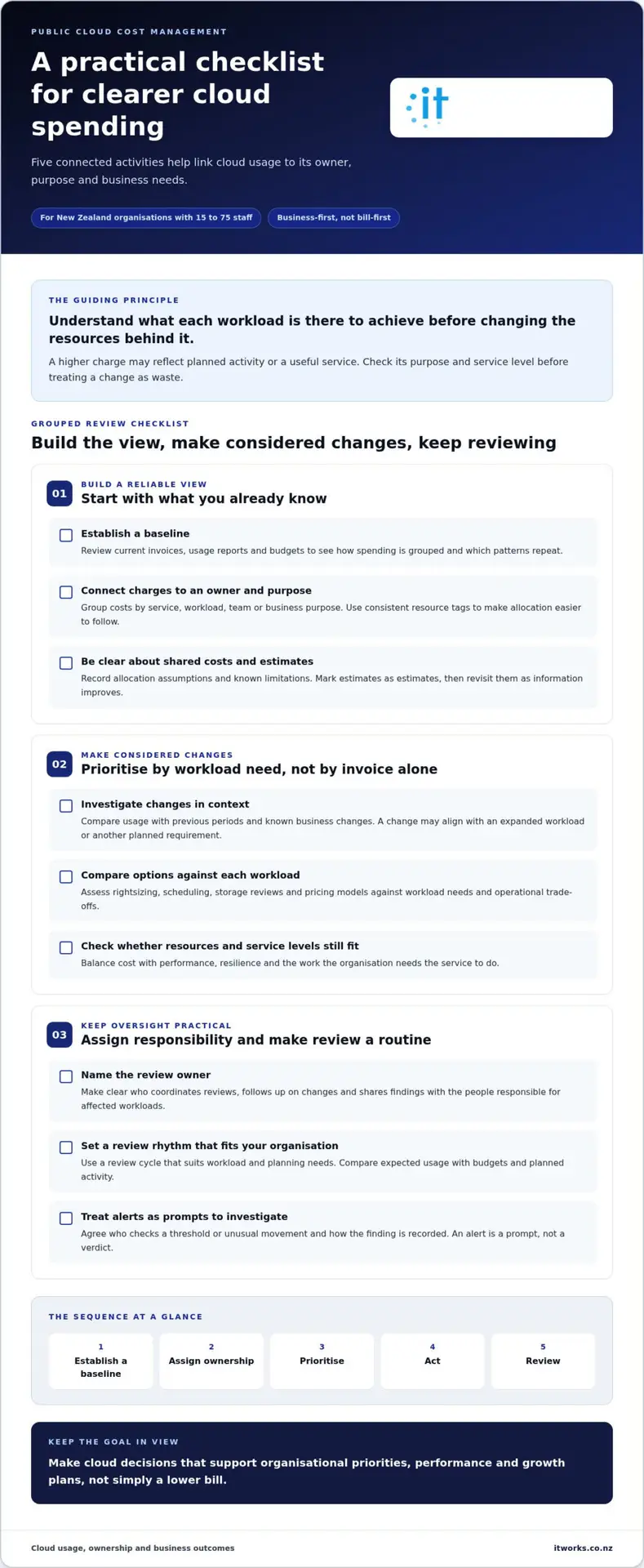
Establish a baseline, assign an owner, prioritise opportunities, make controlled changes, then review what happened. This sequence keeps cost decisions connected to service requirements and business impact.
- Establish a baseline. Bring together current invoices, usage reports and budget information. Note the period covered, any known gaps and business changes that may affect usage, such as a new project or workload.
- Assign ownership. Name a person to coordinate the review and identify the technology and business contacts who can explain specific workloads. Clear responsibility makes it easier to investigate a change and agree what happens next.
- Prioritise findings. Rank opportunities by business relevance, confidence in the available information and effort required. Start with visible, explainable items rather than broad changes to production workloads.
- Act with care. Before making a change, record the expected effect, service requirements and operational effort. Consider who relies on the workload and the performance or availability it needs to provide.
- Review the result. Compare actual usage and service outcomes with the baseline. Record what changed, what you learned and whether further action is appropriate.
Prioritise opportunities and make controlled changes
A finding is more useful when it relates to a specific workload and a clear reason for action. For example, a resource that appears unused may still support a planned activity or recovery process. Check the context with its owner before changing it. If the data is incomplete, document the uncertainty and gather better information before making a decision that could affect a service.
For each proposed change, record the intended outcome and how you’ll assess it. This might include whether the workload remains available when needed, whether performance meets requirements and whether usage changes as expected. Where practical, make one considered change at a time so you can distinguish its effects from other activity.
Establish a repeatable cloud cost review
Choose a review rhythm that suits your organisation’s scale, cloud usage and planning cycle. Bring finance, technology owners and relevant workload stakeholders together when their input can clarify a decision. The review doesn’t need everyone each time, but the right people should have a way to raise changes and resolve questions.
Track agreed measures over time, such as usage patterns, budget variance or service performance, without assuming one target fits every workload. Keep a shared record of decisions, action owners and follow-up dates. Use findings to inform financial planning and technology priorities, so the process supports sound decisions rather than simply producing reports.
How IT Works can support a business-led cloud cost strategy
Cloud spending is one part of a wider technology picture. A decision about a workload can affect service performance, security, resilience and capacity for planned growth. Reviewing these factors together helps leaders weigh the cost of a cloud decision against the business need it serves.
For many organisations, this doesn’t need to mean a large programme or a separate management structure. It means giving cloud decisions clear owners, aligning them with organisational priorities and reviewing them as needs change. Cost management strategies for public cloud are most useful when they support sound technology choices, not just reductions in spending.
Connect cloud decisions with the wider technology roadmap
IT Works provides Cloud Solutions and Technology Strategy & Advisory to bring operational considerations and longer-term planning into the same conversation. For example, a workload’s capacity requirements can be considered alongside its performance expectations, security arrangements, resilience needs and role in future plans. Clear accountability connects strategic decisions with day-to-day oversight, making it easier to review whether the original assumptions still hold.
This wider view helps teams recognise trade-offs. A change that appears appropriate from a billing perspective may not suit a critical service or planned increase in demand. Continued use of a resource should also have a clear purpose. Reviewing cloud decisions as part of an overall technology strategy helps keep investment aligned with business priorities.
Plan a practical next step with IT Works
A useful starting point is to gather information that can support a focused discussion:
- Current public cloud invoices and available usage reports.
- Budget assumptions and planned changes that may affect demand.
- Known workload owners, service requirements and business purpose.
- Questions or spending changes that need further investigation.
This gives the review a practical foundation, even if some details are incomplete. IT Works is a Wellington-based technology partner supporting organisations throughout New Zealand. Its advisory work can bring cloud priorities into view alongside broader technology planning, clarify which decisions need attention and establish considered next steps. The focus is on understanding your organisation’s needs and options, then aligning technology decisions with business priorities.
For business owners and leadership teams, the next step is to bring together the available information, identify the decisions that matter most and agree who should help move them forward. Regular reviews can keep cloud choices connected to operational needs and business direction.
Make your next cloud decision count
Choose one upcoming cloud decision and make its purpose explicit. What business need does it support? Who owns the workload? What service level must it maintain? Clear answers give your team a practical basis for weighing options and checking whether the decision still fits as priorities change.
Over time, consistent cost management strategies for public cloud can make cloud planning a more informed part of business decision-making. The goal isn’t to avoid investment. It’s to understand what that investment enables and manage it with care.
IT Works can help you consider how cloud planning aligns with your organisation’s priorities.
With clear ownership and a considered approach, your cloud environment can keep supporting the work that matters.
Frequently Asked Questions
Can public cloud costs be managed without a dedicated FinOps team?
Yes. FinOps can be a shared way of working rather than a standalone team. In a smaller organisation, finance can bring budget context, technical staff can explain service use, and business leaders can clarify which outcomes matter. The important step is bringing these perspectives into the same decisions. That gives cost management strategies for public cloud a practical place in existing roles, without requiring a new department.
Is multi-cloud always a more cost-effective approach?
No. Compare more than provider charges before moving a workload. Consider the effort required to adapt applications, transfer data, maintain integrations and build staff expertise across environments. You may also need equivalent identity, monitoring and network arrangements in each environment. These costs and tasks can change the overall case. Multi-cloud may suit a specific business or technical requirement, but assess the full operating model, not just a quoted service rate.
How often should an organisation review its public cloud spending?
There’s no single interval that suits every organisation. Alongside routine check-ins, set review points around events that could change demand or assumptions, such as a major release, a seasonal peak, a project ending or a planned service change. These checkpoints help ensure the financial view reflects what the organisation is doing. A calendar of relevant business events can make reviews more useful than relying on the same date for every workload.
What is the difference between cloud cost management and cloud cost optimisation?
Cost management is the decision-making discipline; optimisation is a specific adjustment made within it. For example, leaders might assess whether an analytics service remains a priority as business needs change. If it does, a technical review could identify an adjustment to how it processes work. Cost management considers the broader decision, including purpose and ongoing suitability, while optimisation focuses on improving a particular part of the arrangement.
How can a business allocate shared cloud costs across teams?
Decide whether teams need cost information for awareness or whether the amounts should be assigned to their budgets. The first approach is often called showback; the second is chargeback. Either way, document the allocation policy and explain how shared services are treated. This helps people interpret internal reports consistently and reduces confusion when a team’s reported share changes, even if the provider invoice hasn’t changed.
Can cloud cost optimisation affect workload performance or reliability?
Yes, so test significant changes before applying them broadly. Where suitable, trial a proposed adjustment in a non-production environment using representative activity. Check relevant application measures, such as response times or whether key processing completes as expected. Agree beforehand what result would prompt a rollback, and involve the workload owner in that decision. This gives you a clearer way to assess a change than relying on resource settings alone.
What information should a business gather before reviewing its cloud costs?
Alongside billing records, useful context can include deployment or change logs, project milestones and business service measures. These help explain why a charge changed and whether the shift coincided with a release, temporary activity or a change in demand. Distinguish one-off events from ongoing usage, and make sure records cover comparable billing periods. That context makes a review more meaningful than examining invoice totals alone.