
How can you move essential business systems to the cloud without disrupting work or losing control of your data? For New Zealand organisations, moving from on-premise servers to the cloud NZ isn’t simply a matter of shifting everything at once. Start by identifying which workloads suit cloud services, what needs to stay connected and how the change supports your organisation’s goals.
It’s reasonable to have questions about security, access, disruption and ongoing responsibilities. A cloud move can create more flexibility and support resilience, but only when decisions are guided by business needs rather than technology alone. For many organisations, setting clear priorities and understanding dependencies can make the work more manageable.
This practical guide explains how to assess whether cloud services are a good fit, plan a migration in stages and prepare for the responsibilities that follow. You’ll learn how to set decision points, reduce disruption and align planning, cybersecurity and continuity with long-term goals. The aim is a migration plan that supports productivity now and gives your organisation room to grow.
Key Takeaways
- Identify which workloads, data and business processes suit cloud services before deciding what to move.
- Document system owners, integrations and user needs to uncover dependencies and reduce surprises during migration.
- Compare on-premises, public cloud and hybrid approaches against your organisation’s requirements, control needs and capacity to manage them.
- Make moving from on-premise servers to the cloud NZ a staged process, using a pilot, validation and timing shaped around business priorities.
- Review cloud performance, access, security and resilience regularly so services continue to support changing business needs.
Moving from on-premise servers to the cloud in NZ: What changes for your organisation?
For a New Zealand organisation, moving from on-premise servers to the cloud NZ means shifting selected workloads and data from servers at your workplace to services hosted and managed in the cloud. You don’t need to move every system, or move them all at once. The right destination depends on what each workload does, how staff use it and what the business needs from it.
Cloud computing is the broader model of accessing computing services over a network. A server migration is a business change as much as a technical one: systems, access, support responsibilities and continuity plans may all need to adapt.
A cloud migration is a planned change to where and how business systems operate, not simply a transfer of files to an online folder.
What does moving business servers to the cloud actually involve?
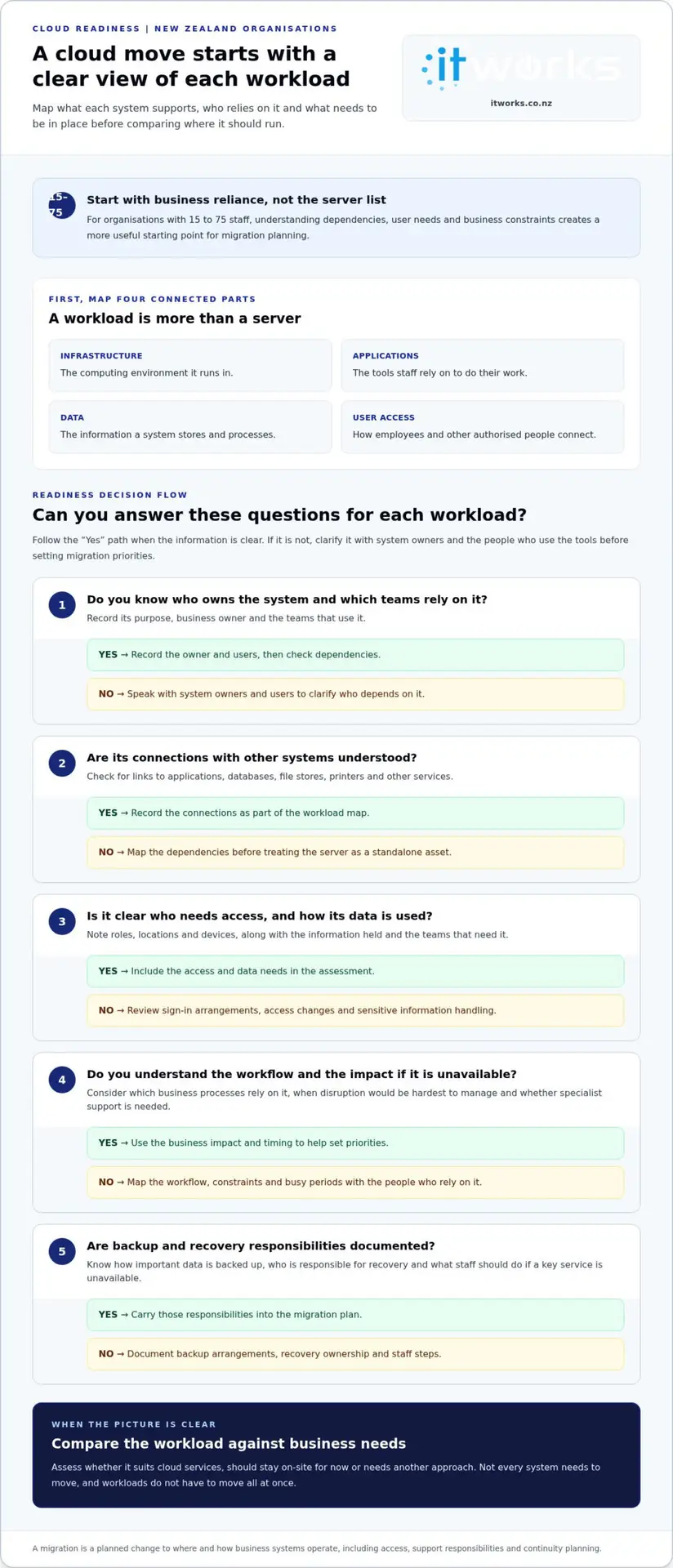
Consider four connected parts: infrastructure, applications, data and user access. Infrastructure is the computing environment. Applications are the tools staff rely on. Data is the information those systems store and process. User access covers how employees and other authorised people connect to them.
These parts don’t always move together. An application may need changes before it runs well in a cloud environment, while its data may need a separate transfer and access plan. Some systems may suit cloud services, others may be better kept on-site for now, and some may need a different approach. Map the connections early so a server isn’t treated as an isolated asset when other processes depend on it.
What business outcomes should a cloud move support?
Cloud services may help an organisation adjust capacity as needs change, support staff working across locations or reduce reliance on ageing infrastructure. A carefully planned move can also support resilience, provided the service design, backup arrangements and recovery plans fit the business. These are benefits to assess, not automatic results of adopting cloud technology.
Start with the constraints in your current environment. Do staff regularly wait for a system to respond? Is secure access difficult when people work away from the office? Does maintaining older infrastructure take time away from planned work? Identify how often each issue occurs and who it affects. This gives your leadership team a practical basis for comparing options and assessing whether the change delivered value.
For many organisations, productivity, continuity and planned growth can be useful decision points. Define what needs to improve, such as reducing delays in a key process or making access more consistent for a particular team. Then assess whether moving the relevant workload is likely to help. Cloud adoption for its own sake isn’t a business case, and some systems may be better left where they are.
The goal is a technology environment that fits how your organisation works. Clear business measures help distinguish a useful migration from a change that adds complexity without addressing a real need.
Assess cloud readiness before moving on-premise servers
Before deciding what to move, build a clear picture of what your organisation relies on now. A readiness assessment can uncover connections between systems, identify business constraints and clarify whether your team has the capacity to manage the change. It gives decision-makers a more useful starting point than a server list alone.
Which workloads and dependencies need to be mapped first?
Start with an inventory of servers, applications, data stores and integrations. For each item, record who owns it, which teams use it and what work depends on it. A finance application, for example, may rely on a shared database or an integration that isn’t obvious to its day-to-day users.
Use this checklist to structure the review:
- Workloads: List the systems and applications running on each server, including their purpose and business owner.
- Dependencies: Note connections between applications, databases, file stores, printers and other services.
- Access: Record who needs access, from which locations and devices, and whether access differs by role.
- Data: Identify what information each system holds, how it’s used and which teams need it.
- Business processes: Map the workflows supported by each system and the impact if it’s unavailable during a change.
- Constraints and timing: Note technical limitations, specialist support needs and busy periods when disruption would be harder to manage.
Talk with system owners and the people who use the tools. They can identify practical dependencies, such as a month-end process that relies on a particular report or a team that needs access while working across sites. Recording these details helps set sensible migration priorities and reduces the risk of overlooking a day-to-day requirement.
How should security, continuity and people factor into readiness?
Include security and continuity in the assessment rather than treating them as separate tasks. Review how staff sign in, how access is granted and removed, and how sensitive information is handled. Consider whether existing access arrangements will still work if systems are hosted differently.
Document how important data is backed up, who is responsible for recovery and what staff need to do if a key service is unavailable. The aim is to understand how the organisation can keep operating through a planned change and what recovery arrangements support normal operations afterwards.
Readiness also depends on people and capacity. Identify who will make decisions, coordinate the work, test systems and communicate changes to staff. Consider whether users need guidance or training, and how much time internal teams can contribute alongside their usual responsibilities. These factors help set a realistic pace.
A structured review of cloud infrastructure management can help connect technical oversight with business requirements. Once you’ve captured the checklist, a conversation about a practical technology roadmap can help turn your findings into clear next steps for moving from on-premise servers to the cloud NZ.
Compare cloud options with your on-premise server requirements
There’s no single hosting model that suits every organisation or workload. Some systems may suit public cloud services, while others may need to remain on-site or use a private environment. The right fit depends on workload requirements, dependencies, risk considerations and your organisation’s capacity to manage the setup.
Use this comparison as a starting point. Control and operational responsibilities can vary within each model, so assess how each option would work for your specific systems and team.
| Approach | Control | Management | May suit |
|---|---|---|---|
| On-premises | Your organisation has direct control over local infrastructure and its configuration. | Your team, or its technology partner, manages the equipment, maintenance, access and continuity arrangements. | Workloads with specific local dependencies, or where direct control and existing capability are important. |
| Public cloud | Services are provided through a cloud platform, with control shared between the provider and your organisation. | The provider manages parts of the underlying service. Your organisation still needs to manage its workloads, user access and chosen settings. | Workloads that benefit from flexible capacity or access for staff working across different locations. |
| Hybrid | Some systems remain on-site while others run in cloud services, so control is spread across both environments. | Teams need to coordinate access, operations and continuity across connected systems. | Organisations moving in stages, or workloads with different technical and business requirements. |
When might public cloud, private cloud or hybrid suit a workload?
Public cloud generally means using computing services provided over a network, while private cloud refers to a cloud environment dedicated to one organisation. Either can involve different management arrangements, so the label alone doesn’t explain who handles each operational task.
Hybrid combines on-site systems with cloud services. Hybrid cloud is an operating model that connects selected on-site and cloud workloads, not a guaranteed middle ground between control and convenience. It can be useful during a staged move and may remain appropriate afterwards, but it also requires clear coordination between environments.
What should organisations compare beyond the hosting location?
Look beyond where a system runs. Compare who is responsible for day-to-day operations, user access, security settings, backup and recovery. Clarify how staff will reach each workload and what happens if a connected service is unavailable. Responsibilities differ by service and arrangement, so document them for each system.
Also consider the ongoing commitment. Cloud services may reduce some infrastructure tasks, but they still need oversight, access reviews and continuity planning. A mixed environment may add coordination work, while keeping everything on-site depends on your organisation’s ability to maintain that environment. Match the approach to your team’s skills and capacity.
For organisations considering moving from on-premise servers to the cloud NZ, compare options against defined business outcomes, such as reliable staff access, smoother scaling or less time spent managing ageing equipment. Choose the operating model that supports those needs and can be managed consistently, rather than adopting a model simply because it’s available.
Plan a controlled move from on-premise servers to the cloud
A controlled migration gives your organisation clear decision points before, during and after each workload moves. Agree the scope, responsibilities and measures of success first, then schedule work around system dependencies and the teams that rely on them. A payroll or finance system, for example, may need careful timing around key processing periods and thorough testing before staff rely on it.
Use a sequence that lets the team learn and adjust before the next stage:
- Plan: Confirm the business goals, workloads in scope, owners, dependencies and success measures. Set out who makes decisions and who communicates with staff.
- Prepare: Check the target environment, data, access requirements and connected systems. Agree how information will be protected, how continuity will be supported and what the team will do if a workload needs attention.
- Pilot: Move a suitable lower-risk workload first. Use it to test the process, surface practical issues and refine instructions before wider changes begin.
- Migrate in stages: Group workloads by their dependencies and business priority. Schedule each stage around staff availability and important business dates, leaving time for checks before moving dependent systems.
- Validate: Test user access, application behaviour, data availability and the workflows staff need to complete. Ask affected users to confirm that essential tasks work as expected.
- Review: Record outcomes, outstanding issues and lessons from each stage. Confirm support ownership and update the plan before starting the next migration wave.
How can a migration sequence reduce disruption?
Migration order should reflect how systems connect, not just which server looks easiest to move. If an application depends on another service or shared data, plan and test those relationships together. A pilot can reveal access or workflow issues while the scope is limited, giving the team a chance to address them before more staff are affected.
Give users practical notice about what is changing, when it is happening and where to get help. Tailor the message to each team: explain any access changes and identify the tasks they should test. Avoid scheduling disruptive work during a known busy period or critical business process.
What should happen before a workload is considered migrated?
Migration isn’t complete just because a system is running in its new environment. Confirm that the right people can sign in, applications behave as expected, required data is available and staff can complete essential workflows. Agree who owns ongoing support and how issues will be tracked. Document remaining dependencies so they inform the next stage.
Continuity planning should sit alongside these checks. Reviewing your backup and disaster recovery approach helps clarify how important services and data will be supported during and after a change.
A controlled approach to moving from on-premise servers to the cloud NZ helps teams make progress while keeping business needs visible at each decision point.
See how IT Works supports practical cloud migration planning
Keep cloud services aligned with the business after migration
A migration changes how technology is operated, supported and reviewed. It isn’t the end of planning. Cloud services need ongoing attention to keep pace with changes to workloads, staff and business priorities. The goal is not simply to keep systems running, but to make sure they remain useful, well managed and aligned with the outcomes the business expects.
What should be reviewed once workloads are in the cloud?
Set regular review points and revisit the plan when there’s a meaningful business or technology change. Compare service performance and user experience with the measures agreed before migration. If a team still encounters delays or access difficulties, investigate whether the service, its configuration or the way people use it needs attention.
Review responsibilities as well as performance. Confirm who looks after each service, who can access it and whether access still matches people’s roles. As staff join, leave or change responsibilities, access practices should keep pace. Check that security arrangements and continuity plans remain suitable for the information and processes the service supports.
A practical review can cover:
- Service fit: Is the service still suitable for the workload and the way staff use it?
- User experience: Can people complete their work effectively, including when working across locations?
- Access and security: Are access arrangements and security practices still aligned with organisational needs?
- Continuity: Do support and recovery arrangements reflect the importance of the workload?
- Business change: Have new applications, team structures or priorities changed what the organisation needs?
Use the findings to update the technology roadmap. A new business process or growing team may change which service is the best fit. A system retained on-site may also become suitable for a different approach later. Regular reviews keep those decisions connected to real requirements.
How can a technology partner support the next stage?
Strategic advice and day-to-day management work best when they inform each other. Operational insight can show where services need adjustment, while a clear roadmap helps prioritise improvements and future investment. IT Works brings Cloud Solutions, technology strategy, cybersecurity and managed services together around practical business outcomes, supporting organisations as their needs evolve.
For a New Zealand organisation, a technology partner can help maintain a clear view of service ownership, performance and changing priorities after project work is complete. IT Works is Wellington-based and works with organisations across New Zealand. Its managed IT services for Wellington organisations connect ongoing operational support with broader technology needs.
Moving from on-premise servers to the cloud NZ is one part of managing technology around the business. Regular, practical reviews help keep that environment connected to productivity, resilience and planned growth.
Make your next technology decision with confidence
The next step doesn’t need to be a commitment to move every system. Choose a business priority, such as improving access for a team or easing reliance on ageing infrastructure, and use it to guide a focused discussion about what should happen next. A clear direction helps your organisation make considered decisions as its needs evolve.
For organisations moving from on-premise servers to the cloud NZ, lasting value comes from keeping technology decisions connected to business priorities. IT Works combines strategic technology roadmaps with project delivery and ongoing managed services, supporting organisations from planning through to day-to-day operations. Its Wellington-based team works with organisations throughout New Zealand.
A practical next step can clarify what your organisation needs now and where it wants to go. With considered advice and a clear plan, technology can continue to support that progress.
Frequently Asked Questions
Is moving from on-premise servers to the cloud right for every NZ business?
No. Moving from on-premise servers to the cloud NZ may suit some workloads but not others. The decision depends on business needs, system dependencies and the organisation’s capacity to manage the change. For example, a business with an application tied to specialised equipment may need to keep that system on-site while moving other services. Compare each workload against a clear business need rather than treating cloud adoption as an end in itself.
Can a business keep some servers on-premise after moving workloads to the cloud?
Yes. An organisation can retain selected on-premise systems while using cloud services for other workloads. This may make sense where an application has a local dependency or where the business prefers to move in stages. Understand how on-site and cloud systems connect, who manages each environment and how staff access the services they need. Review a mixed setup over time as requirements change.
How long does it take to move business servers to the cloud?
There isn’t a standard timeframe for every migration. The schedule depends on the number and complexity of workloads, their dependencies, data handling needs, testing requirements and the availability of staff involved. A straightforward workload may need less preparation than a system connected to several business applications. A readiness assessment and agreed scope help create a realistic schedule, including time for validation and staff communication.
What happens to staff access and business applications during a cloud migration?
Plan and test access and application use as part of the change. Staff may need new sign-in instructions or updated ways to reach a service, depending on the workload and how it’s moved. Identify the roles that use each application, then test access with representative users before a wider rollout. Tell affected teams what is changing, when to test their usual tasks and where to report issues.
Is cloud migration the same as moving files to Microsoft 365?
No. Moving files to a Microsoft 365 service can be one part of a broader cloud change, but it doesn’t by itself move server-hosted applications, databases or other workloads. For example, a team may access shared documents online while still relying on a separate business application hosted on a local server. Map the systems and workflows involved so the plan covers more than file storage.
How should a business plan continuity during a server migration?
Start by identifying which services staff need to keep working and what the business would do if a workload wasn’t available as planned. Set out backup and recovery responsibilities, test relevant recovery arrangements and agree how updates will reach affected staff. For a finance system, plan migration and checks around its key processing tasks. Clear ownership and a documented fallback approach help teams respond in an organised way.
Can an organisation move its servers to the cloud in stages?
Yes. A staged migration lets an organisation move selected workloads in planned groups rather than changing everything at once. Start with a workload suited to an early move, learn from testing and user feedback, then apply those lessons to later stages. Keep dependent systems together where needed, and record links to workloads that remain on-site. This approach helps the organisation manage change while keeping priorities visible.