
What if a message that looks routine is the one that needs a closer look? Cyber phishing can arrive as an email, text, invoice or request that appears to come from a manager, supplier or trusted service. For a New Zealand business, the challenge is knowing what’s genuine without slowing everyday work.
That uncertainty is understandable. A suspicious link or unexpected payment request can be difficult to judge, and staff may be unsure who to tell if they’ve clicked or shared information. Clear guidance helps people respond calmly and consistently.
This guide explains how cyber phishing works, what warning signs to look for and what to do when a message seems suspicious or someone has interacted with it. It also explores how staff, managers and IT support can share responsibility through email protection, awareness and incident response. The aim is a more confident, coordinated approach to reducing risk and strengthening your organisation’s resilience.
Key Takeaways
- Cyber phishing uses deceptive messages to prompt actions that can expose accounts or disrupt everyday business processes.
- Check unexpected requests through a trusted channel, particularly when they involve payments, credentials or urgent action.
- Phishing risk is shared: staff awareness, clear process checks and technical controls each play a part.
- If someone interacts with a suspicious message, follow internal reporting steps promptly and involve the appropriate IT support.
- Build resilience by reviewing existing controls, clarifying responsibilities and checking that your response approach is ready to use.
What is cyber phishing, and why does it matter to a business?
Business communication depends on people acting on information: approving invoices, responding to colleagues and accessing online services. Deceptive messages exploit these familiar tasks, making it harder to distinguish a genuine request from an attempt to gain information or access.
Phishing is a deceptive attempt to trick someone into sharing sensitive information, granting access or taking an action that benefits an attacker. Unlike legitimate correspondence, a phishing message misrepresents who is contacting you or why they need you to act. For a broader overview of the history and techniques, see What is phishing.
The business impact depends on what happens next. If an account is exposed, someone may gain access to business information or use that account to contact others. A deceptive payment request could affect business processes, while disrupted access or systems may interrupt work. These are risks to manage, not inevitable outcomes. Practical cyber phishing defences aim to reduce exposure and help your organisation respond with confidence.
Phishing is not limited to email. It can arrive through text messages, voice calls and other communication channels. The format changes, but the approach is similar: appear credible, prompt a response and seek information, access or action.
How does a phishing attempt work?
A message may impersonate a colleague, supplier or familiar service, then ask the recipient to act. Urgency or a recognisable name can influence a decision, but neither proves a message is fraudulent. Context matters. If a request is unexpected, check it through a separate, trusted channel before acting.
Hypothetical example: An employee receives a message that appears to relate to an invoice already being processed. It asks them to change payment details. Before making any change, the employee checks the request using an established contact method. This illustrates how a familiar business task can be used to prompt action. It is not a real message to copy.
Which types of phishing should business leaders know?
- Spear phishing: A targeted attempt shaped around a particular person, role or organisation, rather than a broad, generic message.
- Business email compromise: Deceptive use or impersonation of a business email account to influence actions such as sharing information or handling a payment request.
- Email, text and voice phishing: Email phishing arrives by email; text-message phishing, often called smishing, uses SMS; voice phishing uses phone calls. Each can imitate a trusted person or organisation.
Knowing these forms gives leaders a clearer starting point: assess how messages, accounts and everyday processes connect, rather than expecting staff to identify every deception on their own.
How cyber phishing targets people, accounts and business processes
A phishing attempt can start with a single message, but the business effect depends on what happens next. It may exploit a familiar name, an expected task or a request that seems to fit the moment. Understanding the possible steps helps leaders identify where practical checks and controls can interrupt the chain.
- Message arrives: Someone receives a message that appears connected to a colleague, supplier or everyday business activity.
- Recipient interacts: They may open a link, share information, provide access or respond to a request.
- Access or information is exposed: If credentials or other details are shared, an account or business information could be at risk.
- Follow-on activity may occur: Depending on the access involved, activity could affect email, shared information or routine approvals.
This sequence helps assess possible exposure. It is not a prediction that every suspicious message will lead to a compromise. The outcome depends on the situation and the controls in place.
Why do convincing phishing messages get attention?
Timing and context matter. A message arriving during a busy period, or one that refers to a task someone is already handling, can prompt a quick response. Familiar names, logos and polished wording may also make a request feel routine. None of these details confirms that a message is genuine, so staff need a straightforward way to pause and check unusual requests. This is a shared risk to manage, not a reason to blame the person who received the message.
What business information or activity may be at risk?
Consider a few scenarios: an exposed email account could contain business conversations; access to shared files could reveal information the account holder can view; or a deceptive request could influence a payment-related approval. These are possibilities, not assumed outcomes.
A request to change account details, share access or bypass an established step deserves a second check through a trusted channel. Clear approval processes help staff verify unusual requests without relying on instinct alone. They can also make it easier to keep essential work moving if an account or process needs attention.
Email protection is an important layer, but it cannot provide a complete organisational response on its own. People need clear reporting routes, business processes need sensible verification checks, and the organisation needs a plan for responding if access is exposed. Together, these measures help reduce risk and support consistent decisions.
Reviewing how these controls fit together can help clarify where to focus next. Organisations can discuss cybersecurity priorities with IT Works as part of a practical assessment of their current approach.
Is phishing mainly a staff mistake? How to assess the real risk
No. Staff awareness matters, but phishing resilience shouldn’t depend on every person recognising every deceptive message. People make decisions in busy working conditions, so responsibility also sits with the organisation: provide clear processes, suitable technical controls and a known route for raising concerns.
A useful way to assess your approach is to compare three connected areas:
- People: Give staff practical guidance on spotting unusual requests, checking them safely and reporting concerns without fear of blame.
- Processes: Set out how to verify requests to change payment details, share access or depart from normal approval steps. Make the process easy to follow.
- Technical controls: Use measures such as email protection, identity and access controls, and endpoint protection to help reduce exposure and support secure working.
No single measure can guarantee that every phishing attempt will be stopped. Awareness can help someone pause, but it works best alongside verification steps and technical controls. Technology can help manage risk, but staff still need to know what to do when a message seems unusual.
What can staff do, and what should the organisation provide?
Give everyone a clear, low-friction way to report suspicious messages, with a named owner or team responsible for receiving reports. Encourage staff to verify unexpected requests through a contact method they already know, rather than relying on details in the message. Questions and reports are useful security signals. Responding constructively helps people speak up early and gives the organisation a clearer view of concerns.
How do layered controls complement awareness?
Email protection can help manage suspicious messages; identity and access controls help govern who can use accounts and information; endpoint protection supports device security. Monitoring, vulnerability management and incident response contribute to a broader approach by helping an organisation review its environment, address weaknesses and act on concerns. Each has a role, but none is a complete answer on its own.
For a practical review, ask: Which controls are in place, who owns each one, and how does a staff member report a concern? If those answers aren’t clear, that’s a useful place to start. The cybersecurity guide for small businesses in New Zealand offers further context on building a considered approach.
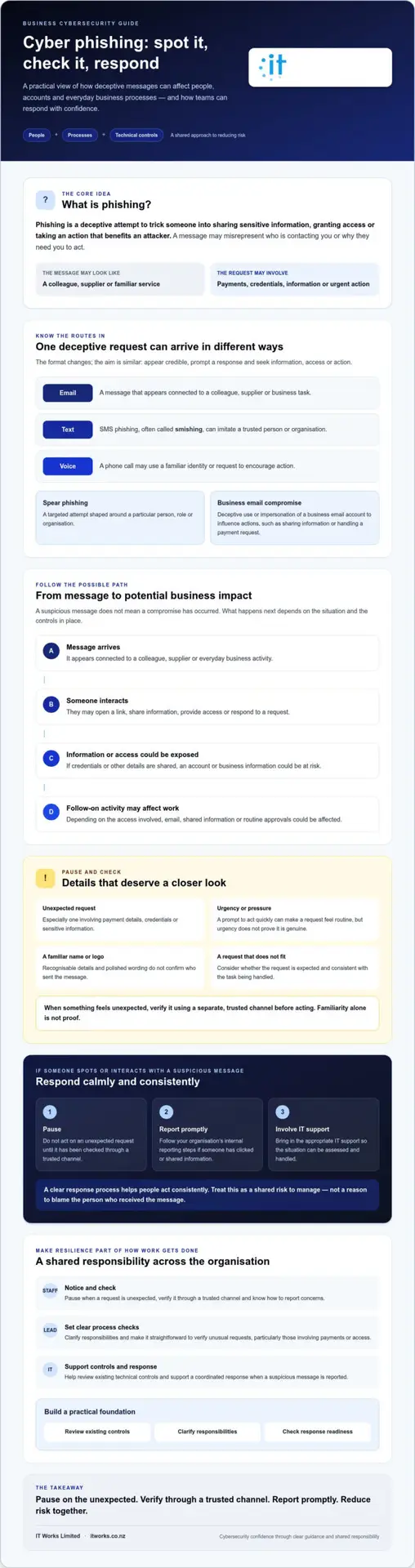
What should your business do when someone spots or interacts with phishing?
A calm, clear response starts with reporting, not blame. Receiving a suspicious message is different from clicking a link, sharing information or entering credentials, so staff should be encouraged to explain what happened and what they did. They don’t need to decide whether an incident is serious before telling the right person.
A clear reporting process helps an organisation respond consistently. Make sure staff know which internal channel to use and who will receive the report. Then follow an ordered approach:
- Report promptly: Use the organisation’s approved channel, whether the message was only received or someone interacted with it.
- Preserve relevant details: Keep the message and note what happened, including any information shared and when. Follow internal guidance on how to provide these details.
- Seek appropriate support: Notify the designated contact or IT support so authorised responders can assess the situation.
- Follow internal procedures: Let the people responsible determine investigation and containment steps for the circumstances, and keep affected managers informed as appropriate.
What if someone clicked a link or shared information?
Contact the designated internal person or IT support promptly, even if the person isn’t sure whether anything happened. Describe the action taken, such as opening a link, entering credentials or sharing information, and when it occurred. Record the details through the organisation’s established incident process. Avoid trying technical fixes based on guesswork; authorised IT responders can decide what steps are appropriate for the account, device or information involved.
If someone only received the message and didn’t interact with it, they should still report it through the approved channel. That report can help the organisation assess the message and decide whether others may need guidance. In both cases, prompt reporting is more useful than waiting to be certain or worrying about being blamed.
How can a business learn from a phishing report?
After the immediate response, review how the message reached the recipient and whether existing controls or processes need attention. Consider whether the reporting route was clear and whether a routine approval step helped staff question the request. Share relevant lessons in practical, non-punitive language, without exposing personal details unnecessarily. If the review identifies a genuine gap, update staff guidance or response steps so the next report can be handled more smoothly.
Consistent reporting and follow-through turn individual reports into useful signals for improving cyber phishing resilience. The aim is to learn and strengthen the organisation’s approach, not to single out the person who received the message.
How to build phishing resilience with a practical cybersecurity partner
Phishing resilience develops over time through clear ownership and controls that fit how your organisation works. A practical starting point is to understand what’s already in place, clarify who is responsible, address the gaps that matter most and check that response arrangements are understood and usable.
What should a practical phishing resilience review cover?
Look across the connected parts of your approach, not just email. A useful review considers:
- Email protection: How suspicious messages are managed and how staff can raise concerns.
- Identity and access: How access to accounts and business information is managed.
- Awareness and reporting: Whether staff know where to report a message and feel comfortable doing so.
- Monitoring and response: Who reviews concerns and how the organisation investigates and responds.
- Ownership: Whether business leaders, staff and technical support understand their roles.
Use the review to agree practical priorities based on business relevance and operational needs, rather than adopting a generic score or checklist without context. The aim is a joined-up approach: email protection, access controls and staff awareness help reduce exposure, while monitoring and incident response support a considered response when concerns arise. No single control removes every risk.
When can managed cybersecurity support add value?
Outside advice can be useful if responsibilities are unclear, internal capacity is limited or security decisions need to align more closely with business priorities. Specialist input can complement internal IT by helping clarify ownership, identify areas to address and connect operational security with longer-term planning and business continuity. The right arrangement should make responsibilities clear, not create another layer of uncertainty.
IT Works is a New Zealand technology and cybersecurity partner, combining strategic advice with practical support across areas such as email protection, identity and access, monitoring and incident response. For organisations reviewing how technology support fits their needs, the managed IT support guide for New Zealand organisations provides further context.
A steady review helps make phishing resilience an ongoing business capability. Understand the current position, agree who owns each part, then revisit priorities as your organisation’s needs change.
Make phishing resilience part of how your business works
Cyber phishing is a risk to manage across your organisation, not a test of whether each staff member can spot every deceptive message. Clear reporting routes and sensible checks for unusual requests help people respond calmly, while business leaders and technical support share responsibility for reducing exposure.
A resilient approach brings people, processes and controls together. Email protection can help manage suspicious messages; security awareness helps staff recognise concerns and raise them; and incident response provides a structured way to assess and address issues. Reviewing who owns each part, how information is reported and whether response steps are clear gives your organisation a practical foundation for improvement.
IT Works is a New Zealand-based technology and cybersecurity partner, combining strategic advice with practical operational support. Its cybersecurity services bring together layered security and incident response to help organisations align priorities with the way they operate.
With clear ownership and steady improvement, your business can build confidence in how it recognises, reports and responds to suspicious messages.
Frequently Asked Questions
What is cyber phishing, in simple terms?
Cyber phishing is a deceptive message or contact designed to persuade someone to reveal information, provide access or take an action that benefits an attacker. It may pretend to come from a person or organisation the recipient recognises. Unlike genuine correspondence, it misrepresents who is asking or why. Check the identity and purpose behind an unexpected request rather than judging it by appearance alone.
How can I tell if an email is phishing?
Look for anything unexpected or out of step with normal communication, such as an unusual request, pressure to act quickly, or a prompt to provide credentials or change payment details. These signs are reasons to pause, not proof that an email is fraudulent. Don’t rely on familiar branding or polished wording as verification. Check the request using a contact method you already trust, and report concerns through your organisation’s approved channel.
Can phishing happen through text messages or phone calls?
Yes. Phishing can arrive by text message or phone call as well as email. A text may appear to come from a familiar service and prompt you to follow a link, while a caller may claim to represent a colleague or organisation and request information or action. Treat unexpected requests consistently across channels. If you’re unsure, end the interaction and verify it using contact details from a trusted source, not details supplied in the message or call.
What should I do if an employee clicks a phishing link?
Ask the employee to report it promptly to the designated internal contact or IT support, even if they’re uncertain whether anything happened. They should explain what they did, such as opening a link or entering information, and when. Follow your organisation’s incident process and let authorised IT responders determine appropriate investigation or containment steps. Avoid blame or guesswork. A prompt, factual report gives the organisation a better basis for deciding what to do next.
Is staff training enough to prevent phishing?
No. Staff awareness is valuable, but it can’t carry the organisation’s whole responsibility or guarantee that every attempt will be recognised. Support it with straightforward reporting routes, verification procedures for unusual requests and technical controls suited to your environment. Email protection, identity and access controls, and endpoint protection can each contribute to risk reduction. Review these measures together so staff know what to do and the organisation knows who will respond.
What is the difference between phishing and spear phishing?
Phishing is the broader practice of using deception to prompt someone to share information, provide access or take an action. Spear phishing is a targeted form, shaped around a particular person, role or organisation. A targeted message may use relevant context to appear credible, but personal details or familiar references don’t establish that a request is genuine. Apply the same careful checks, especially before sharing access or acting on an unusual request.
How can a business reduce the risk of phishing?
Start by reviewing what protections and response steps are already in place, then clarify who owns them and how staff can report concerns. Combine email protection, identity and access controls, staff awareness, monitoring and incident response as part of a broader approach. Make unusual requests easy to verify through established procedures, and review lessons from reports. A cybersecurity partner can help assess priorities where responsibilities, internal capacity or next steps are unclear.