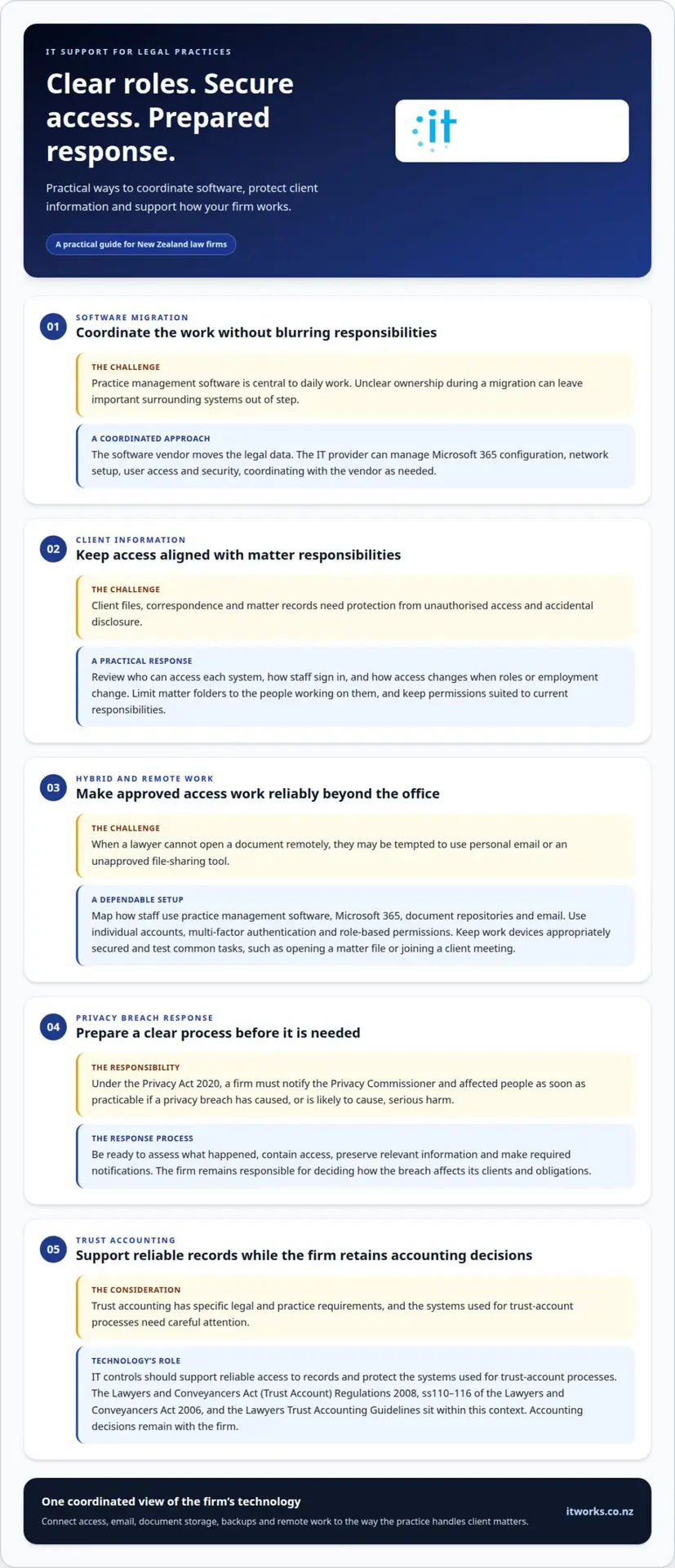
Does your legal practice’s IT provider need a direct relationship with your practice management software vendor? Not necessarily. IT support for legal practices in NZ can coordinate with the software vendor while managing the surrounding technology. During a migration, the vendor moves legal data, while the IT provider handles areas such as Microsoft 365 configuration, network setup, user access and security.
Practice management software is central to a firm’s daily work, so clear coordination matters. The technology around it also needs to support secure access, remote work and reliable business continuity, while fitting the firm’s compliance needs.
This article explains how IT support for legal practices in NZ can help with these priorities, what to consider when software is involved, and how support arrangements can fit your practice. You’ll also learn how security, compliance, remote access and continuity work together, helping you decide what support your firm needs.
Key Takeaways
- See how IT support can work alongside practice management software vendors, with clear responsibilities during a migration.
- Learn how security measures can help protect confidential client information and support trust accounting processes.
- Understand the technology considerations that help legal teams work securely from the office or remotely.
- Explore how backups, recovery planning and ongoing support contribute to business continuity.
- Identify what to consider when assessing an IT provider’s fit with your practice’s systems, priorities and ways of working.
How do you handle security and compliance for law firms?
Law firms need security controls that protect confidential client information and support their legal and trust-accounting responsibilities. A coordinated approach covers access, email, backups, remote work, staff awareness and incident response.
Confidential client information security
Security controls help protect client files, correspondence and matter records from unauthorised access or accidental disclosure. Assess who can access each system, how staff sign in, and how access changes when roles or employment change. For example, limiting matter folders to the people working on them can reduce unnecessary exposure.
Secure client data management
Secure data management connects document storage, email, backups and remote access. IT support can configure permissions, strengthen sign-in controls, maintain backups and manage secure connections for staff working outside the office. The key is to make sure those controls fit how the firm handles client matters, rather than treating each system separately.
Under the Privacy Act 2020, a law firm must notify the Privacy Commissioner and affected people as soon as practicable if a privacy breach has caused, or is likely to cause, serious harm. A prepared response process helps the firm assess what happened, contain access, preserve relevant information and make required notifications. The firm remains responsible for deciding how the breach affects its clients and obligations.
Cybersecurity advice should translate technical risks into clear priorities for partners and practice managers. A review can map important systems, identify access gaps and set practical improvements. Staff training can use familiar examples, such as a suspicious invoice attachment or a request to change payment details. Clear reporting steps help employees raise concerns promptly and without blame.
Ongoing monitoring can track system alerts, account activity and backup status, allowing unusual events to be investigated. Regular reviews also help keep user access aligned with staff responsibilities and identify changes that may affect security. A managed security service contract or retainer, alongside cybersecurity insurance, can help reduce risk, according to ETSI.
Trust accounting needs particular care. New Zealand trust accounting is governed by the Lawyers and Conveyancers Act (Trust Account) Regulations 2008, while ss110-116 of the Lawyers and Conveyancers Act 2006 govern trust accounting. The Lawyers Trust Accounting Guidelines (LTAG) sit alongside this legislation. IT controls should support reliable access to records and protect the systems used for trust-account processes, while leaving accounting decisions with the firm.
Secure hybrid and remote working
Hybrid work gives lawyers flexibility, but access to client matters must remain controlled across office and home networks. A sound setup starts by mapping how people access practice management software, Microsoft 365, document repositories and email. That map helps identify which systems need secure remote access and which staff roles need access to each matter. It also gives support teams a practical basis for designing consistent controls.
Each staff member should use an individual account rather than shared credentials. Multi-factor authentication adds a further sign-in check, while role-based permissions limit access to relevant files. For example, a lawyer working on one matter may not need access to another team’s correspondence. When roles change, review and update permissions to reflect current responsibilities.
Devices matter too. A laptop used for client work should have appropriate security settings, up-to-date software and protection for information if the device is lost. Support teams can configure and manage work devices, then help staff connect securely. Separating work from personal use also reduces the risk of client documents being saved in personal folders or sent from personal email.
Remote access needs to work reliably without encouraging unsafe workarounds. If a lawyer cannot open a document from home, they may be tempted to forward it to a personal account or use an unapproved file-sharing tool. Clear access procedures and responsive technical support help staff use the firm’s approved systems. Testing common tasks, such as opening a matter file or joining a client meeting, can reveal problems before they disrupt daily work.
Confidential conversations need attention beyond the network connection. For example, a lawyer taking a client call in a shared workspace should consider who can hear the discussion or see the screen. Staff guidance can cover screen privacy, secure handling of printed documents and reporting a misplaced device. Practical training based on familiar situations helps make security part of everyday work without making remote work unnecessarily complex.
Remote access should also fit the firm’s continuity arrangements. Support teams can document how staff reach essential systems and whom they contact if sign-in or connectivity fails. A clear fallback process helps distinguish a local internet problem from a wider systems issue. For a coordinated review, consider remote work security planning that reflects your firm’s working arrangements.
Business continuity and resilience
IT support can help law firms manage the risk of ransomware, system failure and downtime through planned safeguards and recovery processes. The aim is to restore essential work in a controlled order, with clear roles for technical teams and firm leaders.
Continuity and resilience planning
A continuity plan identifies the systems and processes a firm needs to keep operating. Partners might prioritise access to matter files, email, telephones and trust-account records. The plan should also identify who makes recovery decisions, who communicates with staff, and how the firm handles client work while systems are unavailable.
Recovery depends on understanding how systems connect. A practice management platform may rely on identity services, network access and document storage, so restoring just one component may not resume normal work. Support teams can document these dependencies and set a recovery sequence with firm leaders. The sequence should reflect the impact of each system being unavailable, rather than treating every application as equally urgent.
Backups are useful only if the firm can restore the information it needs. A recovery process should include checks that backup copies are accessible and restored files open correctly. A practical test might restore a sample matter folder and confirm that its documents and related records are usable. The results can reveal gaps in access, processes or documentation before a disruption occurs.
Continuity planning should also cover people and communication. If office systems are unavailable, staff need to know how to receive updates and where to report workarounds or urgent client matters. Record key contacts, decision-makers and alternative communication methods in the plan. Review it after system changes so responsibilities and recovery steps remain aligned with the firm’s setup.
Ransomware and downtime prevention
Ransomware can make files or systems unavailable, while hardware faults, software issues and network interruptions can also stop routine work. Support teams can reduce exposure through security controls, timely maintenance and monitoring for unusual activity. Clear escalation steps help staff report suspicious messages or unexpected file changes quickly, giving technical teams useful information to assess and respond.
Prevention and recovery work together. Access controls can limit how far an unauthorised account can reach, while protected backups provide a recovery route if working files are affected. Support teams can investigate alerts, contain affected devices and coordinate recovery with the firm’s decision-makers. Documented processes also help maintain a clear record of actions taken during an incident.
Downtime planning should include ordinary failures, not only cyber incidents. For example, if a network fault blocks access to the practice management system, the support process should show how the fault is escalated and which operations take priority. Managed IT Services connect ongoing system oversight with planned recovery, helping a firm maintain a practical response as its technology changes.
IT support for legal practices
A law firm’s support model should match its systems, internal capability and working needs. Clear responsibilities matter, especially when practice software vendors and IT teams share the work.
Managed support or in-house teams
Compare the expertise and coverage your firm needs with the capacity of its internal team. An in-house specialist can build familiarity with the firm’s systems, while managed support adds technical capacity and ongoing oversight. The right balance depends on the firm’s size, complexity and available internal skills.
Some practices use a combined model: internal staff coordinate priorities while an external team manages defined technical work. The agreement should clarify who handles user support, security changes, system maintenance and escalation. For example, a practice manager may own business decisions while technical specialists configure accounts. Clear ownership avoids duplicated effort and missed tasks.
IT support cost considerations
There is no single standard cost for IT support for legal practices in New Zealand. Pricing varies by organisation and is based on factors such as users, devices and network equipment. Consider the systems supported, the level of ongoing coverage and the complexity of the firm’s environment when comparing proposals.
Scope matters as much as headcount. A proposal should explain which systems and tasks are covered, how support is delivered, and how project work is treated. Routine account management, for example, differs from a major migration or network change. Clear inclusions help a firm understand the service being priced and plan technology spending around operational priorities.
Legal-sector provider specialisation
For New Zealand firms, IT support for legal practices should account for how matter files, email, identity access and document systems work together. A Wellington firm should also expect clear coordination with its practice management software vendor. These details show whether technical decisions reflect legal workflows rather than generic office technology.
Assess how a provider manages system changes and staff access. For example, a new team structure may require updates to shared resources, accounts and approval processes. The provider should explain how changes are recorded and responsibilities kept clear. This helps the firm understand how support will fit its daily operations.
Look for a provider that explains its approach in plain language and connects technical work to business needs. When comparing IT support for legal practices in NZ, consider how the provider handles staff onboarding, role changes and planned office or network changes. Clear processes help decision-makers assess whether support can keep pace with the firm’s priorities.
Which IT support providers specialise in New Zealand legal practices?
A provider suited to a New Zealand law firm should understand how legal work depends on reliable access to matter information. Look for a willingness to discuss your firm’s actual workflows, not simply name legal software. For example, ask how support accounts for lawyers moving between matters, working across teams and handling time-sensitive document access.
Assess whether the provider can explain how its service fits the firm’s working day. A useful discussion might cover how requests are prioritised when a lawyer cannot access a document before a client meeting. The response should show an understanding of business impact, with a clear way to communicate progress and resolve the issue.
Legal practices also need technology decisions to respect confidentiality and role boundaries. Ask how the provider reviews access when people change teams and records authorised changes. The provider should explain the process clearly, including how the firm’s nominated people remain involved in decisions that affect access.
New Zealand context is another useful measure. A provider should be comfortable discussing the firm’s operating environment, including its location, staffing arrangements and the systems it relies on. For a Wellington practice with staff working from different locations, consider how the support model accommodates varied working patterns without creating inconsistent processes.
Look beyond technical terminology when assessing experience. Ask for an example of how the provider communicates a proposed change, explains its operational effect and records the agreed outcome. This helps show whether partners and practice managers will receive useful information for decision-making, rather than unexplained technical recommendations.
Compare providers on the clarity of their service scope and accountability. The firm should understand which team handles each type of request, how progress is communicated and how unresolved matters are escalated. Clear arrangements make it easier to coordinate internal responsibilities and keep technology decisions moving.
Specialisation shows in how well a provider adapts its working practices to a firm’s needs. Consider whether its approach supports consistent service across the systems and teams your practice depends on. A provider that listens carefully, explains its reasoning and documents agreed actions can help build an effective working relationship over time.
When comparing costs, ask how the provider’s fixed monthly retainer is calculated and whether it reflects the practice’s current setup. The provider’s fixed monthly retainer is based on the number of users and devices in a law firm. The provider states that its monthly retainer has no callout charges. Confirm what work is covered by the retainer and how any work outside its scope is discussed before it begins. A clear explanation can help the firm assess whether the arrangement suits its staffing and support needs, while making it easier to plan for technology costs and understand when additional approval may be needed.
IT Works
IT Works helps New Zealand organisations align technology with operational and security priorities. For a legal practice, this can mean coordinating managed IT support with cybersecurity, cloud services and the systems staff rely on to manage their work.
Turn to IT Works when you need a considered approach to improving security, supporting remote work, planning continuity or coordinating technology changes. The focus is on understanding your practice’s needs and connecting practical technology decisions with business outcomes. Wellington-based, IT Works proudly supports local organisations right here in Wellington.
Discuss your legal practice’s technology priorities with IT Works.
Set a clear direction for your practice
A useful next step is to agree on what technology should make easier for your practice. Partners and managers can identify the outcomes that matter most, such as smoother staff onboarding, clearer oversight of systems or better alignment between technology decisions and business priorities. This gives support discussions a practical starting point.
A considered approach to IT support for legal practices in NZ connects day-to-day technology with the firm’s plans. IT Works offers Managed IT Services, Cyber Security, and AI & Automation to help organisations address operational and technology priorities. The right focus depends on your practice’s current needs and intended direction.
A constructive conversation can clarify priorities and shape a practical next step, without requiring every decision to be made at once.
With a clear direction, your practice can make technology decisions with greater confidence.
Frequently Asked Questions
Do you have vendor relationships with practice management software providers?
IT support teams can work directly with a practice management software vendor, but coordination matters more than a formal relationship. Discuss how technical questions are routed, who communicates with the vendor, and how updates are shared with your firm. For example, agree who investigates an access issue first and how relevant details reach the software provider. A clear contact and escalation process helps avoid delays and duplicated troubleshooting.
What is legal IT consulting?
Legal IT consulting helps a firm make technology decisions that support its business plans. This might involve assessing whether current systems can support a new office, changing team structure or updated client service processes. A consultant can set out options, dependencies and likely operational impacts for decision-makers. This gives partners a clearer basis for prioritising work and sequencing changes, rather than treating each technology request separately.
What IT support services do law firms in New Zealand typically need?
Firms commonly need user support, cybersecurity, cloud and Microsoft 365 management, network oversight, and backup and recovery. The balance depends on how the practice operates and which systems it relies on. For example, a firm with several locations may prioritise consistent account administration and network coordination. A smaller team may focus on dependable user support and clear oversight of its core systems.
What cybersecurity standards and obligations apply to New Zealand law firms?
Law firms should consider privacy obligations, trust-account requirements and their own risk-management processes when setting security expectations. Start by identifying the information the firm holds, who can access it, and how access is reviewed. Partners should also agree who makes decisions about security risks and incidents. These steps connect technical safeguards with the firm’s governance, rather than treating security as an isolated IT matter.
What questions should a law firm ask when comparing IT support providers in New Zealand?
Ask how the provider will understand your practice’s priorities, communicate planned changes and report on completed work. Clarify how new staff are onboarded, how access changes are handled, and who coordinates with software vendors. You could also ask how the provider would approach a proposed system change. Specific answers help you assess communication, accountability and whether the working relationship suits your firm.