Stop-start technology investment can make construction IT more expensive to manage. For IT infrastructure for construction businesses in NZ, costs depend on how well systems support project workloads, site connectivity, data storage and recovery. A planned approach makes it easier to see where infrastructure spending goes and what it enables.
Delaying upgrades can make sense when workloads shift between projects or budgets are tight. But postponing decisions can leave teams relying on ageing equipment, disconnected systems or capacity that no longer fits the work. Managed cloud infrastructure offers a way to plan resources around business needs and review usage as projects change.
This article explains how stop-start investment affects costs, what shapes cloud infrastructure spending and how to assess your business needs. It also shows how managed cloud infrastructure can support construction teams across offices, sites and project phases, helping you make deliberate technology decisions without adding unnecessary complexity.
Key Takeaways
- Plan infrastructure investment around project needs to reduce the disruption and extra complexity that stop-start decisions can create.
- Assess cloud requirements by considering workloads, data access and recovery needs, rather than treating cloud costs as a single fixed amount.
- Match cloud and on-premise systems to how your teams work, including which tools need reliable access across offices and construction sites.
- Choose site connectivity based on coverage, the work being done and how teams need to share information.
- Managed cloud solutions can help align technology with changing projects and business priorities. IT Works can support that planning through its Cloud Solutions offering.
Costs associated with stop-start infrastructure investment
Stop-start investment creates costs beyond the purchase price of equipment. In construction, delayed decisions can leave project teams using ageing devices, disconnected software or systems that no longer suit the work. The effects can include duplicated effort, avoidable support needs and delays in getting information to the people who need it.
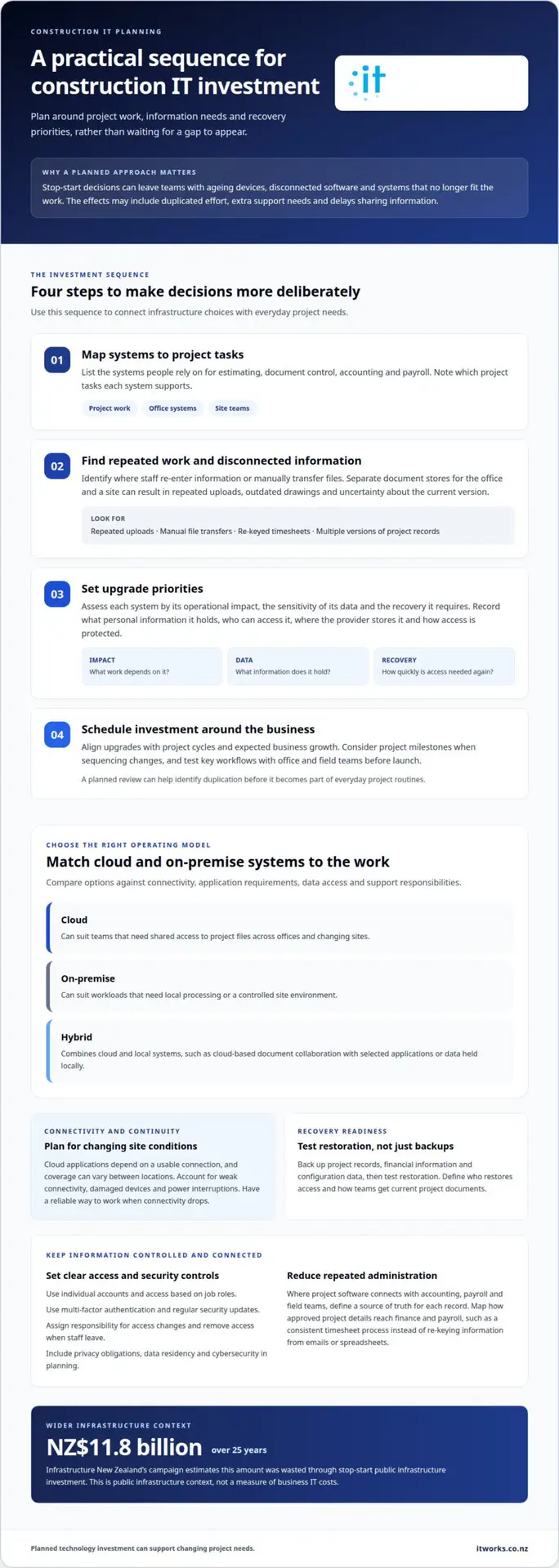
New Zealand’s public infrastructure debate offers a useful comparison, though it is not a measure of business IT costs. Infrastructure New Zealand’s campaign estimates stop-start public infrastructure investment has wasted NZ$11.8 billion over 25 years. It proposes a 12-year building plan that would continue through changes of government. For a construction business, the practical lesson is to plan technology investment around a longer business roadmap, rather than wait for each project to expose a gap.
A stop-start approach can also make spending harder to forecast. Replacing equipment only after it fails can mean an unplanned purchase, while overlapping tools add recurring costs and administration. For example, separate document stores for the office and a site can lead to repeated uploads, outdated drawings and time spent checking which version is current. A planned review can identify duplication before it becomes part of everyday project routines.
Use a simple investment sequence:
- Map current systems to project tasks, including estimating, document control, accounting and payroll.
- Identify where teams re-enter information or rely on manual file transfers.
- Prioritise upgrades by operational impact, data sensitivity and recovery needs.
- Schedule investment against project cycles and expected business growth.
Build privacy, data residency and cybersecurity into the plan. For each system, record what personal information it holds, who can access it, where the provider stores it and how access is protected. Apply relevant New Zealand privacy obligations to the information and business arrangements involved, and include security controls when selecting software and cloud services.
Integration can reduce repeated administration when project software connects with accounting, payroll and field teams. Define the source of truth for each record, then map how approved project details move into finance and payroll workflows. For example, establish a consistent process for timesheets to reach payroll instead of re-keying information from emails or spreadsheets.
Construction sites face practical IT risks, including weak connectivity, damaged devices, power interruptions and outdated files. Reduce disruption with tested backups, clear device and access procedures, and a reliable way to work when connectivity drops. Record who restores access and how teams get current project documents. These steps turn infrastructure spending into planned operational support instead of a series of isolated purchases.
Managed cloud infrastructure
Managed cloud infrastructure brings hosted systems, access controls and ongoing oversight into one operating model. For construction businesses, the design should reflect project workloads, site access and recovery priorities.
Cloud and on-premise options
Cloud systems suit teams that need shared access to project files across offices and changing sites. On-premise equipment can suit workloads requiring local processing or a controlled site environment. A hybrid setup combines the two, such as cloud-based document collaboration with selected applications or data held locally. Compare options against connectivity, application requirements, data access and support responsibilities.
Cybersecurity and backup measures
Protect cloud and on-premise environments with individual user accounts, access based on job roles, multi-factor authentication and regular security updates. Back up project records, financial information and configuration data, then test restoration rather than relying on backup status alone. Define who approves access changes and how access is removed when staff leave. These controls support consistent handling of drawings, contracts and payroll information.
Recovery planning should connect technical design to how long a project can tolerate losing access. ETSI notes that lower recovery time objectives require more redundant equipment in both the technical environment and IT infrastructure. A business aiming for quicker recovery therefore needs to plan redundancy, backup arrangements and restoration processes together.
Planning and implementing an IT upgrade
Start by mapping business-critical applications, users, devices and project dependencies. Set priorities for access, security and recovery before deciding what to move or replace. Sequence changes around project milestones, test key workflows with office and field teams, and prepare a clear support route for launch. This can reduce disruption and help teams adopt the updated environment.
Managed cloud infrastructure also needs ongoing governance. Assign an owner for user access, software changes, backup checks and supplier coordination. Review responsibilities when project teams change or a new site opens. For example, a temporary project team may need selected drawings and schedules, but not payroll records. Clear permissions keep information relevant to each role.
Plan connectivity as part of the design, not as an afterthought. Cloud applications rely on a usable connection, and site conditions can vary between locations. Identify which work must continue during an outage and agree on a process for accessing essential information. For integrated systems, document how data moves between project tools and business applications.
A practical review can connect these decisions into a staged roadmap. It can clarify which workloads belong in the cloud, where local systems remain useful, and what recovery capability each application needs. For support with managed cloud infrastructure planning, bring together your project requirements, application dependencies and recovery priorities.
What are the best cloud and on-premise IT options for NZ construction companies?
Choose an approach by testing it against business requirements, not by selecting a hosting model first. For IT infrastructure for construction businesses in NZ, assess software compatibility, project workflows, information ownership and the effort required to maintain each system. A brief decision record helps managers explain why a particular setup suits the work.
Cloud options for distributed project teams
For each cloud application, check that its functions match how the project team works. Confirm it supports the required file formats, approval steps and access for external project partners. Test a real task, such as reviewing a revised specification, from submission through to approval. Record any hand-offs or duplicate data entry before deciding whether the tool fits.
On-premise systems for local requirements
Before retaining, replacing or migrating an existing local system, assess its dependencies. Document the software version, connected equipment, specialist workflows and internal knowledge needed to keep it running. Then consider the impact of hardware failure or a staff change. This review can show whether the system remains a deliberate business choice or has simply stayed in place without its role being assessed.
Hybrid setups and practical selection
Rather than treating hybrid as a default compromise, identify the specific requirement each environment must meet. A decision matrix can compare options by application compatibility, user experience, administration effort, information access and future change. Give each criterion a business reason, such as enabling project managers to complete approvals without re-entering details. This makes trade-offs clear to owners and managers.
Use these decision checks before committing:
- Application fit: Confirm that essential functions and integrations work in the proposed environment.
- Operational ownership: Assign responsibility for access, updates, supplier coordination and support.
- Information control: Define who owns business records and how they can be retrieved or transferred.
- Change impact: Consider how a new project, software update or team structure could affect the setup.
Keep the assessment grounded in real tasks. For example, trace how an approved variation reaches the people responsible for project records and commercial decisions. Note each system involved and where responsibility changes hands. This can reveal process gaps that a simple hosting comparison misses.
Document the chosen approach and what would trigger a review. Revisit the decision when a key application changes, a project workflow shifts or the business takes on different work. That record gives future managers a useful basis for assessing IT infrastructure for construction businesses in NZ without starting the discussion from scratch.
How much does IT infrastructure cost for a small or medium construction business in NZ?
There’s no single infrastructure budget that fits every New Zealand construction business. Costs depend on staff numbers, project systems, site connectivity, security needs and recovery priorities. For a business with 15 to 75 staff, the first step is separating one-off investment from recurring operating costs.
One-off costs can include devices, network equipment, implementation work and moving systems or data. Recurring costs can include cloud subscriptions, software licences, connectivity and ongoing management. Microsoft 365, for example, may involve recurring licence fees. A business using both cloud tools and an office server needs to account for each environment, not just its newest purchase.
Costs vary by organisation. Key factors include the number of users and sites, existing equipment, application requirements, security controls, data volumes and recovery objectives. A single-office business using standard cloud applications has different needs from a contractor coordinating multiple sites and specialist project software.
Build a cost picture by grouping requirements into practical categories:
- People and devices: Count staff, site teams and the computers or mobile devices they need.
- Applications: List project management, document, accounting and payroll tools, including required connections.
- Connectivity: Record office and site internet needs, plus any arrangements for locations with limited coverage.
- Protection and recovery: Identify which records need backups, controlled access and a defined restoration process.
- Ongoing management: Include software administration, network oversight and support for changing users or projects.
Compare the total operating model, not isolated line items. An on-premise server involves equipment and upkeep, while cloud services shift more spending towards ongoing subscriptions and administration. A hybrid arrangement may include both. A useful comparison reflects the full workload and who is responsible for keeping each part running.
Project timing also affects implementation costs. Moving systems during a busy handover can require more coordination than scheduling changes between project phases. A staged upgrade can prioritise essential access, then move other applications after testing. Include staff time for training and workflow changes, particularly when site teams use different devices from office staff.
Review the budget when staff, sites or software change. Adding a project location can affect connectivity and device requirements, while a new application can create integration or licence needs. Regular reviews connect spending to active work and make future investment easier to plan.
Review the budget when staff, sites or systems change, and revisit assumptions about licences, connectivity, support and recovery. Compare expected costs with actual use, and record who owns each recurring task so subscriptions or support needs do not fall between teams. Keep a contingency for implementation adjustments, and confirm that any proposed saving does not leave site staff without workable access or weaken recovery arrangements.
That comparison is not a substitute for an estimate tailored to your business. Assess requirements, workload and responsibilities, then review the budget as those needs change.
What internet, Wi-Fi, mobile, and connectivity options work best for construction sites in New Zealand?
Construction site connectivity depends on location, project duration and the work teams need to do online. A site office in central Christchurch may have different options from a remote project with limited coverage. Start by identifying essential tasks, then match each connection to those needs.
Fixed-line broadband can suit established site offices where a connection is available. Fibre may support cloud documents, video calls and large design files, while fixed wireless can be an option where installation is impractical. The right choice depends on local availability, expected users and the volume of work. Check that the connection can handle the busiest planned workday, not just basic email.
Mobile broadband can help teams get online at temporary sites or locations without a suitable fixed connection. Coverage varies, so assess the actual work area and likely signal quality. A mobile connection may also provide a secondary route if the primary service fails. For remote projects, consider satellite connectivity where other options cannot meet operational needs.
Site Wi-Fi extends a connection to work areas, but layout matters. Metal structures, distance, equipment and changing site conditions can affect coverage. Plan access points around the site office, meeting areas and places where staff use project systems. For example, a supervisor uploading inspection records needs a dependable connection where that work happens.
Match each option to the work it supports:
- Site office: Use a fixed connection where available for routine cloud and administrative work.
- Temporary work areas: Assess mobile broadband against signal coverage and project duration.
- Remote locations: Compare available wireless or satellite options against essential tasks.
- Mobile teams: Use staff devices for field access, with clear rules for secure connections.
Plan for interruptions as well as normal operation. Identify which documents teams need offline, how they will record changes and who updates shared records once access returns. Set expectations for avoiding duplicate versions of drawings or forms. A clear fallback process helps keep site decisions moving without treating an unstable connection as normal.
Before a project starts, map the site office, work areas, connection options and critical applications. Test access to plans, schedules and communication tools from the places teams will use them. Review the setup when the site layout changes or work moves elsewhere. This keeps connectivity aligned with the project rather than relying on assumptions made in the office.
Infrastructure New Zealand’s Let’s Build NZ campaign sets out Eight priorities for the next New Zealand government; its party scorecard is scheduled to publish on 23 October, before election day, Saturday 7 November.
IT Works: Cloud Solutions
IT Works helps construction businesses plan cloud environments around project workflows, team access and recovery needs. Its Cloud Solutions can support organisations moving applications or information to the cloud, as well as those reviewing an existing setup. This is useful when teams need more consistent access across offices and sites, or technology decisions have become difficult to coordinate.
IT Works can also bring Managed IT Services and Cyber Security into the planning discussion, aligning cloud decisions with day-to-day operations and information protection. The focus is a practical fit for your systems and business priorities, not adopting technology for its own sake.
Contact IT Works to discuss your cloud infrastructure and construction project requirements.
Make your next infrastructure decision count
Give your next technology decision a clear business purpose. For IT infrastructure for construction businesses in NZ, that might mean supporting a new project, improving coordination between office and site teams, or making infrastructure easier to manage as the business grows.
Start with the operational change ahead, then consider which systems and people it affects. IT Works can bring Cloud Solutions, Managed IT Services and Cyber Security into that planning. AI & Automation may also help streamline suitable business processes when it meets a defined need.
A focused conversation can turn priorities into a practical sequence of decisions. Discuss the systems your teams rely on, upcoming project requirements and the outcomes you want technology to support.
With a considered plan, your technology can keep pace with the work and help your teams move forward with confidence.
Frequently Asked Questions
What IT infrastructure do construction businesses in New Zealand typically need?
Most construction businesses need a dependable way to manage staff accounts, work devices and access to project information. When a subcontractor joins a project, for example, access should be limited to relevant files and removed when the work ends. A practical setup also gives managers clear oversight of company devices and user permissions, helping keep project operations organised as teams and contractors change.
Which NZ providers offer managed IT services for construction companies, and what do they charge?
IT Works provides Managed IT Services to New Zealand organisations, including construction businesses. Its monthly fee is based on the number of people, devices and network equipment in the organisation, so the total reflects the environment being managed. There is no single price that suits every business. Based in Wellington, IT Works can discuss your requirements and provide a quote.
What New Zealand privacy, data-residency, and cybersecurity rules apply to construction business IT?
Apply relevant New Zealand privacy obligations to the information held and the business arrangements involved. Record what personal information each system holds, who can access it, where the provider stores it and how access is protected. Use individual accounts, role-based access, multi-factor authentication, security updates and tested backups.