
Growing businesses benefit from an IT roadmap when owners, managing directors, executive teams and IT leads need to connect technology decisions with business goals. An IT roadmap template for growing businesses can bring initiatives, milestones, dependencies and investment priorities into one shared plan, rather than leaving technology work as a list of disconnected projects.
A roadmap should do more than map technical tasks. Its value lies in helping people prioritise work, understand what needs to happen first and see how each initiative supports the organisation’s direction.
This guide explains who benefits from an IT roadmap, how to choose a roadmap type and what to include in a practical template. You’ll also learn how to connect technology initiatives with business goals and market research, then review the plan as priorities and conditions change.
Key Takeaways
- Start with business goals, then prioritise technology initiatives by their expected value, dependencies and resource needs.
- Use a roadmap to give business leaders, teams and IT decision-makers a shared view of priorities and progress.
- Choose a roadmap format that fits the work, from long-term strategic direction to project-level tasks and milestones.
- Make milestones visible with owners, timeframes and dependencies, and review the plan as business priorities change.
- Use customer needs, competitor activity and market opportunities to inform technology decisions and measure progress against meaningful outcomes.
Aligning IT initiatives with business goals
Connect every technology initiative to a business outcome, then define measures, owners and milestones. A roadmap becomes useful when leaders can see why the work matters and what needs to happen next.
-
Set business goals and roadmap themes
Start with a measurable business goal, such as improving customer service or supporting a new sales channel. Turn it into an agile roadmap theme that guides team planning, then explain how proposed work contributes. Check that each theme reflects customer needs, market research and team capacity, not simply technology preferences.
For New Zealand planning, identify the privacy, cybersecurity and data-retention obligations that apply to your organisation and the information it holds. Translate them into roadmap controls, such as limiting access, setting retention and disposal processes, and protecting stored data. Include practical risk-reduction measures such as access management, backups and security monitoring.
-
Group goals, initiatives and epics
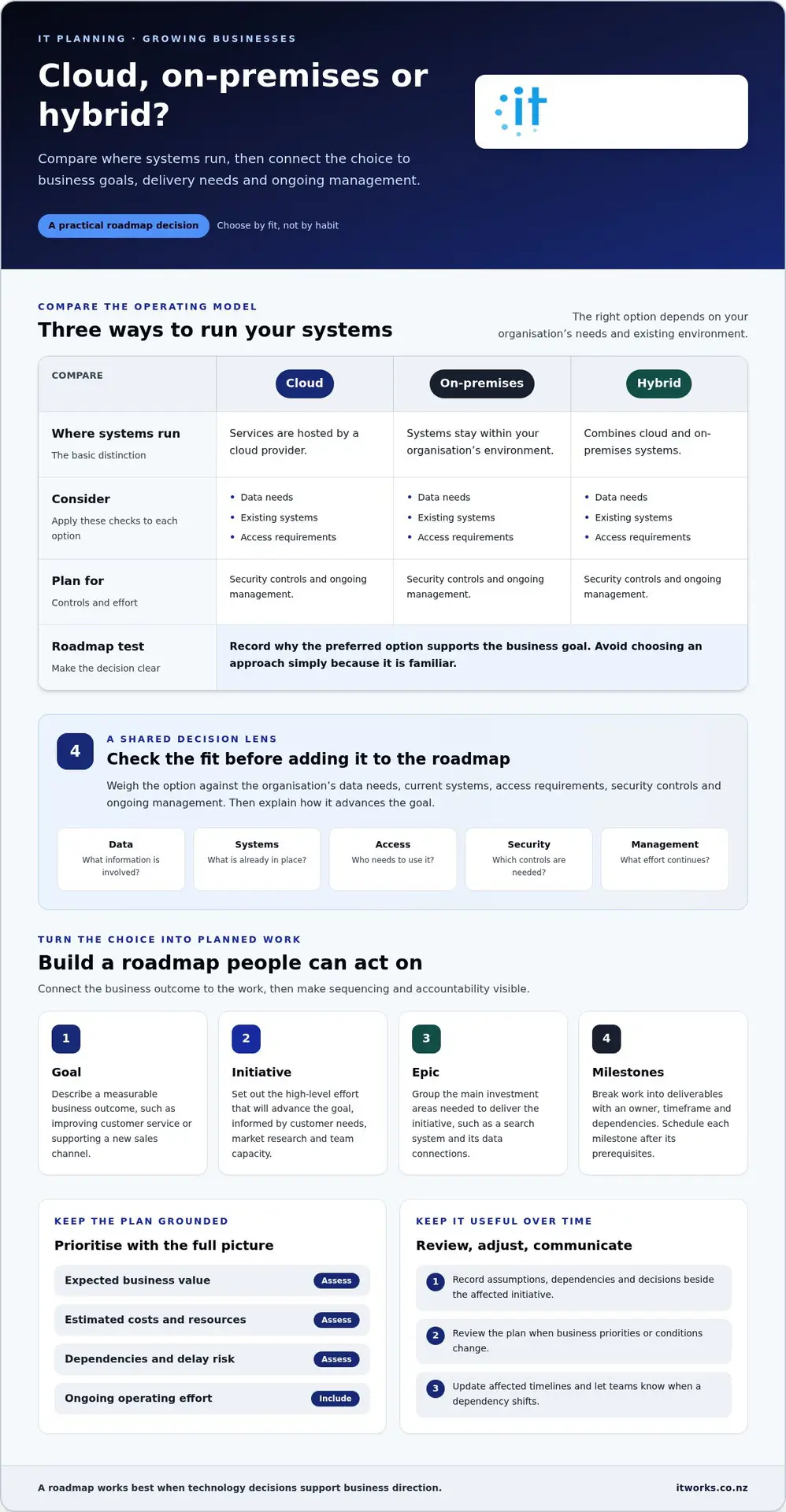
Group related work under each goal. Goals describe the business outcome; initiatives are high-level efforts that advance it; epics are the main investment areas needed to deliver an initiative. For example, a goal to improve customer service could support an initiative to make information easier to find, with an epic covering a search system and its data connections.
Compare cloud, on-premises and hybrid roadmaps by weighing data needs, existing systems, access requirements, security controls and ongoing management. A cloud approach uses services hosted by a cloud provider; on-premises keeps systems within the organisation’s environment; hybrid combines both. Record why the preferred option supports the goal, rather than choosing by habit.
-
Set timelines and milestones
Break each initiative into smaller milestones, assign an owner and show dependencies on a timeline. Use team capacity, previous performance and delivery constraints to set realistic dates. Schedule a release after its prerequisites, such as preparing data before a new system goes live. Communicate changes when a dependency shifts, so teams can adjust related work.
Manage roadmap risks by recording assumptions, dependencies and decisions alongside the affected initiative. For example, if a release depends on data migration, identify that dependency before setting its milestone. Review the plan when priorities or conditions change, and adjust timelines instead of letting outdated dates shape team commitments.
-
Prioritise projects by cost, risk and value
Rank projects by expected business value, estimated costs, resource needs and the risk of delaying the work. Compare a customer-facing improvement with a security control by asking which goal each supports, what it depends on and what capacity it requires. Include ongoing operating effort, not just implementation, when assessing the investment.
Choose the sequence that best balances these factors, then record the reason for each decision. A high-value project may need to wait until a prerequisite is complete, while a risk-reducing control may warrant earlier attention. Revisit rankings during roadmap reviews and update milestones when evidence, market research or business priorities change.
Who benefits from IT roadmap templates?
For a small business, use an editable roadmap template with a monthly timeline and a visual timeline or Gantt chart. Keep it simple enough to update, but detailed enough to show objectives, milestones and dependencies.
- Give leaders and delivery teams a shared view. Business owners, managing directors, CIOs and IT directors benefit when the roadmap connects decisions with company objectives. Team members can see which initiatives need their input and when their work is due. For example, if a new customer system depends on clean data, show data preparation as a separate milestone before implementation.
Use the roadmap to communicate progress, not just planned technology purchases. Record the objective, accountable owner, current status and next milestone for each initiative. This helps leaders discuss trade-offs and delivery teams understand how their work fits the wider plan. A useful template makes the next action clear to both groups.
- Choose a visual that reveals dependencies. A timeline or Gantt chart can show timeframes, sequencing and links between projects. If a network upgrade must happen before a cloud migration, show that dependency beside both initiatives. This makes the order of work visible and helps teams see when a delay could affect another milestone.
Make each milestone specific and actionable. “Improve systems” is difficult to track; “complete testing before release” identifies a deliverable and a clear sequence. Add an owner and due date, then use status labels such as planned, in progress and complete. These details help a small team track progress without burying the business view in task-level detail.
- Set timelines that support useful forecasts. A monthly view suits initiatives that need regular progress visibility, while a longer-term view can show the direction of strategic work. Group related milestones by month or quarter, and show when each initiative is expected to start, reach a decision point and deliver an outcome.
Treat forecasts as working estimates, not fixed promises. Base milestone timing on dependencies, available team capacity and information from completed work. If a supplier decision or data migration affects a release, show that assumption on the roadmap. When the dependency changes, update the forecast and communicate the effect on connected initiatives.
- Review the roadmap as business needs change. Set a regular review date so objectives, owners and timelines remain relevant. Review investment details during monthly or quarterly updates, and revisit the roadmap after a major change. For example, a new customer need may move a planned release ahead of lower-priority work.
Make updates visible. Record what changed, why the priority shifted and which milestones need adjustment. A clear history helps decision-makers understand the reasoning without relying on informal conversations. For a growing business, a practical template is one people can maintain, use to track progress and update as evidence changes.
Strategic, enterprise, technology, product, project and departmental roadmaps
Choose a roadmap format that matches the decision you need to make. Keep the business vision visible, then show how each roadmap supports it.
-
Define the business vision and strategy
Start by writing the business vision as a clear description of the organisation’s intended direction. Translate it into measurable, time-bound objectives, such as improving customer experience or expanding into a new market. A business roadmap then shows how goals and initiatives support that strategy over time. Avoid adding technology projects without a clear link to an objective.
-
Distinguish strategy and execution roadmaps
Use a strategic roadmap to show why major initiatives matter and how they support long-term objectives. It often spans multiple years, while an execution roadmap tracks the tasks, dependencies and milestones required to deliver specific work. For example, a strategic priority might be improving customer access, while an execution plan sets out the system changes and release stages. Keep both formats connected but tailored to their audiences.
-
Plan for strategic growth
Map growth objectives to initiatives, timeframes and the resources required to progress them. A long-term business roadmap may span three to five years or even 10 years, while a product vision may look ahead two, three or five years. Treat these horizons as planning formats, not promises. Use market research and customer needs to shape priorities, then adjust plans as evidence changes.
- Select the roadmap format for each decision. An enterprise roadmap brings organisational priorities into view to help leaders coordinate investment. A technology roadmap focuses on how systems and technology initiatives support those priorities. A product roadmap centres on product direction and planned development. These formats can share objectives, but each should give its audience the detail needed to assess progress.
For example, an executive team may use an enterprise view to compare priorities across departments. Technology leads can then use a technology roadmap to sequence related work. Keep the relationship between the views clear, so changes in business direction flow through to the relevant plans.
- Connect project and departmental plans. A project roadmap presents the work, dependencies and milestones needed for a specific outcome. Departmental roadmaps translate wider objectives into initiatives for teams such as finance, operations or customer service. For example, a customer service goal might involve a project to improve access to information and a departmental plan for staff training.
Keep the business plan distinct: it describes operations in detail, while a roadmap shows strategic goals and initiatives over time. Use the roadmap to communicate progress and highlight where departments rely on shared work. This helps coordinate growth without losing sight of the organisation’s vision.
Benefits of IT roadmaps for growing businesses
A practical roadmap turns a strategic plan into visible choices. It helps leaders keep technology aligned with business goals as priorities and capacity change.
- Make the direction clear. Show how technology supports the organisation’s business goals instead of presenting a disconnected list of systems. For example, if the goal is to serve customers more efficiently, identify the technology initiatives that support this outcome and how progress will be assessed. Leaders can explain why the work matters, while teams see how their contribution fits the wider plan.
A shared direction also helps teams distinguish essential work from attractive ideas. When a new request arrives, compare it with the strategic plan and existing commitments. If it doesn’t advance a stated goal or address a clear business need, record why it’s deferred instead of quietly adding it to the workload.
- Connect investment to business value. Use the roadmap to show what each initiative needs and the outcome it aims to support. For instance, improving staff access to information may require system changes, preparation and user adoption work. Showing these parts together helps decision-makers consider the full effort, rather than judging a project by its initial purchase alone.
This view supports more deliberate investment choices. Leaders can compare business value, resource needs and dependencies across initiatives, then agree which work should proceed first. The roadmap also makes the reasoning visible, so a decision to delay one project can be explained alongside the work receiving priority.
- Spot capacity pressures before they disrupt delivery. Map initiatives against team responsibilities and current commitments. If the same people must support daily operations and prepare a new system release, make the overlap visible. Leaders can adjust sequencing, allocate capacity or refine the scope before pressure affects delivery.
This is especially useful when growth brings new teams, locations or customer needs. A roadmap gives decision-makers a shared view of proposed work and its dependencies. They can identify where one team’s deliverable affects another, then coordinate plans instead of discovering the conflict during implementation.
- Measure progress through outcomes. Choose a measure that reflects the intended business result, then review it alongside delivery progress. IT roadmaps can track measures such as system uptime, user adoption or cost savings. For example, if an initiative aims to improve use of a new system, monitor adoption rather than counting only completed technical tasks.
Pair each measure with a clear owner and review point. If adoption remains low after a release, investigate whether staff need more support or the system needs adjustment. This keeps the roadmap focused on useful outcomes, not simply the number of projects marked complete.
- Adapt the plan without losing strategic alignment. Review progress against current business goals and update initiatives when customer needs, market research or team capacity shifts. Record changed priorities and the reasons for them. For example, new customer feedback may justify moving an improvement ahead of planned internal work.
A roadmap creates value through informed adjustments. It gives leaders a consistent way to discuss trade-offs, communicate decisions and retain a clear direction. Keep the plan connected to business outcomes, and use delivery evidence to shape what happens next.
What should an IT roadmap template for a growing business include?
Build the template around decisions people can act on. Include the information needed to understand each initiative, its timing and its expected contribution to business goals.
- State the business outcome. Give each initiative a goal that explains the business need, not just the technology change. For example, “make customer information easier to access” describes an outcome more clearly than “replace the database”. Add a measure of progress, such as system uptime, user adoption or cost savings, and name the person responsible for tracking it.
- Record initiatives, owners and phases. List each initiative with an owner, due date and phase, such as planning, implementation or release. Break large efforts into milestones that show tangible progress. For example, a system change might have separate milestones for requirements, configuration, testing and launch. Clear ownership helps teams coordinate the work and communicate changes.
- Show dependencies between projects. Identify when one initiative must finish before another can begin. If a new reporting tool relies on cleaned source data, show data preparation as a prerequisite. Add the dependency beside both items and reflect it in their timelines. This makes sequencing visible and helps explain how a delay could affect a later milestone.
- Map timelines and available resources. Choose a timeline view that suits the work, such as months for near-term delivery or quarters for strategic initiatives. The template described in this article uses a monthly timeline, while a strategic view can be divided into quarters. Record estimated costs, budget and resource allocation for each item, so leaders can assess capacity alongside timing.
- Include assumptions and measures for review. Note key assumptions that could affect delivery, such as access to data or staff availability. Pair each initiative with a progress measure and review date. For instance, a milestone may be complete while user adoption still needs attention. This distinction helps decision-makers assess whether delivery is producing the intended business result.
- Keep the template current. Set regular review dates and revisit the roadmap quarterly or after major changes. During monthly or quarterly updates, review investment details and adjust forecasts as priorities or resource needs shift. Keep the revised owner, timeline and decision visible. A useful template supports clear conversations and actionable decisions, rather than becoming a static record of last quarter’s plans.
Assign an owner to each initiative and set regular review dates. List initiatives and milestones with owners, due dates and phases. Set tasks with deadlines and assign them to team members so progress is measurable. Show dependencies wherever one project must be completed before another can begin.
IT Works: Managed IT Services
Based in Lower Hutt, Wellington, IT Works helps New Zealand organisations connect technology decisions with business priorities through Managed IT Services. This can help when your roadmap needs to move from planned initiatives into coordinated technology management, or when cybersecurity and cloud decisions need to support the same direction.
For example, a roadmap may identify cloud changes alongside security improvements and staff needs. IT Works can help turn these priorities into a practical plan, with technology choices focused on business outcomes. Its Cybersecurity, Cloud Solutions and AI & Automation services can also support specific initiatives as your organisation’s needs develop.
Talk to IT Works about aligning your technology plans with your business goals.
Keep your roadmap useful as your business grows
An IT roadmap template for growing businesses works best as a living decision tool, not a document filed away after approval. As your organisation changes, use customer insight, operational experience and market conditions to reconsider which technology decisions will support its direction. This helps leaders respond thoughtfully while keeping future choices connected to business priorities.
Your next step is to identify one upcoming business decision that would benefit from clearer technology planning. Bring together the people who understand the goal, current systems and practical constraints. A focused discussion can turn that decision into a useful starting point for the next stage of your roadmap.
With a clear next step, your team can keep building towards growth with purpose and confidence.
Frequently Asked Questions
How do you create an IT roadmap step by step?
Begin by gathering input from business leaders and the people who use key systems. Note current technology constraints, recurring workarounds and upcoming business changes. Then group needs into initiatives, compare their business impact and dependencies, and decide what can be delivered with available skills and capacity. Assign an accountable owner to each initiative. Finally, share the roadmap with affected teams and use review meetings to record decisions, progress and changing assumptions.
What IT priorities should a growing small business plan for over the next 1-3 years?
Over the next 1-3 years, prioritise technology that supports your growth plans and addresses current operational constraints. For example, a business adding staff may need to review how new employees receive access, equipment and guidance. Consider whether existing systems can handle projected workloads, whether important information can be restored after disruption, and whether teams can use tools effectively. Assess AI opportunities only where a clear business task, suitable information and responsible oversight are in place.