
What if your team could spot a network issue developing before it slows work across the organisation? Staff often notice the disruption first, but not what’s causing it. For New Zealand organisations with 15 to 75 staff, the proactive network monitoring benefits that matter most are clearer visibility, less avoidable disruption and better-informed technology decisions.
Monitoring can track useful signals across network infrastructure and alert the people responsible when something needs attention. But collecting alerts isn’t enough. Alerts need context, clear ownership and follow-through to support business outcomes, rather than add another stream of technical noise.
This article explains what proactive monitoring can observe and how it differs from waiting for staff to report a problem. You’ll learn how to prioritise signals, set a clear response process and decide who should act on alerts. The aim is to make monitoring part of dependable technology management, not simply another tool to install.
Key Takeaways
- The proactive network monitoring benefits for your organisation depend on turning useful network signals into timely, accountable action.
- Monitoring can help surface developing issues earlier than waiting for staff reports, but it can’t guarantee every problem will be detected or prevented.
- Prioritise monitoring around the services and work patterns where disruption would have the greatest effect on your team.
- Agree who reviews alerts, investigates potential issues and follows up, so important signals don’t get lost in technical noise.
- Managed IT Services and Infrastructure Management can connect monitoring with practical business priorities.
What are the proactive network monitoring benefits for a business?
A slowdown can hold up a video call, interrupt access to shared files or leave staff waiting for a cloud application to respond. The effect is obvious, but the cause may not be. It could be a network connection, a change in performance or another part of the technology environment. Without information to guide the investigation, staff may spend time trying workarounds without knowing where the problem lies.
The proactive network monitoring benefits start with better visibility. Monitoring means collecting and reviewing network signals to spot changes that could point to a developing issue. That information gives a support team a useful starting point, rather than relying only on a staff member’s description after work has been affected. Monitoring can support earlier investigation, but it can’t guarantee that every issue will be detected or prevent every outage.
Network monitoring is the observation of a network and its performance. The information worth reviewing depends on how your organisation operates and which connections and services its work relies on.
Which network signals can help identify an issue?
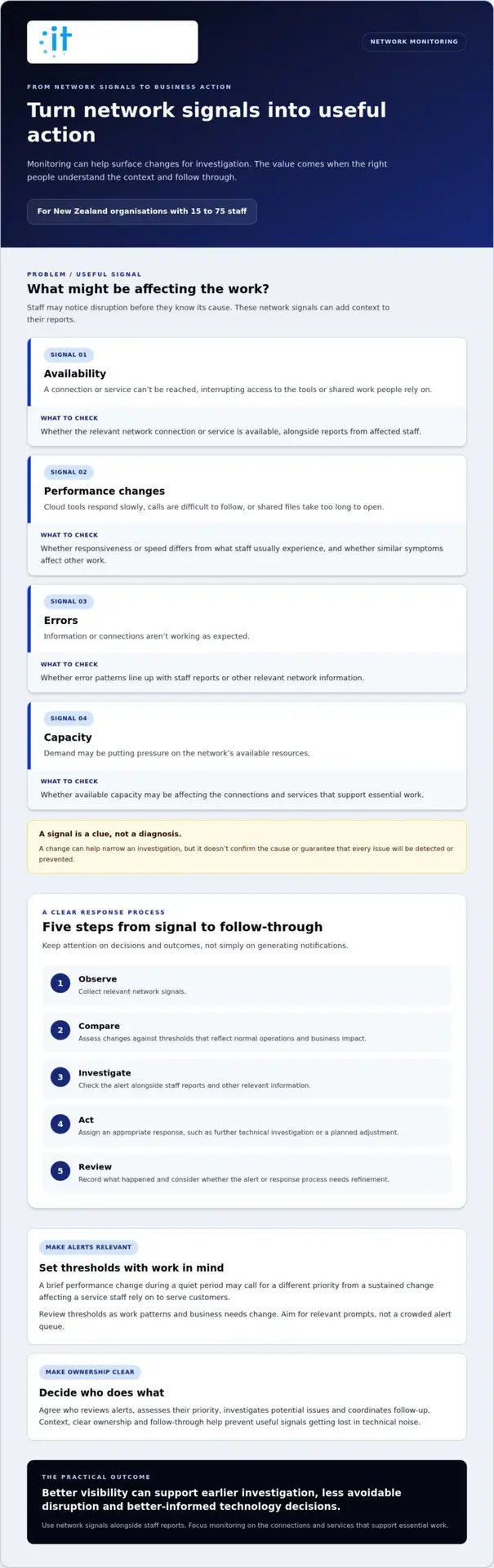
Useful signals may include whether a connection is available, changes in performance, errors and available capacity. A change in one signal doesn’t automatically explain the cause. It can help narrow the investigation, especially when considered alongside staff reports. Focus on signals that relate to your organisation’s network and business priorities, rather than collecting every possible measurement.
- Availability: whether a network connection or service can be reached.
- Performance changes: whether responsiveness or speed differs from what staff usually experience.
- Errors: signs that information or connections aren’t working as expected.
- Capacity: whether demand may be putting pressure on the network’s available resources.
For example, if several people report delays at the same time, availability and performance information may help distinguish a broader network issue from a problem affecting one person or application. These signals are clues, not a diagnosis by themselves.
How can network health affect everyday business work?
Many everyday tasks depend on a reliable connection. A slow or inconsistent network can delay cloud tools, make calls difficult to follow and interrupt access to shared work. For a smaller organisation, an issue that seems minor can affect several people at once.
Network visibility adds context to staff reports. If someone says a call dropped or a shared file took too long to open, a support person can consider that report alongside relevant network signals. This can help guide investigation and show whether similar symptoms are affecting other work. It also gives decision-makers a clearer basis for discussing recurring issues and technology priorities.
Reliable network access gives staff more time to focus on their work and less time working around connection problems.
Network health is one part of the wider technology environment. Broader IT monitoring may also cover systems and services beyond network connections. Keep network monitoring focused on a practical question: are the connections supporting essential work performing as expected, and can the right people investigate when they aren’t?
How does proactive network monitoring turn signals into useful action?
A signal becomes useful when someone understands what it may mean and what to do next. A change in availability, performance or errors can prompt a closer look, but it doesn’t confirm the cause. Investigation separates an indicator from a diagnosis and helps determine an appropriate response.
A practical monitoring process follows a clear sequence:
- Observe: collect relevant network signals.
- Compare: assess changes against thresholds that reflect normal operations and business impact.
- Investigate: check the alert alongside staff reports and other relevant information.
- Act: assign an appropriate response, such as further technical investigation or a planned adjustment.
- Review: record what happened and consider whether the alert or response process needs refinement.
This sequence keeps attention on outcomes, not simply on generating notifications. The proactive network monitoring benefits are easier to realise when alerts help people make informed decisions and follow through.
From network signal to an actionable alert
A useful alert gives someone enough context to judge whether a change matters. Set thresholds with expected network behaviour and the effect of disruption on work in mind. For example, a brief performance change during a quiet period may call for a different priority from a sustained change affecting a service staff rely on to serve customers.
Review thresholds as work patterns and business needs change. If they’re set too broadly, meaningful changes may not stand out. If they generate frequent low-value alerts, people may find it harder to spot the ones that deserve attention. Aim for a manageable set of relevant prompts, not a crowded alert queue.
Why response ownership matters as much as visibility
Decide who reviews alerts, assesses their priority and coordinates follow-up. Depending on the organisation, these responsibilities may sit with an internal technology lead, a support team or be shared. What matters is that every alert has a clear route to investigation, rather than being left for someone to notice by chance.
An alert without an owner can create visibility without improving reliability.
Useful records show whether similar alerts recur, what an investigation found and what action followed. Over time, this context can help a team distinguish a one-off event from a pattern worth addressing. It can also inform decisions about maintenance, capacity and where further investigation would be valuable.
Monitoring works best as part of wider support responsibilities. The people responsible need to understand the business impact, coordinate follow-up and review whether the response addressed the concern. Professional communities such as IEEE provide opportunities to share knowledge across technology fields, while day-to-day alert handling still depends on an organisation’s own context and clear ownership.
For organisations considering how to connect monitoring with ongoing support, IT Works’ managed IT approach brings monitoring into a broader focus on technology management and business needs.
Proactive versus reactive monitoring: which approach better supports your organisation?
Proactive and reactive approaches differ mainly in how an issue first comes to attention. With reactive reporting, a staff member describes a symptom and investigation starts from there. Proactive monitoring adds network signals that may bring a change to attention earlier. Neither approach removes the need for people to assess what is happening and decide what to do.
| Aspect | Proactive monitoring | Reactive reporting |
|---|---|---|
| When an issue becomes visible | A network signal may highlight a change before staff report an effect. | The issue becomes visible when someone notices a symptom and reports it. |
| How investigation starts | A relevant alert can provide a starting point, alongside reports and other context. | The investigation usually starts with the reported symptom and details staff can provide. |
| Possible operational impact | Earlier visibility may give the team more opportunity to investigate while work continues. | Work may be affected before a report is made, particularly if symptoms are intermittent or not widely noticed. |
These are different ways of surfacing a problem, not guarantees about its outcome. The proactive network monitoring benefits depend on relevant coverage, useful alerts, clear ownership and follow-through. Staff reports still matter: people may notice an issue that monitoring signals don’t capture, or provide details that help explain an alert.
What proactive monitoring can improve, and what it cannot promise
Useful monitoring can give a support team more context for diagnosis, prompt earlier investigation and help identify recurring issues. It can’t promise that every issue will be detected, prevented or resolved before work is affected. The outcome depends on what is monitored, how alerts are prioritised and whether someone investigates and acts on them. An overview of the benefits of proactive network monitoring also describes the approach, but results depend on how monitoring is applied and managed.
Monitoring without action can create activity without meaningful improvement. If nobody assesses an alert’s business impact, assigns follow-up or reviews the result, the organisation gains data without necessarily improving reliability. A practical measure of value is whether the information helps people make a decision or take a useful next step.
When a reactive approach may leave important gaps
Relying only on staff reports means an issue may remain unnoticed until it affects someone’s work. Reports can describe symptoms differently, making it harder to tell whether separate incidents share a cause. Intermittent problems are especially difficult to investigate from memory alone: by the time someone reports a slowdown, the network may appear to be working normally again. A record of relevant signals can give the investigation more context.
Reactive reporting remains an important part of support. Staff observations add human context, while monitoring provides another source of information. For a broader view of how security fits into resilient operations, see this cybersecurity guidance for NZ small businesses.
For organisations with 15 to 75 staff, consider whether earlier visibility and useful history would help the people responsible investigate issues and make better decisions. A balanced approach combines relevant monitoring, a clear way for staff to report symptoms and accountable follow-up.
How should a New Zealand organisation prioritise network monitoring?
Monitoring priorities should reflect how your organisation works, not simply how much network information can be collected. For a New Zealand organisation with 15 to 75 staff, start by identifying the work that would be most affected by a network interruption. Then focus monitoring and alert ownership on those priorities. This is relevant for Wellington organisations as well as teams working across other locations.
Use this sequence to build a manageable approach:
- Map important work: identify the services and everyday tasks that depend on reliable network access, such as cloud-based systems, customer communications or shared files.
- Understand the connections involved: note the relevant locations, connections and systems that support this work. Base the map on your own environment.
- Choose a small set of useful signals: start with information that could help identify disruption to those activities, rather than monitoring everything by default.
- Document normal conditions: record what expected operation looks like, so changes can be considered in context.
- Assign responsibility and review: agree who reviews alerts, who coordinates escalation and how the organisation will learn from recurring issues.
Set monitoring priorities around business impact
Consider which staff workflows rely most on stable connections, how strongly they depend on cloud services and what a disruption would mean for customers or colleagues. A team that collaborates through shared online files, for instance, may prioritise visibility into the connections supporting that work. Another organisation may have different essential activities. Start with the signals most closely tied to important work, then expand only when there’s a clear reason.
This approach makes monitoring easier to explain to technical teams and decision-makers. It also connects network information to business priorities, rather than treating every alert as equally important. Network Infrastructure Management provides context when monitoring sits within wider responsibility for managing the organisation’s technology environment.
Establish alert review, escalation and learning
Before extending monitoring, make the process clear: who reviews alerts, who decides whether an issue needs escalation and who communicates its likely operational impact? Keep a record of recurring issues, investigation findings and actions taken. Reviewing these records can show whether priorities remain relevant or should change as services and work patterns evolve.
Monitoring supports visibility, but it isn’t a recovery plan. Consider it alongside arrangements for continuing or restoring important work if a service becomes unavailable. For example, clarify which essential tasks need to continue, who coordinates the response and where staff can find current procedures.
Thoughtful prioritisation helps organisations realise the proactive network monitoring benefits that matter to their teams, while keeping alerts and responsibilities manageable. Review the approach when important systems, workflows or business needs change.
Discuss your network monitoring priorities
How IT Works connects proactive monitoring with business outcomes
For monitoring to support business outcomes, it needs to fit into the way technology is managed day to day. IT Works is a Wellington-based technology partner for New Zealand organisations, including those with 15 to 75 staff. Its Managed IT Services include proactive system monitoring, maintenance and management, alongside a strategic and operational approach to technology.
This means considering more than whether a network signal can be observed. The useful questions are what the information means for staff, who is responsible for reviewing it and how it informs support or future planning. Monitoring can contribute to clearer decisions and help reduce avoidable disruption, but it doesn’t guarantee uninterrupted service.
Monitoring as part of managed technology support
Within Managed IT Services, proactive system monitoring sits alongside the work of maintaining and managing technology. Network Infrastructure Management focuses on the connections and infrastructure that support everyday operations. Together, visibility and clear accountability can help connect a technical change with its potential effect on staff productivity, rather than leave an alert separate from the work it may affect.
That context matters as organisations change. New services, different work patterns or planned growth can alter which technology supports essential tasks. Reviewing monitoring priorities as part of ongoing management helps keep attention aligned with current business needs. The managed IT services guide for New Zealand organisations provides broader context on how support can sit within a managed technology relationship.
Choose next steps that fit your organisation
Start by reviewing recurring network symptoms, the work most affected when connections falter, and who currently owns alerts and follow-up. These points can reveal where visibility or responsibility could be clearer. They also provide a practical basis for deciding which issues deserve attention first, instead of starting with a particular tool or assuming that more monitoring is automatically better.
Then consider how monitoring should fit with existing support, maintenance and technology planning. For some organisations, clarifying alert ownership may be the priority. For others, reviewing repeated symptoms or checking whether monitoring reflects current business-critical work may be more useful. The aim is to align the approach with operational needs and make responsibilities clear.
These are the foundations for making the proactive network monitoring benefits relevant to your organisation: information connected to meaningful work, with people accountable for considering what it means. A thoughtful conversation can help turn that principle into practical priorities for your team.
Learn more about IT Works’ managed technology support and how it can fit your organisation’s priorities.
Keep monitoring aligned with what comes next
Network insight can help leaders make room for new opportunities. As your organisation considers a new service, a different way to work or a change in customer expectations, understanding the role of network reliability can inform the conversation. It gives business and technology teams a shared starting point for weighing operational needs alongside future ambitions.
That perspective can help keep technology decisions connected to the outcomes your organisation wants to achieve, while allowing the right support to grow alongside them.
With a clear view of what matters to your business, your next technology decision can feel more purposeful and well considered.
Frequently Asked Questions
What is proactive network monitoring?
It’s an organised way to use information about network operation as part of managing technology, rather than relying on occasional checks alone. Start by defining what monitoring should help with, such as maintaining access to a key business service. That purpose keeps monitoring relevant to decision-makers and makes it easier to explain why the information is being collected.
Can proactive network monitoring prevent every outage?
No monitoring approach can remove every possible cause of interruption. An issue may arise in an external service, a power supply or a part of the environment outside the monitoring scope. Consider monitoring alongside practical continuity arrangements, including how staff will carry on essential tasks if a service is unavailable. Clear expectations about what monitoring covers also help teams understand its role.
How does network monitoring help identify performance problems?
It can help a technical team distinguish a network-related symptom from other possible causes. For example, if one application is slow but other online services work as usual, the investigation may take a different path than if several services are affected. Comparing reports by location, service and time can help narrow the scope. Staff observations remain valuable because they describe the effect on actual work.
What happens when a network monitoring alert is triggered?
The person responsible can assess the alert, establish whether staff or a business service are affected, and decide what information needs to be shared. If work is disrupted, a brief update can help colleagues understand the impact and practical next steps. After investigation, record the affected service and outcome. This can make later communication clearer, particularly when leaders need to understand the operational significance of a technical issue.
Is network monitoring the same as cybersecurity monitoring?
No. Network monitoring concerns the operation of network infrastructure, while cybersecurity monitoring looks for activity relevant to protecting systems and information. The two can overlap, but an alert about network performance doesn’t by itself establish a security concern. Give each type of alert an appropriate review path, so operational troubleshooting and security assessment are handled in the right context.
Can network monitoring support staff working across multiple locations?
Yes. It can help teams understand whether a reported issue is limited to one site or appears across locations. For instance, a manager could compare reports from staff in different offices who rely on the same business service. Local context still matters: the work taking place at each site and the connections it depends on may differ. This helps decision-makers consider site-specific needs rather than assume a uniform setup.
How often should a business review its network monitoring priorities?
There isn’t one review interval that suits every organisation. A technology planning or budgeting discussion is a useful opportunity to consider whether current monitoring still supports business decisions. Teams can also review whether the information they receive is useful, responsibilities remain clear and the approach fits planned projects. This keeps the review connected to governance and planning, rather than making it an administrative exercise.