
What if reducing your IT spend didn’t mean compromising security or slowing your team down? The most effective it cost reduction strategies remove waste and direct spending towards technology that supports your organisation’s growth.
Unpredictable bills, unused software licences and unplanned repairs make it harder to budget with confidence. Cutting costs without understanding what your business needs can create new inefficiencies. A more strategic approach helps you manage spending while maintaining the support your people rely on.
This guide explains how to review technology spending, streamline software and plan hardware replacements. It also shows how a Technology Roadmap can help reduce emergency spending and align IT investment with business priorities. The aim is a more predictable budget, a leaner technology environment and systems that help your people work productively.
Key Takeaways
- Effective it cost reduction strategies remove waste and fund business priorities, rather than simply cutting budgets.
- Review software licences and subscriptions to find unused tools, overlapping services and features your organisation doesn’t need.
- Assess whether cloud services and practical automation could reduce operational friction and free up time for higher-value work.
- Use a Technology Roadmap to connect investment to growth plans and reduce unplanned spending.
- A strategic technology partner can manage day-to-day IT needs while keeping long-term costs and priorities in view.
Why IT Costs Spiral: Moving Beyond Reactive Budgeting
IT cost reduction isn’t simply a matter of cutting the technology budget. First, understand what your organisation spends, what value that spending delivers and where avoidable costs are building up. The aim is to fund business priorities while maintaining essential services, security and staff productivity. These it cost reduction strategies start with a clear view of total costs, not just the next invoice.
One source of rising costs is technical debt: the ongoing effort required to keep ageing systems working. Older equipment or software may need more maintenance and workarounds, while making it harder to adopt tools that meet current needs. Replacement isn’t automatically cheaper, so compare the cost of maintaining a system with a planned replacement. Include reliability and future requirements in the assessment. A lifecycle plan helps avoid both premature upgrades and emergency purchases.
Apply cost reduction principles to your organisation’s goals, rather than making blanket spending cuts. Cost Reduction Principles and Strategies offers general background on the subject. For IT, ask whether each cost supports a useful outcome, such as reliable operations, secure access or more efficient work.
The True Cost of the Break-Fix Cycle
When an outage stops people working, the expense extends beyond the repair. To estimate the productivity impact, multiply the number of affected staff by the time they’re unable to work, then consider the value of that work time to your organisation. For example, if a team can’t access a system needed to process orders, the interruption may also delay customer responses and internal decisions. Track outages and their business consequences to understand the impact, rather than relying on repair bills alone.
Urgent repairs can bring extra costs, such as expedited parts or unplanned specialist work. Repeated emergencies also make budgeting difficult. Leaders have less time to compare options, plan replacements or connect IT decisions to business priorities. Staff can lose confidence in systems they can’t rely on, adding frustration to an already disrupted workday.
Value Optimisation vs. Simple Cost Cutting
Removing an essential security tool to reduce a monthly bill can be a false economy. Instead, check whether existing tools are configured and used appropriately, and look for overlap before changing protections. Apply the same value-based thinking to automation: identify a repetitive task, estimate how often it happens and how long it takes, then compare that effort with the time needed to implement and manage automation. This helps you assess potential value without assuming every task should be automated.
Use your financial-year goals to guide decisions. If growth depends on serving more customers, prioritise systems that support that capacity. If dependable day-to-day operations are the focus, consider planned maintenance and replacement timing. Proactive management can make costs more predictable while preserving room for purposeful investment.
Identifying Hidden Waste in Your Technology Stack
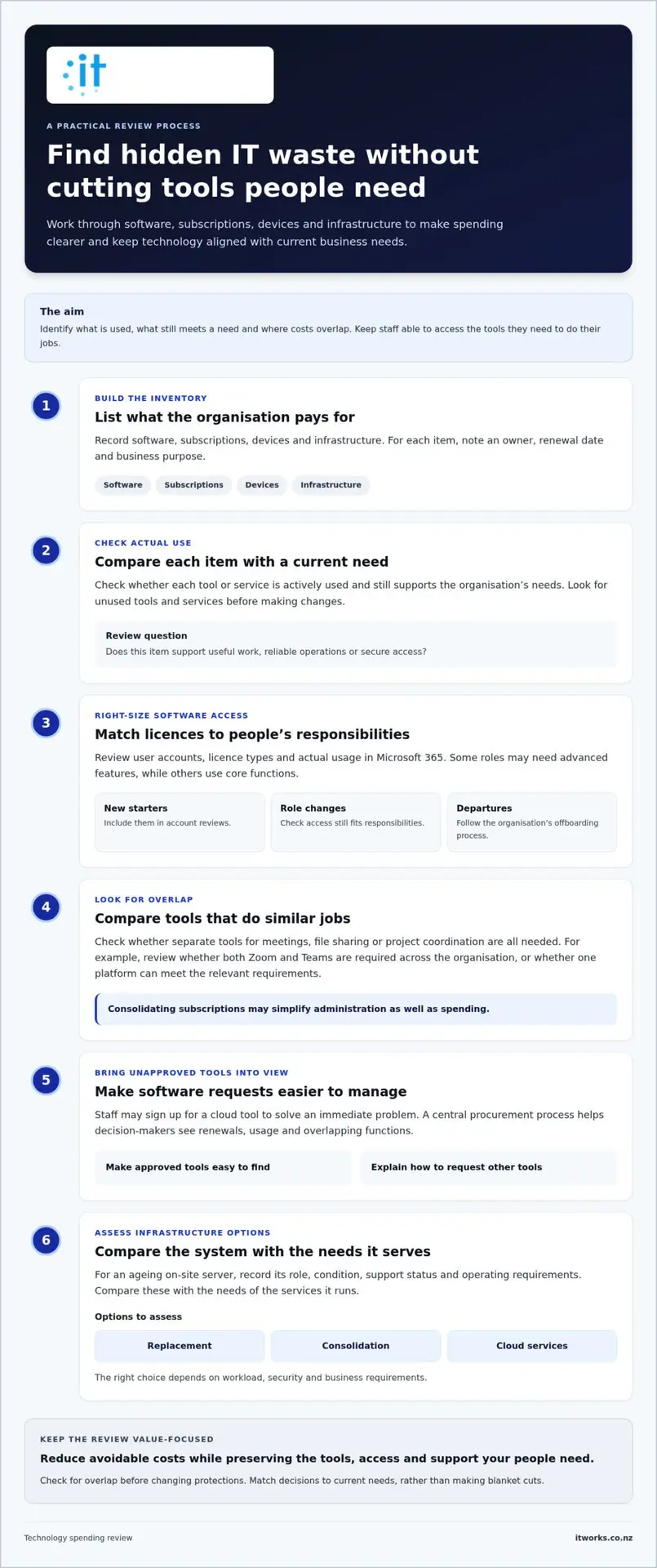
Technology costs often build up through small, scattered commitments rather than one obvious line item. A former employee’s account remains active, a team renews a tool that overlaps with another, or a server continues running after its workload has changed. A straightforward inventory can reveal opportunities to make spending clearer without creating an unwieldy process.
List software, subscriptions, devices and infrastructure, with an owner, renewal date and business purpose for each. Then check whether each item is actively used and meets a current need. These it cost reduction strategies work best when staff can still access the tools they need to do their jobs.
Software Licence Rationalisation
Review user accounts, licence types and actual usage in your Microsoft 365 environment. Some staff may need advanced features, while others use only core functions. Match access to responsibilities, and include new starters, role changes and departing staff in regular account reviews. Remove access that’s no longer required, following your organisation’s offboarding process.
Look beyond individual licences. If teams use separate tools for meetings, file sharing or project coordination, compare their functions and how well they work together. For example, review whether both Zoom and Teams are needed across the organisation, or whether one platform can meet the relevant requirements. Consolidating subscriptions may simplify administration as well as spending.
Addressing Shadow IT
Staff may sign up for a cloud tool to solve an immediate problem, especially if approved options are difficult to use. The subscription can then renew outside normal budget reviews, while business information sits in an account the organisation doesn’t manage. BCG’s discussion of Strategic IT Cost Reduction in Government includes procurement and shadow IT as areas for a more coordinated approach.
Make approved tools easy to find, and explain how staff can request something that isn’t already available. A central procurement process gives decision-makers visibility of renewals, usage and overlapping functions. It also helps the organisation understand its combined requirements when discussing subscription terms, without assuming every supplier offers a bulk discount.
Include physical infrastructure in the review. An ageing on-site server may use more power, need ongoing maintenance or support systems that no longer suit the organisation’s needs. Record its role, condition, support status and operating requirements, then compare these with the needs of the services it runs. Replacement, consolidation or moving to cloud services may be options to assess. The right choice depends on workload, security and business requirements.
Keep the review practical: assign an owner to each major subscription or device, record renewal dates and schedule regular checks with the teams that use them. This makes it easier to spot unused capacity before renewal and helps staff adopt shared, supported tools. For a structured review of your technology environment, talk with IT Works about your technology strategy.
Strategic Consolidation and Practical AI Integration
Once you’ve identified overlapping tools and infrastructure, consider whether a simpler technology environment could reduce administration and better support the way your organisation works. Consolidation isn’t about choosing fewer tools at any cost. It’s about selecting services that fit your needs, work well together and have clear ownership.
Cloud services can shift some technology spending from large, periodic hardware purchases towards ongoing operating expenses. They may also reduce the need to maintain physical servers on site, but moving workloads doesn’t guarantee lower costs. Assess each system’s requirements, usage and ongoing management needs before deciding whether migration makes sense.
Right-Size Cloud and Supplier Arrangements
Review cloud capacity regularly. If resources exceed what a workload needs, your organisation may be paying for unused capacity. If they’re too limited, staff may face performance issues that interrupt work. Reviewing usage, access and business requirements helps keep the setup aligned as needs change.
Consolidating suppliers can reduce the effort spent managing contracts, renewals and support relationships. Keep a clear record of which partner manages each service, who owns the relationship and when agreements are due for review. IBM’s Efficient IT Cost Management Strategies highlights the value of cost discipline and allocation. For a New Zealand organisation, a practical starting point is understanding where spending sits and which business area benefits from it.
Use Automation Where It Helps
Practical AI and automation can reduce repetitive work, but start with a defined task rather than a broad technology rollout. For example, map how staff collect information for a recurring report or transfer data between systems. Identify the manual steps, who checks the output and what could go wrong if information is incomplete. Then assess whether automation can improve the process without creating more work to manage.
Preparing for Microsoft Copilot means considering more than the tool itself. Review how information is stored and accessed, set clear expectations for appropriate use, and help staff understand when outputs need checking. Assess AI automation against a specific productivity need, with responsible governance built into the decision.
Hardware standardisation is another practical opportunity. A consistent device range can simplify support, purchasing and staff setup, while making replacements easier to plan. Standardisation should still allow for roles with different performance or accessibility needs. Document an approved baseline, note justified exceptions and review the fleet as requirements evolve.
Together, these it cost reduction strategies can make technology easier to manage without treating every service or device as interchangeable. A measured assessment of cloud use, supplier arrangements, automation and hardware can show where consolidation creates value. Talk to IT Works about your technology strategy as you weigh these options against your organisation’s priorities.
Five Steps to Build a Sustainable Technology Roadmap
A Technology Roadmap turns business priorities into practical decisions about systems, security and investment. It gives leaders a shared view of what needs attention, when work should happen and how technology supports planned growth. Use these five steps to create a roadmap that helps your executive team make decisions, not just a technical task list.
- Audit your current environment. Record key systems, devices, subscriptions, owners and renewal dates. Note issues that could affect operations, along with unused capacity or overlapping services. This gives you a grounded starting point for prioritising work.
- Connect IT priorities to your three-year growth plan. Consider what your organisation expects to change, such as team size, customer demand or service delivery. Map the technology decisions that will enable that direction, and distinguish essential foundations from optional improvements.
- Plan hardware replacements. Track device condition, support status and business importance, then forecast replacement timing across the roadmap. A staged plan helps spread investment and gives teams time to prepare, rather than leaving purchases to an unexpected failure.
- Prioritise security around business needs. Identify the systems and information most important to your operations, then plan appropriate safeguards. A considered mix of cybersecurity services can support resilience without treating every system as if it has the same needs.
- Review the roadmap quarterly. Check progress, upcoming renewals, changing business priorities and new technology options. Adjust planned work when circumstances change, and record why decisions have shifted.
Budgeting for Predictability
Build the budget around planned work as well as day-to-day support. A managed IT support arrangement with a clear, consistent fee structure may make operating costs easier to forecast. Compare what is covered and how additional work is handled. Show the executive team costs by business purpose, timing and priority, using plain language. This makes trade-offs easier to discuss and supports informed decisions.
Prioritise by Business Risk and Value
Not every system needs the same investment. Start with services that enable core operations, then consider the impact if each were unavailable and the effort needed to restore it. Include backup and disaster recovery planning so recovery arrangements reflect how the organisation works. Balance improvements with reliable foundations, and make the reason for each priority clear to decision-makers.
Use the roadmap to guide choices, not lock the organisation into a fixed plan. Each quarter, confirm owners, next steps and expected outcomes. This keeps spending decisions connected to business needs as they evolve.
Partnering for Long-Term Value and Growth
Reducing technology waste is easier to sustain when someone is accountable for both the day-to-day environment and its longer-term direction. A strategic technology partner can help manage the IT lifecycle, from planning and procurement to ongoing support and replacement decisions. This gives business leaders a clearer view of what is working, what needs attention and how technology investment connects to organisational goals.
For organisations without every specialist skill in-house, an external team can provide expertise across cybersecurity, cloud services and Microsoft 365 management without employing a full-time specialist for each discipline. The value is not simply access to technical knowledge. It’s guidance that connects those areas, weighs options and keeps operational needs in view.
Outcome-Focused Managed Services
A productive partnership looks beyond resolving individual issues. It considers whether systems support staff effectively, whether recurring problems point to a wider need and whether planned changes align with business priorities. For example, repeated access issues might call for a review of processes and permissions, rather than more workarounds. The focus stays on the business result: helping people work reliably and giving leaders a clearer view of technology priorities.
As a Wellington-based technology partner working with organisations across New Zealand, IT Works combines strategic guidance with operational support. This can turn everyday observations into informed planning and provide a consistent point of view as requirements change. Technology should enable productive work, not add unnecessary friction.
Taking the Next Step
A technology audit can give leaders a practical starting point. Review systems, suppliers, user needs and recurring support issues to identify possible quick wins alongside improvements that need more planning. Not every finding calls for immediate change. Categorise actions by business value, effort and timing, then agree who will own the next step.
A tailored roadmap builds on that view. It links proposed investment to organisational priorities, sets out what can be addressed now and identifies decisions to revisit later. This makes it easier to explain why a change matters, compare competing needs and decide where technology can support growth. It also helps your organisation judge whether an option reduces friction, improves resilience or simply adds another service to manage.
Strong it cost reduction strategies depend on regular collaboration, not a one-off review. Share business changes with your technology partner, discuss what the support team is seeing and revisit priorities as plans evolve. Connecting strategic advice with operational insight can help your organisation make steadier decisions and get more value from its technology.
Talk to IT Works about your technology strategy
Make Your Next IT Decision Count
The next step doesn’t need to be a major overhaul. Choose one upcoming decision, such as a software renewal or planned equipment purchase, and use it to test a more deliberate approach. Set out the business need, compare the options and agree how you’ll measure whether the investment is delivering value. This creates a practical starting point for stronger it cost reduction strategies, grounded in your organisation’s priorities.
A trusted technology partner can help maintain that focus over time. IT Works is a Wellington-based team of strategic advisers, with an outcome-focused approach to cybersecurity and AI. The aim is to make technology a dependable part of business planning, with decisions that support people, performance and resilience.
With clear priorities and the right advice, your technology budget can support steady, sustainable progress.
Frequently Asked Questions
What are the most common areas of IT waste in NZ businesses?
The areas vary, so start by understanding how technology spending is distributed across your organisation. Compare expenditure over several months and group it by business function, cost type and planned or unplanned work. Look for costs that are difficult to explain or connect to a business outcome. Asking team leaders what slows their work can also reveal process friction that supplier invoices won’t show.
How can AI actually help my business reduce operational costs?
AI may reduce the effort involved in tasks such as drafting routine content or extracting information for review, but its value depends on the full workflow. Before a trial, decide what a useful result looks like, who checks the output and how errors will be handled. After the trial, compare time saved with the effort spent reviewing or correcting results. This gives you a realistic view of whether the process is worth extending.
Is it cheaper to outsource IT or keep it in-house?
Compare the full cost of each model with the capability your organisation needs. For an in-house role, include employment costs, training, tools and how essential work is covered during leave. For an outsourced arrangement, consider recurring support, project work and any internal time needed to coordinate it. The right choice depends on whether your workload needs steady internal attention, a broader range of skills or a combination of both.
How do I know if we are overpaying for our software licences?
Compare your supplier’s invoice with licence allocations and renewal terms in the administration portal. Check how charges are calculated, whether billing reflects current account status and whether the plan includes features your organisation expects to use. Ask a representative group of staff which features they rely on. Before changing a plan, confirm any effect on stored information, access or contract commitments so a saving doesn’t create avoidable disruption.
Will reducing IT costs increase our vulnerability to cyberattacks?
Cost reductions needn’t weaken security if decisions account for the protection each measure provides. Before changing a control, identify the systems, information or access it helps protect, and consider how the proposed change affects those safeguards. A security review can help distinguish unnecessary duplication from controls that serve separate purposes. This lets your organisation assess savings while maintaining considered protection and confidence in everyday operations.
How often should we review our technology roadmap and budget?
Use the annual budget cycle to check that planned technology spending still supports the organisation’s priorities. Revisit decisions sooner if there’s a meaningful change, such as a new service, a shift in how staff work or a major change to business operations. Check whether timing, ownership and expected outcomes still make sense. Recording why a decision changed helps executives understand the trade-offs and carry that context into future planning.
What is application rationalisation and do I need it?
Application rationalisation means deciding which software applications to retain, change or retire based on how they support business work. It’s useful when teams aren’t clear about who owns an application, what information it handles or which processes depend on it. Map those relationships before making changes. This helps identify consequences a simple feature comparison could miss, such as interrupting a workflow or removing access to information staff still need.
Can better IT strategy improve my staff retention and productivity?
Better IT planning can support productivity when it addresses the practical frustrations staff encounter in daily work. Ask new starters and established team members where systems or processes create unnecessary effort, then compare feedback over time. You could also track how often the same issue affects different teams. These signals help leaders decide what to improve and whether the change has made work easier, without assuming technology alone will determine staff retention.