
What if compliance could build confidence in your organisation rather than add another layer of administration? For growing New Zealand businesses, it compliance services nz should make complex requirements easier to understand and act on. The Privacy Act 2020, the need to protect personal information, and expectations from boards and clients can be difficult to bring together, especially when IT support focuses only on immediate issues rather than governance.
That concern is understandable. A data breach can affect trust as well as day-to-day operations. A clear, proportionate approach helps your organisation manage risk and strengthen resilience without making technology harder to use.
This guide explains key compliance considerations, practical steps to address them, and ways to build security practices that can scale with your business. You’ll learn how technology planning and Microsoft 365 management can support oversight, and how to align security priorities with board and client expectations. The aim is to help you identify what matters and make informed decisions about the technology that supports your organisation.
Key Takeaways
- Understand how IT compliance supports data protection and system integrity, and why it involves the whole organisation, not just the IT team.
- Start with data governance and access controls: know where information is stored and who can access it.
- Look for gaps such as unapproved software and systems that no longer receive security updates.
- Use a technology and risk assessment to establish a baseline, then prioritise improvements by business impact and relevant requirements.
- Connect strategic planning with practical IT management to support stronger governance and audit readiness.
Understanding IT Compliance in the New Zealand Business Environment
IT compliance is the set of processes and controls an organisation uses to protect information and keep its systems reliable. It connects technology decisions with how information is collected, accessed, stored and shared. For a growing business, this helps leaders understand where risks sit and which practices need attention.
It isn’t just an IT issue for the helpdesk. Leaders set priorities and make decisions about risk, managers establish sound working practices, and staff handle information every day. A proactive approach brings these responsibilities together and replaces a cycle of fixing issues after they arise with planned oversight. For organisations considering it compliance services nz, a useful starting point is to understand the relevant obligations and align controls with how the business operates.
The Privacy Act 2020 and Your Obligations
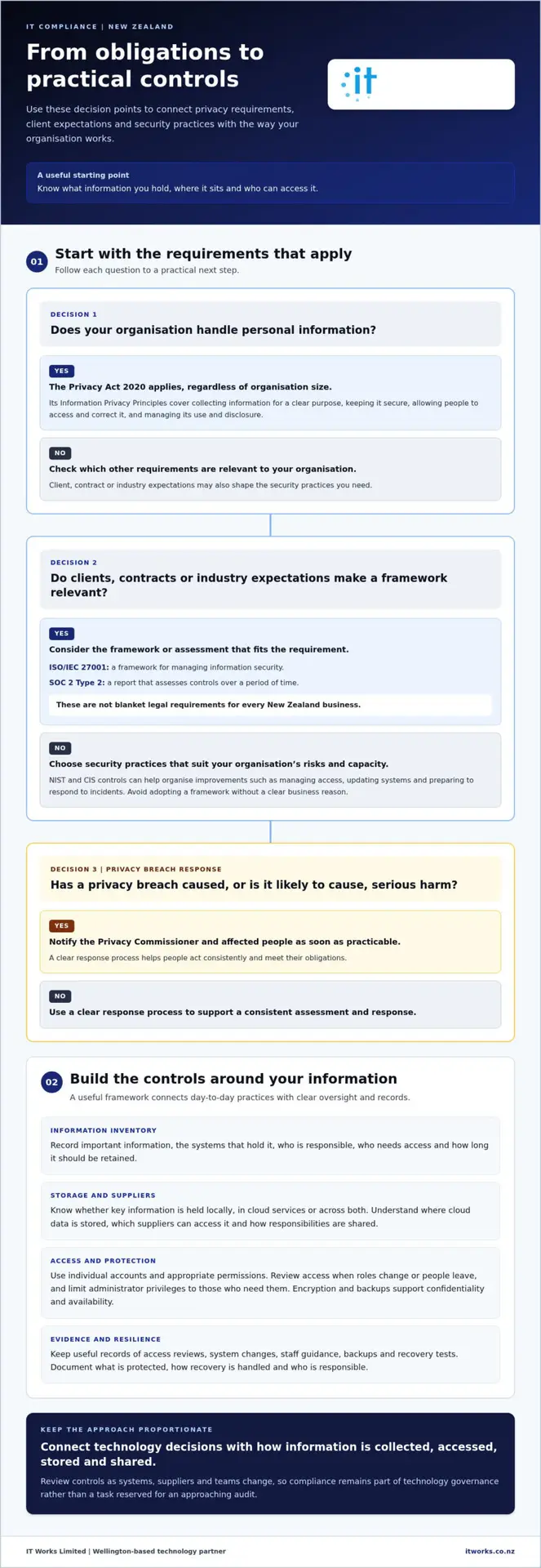
The Privacy Act 2020 applies to organisations that handle personal information, regardless of size. Its Information Privacy Principles cover matters such as collecting information for a clear purpose, keeping it secure, allowing people to access and correct their information, and managing its use and disclosure. The Office of the Privacy Commissioner’s guidance is the best source for interpreting how the Act applies to your organisation. For wider context, see Right to privacy in New Zealand.
Technology can support these principles in practical ways. Access controls help limit who can view records, while retention processes help ensure information isn’t kept longer than needed. If a privacy breach has caused, or is likely to cause, serious harm, the organisation must notify the Privacy Commissioner and affected people as soon as practicable. A clear response process helps people act consistently and meet their obligations. Poor privacy management can also lead to investigation and damage trust among clients and staff.
Cyber security for small business in NZ supports privacy by helping protect the systems and information an organisation relies on.
Industry-Specific Standards vs. General Best Practice
The Privacy Act sets legal privacy requirements, while frameworks and standards offer ways to organise and demonstrate security practices. ISO/IEC 27001 provides a framework for managing information security. A SOC 2 Type 2 report assesses controls over a period of time. These are not blanket legal requirements for every New Zealand business, but clients, contracts or industry expectations may make them relevant.
NIST and CIS controls can help teams organise security improvements, such as managing access, updating systems and preparing to respond to incidents. Choose practices that fit your organisation’s risks and capacity, rather than adopting a framework without a clear business reason.
Include suppliers in your assessment. Cloud platforms and other vendors may handle information or support essential processes, so understand what they can access and how responsibilities are shared. This makes compliance an ongoing part of technology governance, rather than a task to revisit only when an audit approaches.
The Core Pillars of a Robust IT Compliance Framework
A reliable compliance framework depends on connected practices, not a folder of policies prepared for an audit. Start by understanding what information the organisation holds, where it sits and who can access it. Then support those decisions with clear records, secure systems and plans for keeping essential work going.
Data governance provides the foundation. Create an inventory of important information, such as client records, staff details and financial documents. Record which systems hold it, who is responsible for it, who needs access and how long it should be retained. This makes gaps easier to identify and gives leaders a clearer view of how information moves through the organisation.
Data protection and sovereignty
Information may be held on local servers, in cloud services or across both. Know which arrangement applies to each key system, including where cloud data is stored and which suppliers can access it. In New Zealand, sovereignty doesn’t automatically mean every record must stay in the country. The Privacy Act’s rules for information disclosed overseas are relevant, so refer to the Office of the Privacy Commissioner’s New Zealand Privacy Act 2020 guidance when considering how overseas handling is managed.
Encryption helps protect information from unauthorised access, while backups provide a way to restore data after loss or disruption. Together, these controls support confidentiality and availability. Document what is protected, how recovery is handled and who is responsible for each process.
Identity, access and evidence
For remote and hybrid teams, identity and access management helps people reach the information they need without giving everyone the same level of access. Use individual accounts, appropriate permissions and multi-factor authentication where available. Review access when roles change or people leave, and limit administrator privileges to those who need them.
Good governance also needs evidence. Keep useful records of access reviews, system changes, staff guidance, backups and recovery tests. These records help demonstrate that controls are in place and make it easier to identify what needs attention. Managed IT support can help maintain these practices as systems and teams change.
Operational continuity and resilience
Compliance is stronger when the organisation can continue essential work through disruption. A business continuity plan sets out priorities, responsibilities and practical steps for maintaining or restoring operations. Continuity planning is also relevant to some standards and client requirements, though expectations depend on the framework or agreement.
Well-planned backup and disaster recovery in NZ supports that plan. Proactive system monitoring can help identify issues such as unusual access or failed backups, giving the team time to respond in an orderly way. To connect these operational controls with longer-term priorities, discuss IT strategy and compliance planning with IT Works.
Common Compliance Gaps NZ Organisations Face
Compliance gaps often develop through everyday workarounds, outdated technology and unclear responsibilities. They’re easier to address when organisations look beyond individual incidents and identify why a gap appeared in the first place. This helps prevent the same issue from returning.
One common example is legacy software that no longer receives security updates. It may still support an important business process, so replacing it can take planning. Start by recording which systems are no longer supported, what information they hold and how the organisation relies on them. Then assess practical options, such as replacing the system, restricting access or isolating it while a longer-term change is planned.
People also need clear, practical guidance. Regular awareness training helps staff understand how to handle information, use approved tools and report unusual activity. Keep it relevant to their roles, and reinforce it through simple processes rather than relying on a one-off presentation.
Offboarding deserves the same care. If access isn’t removed promptly when someone leaves or changes roles, accounts and permissions may remain active unnecessarily. Use a consistent process to notify the right people, disable accounts, recover devices and transfer ownership of business information.
Shadow IT and SaaS sprawl
Staff may adopt an unapproved app to solve a work problem. Over time, this can create data silos outside the organisation’s usual access, retention and security controls. Start with a practical review: ask teams what tools they use, what information they store in them and what business need each tool serves. Then decide whether to approve and manage the tool, move the work into an existing platform or retire it with a clear transition plan.
Microsoft 365 management can help centralise appropriate work in a managed environment, with clearer oversight of accounts, permissions and information. The aim is to support staff needs while keeping governance visible.
The documentation deficit
A policy only guides behaviour if staff can find it, understand it and know what to do. Keep core documents practical and assign an owner to each. Useful examples include an Acceptable Use Policy, an Incident Response Plan, access management procedures and an onboarding and offboarding process. Record when documents are reviewed and what changed. A scheduled annual review, plus a review after significant changes to systems or responsibilities, can help keep guidance relevant.
The NZ Digital Government IT Governance guidance offers useful context on governance and managing digital information. For growing organisations, it compliance services nz should help turn identified gaps into lasting improvements, not just a list of audit findings. IT Works can help connect technology planning with practical management. See IT Works’ technology team.
Building a Compliance Roadmap: From Assessment to Governance
A compliance roadmap turns findings into practical work that can be planned, resourced and reviewed. It starts with a clear picture of your current technology and risks, then sets priorities that reflect business needs and relevant obligations. This keeps compliance connected to organisational growth rather than treating it as a one-off audit exercise.
A useful sequence is:
- Assess: Review systems, information handling, access controls, policies and existing safeguards to establish a baseline.
- Prioritise: Rank gaps by their potential business impact and relevance to applicable requirements.
- Improve: Address technical vulnerabilities and update policies or processes that no longer fit how the organisation works.
- Review: Monitor key controls, record progress and report changes so leaders can make informed decisions.
Start with a useful baseline
A professional IT assessment should give leaders more than a list of technical findings. It should explain which systems and information are in scope, where controls are working, where gaps exist and what those gaps could mean for business operations. Findings are most useful when they include clear recommendations, priorities and next steps, rather than technical detail without context.
Use the baseline to shape a realistic plan. For a business or not-for-profit, an IT strategy and technology roadmap can connect security improvements with operational needs, planned projects and available resources. The baseline is the start of an ongoing partnership: as the organisation changes, its systems, risks and priorities need to be reviewed too.
Maintain governance and visibility
Compliance is a living process. Executive oversight helps keep responsibilities clear and ensures that decisions about risk, investment and priorities stay connected to business goals. A regular review rhythm, such as Quarterly Business Reviews (QBRs), can give leaders a structured opportunity to track progress, discuss unresolved gaps and agree on next priorities.
Reporting should make change easy to understand. For example, show which actions are complete, which remain open, who owns them and whether new systems or business processes have changed the risk picture. Automation can help gather evidence such as access records, system settings and update status, reducing manual effort. People still need to review the evidence and decide what it means.
The value of it compliance services nz comes from connecting assessment, practical improvements and ongoing governance. That makes progress easier to see and the roadmap easier to adapt as the organisation grows.
Discuss your IT strategy and compliance roadmap
How a Technology Partner Simplifies Your Compliance Obligations
Compliance is easier to sustain when strategy and day-to-day technology management work together. IT Works combines strategic guidance with operational support, helping organisations connect security priorities to the systems, processes and people that keep the business running. This makes compliance part of technology planning, rather than a separate task that only receives attention before an audit.
A proactive approach can also make audit preparation more manageable. Clear records, regularly reviewed controls and assigned responsibilities reduce the need to gather information from scratch. No approach removes every audit task, but keeping evidence and processes current can reduce last-minute disruption and help leaders understand where further work is needed.
Strategic advice that supports business goals
Compliance priorities compete with other technology needs, so consider them as part of overall planning and investment. A technology roadmap can help leaders sequence improvements, understand dependencies and plan expenditure in line with business priorities. An assessment may show, for example, that access controls need attention before a new system is introduced.
Executive-level guidance can help management understand technology risks in business terms: what information or operations may be affected, which decisions need leadership input and what actions should take priority. The focus is not on technical specifications alone. It’s on aligning technology decisions with the organisation’s goals, capacity and responsibilities.
Operational security that supports governance
Controls such as monitoring, endpoint protection and multi-factor authentication can support consistent security practices across an organisation. They don’t replace clear policies or accountable decision-making, but they can help apply controls more reliably and provide useful information for review. For example, monitoring can surface unusual activity for investigation, while access records can support oversight of user permissions.
Incident response and notification responsibilities also need defined processes and clear ownership. Technology can help identify and manage an issue, but leaders and staff need to know how to assess its impact, who makes decisions and what actions are required. A technology partner can help connect operational arrangements with broader governance and resilience planning.
As a Wellington-based partner with a New Zealand team, IT Works brings local context to technology planning for organisations across the country. Support can evolve as your systems, responsibilities and business needs change. It compliance services nz are most useful when they strengthen the ongoing connection between strategy, security and operations, rather than treating compliance as a one-off project.
Talk to IT Works about your technology strategy and compliance priorities.
Make compliance a foundation for confident growth
Strong compliance starts with knowing what information you hold, who can access it and how your systems support its protection. From there, a practical roadmap helps you address priority gaps, keep records current and maintain oversight as your organisation changes. Compliance becomes more manageable when it’s part of everyday technology planning, not a task saved for audit time.
The right it compliance services nz approach connects strategic advice with practical support. IT Works brings together a New Zealand-based team, a proactive, outcome-focused approach, and expertise in cybersecurity and Microsoft 365 management to help align technology decisions with your organisation’s needs.
With clear priorities and a trusted technology partner, you can build resilience steadily and give your people, clients and board greater confidence in the systems that support your work.
Frequently Asked Questions
What is the most important IT compliance regulation for New Zealand businesses?
The Privacy Act 2020 is a key law for organisations that handle personal information. It applies regardless of business size and sets principles for collecting, storing, using and sharing that information. For technology management, consider who can access personal data, how it is protected and how privacy issues are handled. Other standards or contractual requirements may also apply, depending on your organisation, industry and client relationships.
How much does it cost to implement an IT compliance programme in NZ?
There isn’t a single cost because the work depends on your existing systems, risks, business needs and any standards or client requirements you need to address. A review can establish what is already working and identify priority gaps before you plan improvements. This helps your organisation consider compliance alongside its wider technology priorities and budget, rather than investing in controls without a clear understanding of the risks they are intended to manage.
Do small businesses with fewer than 20 staff need to worry about IT compliance?
Yes. The Privacy Act 2020 applies to organisations that handle personal information, with no minimum staff threshold. A small organisation may hold staff details, customer contact information or financial records, so it still needs to manage that information carefully. The scale of your approach can reflect your size and risks. Focus on practical steps such as limiting access, keeping systems maintained and ensuring staff know how to handle information appropriately.
What is the difference between an IT audit and IT compliance services?
An IT audit is typically an assessment at a point in time. It can identify gaps in systems, processes or controls and provide findings for the organisation to consider. IT compliance services nz can encompass ongoing work to plan improvements, maintain controls, keep records current and review changes over time. The two can complement each other: an assessment provides a baseline, while continuing governance helps keep the organisation’s approach relevant as its needs evolve.
How often should our organisation conduct a compliance review?
Set a regular review schedule and revisit controls when a material change affects your systems, information or responsibilities. Examples include adopting a new business platform, changing how customer information is handled or restructuring staff access. The right cadence depends on your organisation’s risks and any applicable standards or contractual commitments. Regular executive reviews can help track open actions, confirm ownership and adjust priorities before processes become disconnected from day-to-day operations.
Can Microsoft 365 help my business meet Privacy Act 2020 requirements?
Microsoft 365 can support privacy practices through features for managing accounts, access and information, but using the platform alone doesn’t ensure compliance with the Privacy Act 2020. Your organisation still needs to configure and manage it appropriately, decide who should access information, and set clear processes for handling records. Review how staff use tools such as email, SharePoint and Teams, and align settings and practices with your organisation’s privacy responsibilities.
What happens if our organisation is found to be non-compliant?
The outcome depends on the issue and the circumstances. A privacy concern may lead to questions, a complaint or an investigation by the Privacy Commissioner. If a privacy breach has caused, or is likely to cause, serious harm, the organisation must notify the Commissioner and affected people as soon as practicable. Addressing gaps promptly, documenting decisions and improving processes can help demonstrate responsible management and support confidence among clients, staff and other stakeholders.