
The right Copilot license may be the one you assign to fewer people first. A broad rollout can look appealing, but licensing staff before you understand their day-to-day tasks, data access and likely use can make it harder to see the business value.
It’s reasonable to want a clear answer on which option to buy and whether people will use it enough to justify the investment. The key is to choose around real work patterns, not a feature list. Microsoft’s Copilot options serve different needs, and Microsoft 365 Copilot is designed for work with Microsoft 365 apps and organisational data. It also requires an eligible underlying Microsoft 365 plan, so check the full licensing picture before committing.
This guide explains how to match a Copilot license to staff tasks and business outcomes, what product names, eligibility and capabilities to verify before purchase, and how to assess data access and readiness. You’ll also find practical guidance for planning a measured rollout, with governance, support and adoption built in from the start.
Key Takeaways
- Start with the work people need to do, then match Copilot access to relevant roles and business outcomes.
- Compare each copilot license option against your Microsoft 365 environment, and verify current names, eligibility and entitlements before buying.
- Define practical tasks and pilot outcomes so you can assess whether staff are using Copilot productively.
- Review data access and governance, and set expectations for human review of AI-generated content.
- Prepare a measured rollout with user guidance, support and regular licence reviews as business needs change.
What a Copilot licence enables, and what your organisation needs it to solve
A Copilot licence gives an eligible user access to a particular Microsoft Copilot product or set of capabilities. It doesn’t, by itself, decide where AI should be used, prepare your information or help staff use it well.
A licence provides product access; readiness, governance and user adoption determine how responsibly and effectively that access is used.
That distinction matters when planning a copilot license purchase. The right option depends on the work people do, the Microsoft 365 environment your organisation already uses and the outcomes you want to improve. Microsoft’s Copilot product names, licence entitlements and capabilities can change, so verify current details against Microsoft’s official information before making a decision. For background on the product family, see this overview of Microsoft Copilot.
Which business tasks could Copilot support?
Start with recurring work, not a product comparison. Where the selected product and licence support it, Copilot may assist with tasks such as drafting or refining text in Word, summarising discussions in Teams, or helping manage and find information in Outlook. The available functions depend on the specific product, licence and setup, so treat these as possible use cases rather than guaranteed features.
Ask teams where routine effort builds up. Is it preparing a first draft, catching up on a meeting, or locating information across work materials? Naming the task and the intended improvement gives you a practical basis for assessing whether a licence is relevant.
Why a licence alone does not deliver business value
Useful results also depend on the quality and organisation of the information people work with, appropriate access permissions and clear staff practices. If content is hard to find or access is broader than intended, introducing an AI tool won’t resolve those underlying issues. It makes sense to understand the environment first.
Separate product access from the wider adoption and governance plan. Decide what work the tool may support, who will review its output, and how staff can learn to use it responsibly. AI-generated content should receive human review appropriate to its purpose and context. A draft for internal discussion may need a different level of checking from material shared with customers.
Not every role will have the same tasks or benefit in the same way. A considered approach identifies where Copilot could support meaningful work, then aligns access, preparation and guidance around those needs. IT Works helps organisations assess Microsoft Copilot readiness and identify practical use cases as part of broader technology planning.
Compare Copilot licence options by user, task and Microsoft 365 environment
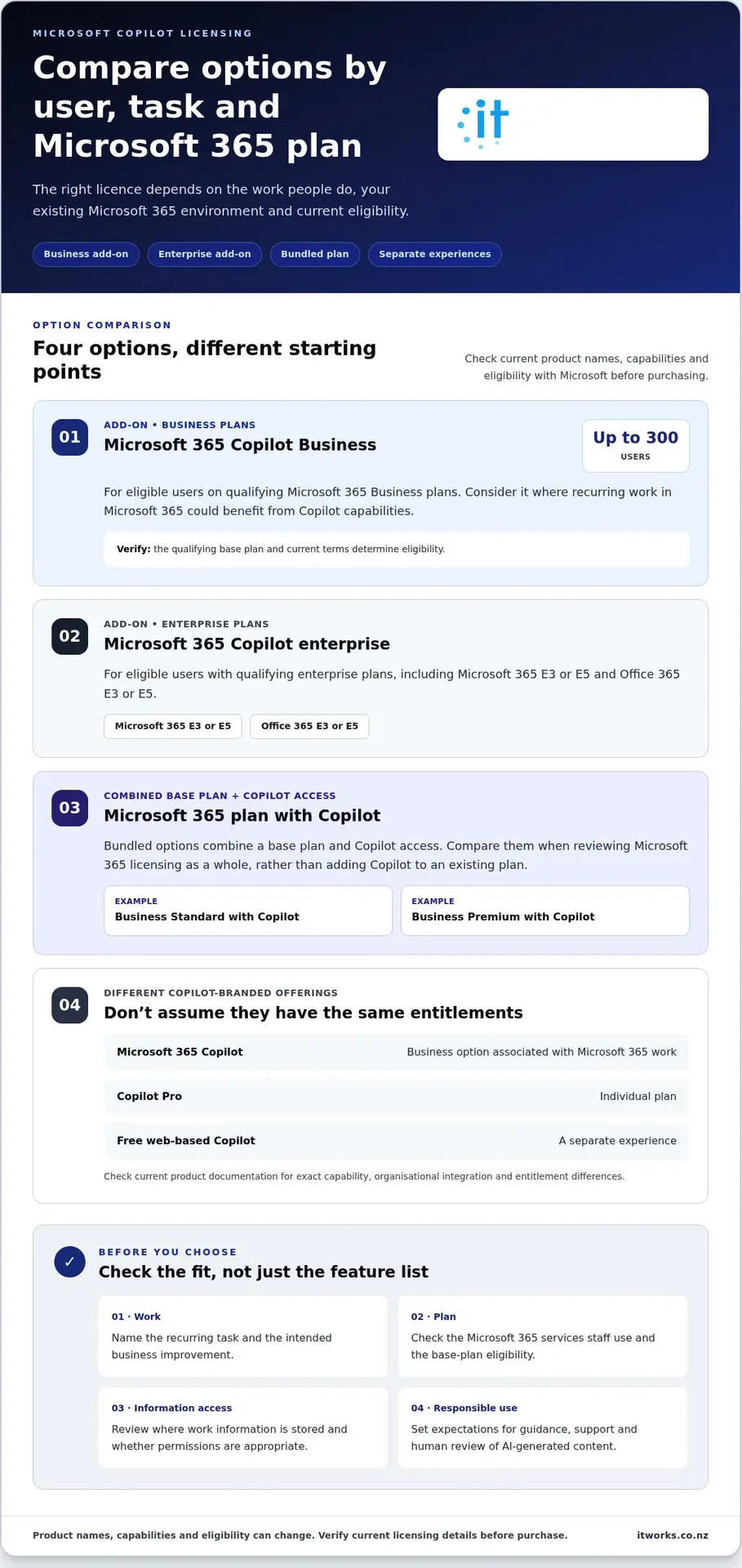
A useful comparison starts with the work each person does and the Microsoft 365 plans your organisation already holds. The options below provide a starting point, not a recommendation for every business. Product names, capabilities and eligibility can change, so check Microsoft’s current licensing information before purchasing.
Microsoft 365 Copilot Business add-on
For eligible Microsoft 365 Business plan users in organisations with up to 300 users. Consider it where people have recurring work in Microsoft 365 that could benefit from Copilot capabilities. Eligibility depends on the qualifying base plan and current terms.
Microsoft 365 Copilot enterprise add-on
For eligible users with qualifying enterprise plans, including Microsoft 365 E3 or E5 and Office 365 E3 or E5. This may be relevant where established enterprise licensing and work patterns inform the decision.
Microsoft 365 plan with Copilot
Bundled options, such as Microsoft 365 Business Standard with Copilot or Business Premium with Copilot, combine a base plan and Copilot access. They may be worth comparing when reviewing Microsoft 365 licensing as a whole, rather than adding Copilot to an existing plan.
These are distinct from other Copilot-branded offerings. Microsoft 365 Copilot is the business option associated with Microsoft 365 work; Copilot Pro is an individual plan, while the free web-based Copilot is a separate experience. Don’t assume that one provides the same capabilities, organisational integration or entitlements as another. Check the current product documentation for the exact differences.
Match licence considerations to different user groups
Look for repeatable tasks and the people responsible for them. A team that regularly works with shared business information may have a clearer use case than staff who would use Copilot only occasionally. That doesn’t mean every frequent user needs a licence: identify the task, the expected benefit and how often it occurs. Access and entitlements still depend on the current product and licence conditions.
Check your existing Microsoft 365 environment
Map the services staff use and where important work information is stored. Consider whether intended users can find the relevant content and whether permissions reflect who should have access. Broader planning can help clarify the picture; see this Microsoft 365 management guide. Responsible use also means setting clear expectations for handling information and reviewing AI outputs before relying on them.
Use the comparison to frame your copilot license decision around user needs, existing entitlements and business priorities. Discuss Copilot readiness and use cases with IT Works as part of a considered Microsoft 365 plan.
Address the main Copilot licence concern: value, access and responsible use
A Copilot licence can go unused if people aren’t sure when or how it fits their work. Rather than assigning access broadly and hoping useful habits develop, connect each licence to a defined task. A pilot can help you understand whether Copilot supports that work in practice before you consider expanding access.
Be clear about what you want to learn. For example, you might assess whether a selected workflow feels easier to complete, whether the output is useful after review, and whether staff choose to use the tool again. These are measures to guide a decision, not promises of time savings or productivity gains. Results depend on the workflow, the environment and people’s judgement.
Assess information access and governance before rollout
Review who can access the Microsoft 365 content relevant to the pilot. Check that permissions reflect current responsibilities, and clarify who owns acceptable-use guidance, staff support and review of outcomes. These steps help establish a considered approach to information access without assuming that a licence alone resolves governance questions.
Product-specific data handling and security details can vary, so verify current statements against Microsoft documentation before drawing conclusions. For broader organisational planning, see this cybersecurity resilience guide.
Set practical measures for a pilot
Choose a small number of real workflows and agree on what a useful result would look like before users begin. Measures might include whether the output meets the task’s quality requirements, how much editing it needs, and whether staff find it relevant enough to use again. Keep the measures proportionate to the work.
- Choose a clear use case: Define the task and who performs it.
- Gather feedback: Ask participants what helped, what needed correction and where the tool didn’t fit.
- Review before expanding: Consider usefulness, output quality and actual adoption alongside governance readiness.
AI-generated material still needs human review suited to its purpose. A summary used for internal understanding may call for different checks from content intended for a customer or decision-maker. Set expectations for staff, and make sure people know when to verify details, add context or choose not to use an output.
A measured pilot gives leaders a better basis for deciding whether a copilot license aligns with real work, rather than relying on assumptions about value. IT Works can help assess Copilot readiness and practical use cases as part of your wider technology planning. Discuss your Copilot plans with IT Works.
Use this Copilot licence buying checklist before you commit
A clear buying decision starts with the work you want to support, then checks whether the people, information and Microsoft 365 environment are ready. Use this checklist to turn a possible Copilot purchase into a decision you can explain and review.
- Define the outcome. Describe the business problem in plain language. For example, are you looking to support a recurring drafting task or make it easier for a team to work with meeting information? Be specific about the intended improvement, without assuming Copilot will deliver it automatically.
- Select the users and workflows. Identify the roles that regularly perform the task, and note how their current process works. Distinguish staff with a clear, frequent use case from those who may only use the capability occasionally. This helps you decide who should be part of an initial trial.
- Assess readiness. Check that the relevant Microsoft 365 information is organised and accessible to the intended users under appropriate permissions. Consider what guidance staff will need and who will oversee responsible use. For broader planning, see this AI automation strategy guide.
- Verify the licence details. Before buying, use official Microsoft information to confirm current product names, entitlements, prerequisites and included capabilities. Check that the proposed Copilot licence aligns with your existing Microsoft 365 plan and that you understand the applicable terms. Product details can change, so base the decision on current documentation rather than an old comparison.
- Plan adoption and review. Decide how staff will be introduced to the tool, where they can get support, and who is responsible for governance. Set a review point to assess whether the chosen workflows are useful, whether staff are adopting them and whether licence allocation still matches business needs.
Before a trial begins, record what would count as a useful result and who will evaluate it. Include output quality and the amount of human review required, not just whether the tool was used. Assign responsibility for gathering staff feedback and deciding what happens next. That makes it easier to adjust the approach if the workflow, guidance or user group needs to change.
Finally, consider the purchase alongside wider Microsoft 365 and technology plans. A licence decision is more useful when it supports a defined business priority and sits within a practical approach to governance and adoption.
Plan a Copilot licence rollout with support for lasting business outcomes
A successful rollout is more than assigning licences. It connects the technology to real work, prepares people to use it appropriately and gives leaders a way to review whether it’s supporting the intended outcomes. A measured start also makes it easier to adjust the approach as staff experience and business priorities develop.
Prepare people and systems for adoption
Begin with the workflows and user group identified in your planning. Check that relevant Microsoft 365 content is organised, access permissions reflect people’s responsibilities, and staff understand what information they should use with Copilot. Product-specific data handling and administration details should be checked against current Microsoft guidance as part of readiness work.
Keep staff guidance practical. Show users how the tool relates to their tasks, where to get support, and how to check AI-assisted outputs before relying on them. Expectations should reflect the context: staff may need to verify facts, refine a draft or add information the tool cannot infer. Clear ownership for user guidance, governance and pilot review helps make these practices part of day-to-day work.
Make the licence decision part of a technology plan
Copilot is best considered alongside wider priorities for productivity, security confidence and Microsoft 365. A licence decision should reflect how your organisation works now, what it wants to improve and how the proposed use fits its technology roadmap. That keeps adoption connected to business needs rather than treating the purchase as an isolated feature choice.
Review licence allocation over time. As roles, workflows and entitlements change, consider whether each user still has a relevant use case and whether the current plan remains suitable. This ongoing alignment helps organisations make informed choices about maintaining, adjusting or expanding access.
IT Works supports Microsoft 365 management, licence optimisation and Copilot readiness, combining strategic advice with operational support. As a New Zealand technology partner, the team can help assess practical use cases, governance considerations and rollout planning. A copilot license can be one part of a wider approach to using AI responsibly and productively, with decisions guided by evidence from your own environment.
Make your next Copilot decision with confidence
A sound copilot license decision starts with the work you want to support, not a feature list. Match access to clear user needs, check current Microsoft eligibility and entitlements, and prepare your information, permissions and staff guidance before rollout.
Start with a defined group and practical use cases, then review whether the outputs are useful, staff are adopting the tool and the approach remains responsible. Treat licence optimisation as ongoing: user needs, entitlements and business priorities can change, so revisit the fit over time.
IT Works supports Microsoft 365 management, including licence optimisation, and helps organisations assess Copilot readiness and practical AI use cases. Its New Zealand-based team combines strategic advice with operational support, helping connect technology decisions to productivity priorities and sound governance.
With a measured plan and the right support, your organisation can explore Copilot thoughtfully and build on what works.
Frequently Asked Questions
What is a Copilot licence?
A Copilot licence gives a user access to a particular Microsoft Copilot product and its entitlements. For business use, Microsoft 365 Copilot is associated with Microsoft 365 work, but a licence alone doesn’t establish which tasks AI should support or how staff should use it. Readiness, appropriate permissions, governance and user guidance all contribute to a responsible rollout. Product names and entitlements can change, so check current Microsoft information.
Which Copilot licence is right for my business?
The right option depends on your existing Microsoft 365 plan, the current eligibility conditions and the tasks you want to support. Start by identifying roles with recurring, clearly defined workflows, then compare relevant Copilot options against those needs. Don’t choose by feature volume alone. Before purchasing a copilot license, verify current product names, prerequisites and entitlements using Microsoft’s official information.
Does a Copilot licence include Microsoft 365?
Not necessarily. Some Copilot licences are add-ons that require a qualifying Microsoft 365 subscription, while bundled options combine a Microsoft 365 plan with Copilot. The total licensing arrangement depends on the specific product and current terms. Review your organisation’s existing subscriptions and confirm the applicable prerequisites and entitlements in Microsoft’s current documentation before you make a purchasing decision.
Can our organisation try Copilot before assigning licences widely?
You can plan a measured pilot by selecting a suitable user group and giving them access under the relevant current licence terms. Choose real workflows, explain how to use and review AI-assisted outputs, and collect staff feedback. Assess whether the tool is useful for those tasks before considering wider access. A pilot helps inform your decision, but its results may not apply equally across every role.
Is our Microsoft 365 data used to provide Copilot responses?
For Microsoft 365 Copilot, responses can draw on organisational information that the user is permitted to access, depending on the product, setup and task. This makes reviewing Microsoft 365 permissions and content access an important readiness step. Data handling and privacy details are product-specific and may change, so consult Microsoft’s current documentation for authoritative information about how a particular Copilot service processes data.
How should a business measure whether Copilot licences are worthwhile?
Start with a defined workflow and agree what a useful result would look like. Review whether the output meets the task’s quality needs, how much human checking or editing it requires, and whether staff find it practical enough to use. Gather feedback from pilot users and consider adoption alongside usefulness. The results depend on the task, implementation and user judgement, so avoid assuming guaranteed savings or productivity gains.
Can IT Works help with Copilot readiness and licence planning?
Yes. IT Works supports Microsoft Copilot readiness and practical AI use-case discovery, alongside Microsoft 365 management and licence optimisation. The team can help connect potential use cases with business priorities, consider readiness and governance, and plan a measured rollout. Its New Zealand-based team combines strategic advice with operational support, helping organisations make licensing decisions that align with their Microsoft 365 environment and intended outcomes.