Strong IT support isn’t measured by the number of tickets closed. The key performance indicators for IT support that give a clearer picture include customer feedback, first-contact resolution, response and resolution times, ticket volume and backlog, and agent utilisation. Together, these help desk metrics show the quality of service people experience and the workload behind it.
Ticket counts and quick replies can look positive on their own, but they don’t show whether issues are solved well or whether the team has enough capacity to keep up. Useful measures connect day-to-day support with what the organisation needs from its technology.
This article explains what each indicator measures, what it can reveal and how to interpret it in context. You’ll learn how to combine customer feedback with resolution, response-time, ticket and utilisation data to spot patterns and make better-informed decisions about IT support performance.
Key Takeaways
- Use customer feedback to understand whether support feels clear and easy, not just whether a ticket was closed.
- Track first-contact resolution alongside escalations to spot opportunities to improve team capability.
- Separate first response time from time to resolution so you can see where delays occur.
- Read ticket volume and backlog together to understand demand and plan support capacity.
- Interpret agent utilisation alongside service quality, so efficiency doesn’t come at the expense of a good support experience.
1. Customer satisfaction and effort
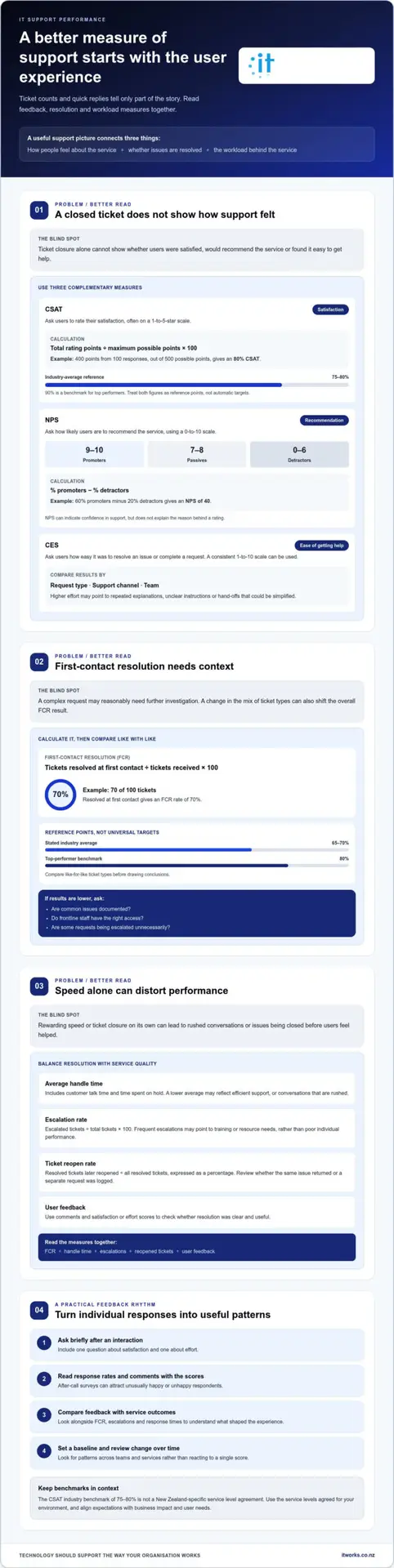
Measure customer satisfaction with short post-interaction surveys, then compare the results with service outcomes. Three useful metrics are CSAT, Net Promoter Score (NPS) and Customer Effort Score (CES). Together, they show whether people are satisfied, would recommend the service and found it easy to get help.
CSAT asks users to rate their satisfaction, often on a 1-to-5-star scale. Add the ratings, divide by the maximum possible score, then multiply by 100. For example, 100 responses totalling 400 points out of 500 produce an 80% CSAT score. An industry-average benchmark is 75-80%, while 90% is a benchmark for top performers. Treat these as reference points, then assess patterns across your own teams and services.
NPS asks how likely a user is to recommend the service desk, using a 0-to-10 scale. Scores of 9-10 are promoters, 7-8 are passives and 0-6 are detractors. Subtract the percentage of detractors from the percentage of promoters. If 60% are promoters and 20% are detractors, the NPS is 40. This measure can indicate confidence in support, but it doesn’t explain the reason behind a rating.
CES focuses on the effort required to resolve an issue or complete a request. Ask users to rate how easy the process was, using a consistent scale such as 1-10. Compare results by request type, support channel or team. A high-effort result may point to repeated explanations, unclear instructions or hand-offs that could be simplified.
For a balanced view of service quality, use a clear feedback process:
- Send a brief survey after an interaction, asking one question about satisfaction and one about effort.
- Review response rates and comments alongside scores, since after-call surveys can attract unusually happy or unhappy respondents.
- Compare results with first-contact resolution, escalations and response times to understand what shaped the experience.
- Set a baseline, then review changes over time rather than reacting to a single score.
Poorly chosen targets can distort behaviour. If agents are rewarded only for speed or ticket closure, they may rush conversations or close issues before users feel helped. Customer satisfaction KPIs should balance experience, effort and resolution, with targets aligned to organisational priorities.
For New Zealand organisations, use the service levels agreed for your environment as the operational reference. The 75-80% CSAT figure is an industry benchmark, not a New Zealand-specific SLA; expectations should reflect business impact and user needs.
2. First contact resolution
First-contact resolution (FCR) measures the percentage of tickets resolved during the user’s initial contact. Calculate it by dividing tickets resolved at first contact by tickets received, then multiplying by 100. If 70 of 100 tickets are resolved at first contact, the FCR rate is 70%. This measure links resolution with productivity, but it needs context: a complex request may reasonably require further investigation.
FCR benchmarks provide a comparison, not a target for every team. The stated industry average is 65-70%, while 80% is a benchmark for top performers. A result below those levels can prompt useful questions: are common issues documented, do frontline staff have the right access, or are some requests being escalated unnecessarily? Compare like-for-like ticket types before drawing conclusions. A change in the mix of tickets can shift the overall result even when the team’s approach stays consistent.
Employee performance metrics should balance first-contact resolution with average handle time and escalation rate. Average handle time includes customer talk time and time spent on hold. A lower average may reflect efficient support, but it could also mean conversations are rushed and users need to make repeat contact. Escalation rate shows the share of tickets sent to higher-tier support. Frequent escalations may point to training or resource needs, rather than poor individual performance.
To measure ticket reopen rate, compare resolved tickets later reopened with all resolved tickets, and express the share as a percentage. Measure escalation rate by dividing escalated tickets by total tickets and multiplying by 100. Assess productivity alongside these measures, using the number of tickets resolved in a consistent period and checking whether resolution quality holds.
- Virtual agent containment: Track conversations resolved without escalation. For example, 480 of 1,200 conversations resolved without escalation gives a 40% containment rate.
- Automated resolution: Compare tickets resolved through automation with all resolved tickets. If automation resolves 150 of 1,000 resolved tickets, the rate is 15%.
Automation can handle suitable, repeatable requests, while people remain important for complex or critical issues. Review containment and automated resolution alongside reopened tickets and user feedback. A high rate alone doesn’t show whether the answer was accurate or useful.
First-contact resolution (FCR) differs from resolution time. FCR records whether an issue was resolved during the initial contact; resolution time measures the time from ticket opening to resolution. Tracking both helps show whether the team resolves issues efficiently or closes them quickly only for them to return later.
To make the measure dependable, define what counts as a first contact and a resolved ticket in your reporting process. For example, record whether a user’s follow-up concerns the same unresolved issue or a separate request. Review ticket notes and outcomes periodically to confirm that recorded first-contact resolutions reflect the support users received.
3. Operational efficiency measures: first response time, time to resolution and ticket backlog
First response time and time to resolution measure different stages of support. First response time is the wait from ticket submission to the first reply. Time to resolution runs from ticket opening until the issue is resolved. For example, a ticket answered 25 minutes after opening has a first response time of 25 minutes. A ticket resolved 4.5 hours after creation has a time to resolution of 4.5 hours.
The most useful key performance indicators for IT support distinguish acknowledgement from meaningful progress. Track response and resolution times by priority and request type. A brief acknowledgement may meet a response target while investigation continues. Comparing both measures helps managers locate delays, before work starts or during troubleshooting. A target of replying within 15 minutes on average is one example, not a universal standard.
Average resolution time is calculated by dividing total resolution time for resolved tickets by the number of resolved tickets. This produces a meaningful average when the tickets being compared are similar. The stated industry-average mean time to resolution benchmark is 24.2 hours, while the top-performer benchmark is less than 8 hours. Compare similar request types, since a password reset and a network outage involve different work.
Average handle time can show how much active effort tickets require, but speed alone doesn’t define service desk efficiency. Review it alongside resolution quality and user impact. The ticket resolution rate compares tickets resolved during a period with tickets received during that same period. If new tickets consistently outnumber resolved ones, processes or available capacity may need attention.
Common SLA compliance and backlog KPIs include the percentage of tickets resolved within agreed service levels, open ticket count, ticket age and overdue tickets. SLA compliance is calculated by dividing tickets resolved within the SLA by tickets received, then multiplying by 100. Resolving 950 of 1,000 SLA-bound tickets within target gives 95% compliance. The stated industry-average benchmark is 85-90%, while 95% is a benchmark for top performers.
Backlog needs both a total and a trend. Starting with 50 open tickets, receiving 40, then resolving 60 leaves 30 tickets. Break the total down by priority and age to identify critical work that an overall figure might obscure. A falling backlog can still hide older unresolved requests, so check whether long-running tickets are being addressed.
To align key performance indicators for IT support with ITIL-style service management, track agreed service levels, response times, resolutions and work in progress. Use consistent ticket definitions and review results regularly. Link operational changes to measurable outcomes rather than overreacting to isolated daily fluctuations.
4. Ticket volume and backlog
Ticket volume shows how much support demand arrives during a defined period. Compare tickets received with tickets resolved, then track open work and how long it has been open. These measures help a support team distinguish a short-term spike from a sustained change in workload. A rising total may reflect more demand, improved reporting or a change in how requests are logged, so interpret it alongside operational changes.
Break volume down by category, priority and support channel. For example, a rise in access requests may point to unclear onboarding steps, while recurring network issues may need investigation beyond the service desk. Consistent categories matter: if similar issues are labelled differently, trend reports become less useful. Agree on shared category definitions, apply them when requests arrive, and review uncategorised tickets to find gaps in the workflow.
KPIs should differ by ticket priority and channel because urgency, impact and handling processes vary. Compare volume and backlog within each priority, then review phone, email and self-service requests separately. This shows where demand is concentrated without treating a critical outage like a routine access request. Use the same reporting period and definitions across channels for a fair comparison.
Ticket touches and replies add detail to the volume measure. Many hand-offs or repeated messages can indicate a complicated workflow, unclear ownership or requests that need better guidance. Review tickets with multiple interactions and identify whether a process change could reduce unnecessary handling. The aim is to understand the work behind the ticket count, not simply to encourage faster closure.
Calculate cost per ticket by dividing support costs for a period by the tickets handled during that period. Keep the cost boundary and ticket definition consistent when comparing periods; otherwise, changes may reflect accounting or categorisation rather than improved efficiency. Consider this measure alongside service quality and workload, rather than using it as a standalone target.
Tool return on investment (ROI) compares the value gained with the investment made. For an automation workflow, assess its implementation and operating inputs against outcomes such as staff time redirected or repeat requests avoided. Self-service can also affect incoming volume: resolving 300 issues while 700 tickets are created produces a 30% ticket deflection rate. Check whether those sessions genuinely resolved users’ needs before counting deflection as a benefit.
Review volume, categories and backlog together. A falling ticket count may reflect effective self-service, but it could also indicate under-reporting. Pair trends with channel data and workflow observations to understand what changed and whether the support team can handle demand sustainably.
5. Agent utilisation
Agent utilisation measures the share of an agent’s shift spent on support activities. These activities include calls, research and after-call work, such as recording the steps taken to resolve a request. Calculate utilisation by dividing time spent on support activities by total shift time, then multiplying by 100. A technician spending six hours on support during an eight-hour shift has a 75% utilisation rate.
Use a consistent definition of “support activity” across the team. If one report counts research time and another excludes it, the comparison won’t be meaningful. Help desk software can record interaction and ticket activity, but managers should understand what the system includes before interpreting its reports. Check that recorded work reflects the actual process, including follow-up and documentation.
Utilisation differs from occupancy. Utilisation compares support work with total shift time, while occupancy measures how much available working time agents spend handling requests. The distinction helps explain workload. A team can have high occupancy during busy periods, even if its full-shift utilisation is lower because that figure includes other scheduled duties.
A high rate isn’t automatically a sign of better performance. Support teams need time for breaks, training, documentation and work that prevents future requests. If agents have little capacity between interactions, urgent issues can disrupt planned work and routine follow-ups may take longer. Read utilisation alongside customer feedback, resolution quality and backlog trends, rather than treating one percentage as a productivity score.
For useful tracking, compare like with like. Review each agent’s activity over a consistent reporting period, then consider differences by request type, channel and scheduled responsibilities. A technician handling complex investigations will have a different work pattern from someone managing frequent, repeatable requests. Use the comparison to identify workload imbalances or process bottlenecks, not to rank staff without context.
- Set a shared measure: agree which support tasks count, including calls, research and after-call work.
- Review work mix: compare ticket types and other assigned duties before interpreting utilisation changes.
- Use multiple indicators: check resolution outcomes and feedback alongside time-use data.
- Look for patterns: investigate repeated peaks or gaps that could point to uneven demand or inefficient processes.
Resolving more tickets per hour can reduce cost per ticket, but only if service quality remains sound. Software reports are most useful when they help managers adjust capacity, improve workflows and support sustainable workloads, rather than encourage agents to rush interactions.
IT Works: Managed IT Services
IT Works helps Wellington organisations connect day-to-day IT support with business priorities through Managed IT Services. If response times, repeat requests or changing ticket volumes make performance difficult to interpret, a strategic review can clarify which measures matter and what they reveal about service quality and workload.
By considering support measures alongside technology needs, leaders can make better-informed decisions about capacity, processes and future improvements. IT Works also offers Cyber Security, AI & Automation and Cloud Solutions when these priorities form part of the wider technology picture.
Contact IT Works to discuss how your IT support measures can better inform business decisions.
Make your support measures part of better decisions
Good reporting is useful when it leads to a clear decision. Choose the key performance indicators for IT support that connect most closely to your organisation’s priorities, agree who will review them, and use the findings to guide practical changes. That might mean adjusting how requests are routed, improving staff guidance or planning support capacity around business needs.
Keep the process purposeful. A dashboard shouldn’t become another report people read and forget. Give each measure an owner, discuss what has changed and record the next action. Over time, this helps leaders connect everyday support with productivity and confident technology decisions.
IT Works offers Managed IT Services, Cyber Security and AI & Automation to help organisations align technology support with their goals. To make your support measures more useful for decision-making, start a conversation with the team.
With a clear view of performance and a practical next step, your organisation can keep improving how technology supports its people and priorities.
Frequently Asked Questions
What are help desk metrics?
Help desk metrics measure support demand, service quality and how work flows. For example, a Wellington organisation could review request categories to see whether staff need clearer guidance on accessing shared files. Metrics become more useful when teams use consistent ticket labels and examine trends alongside business changes, such as a new system rollout. A single figure rarely explains the cause of a support issue.
What is a good FCR rate for a service desk?
A 65-70% first-contact resolution rate is a stated industry-average benchmark, while 80% is a benchmark for top performers. Treat these as comparison points, not automatic targets. A service desk handling straightforward account requests may achieve a different result from one managing complex application faults. Check reopened tickets and feedback as well, so a high rate reflects lasting resolutions rather than quick closures.
What are the most important KPIs for IT support teams?
The most useful measures depend on the business outcome the team needs to improve. A practical set can include customer feedback, first-contact resolution, response and resolution times, backlog and agent utilisation. For a business relying on a critical application, also consider whether important systems remain available. Choose measures that help leaders decide what to change, rather than tracking every available figure without a clear purpose.
How do you calculate first response time and resolution time?
Calculate first response time by subtracting the ticket submission time from the time of its first reply. Calculate resolution time by subtracting the ticket opening time from its recorded resolution time. Use the same timestamp rules across reports. For example, decide whether you’re measuring elapsed time or support hours, then apply that method consistently when comparing teams, request types or reporting periods.
What are typical IT support KPI benchmarks for first response and resolution times?
A 15-minute average reply is an example target, not a universal benchmark. The stated industry-average mean time to resolution is 24.2 hours, while the top-performer benchmark is less than 8 hours. These figures are general comparison points, not New Zealand-specific service standards. Set expectations around business impact and ticket priority, then compare similar requests to keep the measure meaningful.
How is first-contact resolution rate calculated, and what is a good target?
Divide tickets resolved during the user’s first contact by all tickets received, then multiply by 100. For instance, if 70 of 100 tickets are resolved on first contact, the rate is 70%. A stated industry-average benchmark is 65-70%, and 80% is a top-performer benchmark. Review the result with ticket complexity and reopening patterns before deciding whether a target suits your service desk.