Computer procurement is more than choosing a device. It means matching PCs, Apple laptops and Chromebooks to how your people work and where your organisation is heading. For New Zealand organisations, procurement can also involve purchase agreements, tailored requests and planning how equipment fits into the wider technology environment. The goal is a consistent, practical setup that supports business priorities.
It’s easy to focus on specifications or the upfront cost, but device choices also affect day-to-day productivity, security and future planning. Start by identifying what each role needs, then consider how devices will be managed and supported over time.
This article explains what business computer procurement involves, how agreements and custom requests fit in, and what to consider when choosing devices for different teams. It also shows how to connect purchasing decisions with your organisation’s strategy, so each choice serves a clear purpose.
Key Takeaways
- Plan device purchases around how each role works, how equipment will be managed and the organisation’s longer-term priorities.
- Compare PCs, Apple laptops and Chromebooks by their fit with your team’s applications, workflows and existing systems.
- New Zealand’s government hardware contract can offer savings for eligible agencies, with larger agencies saving an average of 8% compared with the best prices outside the contract, according to the Ministry of Business, Innovation and Employment (MBIE).
- Reserve custom computer requests for documented business or technical needs that a standard configuration cannot meet.
- Align purchasing, security and ongoing support so devices contribute to a consistent, productive working environment.
What is IT Hardware Procurement?
IT hardware procurement involves identifying, selecting and acquiring the devices an organisation needs. A sound process links each purchase to a specific work requirement, lifecycle plan and security approach.
Hardware needs and inventory review
Start with an inventory of existing hardware, recording each device’s user, location, age, condition and purpose. Compare it with upcoming work needs: a finance team may need reliable desktop setups, while staff travelling around Wellington may need portable devices.
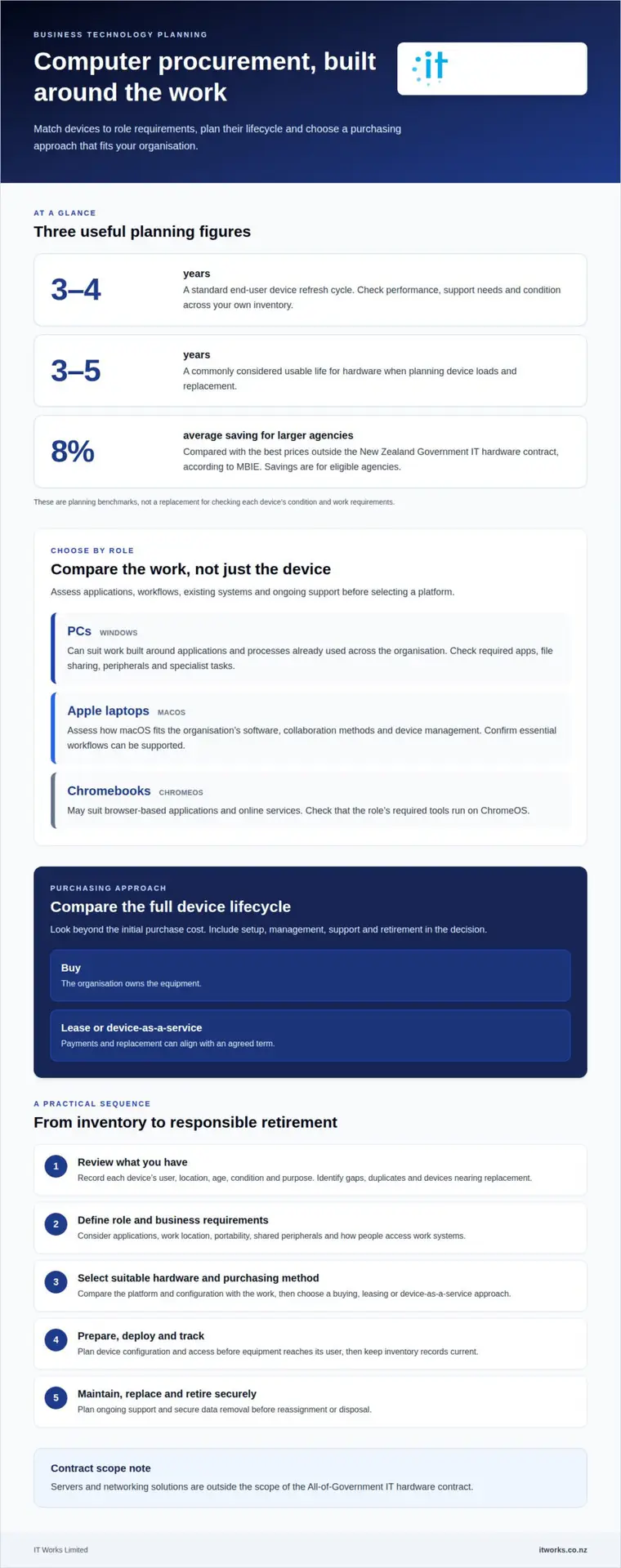
Then identify gaps, duplicate equipment and devices nearing replacement. A standard end-user refresh cycle is 3 to 4 years, while hardware load planning commonly considers a usable life of 3 to 5 years. These are planning benchmarks, not substitutes for checking performance, support needs and condition across your own inventory.
Procurement methods and financial strategy
Choose a purchasing method that suits the equipment and your organisation’s spending plans. Buying gives the organisation ownership; leasing or device-as-a-service can align payments and replacement with an agreed term. Compare the full lifecycle, including setup, management, support and retirement, rather than looking only at the initial purchase cost.
Standardising suitable devices can simplify purchasing, deployment and troubleshooting. For example, one common configuration for office staff may be easier to manage than several similar models. Allow for genuine role-based differences, such as specialised equipment for design work. In New Zealand, servers and networking solutions are outside the scope of the All-of-Government IT hardware contract.
Hardware for different environments
Match hardware to where people work and what they do. A fixed office workstation, a laptop used across Wellington offices and equipment in a shared workspace each have different requirements for portability, access and everyday use. Record those differences before comparing devices.
Consider the wider environment too, including connectivity, shared peripherals, software and ongoing maintenance. A laptop for travel, for instance, should suit the employee’s work applications and the organisation’s approach to secure access. The right choice supports a consistent experience without assuming every team needs the same setup.
Procurement steps and security risks
The computer procurement process involves reviewing your inventory, defining user and business requirements, selecting suitable hardware and a purchasing method, then preparing, deploying and tracking each device. Include a lifecycle plan for maintenance, replacement and responsible retirement. New Zealand agencies and schools may appoint third-party agents to purchase on their behalf through the IT hardware contract.
Assess cybersecurity and privacy risks by considering access controls, device configuration, stored information and secure data removal at retirement. For example, agree how a laptop holding business files will be set up before it reaches its user, then document how data will be removed before reassignment or disposal. These steps help protect information throughout the device lifecycle.
PCs, Apple laptops and Chromebooks
Choose computers by matching their operating systems and applications to each role. A familiar platform can support consistent workflows, while a different device may suit teams with distinct requirements. The useful comparison isn’t simply brand against brand. It’s how well each option fits everyday work, existing systems and planned support.
In New Zealand, business laptop and desktop costs depend on the device, configuration, purchase volume and support requirements. The cost reflects the chosen setup and is provided after a quote request.
A Windows PC may suit work built around applications and processes already used across an organisation. Compare the applications employees need, how they share files and whether peripherals work with the selected configuration. For desktop roles, consider the workspace and any specialist tasks. For mobile staff, portability and reliable access to work systems may matter more.
Apple laptops run macOS, so assess how the platform fits your organisation’s software, collaboration methods and device management. They may suit roles already using Apple devices or applications designed for macOS. Before choosing, map the employee’s essential tasks and confirm those workflows can be supported across the workplace. Consistent setup and support matter as much as individual preference.
Chromebooks use ChromeOS and may suit roles centred on browser-based applications and online services. Assess which work can be done in a browser, how employees access shared information and whether required tools run on ChromeOS. A Chromebook may be less suitable for a role that relies on software unavailable for that platform. Match the device to the work rather than assuming one option fits every team.
Use a role-based comparison to keep decisions practical:
- Office administration: list the applications, documents and peripherals used each day.
- Mobile roles: consider how staff access their work while travelling between sites.
- Specialist work: identify software or workflows that narrow the suitable platform choices.
- Shared environments: assess how multiple users access devices and save their work.
For example, a business might standardise Windows PCs for administrative work, choose Apple laptops for a team using macOS applications and consider Chromebooks for browser-focused tasks. Base that mix on documented role requirements, not assumptions about what a department prefers. Include setup, access to work information and ongoing management in the comparison. Clear criteria help decision-makers explain why each group receives its chosen device.
Finally, compare complete configurations, not just product names. Record the operating system, required applications, peripherals and support approach for each role. This gives purchasing decisions a consistent basis and makes future replacements easier to plan.
Procurement contracts and price locking
New Zealand’s government IT hardware contract applies to participating agencies, not every business. Participating government agencies, excluding schools, must purchase desktops, laptops and monitors from panel suppliers. Some agencies may be required to use the panel for IT hardware purchases.
Agencies and schools must join the contract before purchasing through it. The All-of-Government IT hardware contract began on 23 November 2021, with a current term end date of 23 November 2027. It was structured as a two-year term plus two rights of renewal, each for two years, and has no renewals remaining.
For eligible agencies, panel purchasing can provide a benchmark for value. Larger agencies in New Zealand can save an average of 8% on IT hardware purchases through the contract compared with the best prices outside it, according to the Ministry of Business, Innovation and Employment (MBIE). The contract also provides access to EPEAT, TCO certified and Energy Star certified products.
Businesses outside the government contract can still apply disciplined purchasing controls. Compare like-for-like configurations, delivery arrangements, warranty cover and support terms across quotes. A lower unit price may not be better value if setup is excluded or replacement timing is unclear. Record the selected specifications and purchasing terms so you can compare later orders consistently.
Price locking can help when an organisation plans to buy equipment in batches. For example, a blanket purchase order can lock unit prices when buying 1,000 laptops and deploying them in batches of 200 per quarter. This coordinates staged delivery and budgeting while keeping the approved model and terms consistent across each batch.
Before using a blanket order, specify the devices, quantities, delivery schedule and approval process for changes. Clarify how long the quoted price applies and how substitutions will be handled. These details help procurement teams manage changes while keeping track of the agreed configuration and order.
Supplier warranties, support and service-level agreements are set out in the purchase agreement. Before ordering, compare written coverage, exclusions, fault-reporting steps, response commitments and replacement arrangements. For example, clarify whether support covers hardware faults only or includes setup assistance as well.
For a New Zealand business, define the requirement, compare suitable purchasing routes and document approval terms. Public agencies must follow applicable panel arrangements; private organisations can use clear specifications and staged purchasing to improve consistency. For organisations whose procurement and sourcing operations extend internationally into Asian manufacturing hubs, specialised sourcing partners such as bo-asia.com provide on-the-ground management to maintain similar oversight and contract standards. Keep the contract, quote and delivery records together so future purchases and warranty claims can be managed against the original agreement.
Custom computer requests
A custom computer request makes sense when a standard device cannot meet a documented business or technical requirement. It should address a specific work need, not simply reflect personal preference or a desire for extra features. A clear request helps decision-makers assess why a different configuration is needed and whether it fits organisational priorities.
Start by describing the task that standard equipment cannot support. For example, a team may need a particular component for specialist research software or a technical workflow. Explain what the work involves, where the standard setup falls short and how the requested configuration addresses the gap. This links the request to an operational outcome rather than someone’s preferred brand or model.
At the University of Denver, custom requests are for documented business, instructional, research or technical requirements that standard configurations cannot meet. Its process requires the request to document the required components and justification, and include the unit Budget Officer’s email. This shows how one institution records custom requests, not a New Zealand procurement rule.
For a New Zealand organisation, a useful request gives decision-makers enough detail to assess the need consistently. Include:
- Business purpose: describe the work or workflow the device must support.
- Standard configuration gap: explain why the usual device cannot meet that requirement.
- Required components: identify the specific items needed for the task.
- Justification: connect each requested component to the stated business or technical need.
- Approval: record the person responsible for reviewing the request and its rationale.
Keep the request focused. If a component has no clear connection to the stated task, reconsider whether it belongs in the specification. For example, a request for a specialised workstation should explain which application or technical process requires its components. That explanation helps reviewers distinguish essential requirements from optional preferences.
Assess how the custom device will be deployed and managed alongside standard equipment. Record its configuration, intended user or team, and any differences in setup or support. A concise record makes later maintenance, replacement and reassignment easier to understand. It can also reveal whether the same need arises across several roles, which may justify reviewing the standard configuration.
Keep approval and configuration details with the organisation’s purchasing records. If a requested component changes before purchase, update the justification so the final device still meets the original need. This creates a traceable record from requirement and approval through to delivery, without treating every custom request as an exception by default.
Procurement alignment with business strategy
A device purchase should support a defined business outcome, not simply replace ageing equipment. For a New Zealand organisation planning to grow, that might mean choosing systems employees can use consistently across new locations. For a team changing how it serves customers, the priority may be hardware that supports the updated workflow.
Start with the organisation’s current priorities and translate each into a practical requirement. If leaders want more flexible working, assess how staff access business applications away from the office. If the priority is smoother collaboration, consider how devices fit existing communication and document-sharing practices. This connects the purchase to the work people need to do.
For organisations with 15 to 75 staff, decisions made for one team can affect shared support and security practices. Consider the wider operating model before approving a device choice. A configuration that suits one specialist role may create extra management effort if adopted across every department without a clear reason.
Use a short strategy check before approving a purchase:
- Business priority: name the outcome, such as enabling field staff to complete work on site.
- Role fit: identify which employees and workflows the device must support.
- System fit: assess compatibility with current applications and shared processes.
- Security approach: include device access and information handling in the decision.
- Ownership: assign responsibility for the decision, rollout and future review.
Then weigh immediate needs against the organisation’s direction. A business expanding its services may need devices that support new workflows, while one standardising operations may favour consistent configurations. In either case, document why the chosen approach fits the priority. This gives leaders a clear basis for reviewing the decision as plans develop.
Aligning procurement with strategy also means involving the right people. Managers understand team workflows, finance leaders assess spending plans, and technology staff can identify operational and security implications. For example, a proposed shift to remote work should include input from the teams responsible for access, support and information protection.
Finally, connect purchasing decisions to business needs without inventing targets. Record the reason for the purchase, the roles it supports and the expected outcome. Review those points during later planning, especially when workflows or organisational priorities change. This keeps hardware decisions purposeful rather than driven by habit or isolated preferences.
That review can also account for resilience as a growth consideration: in 2026, 74% of business leaders viewed resilience investments as a driver of growth. Procurement processes may also shape how strategy becomes an approved purchase. At the University of Denver, receiving an Apple computer quote does not complete the purchase; the quote must be forwarded to the Business Officer for a requisition. For smaller agencies in New Zealand, the contract can offer a cost comparison worth including in planning: they can save up to 14% on IT hardware purchases through the contract compared with the best prices outside it. Consider these factors alongside the business outcome and document why the chosen approach fits.
IT Works: Managed IT Services
Wellington-based IT Works helps Wellington organisations connect device decisions with the systems and support their teams rely on. Its Managed IT Services provide ongoing technology management, while Cyber Security helps bring security considerations into device planning and use.
Consider this support when equipment choices need to fit broader business priorities, or when managing devices, cloud services and security is difficult to coordinate internally. IT Works can also discuss how Cloud Solutions or AI & Automation may address practical business needs.
Talk to IT Works about aligning your technology decisions with your business strategy.
Make your next device decision count
Your next computer procurement decision is an opportunity to connect everyday technology with your organisation’s direction. Before approving a purchase, identify the work it should enable, who will use the equipment and how it fits your wider technology plans. This gives business leaders a clear basis for weighing priorities and agreeing on next steps.
IT Works can bring Procurement & Hardware decisions into a broader conversation about business needs. Its Managed IT Services help organisations manage their technology environment, while Cyber Security and AI & Automation can support related security and productivity priorities. The right focus depends on the outcomes your organisation wants technology to enable.
A practical next step is to outline the decision you’re facing, the teams it affects and the outcome you want. A focused discussion can help connect that requirement with a considered plan for your organisation.
With clear priorities, your next technology decision can be a purposeful step forward.
Frequently Asked Questions
What does computer procurement involve for businesses in New Zealand?
For a New Zealand business, the process includes planning purchases, approving requirements and coordinating devices through deployment. Keep clear records linking each order to its team, budget approval and intended use. For example, during an office move, note which staff receive devices, who prepares their access and software, and where purchase records are kept. This makes handovers easier and helps finance and technology teams stay aligned.
Which computer brands and models offer the best value for NZ businesses?
No single brand or model offers the best value for every business. Compare shortlisted options against required applications, existing systems and the effort needed to manage them. Ask representative users to try typical tasks on shortlisted PCs, Apple laptops or Chromebooks. Their feedback can reveal workflow issues before a larger order, while a consistent shortlist makes quotes easier to compare.
How should businesses compare leasing and buying computers?
Compare buying and leasing by considering ownership, payment timing, replacement planning and end-of-term responsibilities. Buying suits organisations that want to own equipment and manage its useful life directly. Leasing can align payments with an agreed device term, but review return conditions, damage rules and what happens if needs change. Compare the full commitment, including setup and ongoing management, rather than judging either option by its first payment alone.
How can organisations assess computer specifications and compatibility before purchasing?
Start with a role-by-role checklist of required applications, operating systems, peripherals and access to shared services. Ask people using specialist tools to identify essential functions, then test a representative device against those tasks. Include sign-in, file access, printing and video meetings. Record compatibility issues and resolve them before ordering, so the specification reflects real work rather than assumptions based on a product sheet.