Neither in-house IT nor outsourcing is automatically the lower-cost, higher-value choice for a New Zealand business. An in-house IT versus outsourced cost-benefit analysis in NZ compares employment, tools and ongoing capability with the scope and value of external support. The right fit depends on your organisation’s needs and priorities.
It’s understandable to focus on visible costs, such as salaries or service fees. But a useful cost-benefit analysis of in-house IT versus outsourced support in NZ looks beyond the invoice. Consider the specialist skills you need, how quickly requirements may change and how support will continue when people are unavailable.
This guide to in-house IT versus outsourced IT cost-benefit analysis in NZ compares costs, specialist expertise, scalability and continuity. You’ll see which factors matter most, where each model can make sense and how to assess the approach that supports your organisation’s goals.
Key Takeaways
- Compare the full cost of each model, including staffing, tools, training and the work needed to keep IT running.
- Consider a hybrid approach when your team needs internal ownership alongside specialist support for selected areas.
- Assess whether your in-house team can maintain the specialist skills and technology your organisation relies on over time.
- Match your IT model to changing workloads, growth plans and the support needed to maintain business continuity.
- Use a clear decision guide to weigh control, capability, flexibility and cost against your organisation’s priorities.
Hybrid in-house and outsourced models
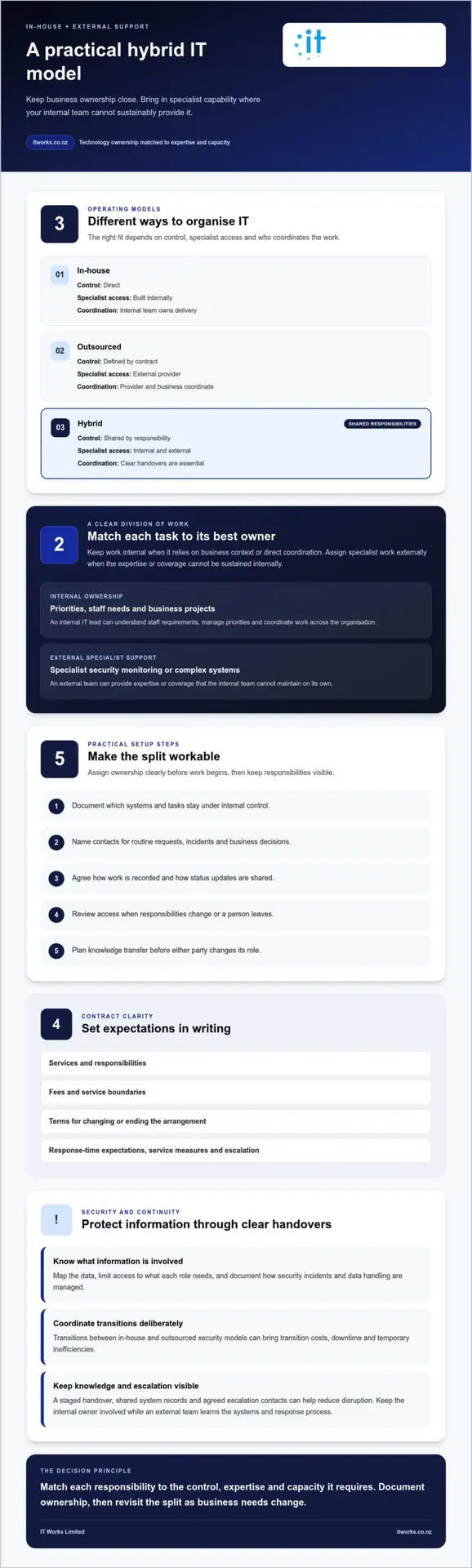
A hybrid model keeps selected IT responsibilities inside the organisation and assigns others to an external provider. It can suit a New Zealand business that wants internal ownership without building every specialist capability itself, with IT firms such as ZANGAARD offering specialised models like managed dual shoring to bridge the gap. A cost-benefit analysis of in-house versus outsourced IT can help show which tasks belong where. The key is a clear division of work, not simply adding another support channel.
For example, an internal IT lead could manage priorities, understand staff needs and coordinate business projects. An external team could provide specialist security monitoring or support for complex systems. A hybrid approach combining in-house and outsourced SOCaaS may also suit some organisations. In each case, name who is responsible for decisions, incident escalation and follow-up.
Start by listing essential IT tasks, then assign each to an owner. Keep work inside the organisation when it depends on detailed business context or direct internal coordination. Assign specialist work externally when it needs expertise or coverage the internal team cannot sustain. Record handovers, access permissions and escalation paths so responsibilities stay visible.
Managed service provider contracts set out services, responsibilities, fees, service boundaries and the terms for changing or ending the arrangement. A service-level agreement can define response-time expectations, service measures and how issues are escalated.
For an outsourced arrangement, cybersecurity and privacy risks include inappropriate access, weak handovers and uncertainty about where information is stored or accessed. Map the data involved, limit access to what each role needs, and document how security incidents and data handling are managed.
Before work begins, use these practical steps to make the split workable:
- Document which systems and tasks stay under internal control.
- Set named contacts for routine requests, incidents and business decisions.
- Agree how the provider records work and shares status updates.
- Review access when responsibilities change or a person leaves.
- Plan knowledge transfer before either party changes its role.
Transitions need deliberate coordination. Moving between in-house and outsourced security models can bring transition costs, downtime and temporary inefficiencies. A staged handover, shared system records and agreed escalation contacts can help reduce disruption. For example, keep the internal owner involved while an external security team learns the organisation’s systems and response process.
| Model | Internal control | Specialist access | Coordination |
|---|---|---|---|
| In-house | Direct | Built internally | Internal team owns delivery |
| Outsourced | Defined by contract | External provider | Provider and business coordinate |
| Hybrid | Shared by responsibility | Internal and external | Clear handovers are essential |
Choose the model by matching each responsibility to the required control, expertise and capacity. Document ownership before work starts, then revisit the division when business needs change.
Long-term cost-effectiveness of in-house teams
An in-house IT team can deliver long-term value when its work is consistent and closely tied to business operations. Internal staff build knowledge of systems, workflows and priorities over time. For example, an IT lead familiar with a finance platform can coordinate changes directly with the finance team. That familiarity can reduce repeated explanations and support informed day-to-day decisions.
However, salary is only one part of the long-term cost. Recruitment, onboarding, professional development, software licences and equipment all contribute. An organisation also needs to plan for upgrades and the time required to manage systems. For example, replacing ageing network hardware involves both the equipment cost and the internal time spent planning and implementing the change.
Specialist capability needs regular investment, too. An in-house security operations function requires ongoing training and technology to keep pace with evolving threats. Staff need time to learn new systems, practise response procedures and maintain relevant skills. If an organisation relies on one specialist, that person’s knowledge may also become a point of operational dependence.
Capacity matters as demand changes. A team that handles routine support well may have limited room for a cloud migration, a new security programme or a major systems upgrade. Before adding a project, map existing responsibilities and estimate the internal time each task requires. This makes workload trade-offs visible before they affect delivery.
Use a consistent cost review to understand whether an internal team remains a sound investment:
- List employment, recruitment, onboarding and training costs.
- Record software licences, hardware purchases and planned upgrades.
- Estimate staff time spent on support, maintenance and project work.
- Identify specialist tasks that require additional training or external expertise.
- Compare planned capacity with upcoming projects and business priorities.
Review the list against real work, not an assumed steady workload. For example, a business preparing a cloud migration may need more project capacity than its usual support rota allows. Separate ongoing responsibilities from temporary project demands. This helps show whether the next investment should strengthen the internal team, fund new tools or bring in specialist support.
Retention also affects continuity and accumulated knowledge. When an experienced employee leaves, the organisation may need to recruit, onboard a replacement and transfer system knowledge. Documenting configurations, access processes and supplier relationships makes that knowledge easier to share. It also gives managers a clearer view of which responsibilities depend on one person.
In-house IT is most cost-effective when the organisation can use the team’s skills consistently, fund ongoing development and maintain adequate capacity. If specialist needs fluctuate or exceed internal resources, compare the cost of building those capabilities with a targeted external arrangement. Regularly reviewing workload, technology investment and business plans keeps the decision grounded in actual needs.
Outsourcing for access to specialist skills
Specialist IT work often needs deeper knowledge than a small internal team can maintain across every area. Cybersecurity is one example: outsourced SOCaaS can provide access to professionals who keep up with emerging threats and technologies. That gives an organisation another way to access focused expertise without building every specialist role internally.
Compare the capability needed with the work your team handles regularly. An internal generalist may manage user access and routine systems, while a security specialist assesses alerts or helps refine incident processes. The distinction matters: occasional specialist work can be difficult to sustain as a permanent internal role, while recurring needs may justify developing capability inside the business.
Outsourcing can also bring a wider mix of skills to a defined task. For example, a cloud project or custom software build may involve system configuration, security settings and specialised engineering. Engaging an external specialist such as 4mation can contribute focused experience, while an internal owner provides business context and coordinates decisions. The organisation still needs clear ownership of outcomes and internal knowledge.
Assess the fit with a short capability review:
- List specialist tasks completed during a typical operating period.
- Mark which tasks require current, dedicated expertise.
- Identify the business impact if each task is delayed.
- Decide which skills need ongoing internal ownership.
- Compare the remaining specialist requirements with external support.
This review helps separate routine responsibility from specialist depth. For example, if security monitoring is continuous but advanced analysis is less frequent, an organisation could retain internal oversight and use external expertise for defined security operations. The division should state who reviews findings, makes decisions and follows through on agreed actions.
Outsourcing does not remove the need for internal understanding. Keep a named business owner for each system or specialist engagement. Ask for clear records of changes, decisions and outstanding work. Those records help staff understand what has been done and support continuity if responsibilities change.
Compare the full commitment, not just the apparent cost of one specialist task. An in-house role includes fixed employment costs and ongoing development, while external support may provide specialist skills without the fixed costs of an internal hire. The best comparison also considers workload consistency, business knowledge and how quickly the expertise is needed.
For each option, assess the practical trade-offs:
- Internal expertise: closer context, direct coordination and skills to maintain.
- External expertise: access to specialist knowledge and a defined handover process.
- Shared responsibility: internal ownership combined with external technical depth.
Outsourcing is most useful when specialist requirements exceed the team’s current skills or occur too irregularly to justify building them internally. Make responsibilities and knowledge-sharing explicit, so expert input strengthens the organisation’s capability rather than sitting outside it.
Scalability and business continuity
Business size, user count and support needs shape the IT model. A growing organisation with changing workloads may value external capacity, while steady, specialised work can support an internal team. Assess how demand shifts during projects, staff changes and busy periods.
Scaling an in-house security operations centre as an organisation grows requires further investment in technology and personnel. For example, adding staff may also mean expanding system access, monitoring tools and training. These costs and responsibilities grow alongside the capability the organisation wants to maintain.
Outsourced SOCaaS providers can scale services up or down as an organisation’s needs change. That flexibility may suit a business facing a short-term project or fluctuating security requirements. Define the scope and responsibilities clearly so service changes align with actual workloads.
Continuity depends on more than the number of people available. A documented process helps staff manage system changes, routine requests and incidents when a key employee is away. For example, recording system ownership, access procedures and escalation contacts gives colleagues a practical reference during a handover.
Review continuity with a simple set of questions:
- Which systems are essential for daily work?
- Who can approve access or system changes?
- Where are support records and recovery instructions kept?
- How are issues escalated if the usual contact is unavailable?
- What additional support is needed during a major project?
These checks reveal whether capability rests with one person or is shared across a team. If only one employee understands a system, document key steps and assign a backup owner. If an external provider supports the system, include its role in the handover and escalation process.
Compare likely demand across normal operations and planned change. A new office, cloud migration or increase in staff can create different support needs from day-to-day work. Note which skills and systems each change affects, then decide whether internal capacity can absorb the work or external expertise would help.
For each model, consider how service can adjust when requirements shift. An internal team offers direct organisational knowledge, but expanding it requires suitable people and technology. Outsourcing can provide adjustable capacity, while a hybrid arrangement pairs internal oversight with external specialist support. Clear ownership helps prevent gaps between those roles.
Choose the model that can support expected workloads and keep essential knowledge accessible. Revisit the decision when staffing, systems or project demands change, and update support responsibilities accordingly.
Outsourced marketing support can be scaled according to a New Zealand business’s needs, while scaling an in-house team usually means hiring more staff. The agency relationship includes its software and tools, rather than an extra monthly business cost.
Outsourcing and in-house cost comparison
For a New Zealand small business, in-house IT costs include employment, recruitment, training, software and hardware, not salary alone. IT salaries and employer on-costs vary with role, experience and location, while recruitment adds advertising, assessment and onboarding costs.
In-house IT costs
An in-house IT role gives the business direct day-to-day capacity and knowledge of its systems. Its total cost also includes equipment, software licences, training and the time spent managing technology. For example, a business comparing an IT employee with external support should include planned hardware upgrades and ongoing skill development, not just the employee’s pay.
Separate recurring costs from one-off spending. A salary is a regular commitment, while recruitment and onboarding arise when a role is filled. Equipment and software may have different replacement or renewal cycles. Listing these items together gives decision-makers a clearer view of the resources required to maintain internal capability.
Salaries, on-costs and recruitment
Typical New Zealand IT salaries depend on the role’s responsibilities, experience and location. A general support role and a cybersecurity specialist require different capabilities, so one salary figure would not represent both accurately. Employer on-costs add to the salary commitment, while recruitment can involve advertising, candidate assessment and time spent onboarding a new employee.
Build a role-specific estimate using the position’s actual requirements. Include salary, employer on-costs, recruitment, onboarding and professional development. Then account for equipment and the time needed to keep systems working. This approach gives a more complete comparison than using a headline salary alone.
Outsourcing costs and break-even point
To calculate a break-even point, compare the full internal cost with the external service cost over the same period. Include employment, recruitment, training, tools and hardware for the in-house option. For outsourcing, use the agreed service scope and include any internal time still needed to coordinate work.
For example, list the tasks handled internally, then identify which tasks an external arrangement would cover. Compare like with like, including specialist work and support requirements. The break-even point is where the total costs match; above or below it, weigh service scope, expertise and internal capacity alongside the figures.
Outsourced pricing depends on service scope, user numbers, systems and support requirements. The exact figure is provided in a quote for your case.
Use this simple sequence to make the comparison practical:
- Choose the same comparison period for both models.
- Add direct and supporting costs for each option.
- Compare equivalent work and service coverage.
- Review the result against your business priorities.
IT Works: Managed IT Services
IT Works helps New Zealand organisations align technology support with business priorities through Managed IT Services. This is a natural next step if your comparison shows gaps in internal capacity, specialist skills or continuity. The right model can also combine internal ownership with external support, rather than replacing your existing team.
IT Works can also support related priorities through Cybersecurity and Cloud Solutions. Together, these services help organisations consider day-to-day technology needs alongside security and planned change. Start by identifying which responsibilities your team wants to retain and where additional support would be useful. That gives the conversation a practical focus, grounded in your organisation’s needs and goals.
Contact IT Works to discuss your technology strategy.
Make your next IT decision with confidence
Choose an IT model that supports the organisation you’re building, not just the systems you have today. A cost-benefit analysis of in-house IT versus outsourced support in New Zealand can guide that decision, but its value comes from revisiting assumptions as priorities change. Treat the result as a practical planning tool, then review it when your operating needs shift.
Before making a change, agree what success looks like across the business. That might mean clearer responsibility for technology decisions, stronger alignment between IT and business plans, or more capacity for upcoming work. Give leaders and staff a shared understanding of the intended outcomes, so the model supports confident, purposeful decisions.
A considered approach can make technology a more reliable foundation for growth. Take the next step at a pace that suits your organisation.
Frequently Asked Questions
Should Your Business Outsource or Not?
Outsource when your organisation needs capabilities or support coverage it can’t sensibly maintain internally. Keep responsibilities in-house where direct knowledge, decision-making or close coordination matters most. For example, a Wellington business could retain an internal technology lead while engaging external specialists for defined projects. Map essential tasks, ownership and expected workloads first, then decide which arrangement supports your priorities and where a hybrid model could fill gaps.
How do in-house and outsourced IT costs compare over three to five years in NZ?
Compare the total cost of equivalent work across the same three-to-five-year period, rather than comparing salary with a service fee. Include recurring employment and service costs, plus recruitment, training, software, hardware and project requirements. Account for changes in staffing, systems and support needs during the period. A spreadsheet by year can show when large purchases or recruitment affect the comparison, without assuming either model stays unchanged.
What costs should an IT outsourcing cost-benefit analysis include?
Include the contracted service scope, software and licences, hardware, projects and any internal time needed to manage the relationship. Also account for transition work, knowledge transfer and tasks that remain outside the agreement. For example, if a provider manages routine support but a major system change sits outside scope, include that project separately. Comparing the same responsibilities across both options helps reveal differences beyond the headline service fee.
What are the benefits and drawbacks of in-house IT versus outsourced IT support?
In-house IT offers close business context and direct control, but the organisation carries responsibility for developing and retaining its capability. Outsourced support can provide access to external expertise and adaptable capacity, but requires clear communication, defined responsibilities and effective handovers. A hybrid arrangement can balance these considerations. For example, an internal manager might prioritise work while external specialists support a project, with ownership and decision-making agreed in advance.