
Years in business matter, but they’re only one part of choosing a managed IT provider. The most useful questions to ask a potential managed IT provider cover its experience, how support fits your organisation and how cybersecurity is built into the service. Ask about the provider’s track record, then explore the experience and outcomes behind its answer.
It’s reasonable to want a dependable partner who understands your needs and can support your organisation as it changes. The right questions help you compare more than promises: they reveal how a provider communicates, responds to issues, plans for growth and approaches security. This guide covers experience, IT requirements, support, industry knowledge, references and cybersecurity, helping you make a more informed choice.
Key Takeaways
- Ask for client references and use the service-level agreement to understand response expectations and how performance is measured.
- Map your current IT challenges and future plans before comparing providers, including support needs and recovery priorities.
- Look for relevant industry experience and ask how the provider’s past work relates to organisations like yours.
- Clarify how remote and on-site support work together, and which services are covered by the agreement.
- Explore how cybersecurity is included in managed IT, from everyday protection measures to the provider’s approach to recognised frameworks.
1. Can you provide referrals?
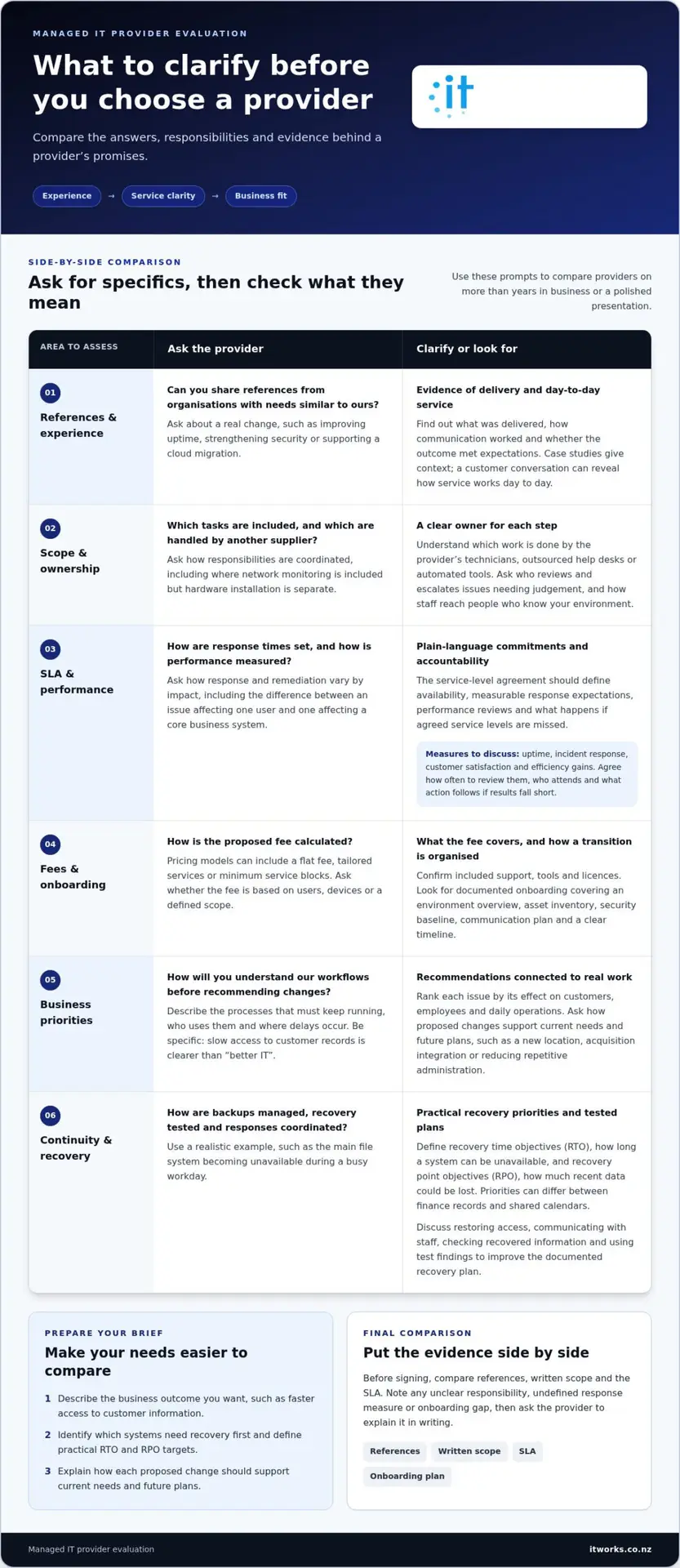
Ask a managed service provider for references from organisations with needs similar to yours. A useful reference can explain how the provider handled a real change, such as improving system uptime, strengthening security or supporting staff through a cloud migration. Ask what the provider delivered, how communication worked and whether the outcome met expectations. Case studies add context, while a conversation with a current or past customer can show how the service works day to day.
Compare the provider’s capabilities with the work your organisation needs done. Some providers manage IT and infrastructure end to end; others focus on services such as infrastructure hosting or end-user support. Ask which tasks are included, which are handled by another supplier and how responsibilities are coordinated. For example, if network monitoring is included but hardware installation is separate, clarify who plans and oversees each task.
Understand how the service is delivered. Ask which work is completed by the provider’s own technicians, outsourced help desks or automated tools. If first-level support is outsourced, ask how staff can reach people who know your environment. If automation handles routine alerts, ask how technicians review and escalate issues requiring judgement. The key is knowing who owns each step, not just which tools are used.
Request the service-level agreement (SLA) before choosing a provider. It should explain service availability and response expectations in plain language, with measurable goals and clear accountability. Ask how response and remediation times vary by impact, and how the provider classifies an issue affecting one user compared with one affecting a core business system. The SLA should also explain how performance is reviewed and what happens when agreed service levels are missed.
Use defined measures to assess performance over time. Ask how the provider reports uptime, incident response, customer satisfaction and efficiency gains. Agree how often you’ll review those measures, who attends and what action follows if results fall short. A dashboard is useful only when its measures relate to business priorities, such as staff access to essential systems.
How do New Zealand managed IT providers charge? Pricing models can include a flat fee, tailored services or minimum service blocks. Ask whether the proposed fee is based on users, devices or a defined scope, and what support, tools and licences it covers.
What onboarding steps and documentation should a provider provide? Look for a documented process that covers an environment overview, asset inventory, security baseline, communication plan and clear timeline. These steps help both parties understand the starting point and organise a transition that minimises disruption.
Before signing, compare the references, written scope and SLA side by side. Note any unclear responsibility, undefined response measure or onboarding gap, then ask the provider to explain it in writing. This gives you a practical basis for your decision beyond a polished sales presentation.
2. Identifying business challenges and IT requirements
Before comparing providers, write down the business problems technology needs to address. Be specific: slow access to customer records, repeated manual data entry or staff struggling to work remotely are clearer priorities than “better IT”. Rank each issue by its effect on customers, employees and daily operations. A clear brief helps a provider assess your needs rather than propose a generic package. These are useful starting points for the questions to ask a potential managed IT provider.
Ask how the provider will learn your workflows and industry context before recommending changes. A retailer, professional services firm and community organisation may rely on different systems and working patterns. Explain which processes must keep running, who uses them and where delays occur. For example, if staff duplicate information between systems, ask how the provider would investigate the cause before suggesting a new tool. Your questions should show how recommendations will connect to your actual work.
Discuss business continuity alongside routine support. Ask how backups are managed, how recovery is tested and who coordinates the response if a key system becomes unavailable. Clarify your recovery time objective (RTO), the time your organisation can tolerate a system being unavailable, and recovery point objective (RPO), the amount of recent data it can afford to lose. Priorities differ between systems, such as finance records and shared calendars.
Use a realistic scenario to understand the provider’s approach. For example, ask what would happen if your main file system became unavailable during a busy workday. The discussion should cover restoring access, communicating with staff and checking that recovered information is usable. A documented disaster recovery and business continuity plan should be tested, not left untouched. Ask how test findings would improve your recovery process.
Look beyond immediate fixes and ask how recommendations support your business plans. A strategic provider can help map technology investments to priorities such as opening a new location, integrating an acquisition or reducing repetitive administration. Ask how the service could adapt as your organisation grows or changes. Discuss whether automation or AI could improve a specific process, and how staff would remain involved in decisions and oversight.
- Describe the business outcome you want, such as faster access to customer information.
- Identify which systems need recovery first and define practical RTO and RPO targets.
- Ask how each proposed change supports current needs and future plans.
Proactive planning also depends on an ongoing relationship. Agree how technology priorities will be reviewed, who from your organisation should contribute and how recommendations will be explained in business terms. For example, a proposed system change should identify the process it improves, the teams affected and how its value will be assessed.
If you’re shaping a roadmap alongside operational support, a discussion about IT strategy and business priorities can help connect technology decisions with your organisation’s goals.
3. Do You Have Experience Working with Other Organisations in My Industry?
Industry experience helps a provider understand the systems, workflows and service expectations your organisation relies on. Ask for examples from organisations in your sector, then explore what the provider actually delivered. A firm supporting professional services, for example, should explain how its work addressed document access, staff collaboration or client-facing systems. Look for relevant experience, not just a list of familiar industry names.
Request references from clients whose needs resemble yours in size, structure or operating model. Ask how long each reference has worked with the provider, how communication works and whether the service meets agreed expectations. A specific example, such as support during a system change, offers more insight than a general testimonial. Ask how the provider monitors service performance and whether reviews lead to practical changes.
Check stability through several indicators rather than relying on one claim. Ask about the provider’s operating history, business continuity for its own operations and the team responsible for your account. References and evidence of financial backing can also help you understand continuity. Clarify what happens to your support if a key technician leaves or the provider changes its service model.
Ask which technology vendors the provider works with and how those relationships support your environment. For example, if your organisation relies on Microsoft 365, ask who manages the platform and how support responsibilities are handled. Industry recognition can provide another point of context: Channel Futures MSP 500 and MSP Alert MSSP 250 are named industry recognitions. Ask what any recognition represents and how it relates to the service you need.
Industry-specific knowledge should cover how technology supports your work, not just familiarity with terminology. Ask how the provider would approach a sector-relevant scenario, such as managing access to sensitive client information or maintaining essential systems during a busy period. If your organisation has compliance or data-governance requirements, ask how the provider identifies relevant controls, documents responsibilities and reports progress. The answer should relate to your organisation’s actual requirements.
What are the risks of choosing the wrong managed IT provider? A poor fit can leave important systems or responsibilities outside the agreed service, slowing work and causing confusion when support is needed. Misaligned expertise can also lead to recommendations that don’t address your sector’s workflows or priorities.
- Compare references against your organisation’s needs and operating model.
- Ask who will deliver support and how continuity is managed.
- Review the contract’s scope and service level commitments alongside any recognition claims.
Use the conversation to test how clearly a provider can explain its work. Ask for a relevant client example, the people accountable for delivery and the measures used to monitor service. Clear answers help you judge whether the relationship can support both day-to-day operations and future priorities.
4. Do You Deliver Both Remote Management and On-site Support?
Use the discussion to understand how a provider builds cybersecurity into its team’s work. Ask how staff receive security training, what it covers and how people report a concern. A practical example is an exercise showing employees how to identify an unexpected request for credentials and report it through the organisation’s agreed process. Ask how training is adapted to staff roles and everyday work.
Clarify how the provider assesses its own security practices. Ask what an independent review covers, who conducts it and how findings are prioritised. A useful answer explains how gaps are recorded, assigned to an owner and followed through to completion. You can also ask how the provider shares relevant assessment information with customers while protecting confidential details about its systems and other clients.
Ask which security frameworks guide the provider’s approach and how it uses them in practice. NIST, CIS, ISO 27001 and HITRUST are examples of established cybersecurity frameworks; according to the International Organization for Standardization (ISO), ISO 27001 is an information security management standard. Ask how the provider selects relevant controls for your organisation, rather than treating a framework name as proof that every risk is addressed.
Understand how security tools are selected and maintained. Ask what criteria the provider uses, how it reviews whether tools remain suitable and how it avoids gaps between products. For example, if identity management and email security use different systems, ask how their interaction is considered. A clear explanation should link each tool to a defined purpose and describe how its effectiveness is reviewed.
Ask what a security operations centre does, if the provider uses one. Clarify what information it monitors, how alerts are assessed and who decides whether an event needs further investigation. The provider should explain how automated alerts reach an analyst and how relevant findings are shared with your organisation. This helps distinguish a named capability from a clearly described operating process.
Security awareness also depends on organisational habits. Ask how the provider helps leaders reinforce good practices, such as reporting unusual activity without blame. Consider how new starters learn your organisation’s expectations and how guidance changes when systems or work processes change. These details show whether cybersecurity is treated as an ongoing part of how people work, not just a technical setup.
- Ask for examples of staff guidance tailored to different roles.
- Find out how security reviews create owned, tracked improvements.
- Ask how frameworks and tools are applied to your organisation’s environment.
Use the conversation to assess whether the provider can explain its security approach in plain language. Clear ownership, relevant staff guidance and a practical way to review controls help you understand how cybersecurity supports your organisation’s work.
5. Cybersecurity included in managed IT
Cybersecurity works best when everyday safeguards have clear owners. While evaluating managed IT, ask which protections are included in the service and which tasks remain with your organisation. For example, a provider may manage device protection while your managers approve staff access. Write down who handles each responsibility, how changes are recorded and who receives updates. This makes the partnership practical instead of leaving security as an assumed part of outsourcing.
Ask how the provider manages core safeguards across your infrastructure. Discuss multi-factor authentication, endpoint protection, email security, firewalls and patch management. For each, ask what it protects, who reviews its status and how exceptions are handled. If a staff member changes roles, for instance, clarify how access changes are initiated and completed. Clear processes keep controls aligned with how people actually use systems.
Explore how patching decisions are made. Ask how the provider identifies updates, prioritises them and handles devices that can’t be updated immediately. A business-critical application may need testing before a change is applied. The provider should explain how it records the decision, tracks the outstanding update and communicates any temporary measures. This gives your team visibility without requiring executives to manage technical details themselves.
Incident response also needs practical definition. Ask what happens when an employee reports a suspicious email or unusual account activity. Clarify who receives the report, who assesses it and how the right people in your organisation are contacted. Discuss what information the provider will share and how decisions affecting business operations are coordinated. A clear pathway helps staff act consistently and supports timely assessment.
Ask how the provider’s security work adapts as your organisation changes. New starters, departing employees, new devices and changes to business applications can all affect access and protection needs. Agree how these changes are communicated and reflected in security processes. For example, adding a cloud application should prompt a discussion about who can access it and how that access is managed.
No provider can prevent every security issue, so ask how it helps your organisation reduce risk and respond constructively. Consider whether reporting is understandable to business leaders, not just technical teams. Useful reporting can show completed actions, unresolved items, responsible owners and decisions needed. This gives leaders a basis for prioritising improvements alongside operational demands.
- Define which security tasks the provider owns and which your team manages.
- Ask how exceptions, staff changes and new applications affect safeguards.
- Look for reporting that helps leaders assign priorities and track actions.
Discuss your cybersecurity priorities with our team.
IT Works: Managed IT Services
IT Works helps New Zealand organisations connect everyday technology support with broader business priorities. Its Managed IT Services can support teams seeking a more coordinated approach to systems, users and technology planning. When cybersecurity needs closer alignment with daily operations, Cybersecurity can form part of the conversation. Cloud Solutions and AI & Automation can also support practical improvements to how work gets done.
Consider speaking with IT Works if you’re reviewing your current support, planning a change or looking for a longer-term technology partner. Based in Wellington and supporting organisations across New Zealand, IT Works can discuss how technology services could align with your priorities.
Talk to IT Works about your technology needs.
Choose a partner for what comes next
Choosing a provider is also a decision about how technology will support your organisation as it changes. Use the questions to ask a potential managed IT provider to establish the basis for an ongoing working relationship: shared priorities, clear ownership and regular strategic conversations. That foundation helps keep technology decisions connected to the outcomes your leadership team values.
IT Works supports organisations through Managed IT Services and Cybersecurity, with AI & Automation available for practical business applications. If you’re considering a change of provider or want to align technology more closely with your plans, a conversation can help clarify where to focus.
A thoughtful next step can bring greater clarity to your technology direction and confidence in the decisions ahead.
Frequently Asked Questions
How long have you been in business?
IT Works has supported New Zealand organisations for 18 years. Time in business can provide useful context, but it doesn’t show how well a provider’s current team will support your environment. Consider asking who would work with your organisation, how account knowledge is maintained, and how the provider keeps its skills relevant. Those details help you assess the continuity and experience behind the relationship.
Are Your Services Available 24x7x365 If I Need Them?
IT Works provides 24/7 remote helpdesk support, but that doesn’t mean every service is available around the clock. Separate remote helpdesk coverage from on-site assistance, project work and public-holiday support when comparing providers. Consider which systems and staff need help outside normal working hours, then match those needs to the relevant service arrangements. This helps you distinguish continuous remote support from other forms of assistance.
Are Your Services Focused on Proactivity?
Yes. IT Works includes proactive system monitoring and maintenance in its managed IT approach. The service looks after the technology environment rather than relying only on staff to report problems. For example, monitoring can help identify an issue for review before it becomes a repeated interruption. Ask how ongoing maintenance is planned and how recommendations connect to your organisation’s priorities.
Can Your Firm Help with Upgrades or New Technology Implementations?
Yes. IT Works supports technology projects such as cloud migrations, AI integration and infrastructure deployment. The right approach starts with the business reason for a change, such as making information easier to access or preparing systems for growth. Clarify the project’s scope, who will coordinate implementation and how the change will affect staff workflows. A planned rollout can help teams adopt new technology with clearer expectations.
Can you provide referrals?
References can help you understand how a provider works beyond sales conversations. Ask to speak with an organisation that has a comparable operating model, then discuss communication, project coordination and how the relationship works after implementation. You can also ask for a case study describing the business need, work delivered and outcome. Look for details relevant to your priorities rather than relying only on broad praise.
Do You Deliver Both Remote Management and On-site Support?
IT Works provides remote helpdesk support and on-site technical assistance. These channels suit different needs: remote support can help with a user’s access issue, while physical equipment work may require someone on site. Consider how support is coordinated when an issue moves between the two. A clear handover helps staff know who is managing their request and reduces the need to explain the problem again.
Do You Have Experience Working with Other Organisations in My Industry?
IT Works works with organisations across sectors, including professional services, health, manufacturing, the public sector, councils, iwi organisations, research institutes and non-profits. Industry experience matters because workflows and technology priorities vary. For example, a research organisation may depend on different systems from a professional services firm. Ask how the provider’s experience relates to your organisation’s work, team structure and the systems your staff rely on.
Do Your Engineers Have Experience with a Vast Breadth of Technologies and Infrastructure Types?
IT Works’ services span cloud environments, Microsoft 365, backup and continuity, and infrastructure management. When assessing technical breadth, focus on the systems your organisation actually uses, rather than an impressive list of product names. Ask how the provider approaches an issue that crosses services, such as a connectivity problem affecting access to cloud tools. You’ll learn whether its expertise connects separate parts of your environment.