
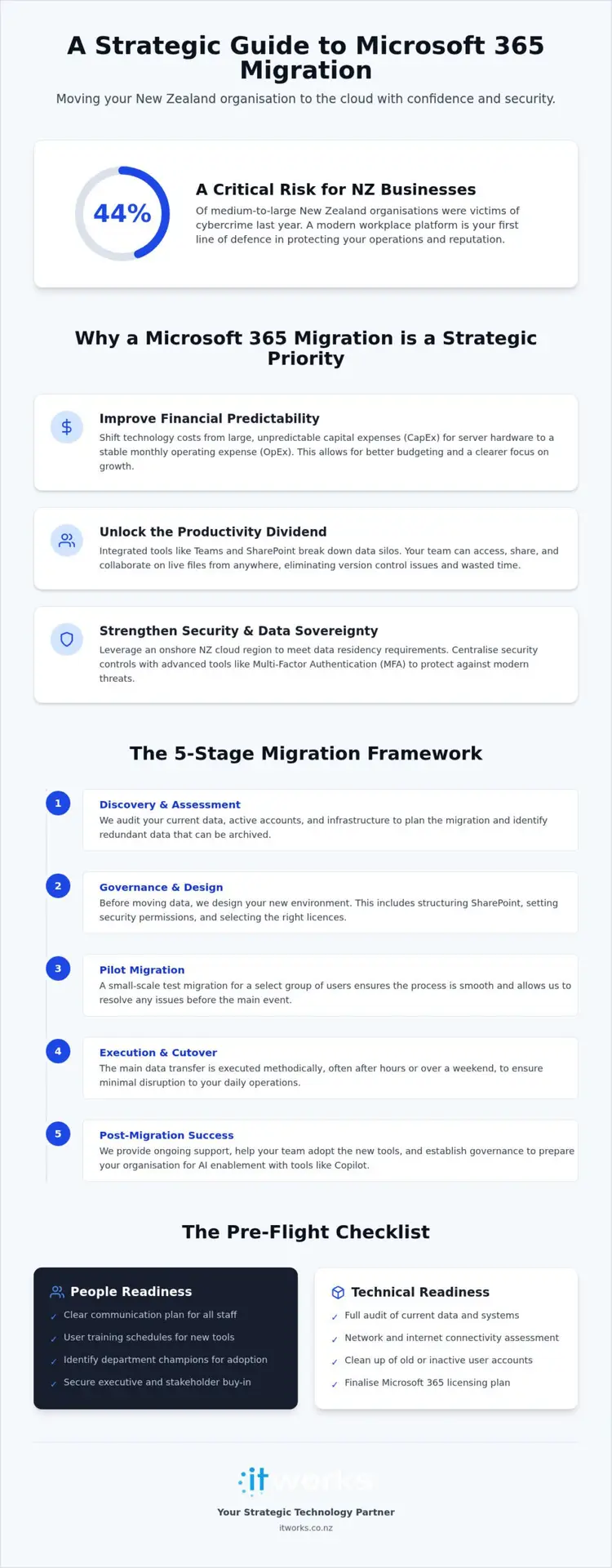
If 44% of medium-to-large New Zealand organisations were victims of cybercrime in the past year, is your current infrastructure doing enough to protect your reputation? This statistic from the 2026 Kordia report highlights why a modern workplace is no longer optional for those seeking stability and growth. Most business leaders recognise the need for better tools, but the prospect of a Microsoft 365 migration NZ often feels like a looming headache. You might worry about significant downtime, potential data loss, or the sheer complexity of technical licensing jargon.
We understand that your primary goal is a seamless transition where productivity doesn’t skip a beat. This guide outlines how to move your organisation to the cloud with confidence, ensuring your data remains secure with onshore residency. You’ll discover how to enhance collaboration through Teams and SharePoint while building a resilient security posture that protects your team from evolving threats. We will walk through a structured, strategic approach to the migration process, focusing on practical business outcomes rather than just technical features.
Key Takeaways
- Replace ageing on-premises servers by following a structured methodology that ensures no data is left behind during your Microsoft 365 migration NZ.
- Compare technical migration paths to select the approach that minimises staff disruption and maintains operational stability throughout the process.
- Use our comprehensive pre-flight checklist to address “people-readiness” and technical requirements well before the actual data transfer begins.
- Leverage an NZ-based cloud region for data residency while preparing your organisation for the practical benefits of AI tools like Microsoft Copilot.
Why Microsoft 365 Migration is a Strategic Priority for NZ Organisations
A Microsoft 365 migration NZ is much more than a simple mailbox move. It is a transition of your entire organisational ecosystem, including email, files, and collaboration tools, into a unified cloud environment. For many New Zealand businesses, this shift marks the end of a cycle of heavy investment in ageing on-premises hardware. Legacy servers are often expensive to maintain and prone to failure; moving to the cloud replaces these physical risks with a stable, scalable platform.
Shifting your technology costs from capital expenditure (CapEx) to a predictable operating cost (OpEx) model provides a clear advantage for your balance sheet. Instead of facing large, lump-sum costs for server refreshes every few years, you gain a transparent monthly subscription. This financial predictability allows executive teams to focus on growth rather than emergency hardware replacements. The ultimate outcome isn’t just better software, but an organisation that is more resilient, flexible, and better equipped to handle the demands of a modern workforce.
The Productivity Dividend
Integrated tools like Microsoft Teams and SharePoint work together to eliminate data silos that often plague traditional file servers. When your team can access information through a single interface, they spend less time searching for documents and more time on high-value tasks. Mobile access is a significant benefit for staff working across the country, whether they are visiting regional sites or working from home. Because everyone works on the same live files, you effectively remove the frustration of version control issues and the risk of working on outdated information.
Security and Data Sovereignty in NZ
Security is a primary concern for any business leader, and a cloud-first environment allows for a layered approach to protection. With the launch of the onshore cloud region in late 2024, organisations can now meet strict data residency requirements within our borders. This is particularly relevant given the Privacy Amendment Act 2025, which introduced new transparency obligations for handling personal information under Principle 3A. Ensuring your data stays in-country is a key step in maintaining organisational confidence and regulatory compliance.
Migration also enables sophisticated identity management, such as Multi-Factor Authentication (MFA). These tools provide a robust first line of defence against credential harvesting, which remains a common threat according to recent NCSC reports. By centralising your security controls, you create an environment where your data is protected by global standards while remaining easily accessible to your authorised team members.
The 5-Stage Migration Framework: A Structured Approach
Successful technology transitions don’t happen by accident. They are the result of a methodical, step-by-step process designed to protect your data while keeping your team productive. A Microsoft 365 migration NZ requires more than just moving files from one location to another; it’s a strategic realignment of how your organisation handles information. By following a structured methodology, you ensure that no critical data is left behind and that the move causes minimal disruption to your daily operations.
Complexity is best managed with a steady hand and deep technical expertise. Engaging a technology partner allows your executive team to focus on business outcomes while specialists handle the intricate backend configurations. This partnership replaces the typical stress of a technical “cutover” with a sense of calm reliability, moving your organisation toward a more modern, integrated ecosystem.
Discovery and Assessment
The first stage is always about visibility. We start by auditing your current data volumes, active email accounts, and any third-party integrations that rely on your existing servers. This is the ideal time to identify “dark data” which is redundant, obsolete, or trivial information that no longer serves a purpose. There’s little value in paying to migrate and store files that haven’t been accessed in a decade. We also assess your local hardware and internet connectivity to ensure your office infrastructure can support a cloud-first environment without lag.
Governance and Design
Before a single byte moves, we must define the rules of your new environment. This involves organising SharePoint structures to reflect your actual business workflows rather than just mimicking an old folder tree. We establish clear data access policies and security permissions, ensuring that sensitive information is only available to those who need it. Part of this design phase involves discussing your technology strategy to select the right mix of Microsoft 365 licences, ensuring you only pay for the features your staff actually use.
Pilot, Execution, and Support
We believe in testing before a full-scale launch. By running a pilot migration with a small, diverse group of staff, we can identify and resolve any minor friction points before the main event. The “Go-Live” or cutover is managed outside of your peak business hours to ensure a seamless experience when your team logs in the next morning. Post-migration support is perhaps the most critical phase. Our NZ-based team provides dedicated helpdesk assistance to answer user queries and ensure every staff member feels confident using their new tools from day one.
Comparing Migration Methods: Which is Right for Your Business?
Selecting the right technical path for your Microsoft 365 migration NZ is a strategic decision that directly impacts your team’s productivity. There isn’t a single “correct” way to move; rather, the choice depends on the complexity of your current systems and your tolerance for downtime. A well-chosen method aligns with your business continuity goals, ensuring that while the background technology changes, your operations remain steady.
Decision-makers must weigh the speed of the transition against the need for a seamless user experience. The “best” method is always the one that provides the most stability for your specific environment. Complexity shouldn’t be a source of stress, but it does require a tailored approach to ensure every file and email account arrives safely in its new home.
Cutover Migration
A cutover migration is often the most efficient choice for smaller organisations with straightforward data needs. This “all-at-once” approach involves moving all mailboxes and files in a single, coordinated event, typically over a weekend. It’s fast and provides a clean break from legacy systems, meaning your team leaves the old environment on Friday and starts fresh in Microsoft 365 on Monday morning.
While this method is swift, it requires meticulous preparation to avoid “Monday morning surprises.” It’s best suited for businesses with:
- Fewer than 150 mailboxes to ensure the data transfer completes within a standard weekend window.
- Minimal complex third-party integrations that rely on legacy server settings.
- The ability to handle a short period of system unavailability during the actual cutover event.
Staged and Hybrid Migrations
Larger organisations with 50 or more staff, or those with complex on-premises requirements, often find a staged or hybrid approach more suitable. A staged migration allows you to move departments or groups of users in logical phases. This spreads the support load and lets you learn from each phase, refining the process as you go. It’s a deliberate, methodical way to handle a Microsoft 365 migration NZ without overwhelming your internal resources.
Hybrid migrations offer the highest level of flexibility by allowing your on-premises servers and the Microsoft 365 cloud to coexist for an extended period. This is particularly beneficial for organisations that need to move users over several months or those with legacy applications that must remain on-premises for a time. In a hybrid setup, cloud and on-premises users can still see each other’s calendars and share information as if they were on the same system, maintaining total collaboration throughout the transition.
The Pre-Flight Checklist: Preparing Your Systems and Staff
Preparation is the silent engine of a successful transition. While the technical transfer of data is critical, a Microsoft 365 migration NZ is often won or lost in the weeks before the actual cutover. Managers who prioritise a comprehensive checklist find that the burden on their helpdesk is significantly reduced, as both systems and staff are ready for the change. This proactive approach replaces the frantic energy of reactive support with a methodical, calm progression.
By ticking off these essential items, you ensure your Microsoft 365 migration NZ proceeds with minimal friction. For a broader view of how these steps fit into your long-term technology strategy, you can refer to our Microsoft 365 management New Zealand guide, which explores the ongoing governance of your new environment.
Technical Housekeeping
Before moving any data, you must ensure your current environment is clean and compatible. This starts with Active Directory housekeeping. Remove old user accounts, update incorrect contact details, and prune distribution lists that are no longer in use. Migrating “ghost” accounts only adds unnecessary bloat and potential security risks to your new tenant. You should also verify that all local software, particularly older versions of Office or specialist line-of-business applications, will remain compatible with the cloud environment.
Verifying domain ownership and DNS access is another vital step that is frequently overlooked. You’ll need the ability to update your DNS records quickly during the cutover event to point your email and services toward Microsoft. If you don’t have the login details for your domain registrar or if they are held by a former provider, secure these well in advance to avoid a last-minute scramble.
Communication and Training
People-readiness is just as important as technical readiness. Clear communication is the best antidote to the natural anxiety that accompanies a change in tools. Draft staff announcements that explain the “why” behind the move, focusing on the benefits like easier collaboration and better mobile access. Be specific about the “when,” so everyone knows exactly when their old systems will be retired and when they should first log in to the new platform.
Organising basic training sessions for Teams and SharePoint before the migration begins can prevent a flood of support tickets on day one. Your team doesn’t need to be experts immediately, but they should know how to find their files and start a chat. Setting clear expectations for the cutover weekend or evening ensures that staff don’t try to access systems while the data is still in transit, allowing your technical team to work without interruption.
Post-Migration Success: Governance and AI Enablement
Completing your Microsoft 365 migration NZ is a major milestone, yet it’s helpful to view this event as the foundation rather than the finish line. Once your data is safely in the cloud, the real work of strategic alignment begins. This phase is about moving beyond basic operational support to build a technology roadmap that leverages the full capabilities of the platform. A secure and productive environment doesn’t maintain itself; it requires deliberate, ongoing management to ensure your investment continues to deliver value.
The transition to a cloud-first model provides a unique opportunity to reset your organisational habits. Instead of simply replicating old ways of working, you can now focus on refined workflows and better communication. Success in the post-migration phase is measured by how well your team adopts these new tools and how effectively you protect your digital assets over the long term.
Ongoing Governance and Security
A resilient environment requires regular maintenance and a proactive approach to security. This includes a consistent review of permissions and external sharing settings to ensure sensitive information hasn’t been accidentally exposed. With the Privacy Amendment Act 2025 now in effect, maintaining clear visibility over how personal information is handled is a legal necessity for New Zealand organisations. You should also monitor your licence usage monthly; there’s no sense in paying for premium features if your staff only require basic functionality.
Security awareness training is another critical component of post-migration governance. Technology can provide the framework, but your staff are the front line of your defence. Regular, low-pressure education on how to spot sophisticated phishing or credential harvesting attempts helps build a culture of organisational confidence. This layered approach ensures that your Microsoft 365 environment remains a safe space for collaboration.
Practical AI Readiness
One of the most significant benefits of a successful Microsoft 365 migration NZ is that it prepares your organisation for AI enablement. Tools like Microsoft Copilot rely on well-structured, permissioned data to provide accurate assistance. If your SharePoint folders are cluttered or access rights are too broad, AI tools may inadvertently surface information to the wrong people. Preparing your data structures now ensures that when you choose to deploy AI, it works safely and effectively.
Focus on identifying practical use-cases where automation can remove the burden of repetitive tasks. Whether it’s summarising long meeting transcripts in Teams or automating internal reporting, these small gains in productivity quickly add up. Establishing responsible AI governance from day one ensures that your team uses these tools ethically and in compliance with local regulations. Long-term success in the cloud is a journey best shared with a strategic ally. IT Works services provide the ongoing guidance and technical expertise needed to ensure your technology continues to enable your business success.
Building Your Modern Workplace Foundation
A successful Microsoft 365 migration NZ is the first step toward a more resilient and flexible organisation. By following a structured 5-stage framework, you replace the typical stress of technical management with a predictable, outcome-led transition. This process ensures your data is protected within local borders while providing your team with the tools they need to collaborate effectively from any location across the country.
The journey doesn’t end once the mailboxes are moved. True business success comes from ongoing governance and a commitment to strategic roadmapping. This foundation allows you to leverage new developments in AI and Microsoft Copilot with confidence; you’ll know your data structures are secure and your staff are well-prepared. As your NZ-based strategic technology partner, we focus on these long-term outcomes to ensure your technology remains an asset rather than a burden.
We are here to act as your steady guide, helping you navigate the complexities of modern infrastructure with pragmatic, functional results. Your organisation deserves a technology environment that fosters growth, security, and long-term value.
Frequently Asked Questions
How long does a typical Microsoft 365 migration take for an NZ business?
A typical Microsoft 365 migration NZ for a medium-sized organisation usually takes between four to eight weeks from the initial discovery phase to final support. Smaller businesses with straightforward data needs can often complete the process in as little as two weeks. Larger organisations with complex on-premises requirements or significant data volumes may require three months to ensure a methodical and stable transition without disrupting daily operations.
Will our staff experience downtime during the migration process?
Your team should experience zero downtime when the transition is managed correctly. We typically perform the actual data cutover during a weekend or after hours to ensure your systems are ready when staff log in the next morning. By using a staged or hybrid approach, we allow your old and new systems to coexist, ensuring that email and file access remain constant throughout the entire project.
Where is our data actually stored when we move to Microsoft 365?
Your primary data is now stored right here in New Zealand following the launch of the onshore hyperscale cloud region in late 2024. This local data residency helps your organisation meet strict compliance requirements under the Privacy Act 2020. While some secondary processing might occur globally, having your core mailbox and document storage within our borders provides significant peace of mind regarding data sovereignty and latency.
Can we migrate from Google Workspace or Dropbox to Microsoft 365?
Yes, migrating from platforms like Google Workspace or Dropbox is a standard procedure that we handle regularly. We use specialised tools to ensure your email history, calendar appointments, and folder structures are preserved during the move. This consolidation into a single ecosystem reduces your subscription costs and simplifies your security management by removing the need to juggle multiple third-party storage providers.
Do we need to upgrade our office internet before migrating?
You don’t always need a faster connection, but we always audit your current bandwidth during the discovery phase. Since cloud tools rely on a stable internet connection, we verify that your office can handle the increased traffic of Teams calls and real-time file syncing. If your current setup is insufficient, we can provide guidance on upgrading to a more resilient fibre connection to ensure a smooth user experience.
How does Microsoft 365 improve our cybersecurity posture?
Microsoft 365 improves your security by providing a layered defence that is difficult to replicate on-premises. It enables modern identity management features like Multi-Factor Authentication (MFA), which is your best protection against the credential harvesting attacks reported by the NCSC. By centralising your data, you can apply consistent security policies across all devices, ensuring that sensitive information remains protected even when staff work remotely.
What happens to our old legacy server after the migration?
Once your Microsoft 365 migration NZ is complete and your data is verified, your old legacy server can be decommissioned. This reduces your local power consumption and removes the ongoing maintenance costs of ageing hardware. We often recommend keeping the old server offline for a short period as a final safety net before securely wiping the drives and arranging for responsible hardware recycling or repurposing.
Is staff training included in a standard migration project?
Yes, training is a core component of our migration methodology because technical success means little without staff adoption. We provide focused sessions on using Teams and SharePoint effectively to ensure your team feels confident from day one. This educational approach reduces the initial volume of support queries and helps your organisation realise the productivity benefits of your new cloud environment much faster.