
A successful first day with a new IT partner starts before they log in. Knowing what to expect when onboarding a new IT partner means preparing equipment and secure access, agreeing how you’ll work together, and setting practical early milestones. A 30-, 60- and 90-day roadmap gives both sides clear points to review progress and priorities.
It’s reasonable to expect onboarding to involve more than a welcome call, especially when your systems, people and ways of working need to come together. For a remote or hybrid partnership, clear communication from the outset helps everyone work confidently, even when they are not in the same room.
This guide explains how to prepare devices and access, agree expectations, plan early milestones and keep a new IT partner connected remotely. A considered start helps turn introductions into coordinated, useful work.
Key Takeaways
- Agree the purpose, responsibilities and governance records for the partnership before work begins.
- Prepare the equipment, accounts and software access the IT partner needs, with permissions matched to their role.
- Set clear expectations for communication, priorities and what progress will look like.
- Use 30-, 60- and 90-day milestones to review progress, resolve blockers and adjust priorities.
- Support remote work with clear communication channels, named contacts and regular check-ins.
What Is Partner Onboarding?
Partner onboarding is the planned transfer of knowledge, access and responsibilities between your organisation and its new IT partner. It covers agreed ways of working, relevant training and records of access approvals and key decisions.
For New Zealand privacy and cybersecurity, apply your organisation’s privacy policies, security controls and contractual requirements throughout onboarding. Give the partner access only to the systems and information needed for their agreed work, and record approvals and changes.
There’s no single onboarding cost for every New Zealand organisation. The effort depends on factors such as system complexity, the quality of existing documentation, training needs and how much work is required to transfer responsibilities.
Arrange a handover of current system documentation, asset and account records, configuration details, open issues and relevant governance records. Agree who will transfer each item and record its receipt, so the new partner can identify gaps before taking responsibility.
Common delays include incomplete records, unclear account ownership, late approvals and dependencies on third-party systems. Use a checklist with named owners and due dates to surface blockers early, before the incoming partner is left waiting for essential information.
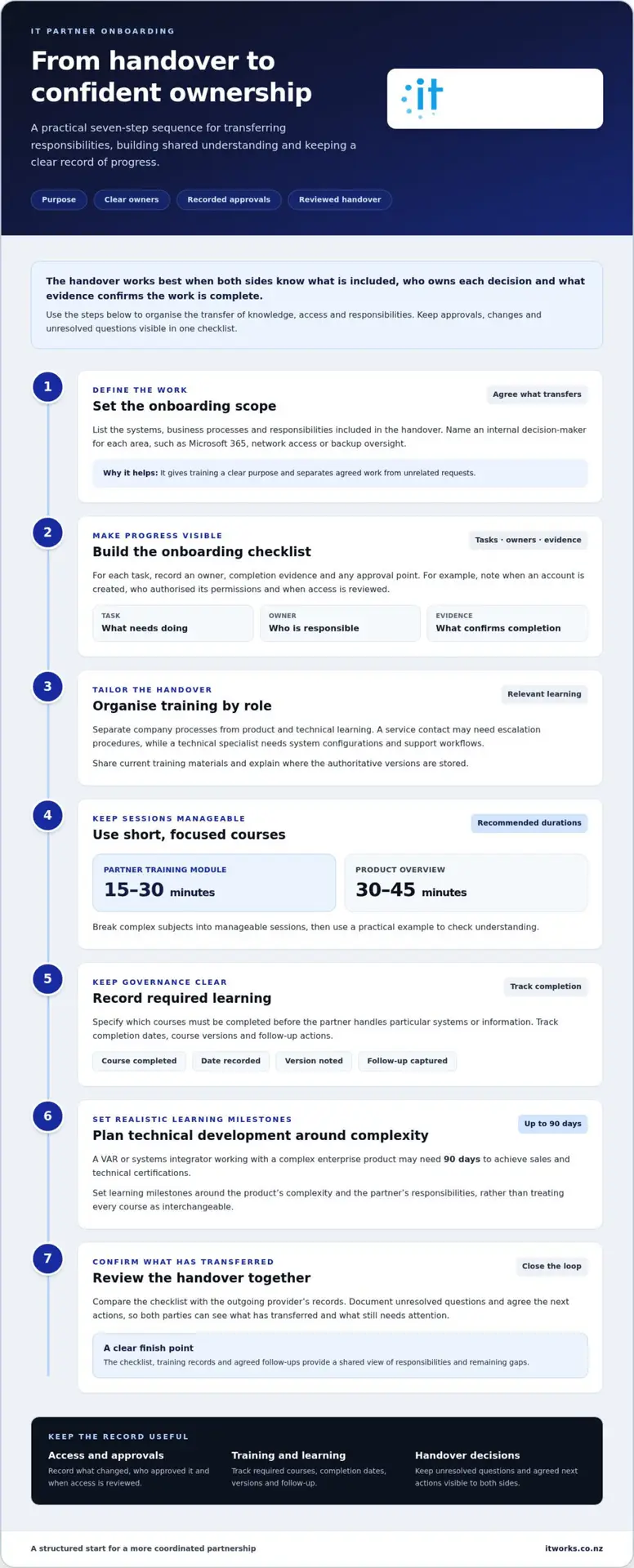
- Set the onboarding scope. List the systems, business processes and responsibilities included in the handover. Name an internal decision-maker for each area, such as Microsoft 365, network access or backup oversight. This gives training a clear purpose and helps distinguish agreed work from unrelated requests.
- Build an onboarding checklist. Include tasks, owners, completion evidence and approval points. For example, record when an account is created, who authorised its permissions and when access is reviewed. A consistent audit trail helps your team understand what changed and why.
- Organise training by role. Separate company processes from product and technical learning. A service contact may need escalation procedures, while a technical specialist needs system configurations and support workflows. Share current training materials and explain where the authoritative versions are stored.
- Use short, focused courses. Partner training modules are recommended to run for 15-30 minutes, while a product overview is recommended to last 30-45 minutes. Break complex subjects into manageable sessions, then use a practical example to check understanding.
- Record required learning. Specify which courses the partner must complete before handling particular systems or information. Track completion dates, course versions and any follow-up actions. These governance records make responsibilities clearer when staff or procedures change.
- Plan technical development realistically. A VAR or systems integrator working with a complex enterprise product may need 90 days to achieve sales and technical certifications. Set learning milestones around the product’s complexity and the partner’s responsibilities, rather than treating every course as interchangeable.
- Review the handover together. Compare the checklist with the outgoing provider’s records, then document unresolved questions and agreed next actions. This gives both parties a clear moment to confirm what has transferred and what still needs attention.
IT equipment, software access and login readiness before day one
Prepare devices, accounts and software before the partner’s start date. The welcome and portal access phase is scheduled for the first 1-3 days of partner onboarding.
- Prepare the workstation and access list. Set up the required equipment before the partner starts, then match each account to their agreed responsibilities. List the systems they need, such as email, collaboration tools, business applications and support portals. Prepare workstations, equipment, logins and software access in advance. Record who approves each access request and who can help if a login fails.
-
Transfer passwords, admin access and IT documentation
Transfer credentials and administrator access through an approved secure method, not ordinary email or a shared document. Confirm the receiving contact and systems covered before sharing access. Provide relevant documentation, such as system diagrams, configuration notes and account ownership records, through an access-controlled location.
Record what was transferred, who received it and when. Check that the incoming partner can access required systems without using another person’s everyday account. Share only the credentials and documentation needed for the agreed work.
-
Set up portal access and team invitations
Create portal accounts for named partner contacts and invite the internal staff involved in the handover. Check that each person can access the right workspace, tickets, documents and communication channels. For example, finance staff may need a route to submit a software request, while managers need visibility of outstanding onboarding tasks.
Send a welcome message with the portal entry point, key contacts and first meeting details. Introduce the people involved and explain where ongoing updates belong, so requests do not get scattered across email threads.
-
Check first-day systems and access
On the first day, test each agreed login with the person who will use it. Confirm that email, collaboration tools, essential business systems and the support portal work as expected. If the arrangement is remote or hybrid, test access from the partner’s working location.
Only 11% of New Zealand businesses complete onboarding administration on the same day a new employee joins. Use a short first-day checklist to mark each successful test, record any blocker and assign its next action.
- Close access gaps and confirm readiness. Review incomplete items with the partner and the relevant internal owner. Record whether the issue involves equipment, an approval, missing information or a system dependency. Keep the signed handover and access records together with the onboarding checklist, and use access and security planning to keep permissions aligned with the partner’s agreed work.
Performance expectations and ongoing development
Compare providers using the same criteria: onboarding steps, service commitments, escalation routes and progress reporting. This helps you assess whether each process supports your systems, employees and business priorities.
-
Set performance expectations
Agree how you will assess the relationship, then document responsibilities, priorities and reporting. For example, define how the partner will communicate planned work, track open issues and explain recurring problems. Set expectations for service levels and escalation routes, so everyone knows how requests are prioritised and progress is shared.
Choose measures that reflect business outcomes, not just activity. Track time to first value, such as a completed improvement or resolved process gap, alongside adoption, early results and staff feedback. These indicators help you assess the relationship and identify where support may need to change.
-
Compare onboarding processes and service levels
Ask each provider to explain their onboarding process, from handover through to ongoing support. Compare who owns each task, how progress is reported and how unresolved issues are escalated. Review service commitments in practical terms for your organisation, including communication, prioritisation and updates when work takes longer than expected.
Use the same requirements for each comparison. A clear process connects training, responsibilities and service commitments to your business needs, rather than relying on broad promises.
- Plan training beyond the first few weeks. Schedule certification and advanced training for weeks 4-8 of partner onboarding where the role or technology requires it. Use those sessions to deepen product and technical knowledge, then check that learning applies to your organisation’s systems. A certificate alone doesn’t show whether the partner can support your agreed priorities.
- Separate onboarding from ongoing enablement. Treat onboarding as an introduction to your environment and ways of working. Ongoing enablement keeps knowledge current as systems, priorities and team needs evolve. Review guidance and learning materials regularly, and update them when processes or responsibilities change.
- Measure whether training is useful. Nearly three quarters of business respondents say partner training improves customer relations, while more than two thirds say enablement improves customer awareness of products and services. Use those outcomes as prompts to assess your own working relationship. Track training asset completion, partner adoption, certifications and early results.
- Review progress and adjust the plan. Partners who complete onboarding training are 74% more likely to generate revenue within 6 months. Track satisfaction through pulse surveys or NPS, alongside time to first value. Use employee feedback and service reviews to spot knowledge gaps, clarify ownership and agree the next development action.
Schedule graduation and ongoing enablement for weeks 8-12 of partner onboarding, and track partner enablement asset completion rates. Without structured onboarding, the average channel partner takes 6-12 months to become fully productive.
Structured 30-60-90 day milestones and manager check-ins
Map the first 90 days as a sequence of agreed outcomes, owners and review points. A typical partner onboarding programme covers the first 30-90 days of the relationship.
-
Create an onboarding checklist and milestones
Build a checklist linking each milestone to a business outcome, a responsible person and evidence of completion. For example, document key systems first, then agree priority improvements. This keeps managers and the partner aligned on what success means, rather than relying on a positive first impression.
Set practical targets for 30 days, 60 days, or 90 days. Choose targets that reflect the organisation’s needs, such as confirming support processes, reviewing recurring issues or presenting a prioritised improvement plan. Include dependencies and decisions your team must provide, so delays have a clear owner and next action.
Keep the checklist active throughout onboarding. Mark completed items, record decisions and update dates when priorities change. A live record gives everyone a shared view of progress and helps prevent actions from being lost between meetings.
-
Set 30-, 60- and 90-day check-ins
Book manager check-ins at 30, 60 and 90 days when the partnership begins. At the 30-day meeting, review access to people and information, early service experience and unresolved handover questions. Ask what is working and what needs a clearer owner. Record actions rather than relying on informal follow-up.
Use the 60-day discussion to assess progress against agreed priorities. Check whether reporting is useful, communication is working and planned improvements remain relevant. At 90 days, review outcomes, outstanding risks and the next set of priorities. These meetings should invite feedback from staff who use the service, not just the executive sponsor.
Keep each check-in focused: review the checklist, discuss changes and confirm actions before wrapping up. A short written summary helps both sides track commitments and gives the next meeting a clear starting point.
-
Map the provider onboarding timeline
Agree the timeline with the partner and connect each phase to a decision or deliverable. Structured partner onboarding programmes typically run for 60-90 days, while onboarding generally covers the first 30-90 days of the partnership. Use those periods as planning guides, then tailor the sequence to system complexity and business priorities.
For example, schedule discovery and priority setting first, then use later reviews to assess delivery and refine the plan. Avoid treating the 90-day point as automatic completion. The onboarding process recommends monthly or quarterly progress check-ins after the initial sequence, keeping responsibilities and priorities visible as the relationship develops.
At each milestone, record the manager’s assessment, partner feedback and agreed next steps. This shows whether the relationship is meeting expectations and where further development could add value.
Remote-first onboarding support
Remote onboarding works best when people know where to communicate, find documents and raise decisions. Agree the channels and meeting rhythm before the first remote session, then keep them consistent through the first 90 days. Understanding what to expect when onboarding a new IT partner also means making remote collaboration part of the plan from the start.
- Run a focused kickoff call. Schedule a 30 to 45 minute conversation with the partner and key internal contacts. Confirm business priorities, responsibilities, communication channels and immediate questions. Share an agenda beforehand, so people can prepare and the call creates clear next steps. End by recording actions, owners and due dates in a shared location.
- Agree how remote communication works. Name the primary channel for routine requests, the route for urgent operational issues and the place for decisions. For example, use one agreed channel for day-to-day questions and a shared record for approvals. Tell employees which route to use, so requests do not split across personal messages, email and meetings.
- Make documents easy to find. Create a shared, access-controlled location for onboarding records, system guidance, meeting notes and agreed priorities. Organise documents by topic and label current versions clearly. During the first week, ask the partner to find key information independently. This simple exercise shows whether the structure works for remote collaboration.
- Introduce people and working practices. Invite the partner to relevant team meetings and introduce them to the contacts who own business systems or decisions. Explain how your team shares updates, records actions and raises concerns. A remote introduction should make responsibilities clear, rather than leaving the partner to infer them from meeting attendance.
- Check remote access in the first week. The first week is a common target for having a partner fully set up. Confirm the partner can reach agreed documents, channels and systems, and can participate in planned meetings. If someone works from a different location, test the process with that person rather than assuming every setup behaves identically.
- Make remote decisions visible. After a video meeting, post the decision, owner and next action in the shared workspace. This gives people who could not attend a reliable record and prevents teams from acting on different versions. Keep the entry brief and link it to the relevant document or request.
- Invite feedback from employees. Ask staff what makes it easy or difficult to work with the partner remotely. A simple prompt, such as “Can you find the right channel and get a clear update?”, can provide practical feedback. Knowing what to expect when onboarding a new IT partner also means listening to staff and adjusting communication routes when they create friction.
IT Works: Managed IT Services
IT Works helps organisations establish managed IT partnerships with clear responsibilities, practical priorities and ongoing guidance. A strategic technology partner is especially useful when a handover involves complex systems, security considerations or competing business needs that require coordinated planning.
Managed IT Services supports the day-to-day technology environment, while Cybersecurity, Cloud Solutions and AI Enablement can address specific organisational priorities. The aim is to connect technology decisions with productivity, resilience and business goals, not simply to complete a handover checklist.
For organisations in Wellington and across New Zealand, a useful first conversation can cover your current systems, the outcomes you want from the relationship and the areas needing attention. Talk to IT Works about your technology strategy.
Build the partnership into your next business decisions
A new IT relationship can create value beyond keeping current systems running. Treat it as an ongoing business conversation: consider where technology supports your people, where friction remains and which changes could improve the way work gets done. This keeps future decisions connected to your priorities, rather than treating onboarding as the finish line.
Knowing what to expect when onboarding a new IT partner also means sharing context as your organisation evolves. Keep your partner informed about changes to business goals, team needs and working practices. This helps ensure advice on managed IT services, cybersecurity or AI Enablement reflects how your organisation operates and what it aims to achieve.
When you’re ready, bring your priorities and questions to a conversation with IT Works. A clear discussion can help you consider how technology support fits your plans and where a strategic partnership could make a practical difference.
A thoughtful start gives your organisation a stronger foundation for what comes next.
Frequently Asked Questions
Why does onboarding matter?
Onboarding gives your new IT partner the business context needed to make sound decisions, not just access to technology. Explain which work periods are most sensitive, such as month-end processing or a scheduled client delivery, and which systems support them. This helps the partner understand the impact of changes and plan work around operational priorities. It also gives staff a clear point of contact for questions during the transition.
What happens during onboarding with a new IT support provider?
The partner builds a working understanding of your organisation, its technology and how your team makes decisions. Walk through a routine scenario, such as a new employee needing access to shared files. This can reveal hand-offs, approval steps and business dependencies that documents may not show. Agree how decisions are escalated, who can approve changes and how the team will communicate completed work.
What information and access does a new IT partner need?
Share the context needed to manage agreed systems, including business-critical workflows, internal owners and relevant third-party dependencies. Explain which systems support customer delivery, finance or staff collaboration, and identify who approves changes in each area. Provide access only for the partner’s responsibilities, then review it when those responsibilities change. This keeps permissions aligned with current work while giving the partner enough context to support your team effectively.