
What if meeting your privacy obligations depended less on a single security product and more on the everyday decisions behind your IT systems? For New Zealand organisations, the New Zealand privacy act 2020 IT requirements connect broad privacy principles with practical safeguards for the personal information you collect, use and store.
It can be difficult to see where legal responsibilities end and IT controls begin. Cloud platforms, third-party access and information handled overseas add complexity, particularly as systems and suppliers change. The Privacy Act’s principles provide a useful starting point for reviewing how your organisation manages and protects information.
This guide explains the principles most relevant to technology, including security, access, retention and overseas disclosure. It covers practical areas to review, from permissions and data-handling procedures to supplier responsibilities, and explains when privacy, legal and IT expertise should work together. The aim is to help you build a clear, manageable plan for protecting personal information and supporting confident business decisions.
Key Takeaways
- Translate the New Zealand privacy act 2020 IT requirements into practical safeguards for how your organisation collects, accesses, stores and disposes of personal information.
- Review who can access personal information and whether safeguards remain appropriate as systems and staff responsibilities change.
- Map where personal information is held, including by cloud providers, and assess overseas disclosures in the context of each arrangement.
- Set up a proportionate review process with clear ownership, and revisit controls as your organisation’s systems and needs evolve.
- Bring privacy, legal and IT expertise together when interpreting obligations or making decisions about data handling.
What the New Zealand Privacy Act 2020 means for your organisation’s IT
To understand how personal information is handled across your organisation, start by identifying what you hold, where it is used and who can access it. The Privacy Act 2020 sets principles for handling personal information. Your technology and procedures help put those principles into practice. That’s the practical focus of New Zealand privacy act 2020 IT requirements: connect the information you hold with safeguards suited to how it is used and the risks involved.
The Act doesn’t prescribe one set of IT products for every organisation. A business with a small contact database may handle different information and risks from an organisation managing detailed staff or client records. Safeguards should reflect those circumstances. Technology can support privacy responsibilities, but choosing a tool doesn’t transfer accountability away from the organisation.
What counts as personal information in business systems?
The Act describes personal information as information about an identifiable individual. A person might be identified from one detail, such as a name, or from details combined across records. Depending on the organisation, systems may hold staff contact details, customer enquiries, donor records or a supplier representative’s work email address. These are examples, not a complete list, and different organisations will hold different information.
Look across your whole system, not only at a database labelled “customer”. Names and contact details may also appear in email, shared files, business applications and backups. A record that appears anonymous in one place may identify someone when combined with other details. Mapping where information sits helps you see which systems and processes need attention.
Does the Privacy Act prescribe particular IT products or certifications?
No single product or certification proves that an organisation meets its privacy responsibilities. The Act sets principles rather than a universal technical checklist. A tool may help manage access or protect stored information, but its value depends on how it is configured, used and maintained. For general background, see the Privacy Act 2020 (New Zealand) Wikipedia overview.
Instead, match safeguards to the information you hold and how it moves through your organisation. Ask practical questions such as:
- Who needs access to each system or record?
- How is information shared between staff, systems and service providers?
- Does the organisation know where information is stored and how long it is needed?
- Are responsibilities clear when staff roles or systems change?
These prompts can help structure a review, but they aren’t a complete legal test. The right response may combine access settings, staff procedures, system management and clear ownership. The Privacy Act’s principles guide how personal information should be handled; organisational decisions determine how those principles are reflected in day-to-day work.
This distinction matters for business leaders. IT teams can identify systems, assess technical safeguards and help keep controls working as the environment changes. Privacy or legal expertise can help interpret obligations in context. Bringing these perspectives together supports clear accountability without expecting a product choice to answer every privacy question.
Privacy principles translated into practical IT safeguards
Privacy principles are easier to apply when you follow personal information through its lifecycle: collection, access, use, storage, sharing and disposal. Each stage raises practical questions. What information does a form request? Who can view the resulting record? How can it be corrected, and when is it no longer needed? Mapping these steps connects the New Zealand privacy act 2020 IT requirements with everyday processes, rather than leaving privacy in a policy document.
The Office of the Privacy Commissioner’s New Zealand Privacy Act 2020 Official Guide explains the Information Privacy Principles. The principles cover different aspects of information handling, so safeguards need to work together across systems and business procedures.
How collection, access, and accuracy affect business systems
When collecting information, check that online forms request details relevant to the stated purpose and give people appropriate information about collection and use. Make sure submitted details reach the right database and are available to staff who need them for their work. Clear access permissions help limit unnecessary viewing or changes. A defined process also gives staff a way to raise concerns about information they believe is inaccurate.
Access and correction requests need a reliable route through the organisation. Assign responsibility for receiving and coordinating requests, then identify which systems may hold the relevant information. A record could be in a customer platform, email, shared files or another business system. Privacy and legal advisers can help interpret how the Act applies to a particular request, while IT staff can help locate and manage the records.
What reasonable security safeguards can look like
Principle 5 requires reasonable safeguards to protect personal information against loss, unauthorised access, use, modification or disclosure. It doesn’t prescribe a fixed checklist for every organisation. Appropriate measures depend on the information, systems and circumstances. Possible safeguards include managed user access, endpoint and email protection, monitoring, tested backups, staff awareness and vulnerability management. No single measure does the whole job.
Consider how controls work together. Access management, for example, can restrict who opens a sensitive file, while staff guidance helps people handle it appropriately and monitoring can support oversight of system activity. Backups contribute to recovery, but also consider how backup information is accessed and managed. The aim is a proportionate set of safeguards that addresses assessed risks and stays under review.
Other principles also have system implications. These include checking accuracy before information is used or disclosed, avoiding keeping information longer than needed, and having procedures for appropriate use and disclosure. Consider how staff can correct a record, how outdated copies are handled and whether information moves through approved processes. Build these steps into normal work rather than relying on a one-off review.
The practical takeaway: match IT safeguards to the personal information you hold and the context in which it is handled. For support aligning technical controls with business processes, discuss your IT strategy with IT Works.
Cloud services, third parties, overseas disclosures, and privacy incidents
Cloud services and external providers can make information easier to access and manage, but they also add relationships and data flows to your privacy picture. A provider storing information for your organisation doesn’t automatically mean you’ve disclosed it overseas. The legal treatment depends on the arrangement, including who controls the information, what the provider can do with it and whether it handles information only on your behalf. Assess the service and responsibilities rather than relying on the location of a data centre alone.
Principle 12 concerns disclosure of personal information outside New Zealand. The Office of the Privacy Commissioner’s Privacy Act 2020 guidance is a useful starting point for understanding the principle. Whether a particular cloud or support arrangement amounts to an overseas disclosure depends on its details. Seek privacy or legal advice where the position is unclear. These considerations are an important part of the New Zealand privacy act 2020 IT requirements for organisations using cloud platforms or external support.
Questions to map cloud services and external providers
Build a practical picture of where personal information sits and how providers may interact with it. Consider the service itself, not just the organisation that signed the contract. For each relevant system or provider, record:
- What personal information the system holds and the business purpose for using it.
- Which provider staff or support teams can access it, and through what access pathways.
- Where information is stored or accessed from, and whether it may be handled outside New Zealand.
- Who is responsible for security tasks, raising concerns and escalating a suspected incident.
Use this map to identify gaps between the written arrangement and day-to-day practice. For example, a provider may have a support pathway into a system even when routine staff access is tightly controlled. Make sure the people who manage the service understand responsibilities, access and escalation arrangements.
Preparing for a privacy incident and possible notification
A security incident is an event that may affect systems or information. It becomes a privacy breach when personal information is involved in an unauthorised or accidental loss, access, use, modification or disclosure, or when access to it is prevented. Not every privacy breach is notifiable. Notification decisions depend on whether the breach is likely to cause serious harm, as well as the circumstances and information involved. Assess a suspected incident promptly rather than assuming notification is or isn’t required.
Agree on a response pathway before an incident occurs. Staff should know how to report a concern, who coordinates the response and which technical contacts can help investigate. A practical sequence is to:
- Record what has been reported and involve the designated organisational decision-makers.
- Work with IT and relevant providers to contain the issue and establish which information and systems may be affected.
- Escalate the facts for privacy and legal assessment, including whether notification obligations apply.
- Document decisions and actions, then address any control or process gaps identified.
For a live incident, refer to current Privacy Commissioner guidance and seek legal advice on the specific facts. Clear provider contacts and escalation arrangements help your organisation respond in a coordinated, considered way.
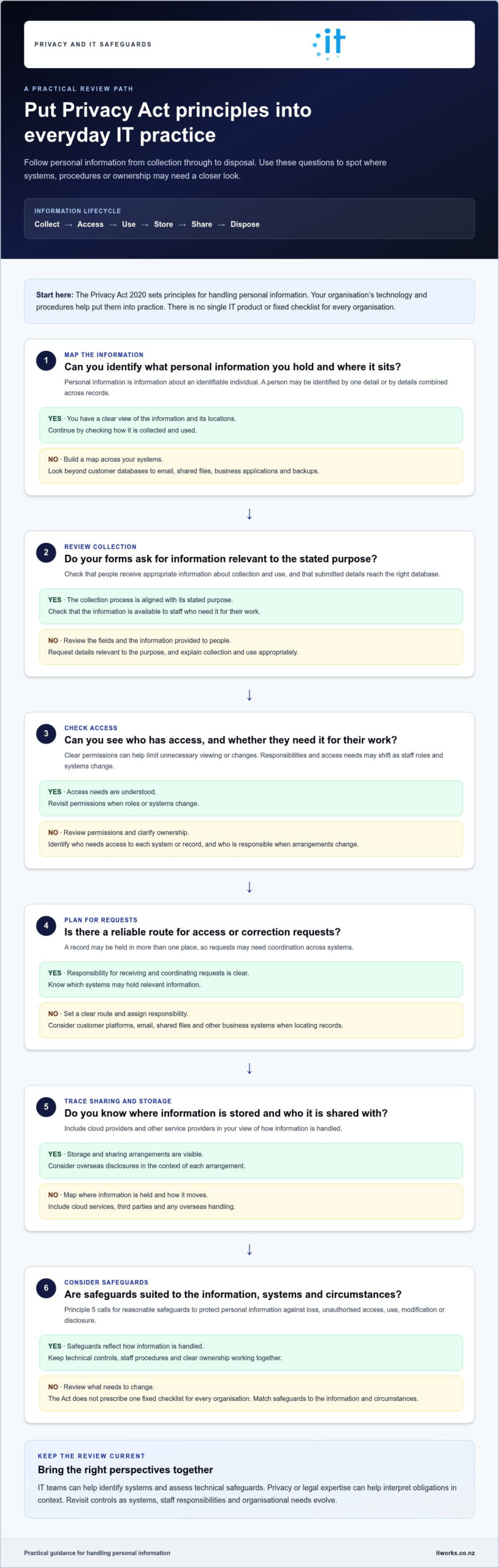
A practical process for reviewing Privacy Act-related IT controls
A useful review doesn’t need to start with every application or technical setting. First build a clear picture of the personal information your organisation handles. Then consider how it moves, who is responsible and where safeguards could be strengthened. This gives business leaders and IT teams a shared view of priorities, rather than a checklist disconnected from daily operations.
How to map personal information and system access
Create a working inventory of the main systems and information categories, such as staff records, customer enquiries or membership details where relevant. Note the business purpose for each, the groups with access and routine transfers between systems or external providers. Include less visible locations, such as shared folders and email, where appropriate. Keep the map proportionate: start with systems holding personal information and the information pathways that matter to your organisation.
Make ownership clear. A privacy lead or relevant business manager can coordinate privacy decisions, while IT staff maintain technical safeguards and explain how systems handle information. These roles need to work together, particularly when a process, access group or provider changes.
How to prioritise and document improvements
Compare current arrangements with the information-handling risks and business needs you’ve identified. Consider whether access is appropriate, information flows are understood and responsibilities are clear. Prioritise gaps by considering their potential effect on people and business operations, alongside the practical effort needed to address them. The New Zealand privacy act 2020 IT requirements are best approached as an ongoing review of real systems and responsibilities, not a one-off exercise.
Record agreed actions with an owner, a practical timeframe and a point to check progress. Keep useful evidence together, such as system and access records, relevant procedures, staff guidance, safeguard decisions and incident response arrangements. This helps people understand why a control is in place and gives the next review a useful starting point.
| Review area | Evidence to gather | Accountable role |
|---|---|---|
| Information and systems | System inventory, information categories, purposes and data flows | Business process owner, supported by IT |
| Access and safeguards | Access groups, permissions, safeguard records and identified gaps | IT lead, with business owners confirming access needs |
| Providers and responsibilities | Provider access pathways, service responsibilities and escalation contacts | Relationship owner, supported by IT and privacy lead |
| Actions and reassessment | Decision notes, assigned actions, progress and review points | Privacy lead or designated business owner |
Revisit the review at planned intervals and when a material change affects systems, access, providers or the information handled. Timing depends on your organisation and its environment. A completed review or well-organised records can support sound decisions, but they don’t guarantee legal compliance. Seek privacy or legal advice when interpreting obligations or assessing a particular situation.
Keeping privacy safeguards aligned with your IT environment
Privacy safeguards need to keep pace with the organisation they support. A new cloud platform, a change in staff responsibilities or a growing team can alter where personal information sits and who can access it. Even a small system change may affect existing processes. Including privacy in routine technology planning helps keep responsibilities visible as the business evolves.
For organisations with 15 to 75 staff, ownership may be shared across business leaders, privacy contacts and IT teams. The key is to make sure someone recognises when a change could affect personal information and brings the right people together to review its implications before new arrangements become business as usual.
How ongoing IT management supports privacy practices
Ongoing IT management can help maintain a current view of systems, user access and technical safeguards. Staff joining or leaving, role changes and new applications can prompt a review of permissions and information flows. Regular oversight also helps keep procedures and technical settings aligned, rather than relying on an outdated inventory or a one-off review.
Layered cybersecurity practices can support risk reduction and organisational confidence by bringing safeguards together around the systems and information in use. The appropriate approach depends on your environment and business needs. IT management supports the practical work, but it doesn’t by itself establish or guarantee Privacy Act compliance. Accountability and privacy decisions remain with the organisation.
IT Works is a Wellington-based technology partner supporting organisations across New Zealand with strategy, cybersecurity and operational IT. Combining these perspectives can help connect business priorities with the day-to-day management of systems, access and safeguards.
When to bring in technology and privacy expertise
Bring the right people together when considering a significant system change, a new provider or a cloud arrangement that may affect how personal information is accessed or handled. If an incident occurs, technical specialists can help establish what happened and which systems or information may be involved. Privacy and legal advisers can help interpret obligations and assess the appropriate response.
Keep roles clear. IT teams provide technical information and help manage systems and safeguards. Privacy leads coordinate internal processes, while qualified legal advisers can interpret the law for specific circumstances. Business leaders retain responsibility for organisational decisions. This collaboration helps people act on reliable information without expecting a technical control to answer a legal question.
Make privacy review part of existing decision points, such as approving new software, changing access arrangements or planning business growth. A discussion at the right stage can help identify who needs to be involved, what information needs review and whether safeguards or procedures should change. Revisit ownership and arrangements as the environment develops, so your approach remains practical.
If you’re reviewing how your technology and security priorities fit together, talk to IT Works about a practical plan for your organisation.
Make privacy part of your next technology decision
Make privacy a standing consideration in technology planning, rather than a separate task that only comes up during an annual review. Before introducing a new system, provider or business process, consider how it could change the way personal information is accessed, shared or managed. Raising these questions early helps decision-makers clarify responsibilities and plan practical safeguards alongside business needs.
For leaders, the New Zealand privacy act 2020 IT requirements are best approached as an ongoing part of managing change. Keep privacy decisions connected to technology ownership, operational priorities and the people responsible for interpreting the organisation’s obligations. If a question turns on legal interpretation, involve a qualified privacy or legal professional. Technical planning and legal advice have different roles, and both can contribute to well-informed decisions.
IT Works can help your organisation consider its technology and security priorities in a practical, business-focused way.
With clear ownership and thoughtful planning, your organisation can adapt while making responsible care of personal information part of how it works.
Frequently Asked Questions
What IT requirements does the New Zealand Privacy Act 2020 set for businesses?
The Act doesn’t prescribe a standard IT configuration. Start by checking whether written privacy procedures match what staff do in practice. For example, compare the information requested on a customer form with the fields staff enter into the customer system, then check whether access reflects job responsibilities. Interpret the New Zealand privacy act 2020 IT requirements alongside current official guidance, and seek legal advice for questions specific to your organisation.
Does the Privacy Act 2020 require businesses to encrypt personal information?
The Act doesn’t name encryption as a universal requirement for every record. Consider it in context, particularly for information sent outside a controlled system or stored on portable devices. If you use encryption, decide who manages access to the keys and how authorised staff can recover information when needed. Documenting the reason for the control, including its limits, helps explain how the organisation assessed the particular situation.
What is Principle 5 of the New Zealand Privacy Act?
Principle 5 concerns the storage and security of personal information. To apply it in practice, look beyond system settings at routine work. For instance, staff may download a report for a meeting and leave a copy in a shared location. Set clear expectations for handling working copies, including who may use them and what should happen when they’re no longer needed. Check the current wording of the principle against official guidance.
Does the Privacy Act apply to information stored in cloud services?
Yes, using cloud services doesn’t remove the organisation’s privacy responsibilities. A useful service review looks beyond the main database to support records, diagnostic logs, copies and information held at the end of the arrangement. These details can affect how personal information is handled over time. Record the relevant service terms and operational practices, and seek advice if you’re unsure how a particular arrangement should be treated.
Do New Zealand businesses have to report every privacy breach?
No, not every event involving technology or information requires notification. If an email goes to the wrong recipient, for example, preserve the message and available delivery details rather than relying on memory later. Record when the issue was discovered, what information may be involved and the steps taken to limit further access. These facts can help decision-makers assess the incident using current official guidance and legal advice.
How can a business start checking its IT against the Privacy Act 2020?
Choose an established business process and compare its documented steps with how staff carry it out. For example, trace a recent staff departure from the notification to the relevant team through to the closure of system access. Note any delay, unclear hand-off or exception, then agree who will address it and when to review the change. A small, evidence-based test gives leaders a useful starting point without treating the result as a compliance guarantee.