
What if the most useful IT compliance checklist is built around your organisation’s actual obligations, rather than a generic list of controls? For New Zealand businesses, requirements can come from legislation, customer contracts and supplier relationships. Working out which apply, who owns them and what evidence shows they’re being followed can be difficult when information is spread across systems and teams. An IT compliance checklist for NZ businesses can bring those moving parts into one practical view.
Compliance works best as an ongoing business process, not a one-off paperwork exercise. A clear, repeatable review helps your team track responsibilities, identify gaps and respond confidently to customer enquiries or reviews.
This guide explains how to identify relevant requirements, assign accountable owners and organise useful evidence, from access and security settings to supplier records and staff processes. It also covers setting a manageable review rhythm, so your controls stay connected to the way your organisation works and adapt as your needs change.
Key Takeaways
- Start by identifying the legal, contractual and agreed requirements that apply to your organisation.
- Use an IT compliance checklist for NZ businesses to connect systems and suppliers with the controls they rely on.
- Distinguish between a control, the evidence that shows how it works and the requirement it supports.
- Review access, devices, updates, information handling, cloud services, backups and incident procedures in a consistent sequence.
- Link compliance reviews with technology planning and business continuity to make improvement practical and ongoing.
What an IT compliance checklist means for NZ businesses
For a business leader, the challenge isn’t simply knowing that security measures are in place. It’s understanding which responsibilities apply, who looks after each control and what records show that agreed practices are being followed. Without that clarity, it can be difficult to answer customer questions or make informed decisions about technology risks.
IT compliance means meeting the technology-related legal, contractual and other agreed requirements that apply to your organisation. An IT compliance checklist for NZ businesses brings those requirements into a structured review. It can help leaders see what needs attention, who is responsible and where relevant evidence is kept.
A checklist is a working aid, not a compliance certificate. Completing it doesn’t prove that every obligation has been met, and a generic template can’t account for the details of every organisation. Use it to guide review and discussion, then verify specific requirements against authoritative New Zealand guidance and the agreements that apply to your business.
Which IT compliance requirements might apply to an organisation?
Potential requirements come from several sources. Laws may apply to how an organisation handles information or operates its services. Contracts can set conditions for protecting data or managing access. Customers may have their own security requirements, while an insurer’s policy may include conditions relevant to cover. An organisation may also choose to adopt a standard or framework to guide its practices.
These sources aren’t interchangeable. A law or contract may create an obligation, while a framework or internal policy may be a voluntary commitment unless it has been adopted through an agreement or another requirement. Which items matter depends on your activities, the information you hold, your customers and your agreements. Record the source and scope of each requirement, and check current New Zealand guidance rather than assuming a generic list applies to every business.
How is IT compliance different from cybersecurity?
Cybersecurity is the practical work of protecting systems and information through safeguards such as managing access, maintaining devices and preparing for incidents. Compliance is about meeting the requirements that apply and showing how relevant controls support them. Information security principles offer useful background on protecting information, but a security practice alone doesn’t establish that every legal or contractual requirement has been met.
The two areas work best together. For example, restricting access to business information can reduce security risk and support a customer requirement. To show the connection, record the requirement, the access control used, its responsible owner and evidence from a review. The evidence will depend on the control and obligation. Strong security practices can contribute to compliance, but neither replaces the other.
Map IT compliance responsibilities across systems, people and suppliers
A compliance register is useful only if it reflects how your organisation works. Start by mapping the technology and information your team relies on, then connect each item to a responsible person and the requirements it supports. This gives leaders a clearer view of where responsibilities sit, including areas managed by external suppliers.
For an organisation with 15 to 75 staff, the register can be straightforward. A well-organised spreadsheet or existing business system may be enough, provided it’s kept current and people know how to use it. The aim isn’t to document every technical detail. It’s to make important responsibilities, records and follow-up actions easy to find.
What should an IT compliance register record?
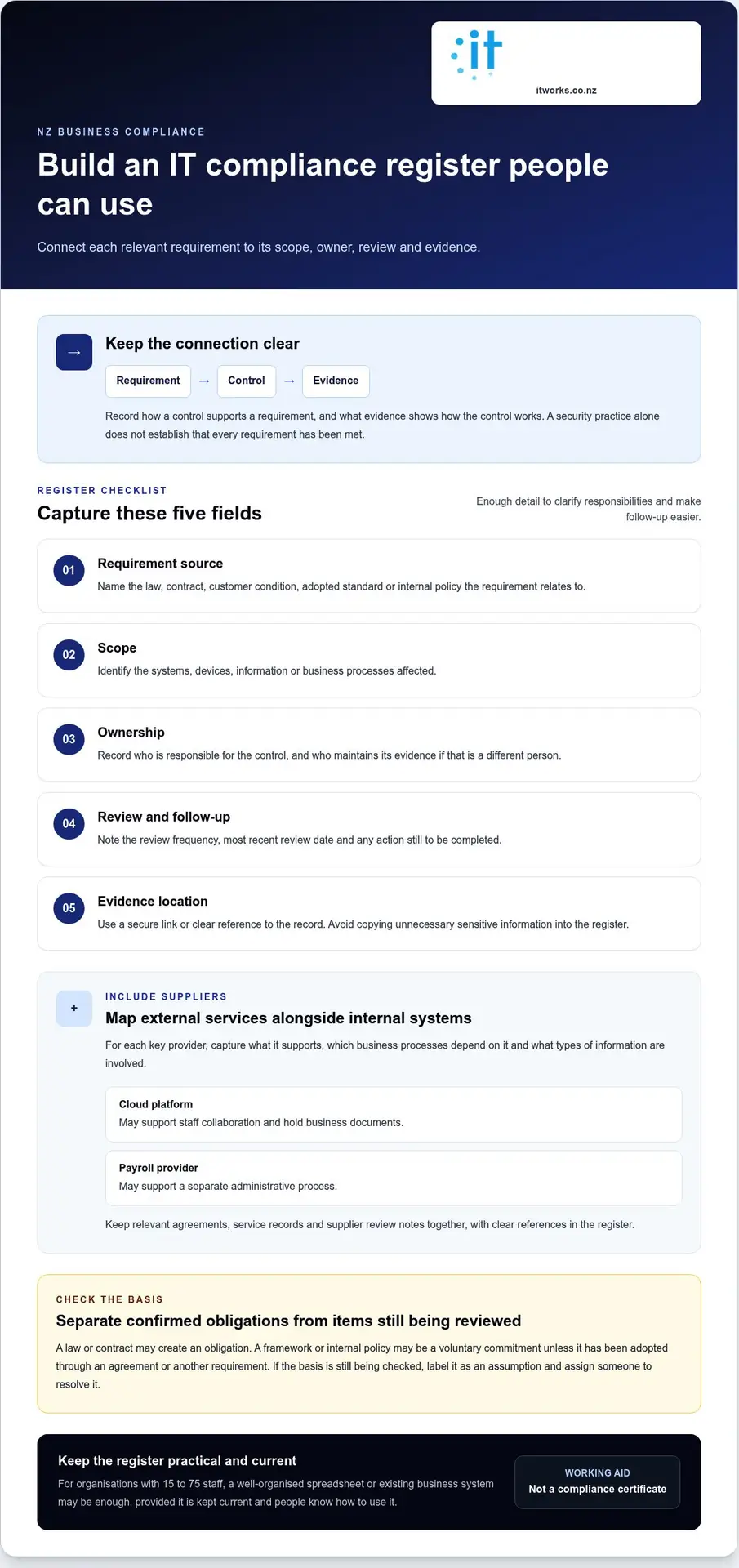
For each relevant requirement or control, capture enough information to understand its purpose and how it’s maintained. A practical entry can include:
- Requirement source: the law, contract, customer condition, adopted standard or internal policy it relates to.
- Scope: the systems, devices, information or business processes affected.
- Ownership: the person responsible for the control, alongside the person who maintains its evidence if that differs.
- Review details: the review frequency, most recent review date and any action still to be completed.
- Evidence location: a secure link or clear reference to the relevant record, rather than unnecessary sensitive information copied into the register.
Separate confirmed obligations from items that still need internal or specialist review. For example, record that a customer contract requires a particular process only after checking the relevant agreement. If the basis is still being investigated, label it as an assumption and assign someone to resolve it. The New Zealand Government security and privacy standards provide useful reference material, but whether a particular standard applies depends on the organisation’s circumstances and agreements.
How should businesses account for cloud services and suppliers?
Include key providers in the same map as internal systems. Record what each supplier supports, which business processes depend on the service and what types of information are involved. For example, a cloud platform might support staff collaboration and hold business documents, while a payroll provider supports a separate administrative process. Keep relevant agreements, service records and supplier review notes together, with clear references in the register.
Be precise about the division of responsibilities. A supplier may describe the controls it manages, but your organisation still needs to identify its own actions, such as managing user access or deciding who can approve changes. Record the source for each responsibility, and note any point that needs clarification or follow-up.
Connect this map with business continuity planning. Identify which systems and suppliers are important to keeping essential work running, then note where recovery responsibilities and supporting records sit. This adds useful context without turning the compliance register into a full disaster recovery plan. IT Works provides IT strategy and consulting to help organisations bring technology ownership, supplier records and continuity responsibilities into a clearer, workable structure.
Avoid the compliance misconception: security controls are not proof by themselves
Installing a security tool is a useful step, but it doesn’t establish that every relevant requirement is being met. A control describes what your organisation does. Evidence shows how that control operates. A requirement explains why the control matters and what it needs to achieve. Keeping these ideas distinct makes reviews more practical and avoids treating a product or policy as proof on its own.
Consider this illustrative example: a business agreement requires access to certain information to be limited to authorised staff. The control might be a process for approving and reviewing user access. Evidence could include the current approval record and a dated review. The requirement is the agreement’s access condition. Your own requirements and suitable evidence will depend on your circumstances.
Illustrative example: access to business information
Requirement: An agreement specifies that access must be restricted to authorised staff.
Control: The organisation approves access and reviews who can use the relevant system.
Evidence: A current access list, approval records and review notes show how the process is being applied.
A security product may support a control, but it can’t show by itself whether the control is appropriate for a particular requirement, who checks it or whether the process is followed. Policies need an owner and review date, while operational records should show how the policy works in practice. An IT compliance checklist for NZ businesses should connect each requirement to its control and relevant evidence, rather than simply listing tools or documents.
What counts as useful evidence of an IT control?
Useful evidence is relevant to the control and proportionate to its purpose. Depending on the organisation and requirement, it might include an approved policy, access review records, backup reports, training records, incident procedures or review notes. Not every business needs every record. The important point is that evidence reflects what actually happens, rather than only what a policy says should happen.
Keep records current, findable and protected from access by people who don’t need them. Link each item to a responsible owner and the control it supports. Avoid copying sensitive details into a general register when a secure reference to the original record will do. A reviewer should be able to follow the connection without exposing more information than necessary.
Why can’t one checklist guarantee compliance?
Requirements vary with an organisation’s activities, the information it handles and the terms it has agreed with customers or suppliers. A control that addresses one requirement may not be sufficient for another. A checklist can prompt consistent reviews and reveal questions to resolve, but it can’t interpret every agreement or confirm that a control meets every applicable obligation.
Where the meaning or application of a requirement is unclear, check the relevant agreement and authoritative New Zealand guidance, or seek advice from an appropriate specialist. Record what has been confirmed, what remains uncertain and who will follow it up. That creates a more dependable review process than assuming a completed checklist or installed security product proves compliance.
Use this practical IT compliance checklist to review your environment
A structured review turns requirements into manageable actions. Work through these steps in order, focusing on what applies to your organisation and the records that help demonstrate how relevant controls work. The examples are prompts, not universal duties. Adapt them to your systems, agreements and business activities.
- Identify requirements. Record each relevant legal, contractual, customer or internally adopted requirement, noting its source and any points that need clarification.
- Map systems and information. List the business systems, devices, information stores, cloud services and suppliers within scope.
- Assign owners. Name a person responsible for each important control and for maintaining or locating its evidence.
- Inspect evidence. Check whether records are current, accessible to authorised people and relevant to the control they support.
- Track actions. For each gap, record its risk priority, an accountable owner and a realistic date for review or follow-up.
As you review, check whether access matches people’s current roles and whether changes are recorded. Look at how devices are managed, how updates are handled and how business information is stored or shared. Include cloud services, backups and incident procedures where they’re relevant to your requirements and operations. The goal is to understand what’s in place and where a decision or improvement is needed, not to assume every organisation must use the same controls.
Which IT controls should a small organisation review?
Use a simple evidence map to keep the review practical. These examples are prompts only. Choose evidence that fits the control, your organisation’s needs and any applicable requirements.
Checklist item: User access
Evidence example: Current access list or review record
Owner: System or business information owner
Checklist item: Devices and updates
Evidence example: Device register or update review record
Owner: Person responsible for managing devices
Checklist item: Information handling and cloud services
Evidence example: Relevant process, configuration or supplier record
Owner: Information or service owner
Checklist item: Backups and incident procedures
Evidence example: Backup report or documented procedure, where relevant
Owner: Person responsible for continuity or incident coordination
For each item, note what you reviewed, when you reviewed it and what needs to happen next. If a control isn’t relevant, record the reason rather than leaving an unexplained blank. This makes the IT compliance checklist for NZ businesses a useful management record, not just a list of technical tasks.
How can a business keep evidence organised?
Store evidence in a controlled central location with clear access permissions and consistent file names. A useful record name can identify the system, control and review date without exposing sensitive details. Link each record to its requirement, system and owner, then set review dates that suit the control. Record decisions and follow-up actions so the next review can continue from where the last one finished.
IT Works’ cybersecurity services help organisations review technology controls, evidence and ownership. Visit IT Works to learn more.
Make IT compliance a manageable part of business planning
Compliance is easier to maintain when it’s part of normal business planning, rather than a separate task that resurfaces only when a customer asks for evidence. Set review dates that suit each control and the pace of change in your organisation. Reviews can then inform decisions about technology investment, supplier arrangements and business continuity.
For example, a planned change to a cloud service can prompt a review of who will access it, what information it will handle and whether existing records need updating. Linking that work to technology planning keeps responsibilities visible as the business evolves. The IT compliance checklist for NZ businesses becomes a practical management tool when its findings feed into decisions, ownership and follow-up.
When might an organisation need extra IT compliance support?
Internal owners may benefit from coordinated support when responsibilities are unclear, evidence is spread across systems, or changes to suppliers and technology make existing records difficult to maintain. These are useful prompts to review how work is organised, not signs that every organisation needs the same level of external help.
Strategic and operational support can connect a business goal with the technology controls behind it. For instance, a planned cloud change may involve cybersecurity settings, user access, supplier responsibilities and continuity arrangements. Coordinating these areas helps teams see dependencies, assign actions and keep decisions aligned with business needs.
How can leaders turn checklist findings into next steps?
Start by considering the impact of each finding on business operations, information and agreed requirements. Then assign an accountable owner and agree a realistic timing for action or review. This keeps the plan focused and gives leaders a clear way to track progress without treating every gap as equally urgent.
Group related actions where that makes ownership clearer. For example, access changes, information handling and cloud configuration can be considered together when reviewing Microsoft 365. Backup and recovery findings can feed into continuity planning, while other observations may call for a cybersecurity review or updates to managed IT processes. Keep the action record concise: describe the issue, its business relevance, the decision made, the owner and the next review point.
Not every finding needs a new project. Some may be resolved through an existing process, clearer ownership or a scheduled review. Others may need input from people responsible for technology and business operations. The aim is a practical roadmap that reflects your organisation’s priorities and capacity, and can be revisited as plans or systems change.
IT Works is a Wellington-based technology partner providing managed IT services, cybersecurity and strategic advice. We help organisations connect cloud services, technology planning and day-to-day IT management with their business priorities.
Make your next technology decision a confident one
Use your compliance review to inform decisions before they become difficult to change. When planning a new business initiative, include technology, security and continuity in the conversation. The IT compliance checklist for NZ businesses can help your leadership team keep those considerations visible alongside the organisation’s wider goals.
IT Works is SMB1001:2025 Gold certified and brings strategic advice together with operational IT and cybersecurity services. This combination connects technology choices with the practical work of managing systems and supporting your organisation’s plans.
Choose a priority that matters to your business, then consider what guidance or capability would help move it forward. A clear, considered next step can build momentum without adding unnecessary complexity.
With thoughtful planning, your technology can continue to support the outcomes your organisation is working towards.
Frequently Asked Questions
What is IT compliance for a New Zealand business?
It means managing the technology-related responsibilities and commitments that apply to your organisation, and being able to explain how you address them. An IT compliance checklist for NZ businesses can make those responsibilities easier to oversee. For example, if a customer asks how access to shared business records is managed, your team should know who can provide a clear, accurate answer and where supporting information is held.
What should an IT compliance checklist include?
Include enough detail for someone to understand what needs attention and what to do next. For each item, record its purpose, the relevant system or process, the accountable owner, a reference to supporting information, the last review date and any open action. You could also include a status field, such as “in place”, “needs review” or “not applicable”, with a short explanation where the status might otherwise be unclear.
Which IT compliance requirements apply to my NZ business?
That depends on your organisation’s work, the information it handles and the agreements it has made. Start by checking relevant New Zealand laws and official guidance, then review customer and supplier contracts, insurance terms and any standards your organisation has adopted. A business that handles different information or works under different customer agreements may have different requirements from another organisation. For uncertain interpretations, seek advice from an appropriate specialist.
Is IT compliance the same as cybersecurity?
No. Cybersecurity is the ongoing work of reducing risks to your systems and information. IT compliance focuses on whether your organisation is meeting the relevant requirements and commitments. For example, a security measure may help protect a shared system, while a customer agreement may also call for a particular process or record. A well-managed security programme can support compliance, but it doesn’t automatically address every obligation.
How often should a business review its IT compliance checklist?
Set review dates to suit each item, rather than assuming every control needs the same schedule. A stable process may need a different review rhythm from one affected by frequent staff, system or supplier changes. Revisit relevant entries after a material change, such as introducing a new cloud service or changing how staff access information. Record the review decision and next date so owners can maintain a consistent routine.
What evidence can show that IT controls are being managed?
Useful records can show decisions and activity over time. For example, an approved access change, a dated record of a staff member’s responsibilities, or a note explaining why an exception was accepted may help show how a process operates. Choose evidence that relates directly to the control and keep it in a suitable, access-controlled location. The record should be understandable to the person reviewing it, without exposing unnecessary sensitive information.
Can a managed IT provider help with IT compliance?
Yes. A managed IT provider can help maintain technology controls, organise relevant operational records and clarify who owns each technology task. This can be useful when internal staff are balancing compliance work with other responsibilities. The business still needs to understand its requirements and make decisions about them. Agree who handles each task, what information will be provided and how findings will be escalated to the right decision-makers.